
Next.js and Astro single-product store with a model picker and checkout UI
Tarn
Next.js and Astro site for a paid Mac app, with a licence-key demo checkout
shadcnblocks.comExplore the product
AT A GLANCE
- Website
- shadcnblocks.com
- Pricing
- Paid
- Categories
- Templates
- Listed
- Nov 2026
- Updated
- Nov 2026
Details about Tarn
KEY POINTS
- MDX support
- Tailwind CSS v4
Short verdict: Tarn is a 22-page site for selling a Mac app directly: a home page with animated scenes of the app at work on painted landscapes, pricing with two one-time licences, a changelog, a download page, nine help guides and a demo checkout that issues a licence key. The checkout is front-end only: no payment provider, no email, and the key is a random string. The home page is heavy on phones and its headlines need JavaScript to show in full. Buy it if you sell a paid Mac or desktop app with a trial and licence keys and can wire up payments. Skip it for a web SaaS with sign-ups or an App Store-only app.
How we reviewed it: On 28 November 2026 we used the live Next.js demo on a 1440 px desktop and a 390 px phone, and repeated the checkout test on the Astro demo. We opened all 20 linked pages, bought both licences with test card details while logging every request, searched the help center, switched themes and retested with reduced motion, a dark system setting and JavaScript turned off. Lighthouse 12.8.2 ran once per page on the home and pricing pages. We did not buy the template, so we could not see its source code. Prices and terms are from shadcnblocks.com on the same day.
Disclosure: Shadcnblocks, the maker of Tarn, sponsors Tailkits, and our links to it are affiliate links, so Tailkits may earn a commission if you buy through them.
What you get for $79
| Price | $79 one-time for both editions, or $47 with Shadcnblocks' Black Friday code (40% off, ending 1 December 2026). Also in the Premium plan with 22 other templates: $299, or $179 with the same code. |
|---|---|
| Editions | Next.js 16 and Astro 7, both in one purchase, each with a public demo. The two demos have the same 20 linked pages and behaved the same in our checkout test. |
| Version | 1.0.0, released 26 November 2026, per Shadcnblocks. |
| Size | 22 pages and 120+ components, per Shadcnblocks. We counted 20 linked pages (home, pricing, changelog, download, help and nine guides, FAQ, two checkouts, three legal pages), plus the order confirmation and a 404 page. |
| Stack | shadcn/ui, Tailwind CSS 4 (4.3.5 in the demo's stylesheet), TypeScript and Markdown. The Astro edition adds content collections, MDX and a sitemap; both have MDX legal pages, per Shadcnblocks. No Figma file. |
| Deploys to | Vercel, Netlify and Cloudflare Pages, as tested by Shadcnblocks. |
| License | Unlimited end products, including client sites and a paid app's own website, for one person; the Team license covers up to 10. You can't resell or redistribute the template or turn it into a theme or starter kit. Shadcnblocks generally does not refund digital goods. License terms |
What we found in the demo
A home page that shows the app instead of describing it
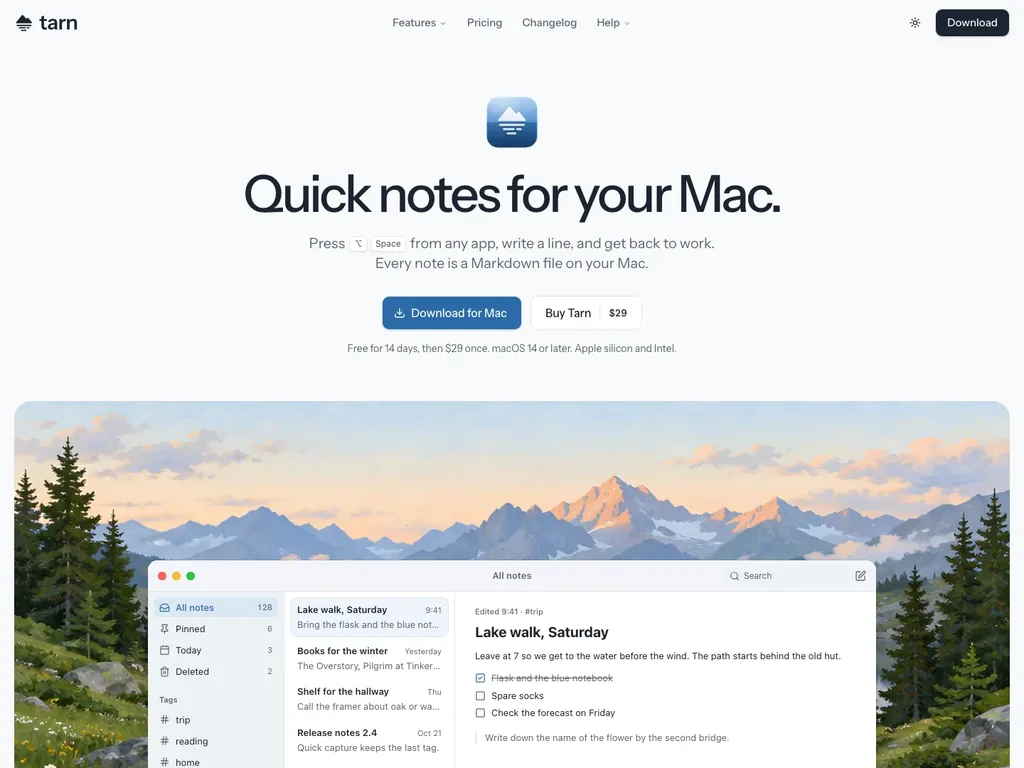
The home page sells a fictional notes app with mock-ups built in code rather than screenshots: a three-pane notes window on a painted mountain lake, a Finder window listing the notes as .md files, a settings pane listing synced Macs and a menu bar menu. Animated scenes play out the three-step quick capture and a before-and-after that puts "6 steps" for a typical notes app against Tarn's 3. Further down come an AI section, six reviews that rotate on a timer, pricing, a chat-style FAQ and a founder's note, all sample content.
With reduced motion turned on, the five animations that run on load stopped. The theme choice is saved in localStorage, but a first visit with a dark system setting still opened in light mode.
A demo checkout that issues a licence key
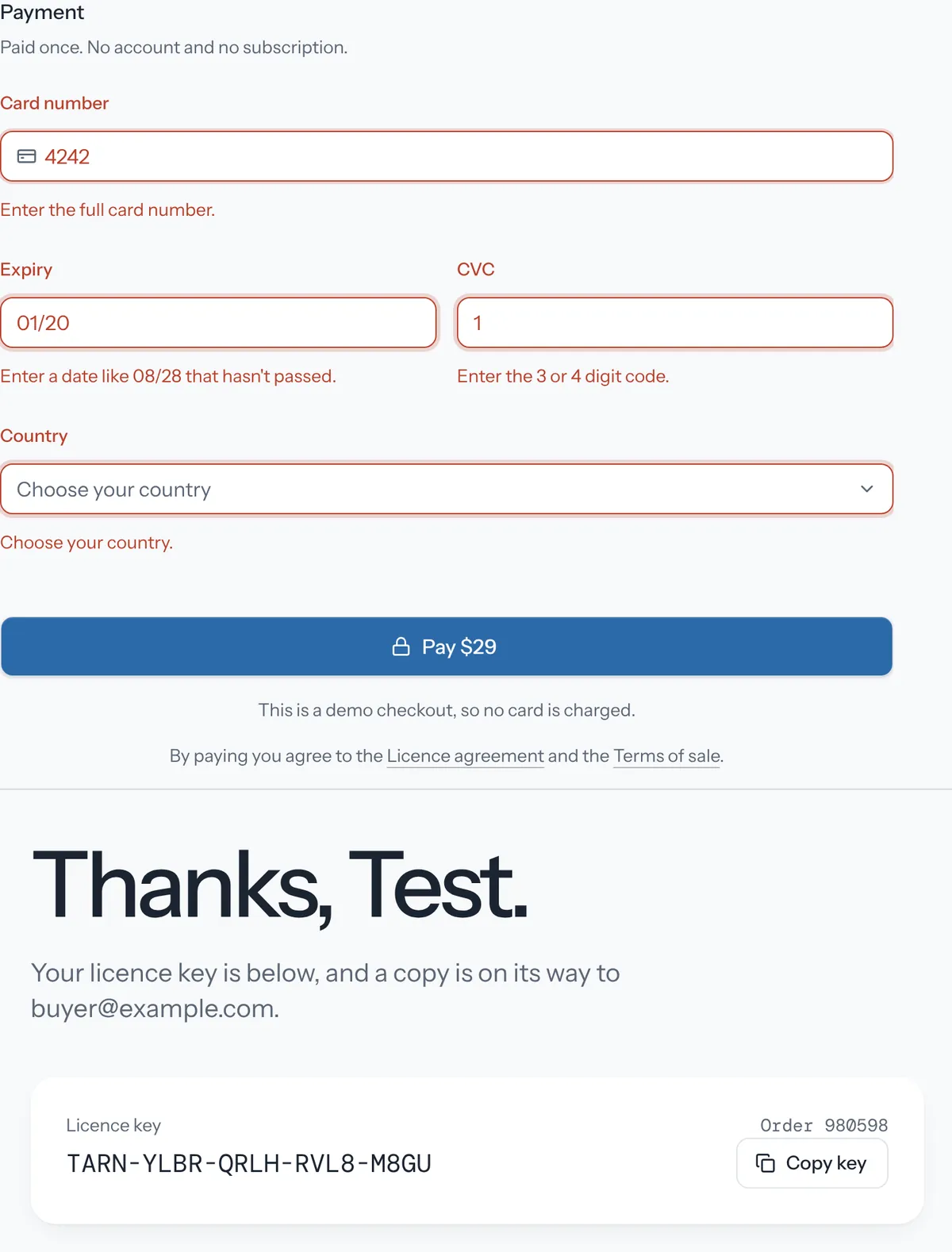
The Buy buttons open a checkout for the Personal ($29) or Family ($49) licence, and switching the plan changes the address and the Pay button. Every field validates in place: an empty form showed six messages, a past expiry date and a one-digit CVC were refused, and the card number formats itself in groups of four. A made-up number (1234 5678 9012 3456) passed, though, because the card number is not checked further.
A valid order leads to a confirmation page with an order number, a key like TARN-YLBR-QRLH-RVL8-M8GU, a copy button and three activation steps. It says "a copy is on its way" to the buyer's email, but no request left the page on either demo: the order lives in sessionStorage under tarn-order and the key is generated in the browser.
Pricing, download and changelog pages
The pricing page has a Just me / My household switch, a comparison table, a timeline of the four free 2.x updates and seven buying questions. The switch only moves the highlight from one plan to the other; both plans stay on screen. The download page shows version 2.4, the system requirements and a three-step install animation, but its Download for Mac button plays an animation and downloads nothing; the home page's download links all lead there. The changelog lists eight releases from 2022 to 2026 with New, Improved and Fixed labels.
A help center whose search covers guides only
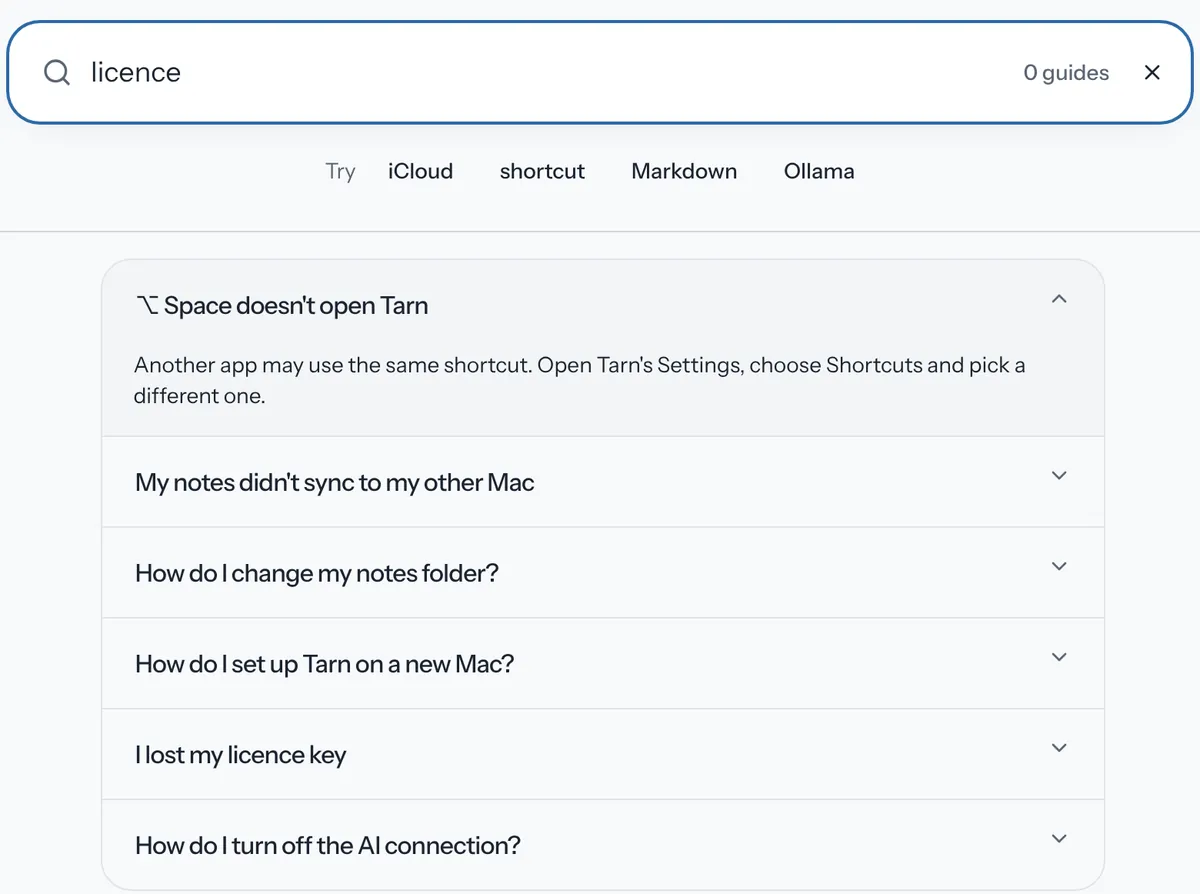
The help page lists nine guides under four topics (Getting started, Notes, Sync, AI), each with three or four numbered steps, and six common problems in an accordion. The topic filters work, and search narrows the guides as you type: "sync" found 2, "mcp" 1. It does not search the common problems, so "licence" found nothing even though "I lost my licence key" sits further down the same page. The separate FAQ page holds 20 questions in four groups.
Headlines that need JavaScript
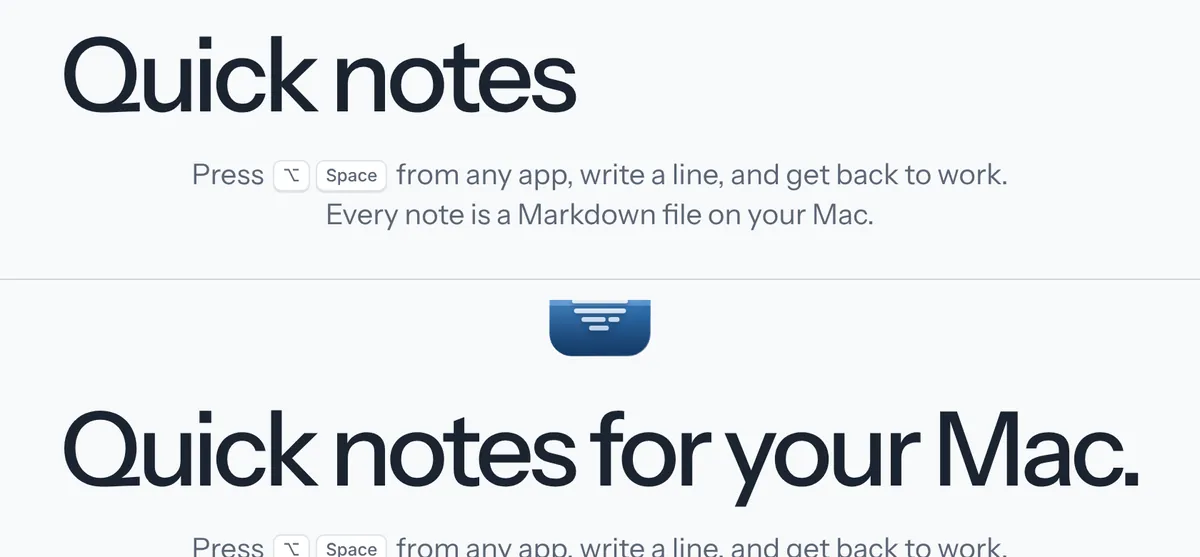
Headlines reveal word by word, and the hidden words start invisible in the HTML. With JavaScript turned off, the home page's H1 read "Quick notes" instead of "Quick notes for your Mac.", and 386 of the home page's 1,463 words stayed invisible, most of them in the animated mock-ups. Pricing, help and the guides were barely affected. At 390 px none of the 10 pages we checked scrolled sideways, and the mobile menu lists every main page.
Performance and SEO
One Lighthouse 12.8.2 run per page on 28 November 2026:
| Page | Performance | Accessibility | Best practices | SEO |
|---|---|---|---|---|
| Home, mobile | 75 | 95 | 100 | 100 |
| Home, desktop | 100 | 95 | 100 | 100 |
| Pricing, mobile | 84 | 92 | 100 | 100 |
| Pricing, desktop | 99 | 95 | 100 | 100 |
The home page transfers 867 KiB on mobile, 386 KiB of it JavaScript and 146 KiB fonts, with a 4.0 s largest contentful paint (the painted lake) and 460 ms of blocking time. Lighthouse estimates that sizing the paintings for the screen would save 117 KiB on mobile and 209 KiB on desktop; that and trimming the scripts behind the animations are the fixes to make. Accessibility lost points for six unnamed progress bars in the review carousel, a skipped heading level, a pricing switch whose aria-controls points at a panel that doesn't exist, and grey text at 4.07:1 contrast on the pricing page.
Every page has a title, canonical link and social image. The FAQ page carries FAQPage markup; there is no SoftwareApplication markup with the app's price, which a store page for an app would want. The Next.js demo has no sitemap or robots.txt; the Astro demo has a sitemap with 18 URLs but no robots.txt either.
What you still have to build
Payments and licences. Connect the checkout to a provider that sells software licences (Paddle, Lemon Squeezy or Stripe with your own key server), send the key by email and drop the client-side key generator.
Real downloads. Point every Download for Mac button at your signed, notarized build, with your version and requirements.
Your app's content. The founder, reviews, release notes, guides, FAQs and mock-ups describe the sample notes app; the mock-ups are code, so adapting them is front-end work.
Fixes. Follow the system dark setting on a first visit, make headlines readable without JavaScript, search the common problems too, resize the paintings and add a robots file and app markup.
Contact details. Replace [email protected] and the Annecy address; the legal pages name a French regulator (CNIL) for the sample business.
Pros and cons
Pros
A full direct-sales flow for a desktop app: pricing, checkout with inline validation, licence key confirmation, download and install guides.
App mock-ups and scenes built in code, which stop for reduced motion.
A help center with nine step-by-step guides, topic filters and a 20-question FAQ.
Next.js and Astro editions in one purchase, both with working demos.
Fast on desktop: 100 and 99 in Lighthouse.
Cons
The checkout and download only look real: no payment, no email, no file.
75 on mobile for the home page, with a 4.0 s largest contentful paint.
Without JavaScript the H1 and other headlines lose words.
Help search skips the common problems, and dark system settings are ignored on a first visit.
Every page is written for one fictional notes app, so the copy needs a full rewrite.
How Tarn compares
Nook, from Cruip ($49, in the Modern Bundle), is a warm, serif Next.js template for a Mac app with an iPhone companion, built around a detailed download page, with an MDX blog and a Figma file. Its download, purchase and forms are placeholders too. Pick it for a blog and a lower price without a checkout design.
Kestrel, also from Cruip ($49, same bundle), is a dark-only Next.js site for a Mac and iPad creative tool, with a clickable editor mock-up and download, pricing, changelog and help pages. Pick it for a pro or creative app that suits a dark look.
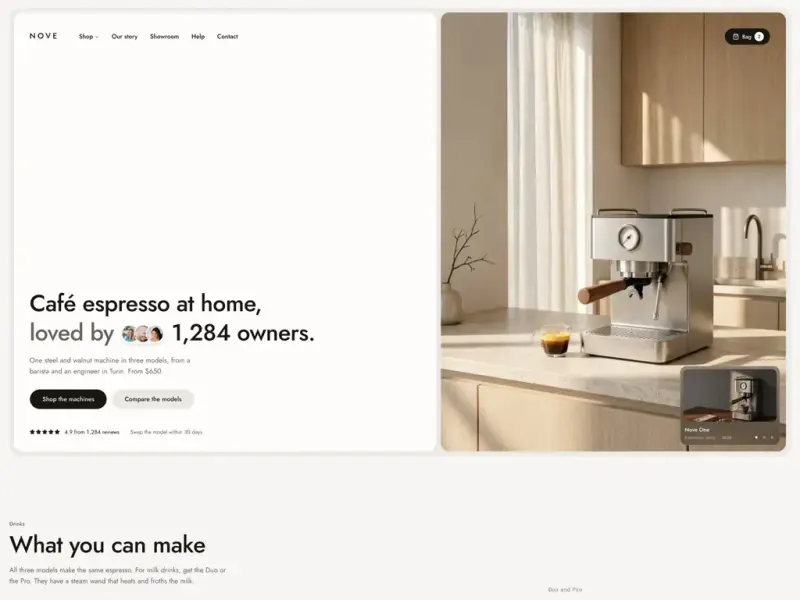
The Shadcnblocks Premium plan ($299, or $179 with the Black Friday code) includes Tarn and the 22 other Shadcnblocks templates, such as Nove and Apex, if you build several sites.
See all landing page templates for more options.
Who should buy Tarn
Buy Tarn if you are an indie developer selling a paid Mac or desktop app outside the App Store, with a free trial, one-time licences and a help center, and you or a developer can connect a licence-selling payment provider. Look elsewhere for a web app with accounts and subscriptions, an App Store-only app, or if you need a blog, a Figma file or a checkout that works on day one.
FAQ
Does Tarn's checkout take real payments?
No. It validates the form and shows a licence key, but in our test nothing was sent: no payment, no email, and the key is generated in the browser. Connect it to a provider that sells software licences, such as Paddle or Lemon Squeezy.
Do I get both the Next.js and Astro editions?
Yes. The $79 purchase ($47 with the Black Friday code) includes Next.js 16 and Astro 7 editions, and each has a public demo. We tested the Next.js demo in full and repeated the checkout test on the Astro demo.
Can I use Tarn for an app that isn't a notes app?
Yes, with work. The structure fits any paid desktop app, but all copy, guides, release notes and the app mock-ups, which are built in code, describe the sample notes app and need replacing.
Can I use Tarn for client projects?
Yes. The Shadcnblocks license allows unlimited end products, including sites your clients own. A standard license is for one person; the Team license covers up to 10.
Is Tarn included in a Shadcnblocks plan?
Yes. The Premium plan ($299 one-time, $179 with the Black Friday code) includes Tarn and every other Shadcnblocks template.
New templates like Tarn, in your inbox
The best developer tools, templates and UI components added to Tailkits, each reviewed by an editor. Free, unsubscribe in one click.
27 new in the last 30 days324 products reviewed so farSee what you get
KEEP EXPLORING
More templates Good company for Tarn.
Do you make Tarn? Get a badge for your site
An optional "Featured on Tailkits" badge that links to this page. Pick light or dark and paste the code into your site, for example in the footer.