
Next.js and Astro single-product store with a model picker and checkout UI
Argon
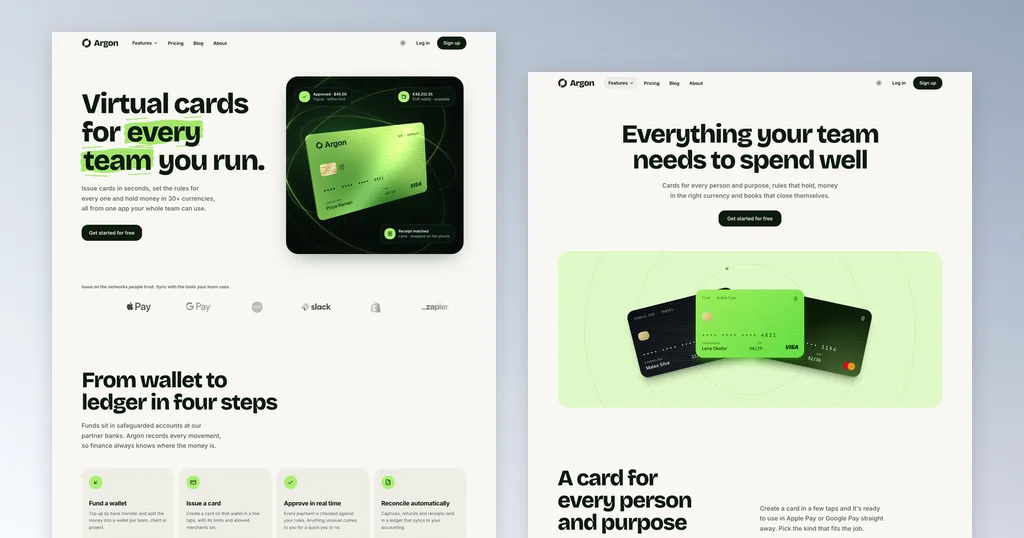
Next.js fintech template with a 3D card hero and card rules you can toggle
cruip.comExplore the product
AT A GLANCE
Details about Argon
KEY POINTS
- Tailwind CSS v4
- Figma file
- MDX support
Short verdict: Argon gives a corporate card or spend management startup a marketing site whose product demos actually work: card rules that approve or decline a sample payment, an approvals inbox, wallets with a converter and a fee calculator, all built in code. But no form sends anything, sign-up and log-in do nothing, and the calculator credits interchange share that the template's own plan table reserves for its top plan. Buy it if a developer will wire it up and someone will vet the money wording; skip it if you need the HTML, Vue or Astro edition Cruip lists, since only Next.js has a demo.
How we reviewed it: On 24 November 2026 we used the Next.js demo, without Cruip's purchase banner, on a desktop and a 390 px phone. We loaded its 16 sitemap pages, tried every card rule, the dashboard, the converter and every calculator input, and submitted the three forms with third-party requests blocked and logged. We also checked reduced motion and JavaScript-off behavior, and ran Lighthouse 12.8.2 once per page on the home and pricing pages. We did not buy the template, so we could not read the code, the Figma file or the other editions. Prices and terms are from cruip.com that day.
Disclosure: Our links to Cruip carry a referral tag.
What you get for $49
| Price | $49 one-time. Argon is also one of the 13 templates in Cruip's Modern Bundle: $149 one-time, or $74.50 in Cruip's Black Friday sale, which has no end date on the site. |
|---|---|
| Size | 10 pages, per Cruip. We counted 10 page designs behind 16 URLs: home, features, pricing, about, contact, sign-up, log-in, a blog with five posts (MDX files, per Cruip) and three legal pages. |
| Stack | Next.js 16 (the demo runs 16.4.6), React 19, Tailwind CSS 4 and Motion, with shadcn/ui for the FAQ accordion and the form fields. Cruip's sidebar also lists HTML, Vue and Astro downloads, but none of them has a demo: the matching demo addresses return 404. |
| Version | Cruip gives no version number or release date, and its changelog has no entry for Argon. |
| Design file | A Figma file, which Cruip calls a visual reference without auto layout or components. We did not see it. |
| License | Unlimited end products for you or your clients. No use in website builders or theme generators, no reselling, and access can't be shared; Cruip lists no team license. Terms and license |
| Support and refunds | One year of support for common questions, not customization. No refunds unless the product is defective or won't download. Students get 25% off. |
What we found in the demo
A WebGL card that stops for reduced motion
The hero card is a custom WebGL2 scene, not three.js, in a 16 KB script that also runs the home page's widgets; it pauses off screen and has a text description for screen readers. A second WebGL scene, three floating cards, sits behind the closing call to action. With reduced motion on, both drew one still frame and stopped, as did the logo marquee and the highlighter stroke in the headline. Scroll reveals drop their 12 px slide but keep a half-second fade from a 3 px blur, as Motion's reduced-motion mode intends. Cruip's claim holds.
Card rules that really approve and decline
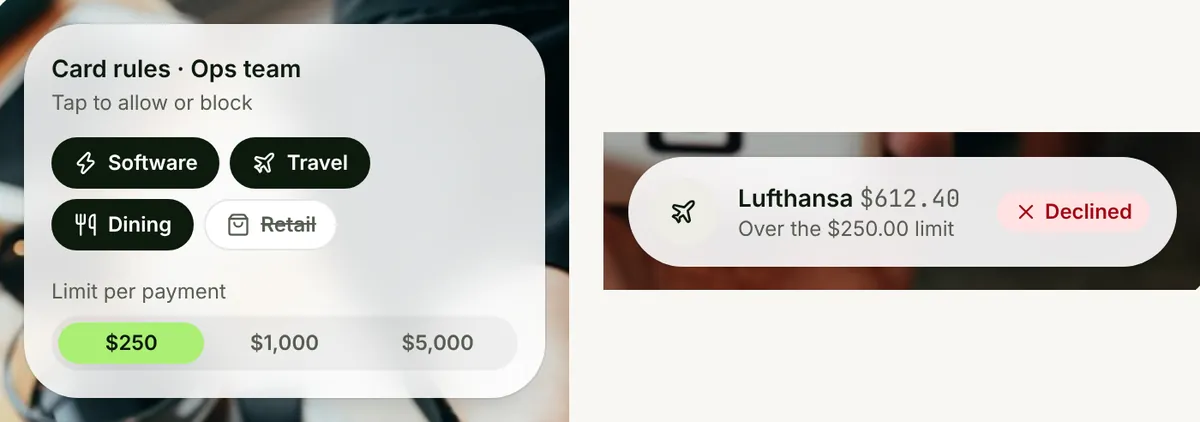
Over a photo of a card terminal, visitors can block four merchant categories or pick a $250, $1,000 or $5,000 limit while a feed cycles through six sample payments. The rules are really evaluated: allowing Retail approved the $129.90 Northwind Supply payment it had declined, a $250 limit declined the $612.40 Lufthansa one, and $5,000 approved a $1,284.19 AWS charge. But after the first tap the feed freezes on the current payment (for the full 40 seconds we watched), so later changes only apply to that one.
An approvals inbox and wallets on fixed data
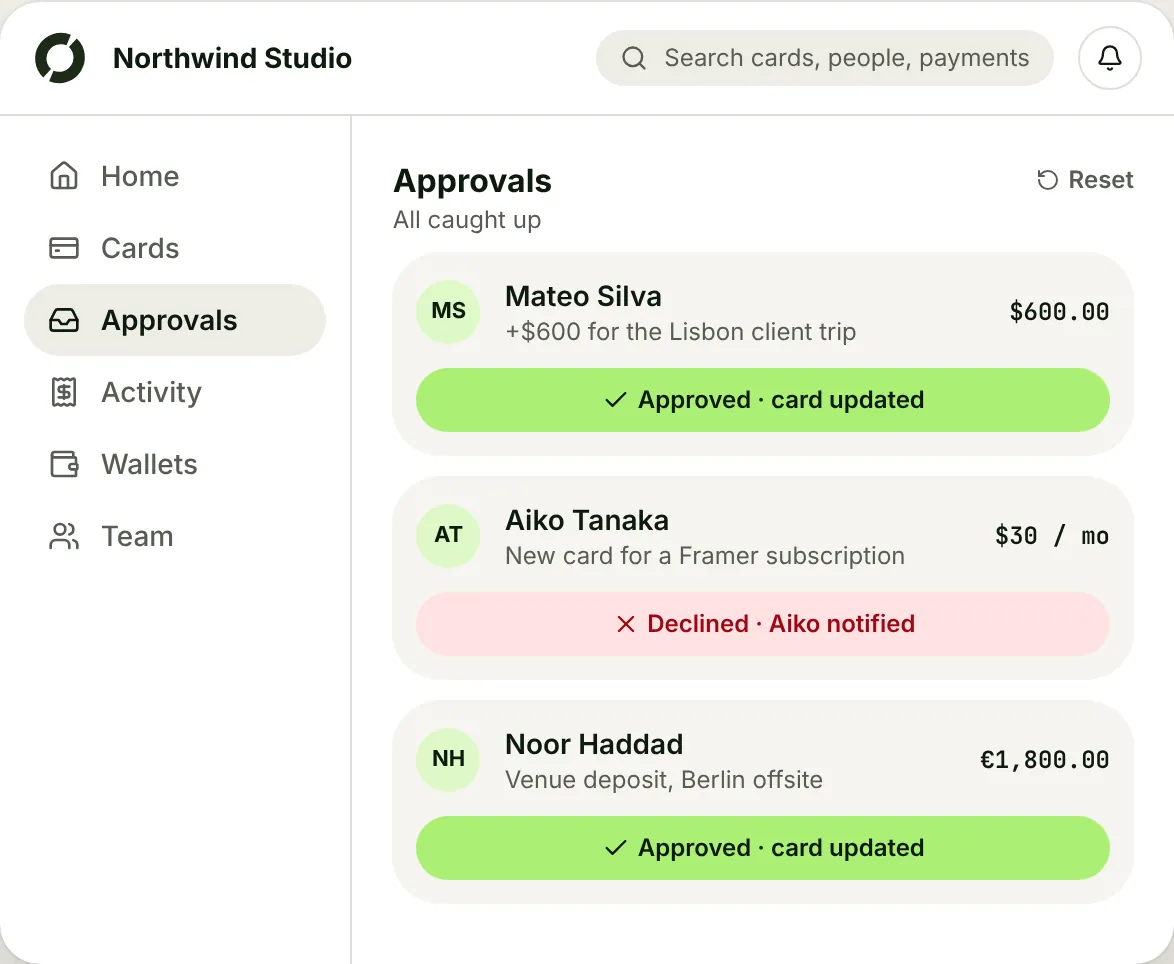
The "Northwind Studio" app window switches between Cards, Approvals and Activity (tabs on a phone). Cards can be frozen, and approving or declining requests counts down to "All caught up", with a Reset link. The search box, Home, Wallets and Team do nothing, a reload resets everything, and the header says "5 active" while one card is frozen.
Sub-wallet amounts add up on all four currency tabs. The converter charges 0.25% at rates fixed in the code (0.92 euros, 0.79 pounds and 151.2 yen to the dollar), and its math is right: €5,000 costs a €12.50 fee and returns $5,421.20. Only the yen tab misleads: its rate line reads "1 JPY = 0.01 USD" for about 0.0066.
A pricing calculator that contradicts its own plans
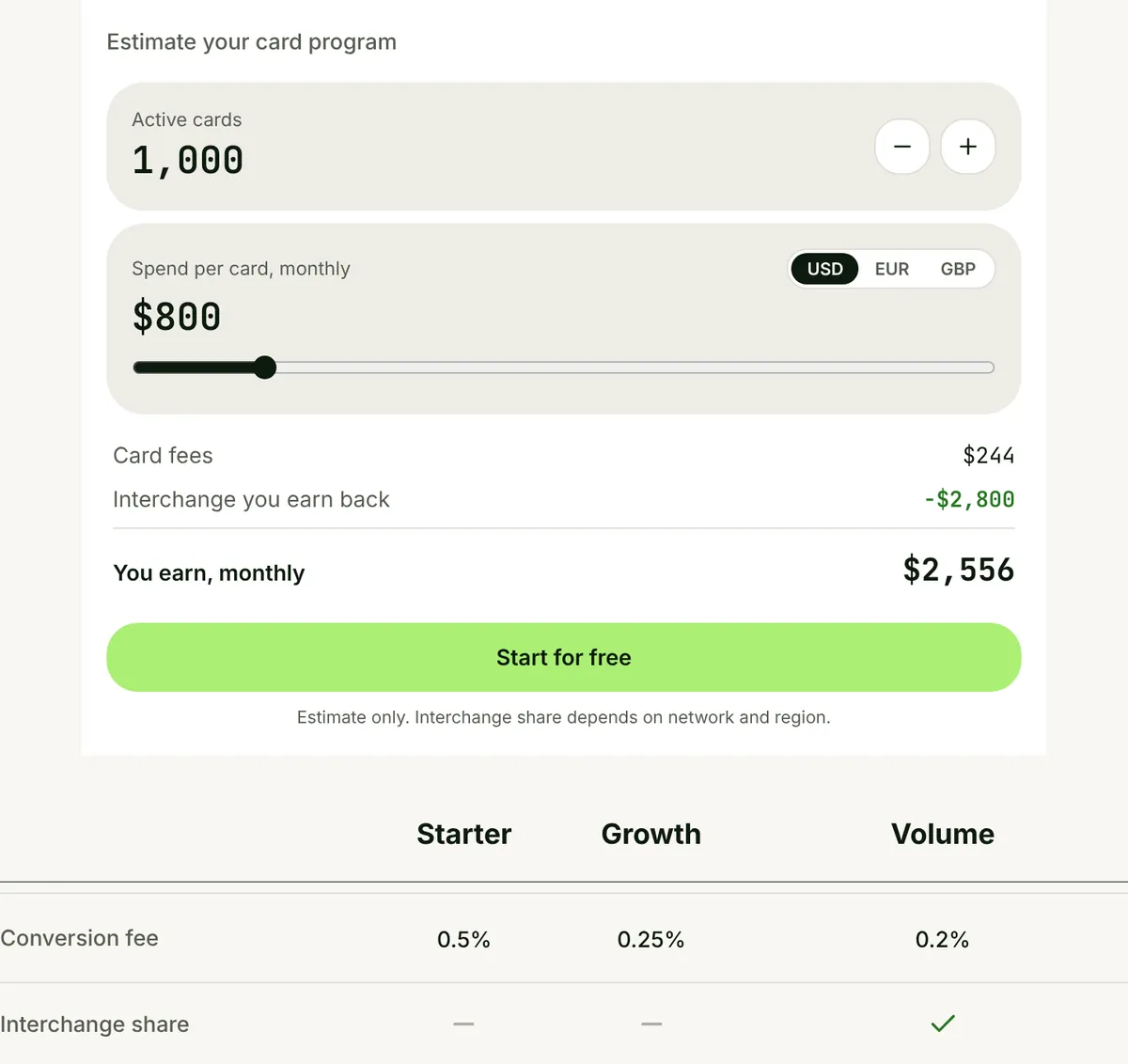
The calculator, on the home and pricing pages, takes 100 to 10,000 active cards and $100 to $5,000 of monthly spend per card, in dollars, euros or pounds. Fees match the plans exactly: 25 free cards, then $0.25 a card up to 2,000 and $0.12 above, so 2,500 cards cost $554 (1,975 × $0.25 + 500 × $0.12). Interchange is a flat 0.35% of spend.
The plan cards, comparison table and FAQ give interchange share to the Volume plan only, from 2,000 active cards, yet the calculator credits it at every size: its default of 1,000 cards at $800 reads "You earn, monthly $2,556" where the plans add up to a $244 bill. Since any card spending over about $71 a month covers its fee at 0.35%, and the slider starts at $100, every setting shows a profit. The currency switch only changes the symbol.
Forms with a confirmation state and nothing behind it
All three forms rely on the browser's own validation. A valid contact message swaps the form for "Thanks, it's with us.", but we logged no request of any kind, so nothing was sent anywhere. Valid sign-up and log-in forms do nothing at all, the Google and Microsoft buttons have no action, and "Forgot password?" opens the contact page.
Blog, legal pages and the phone layout
The blog has five posts by four sample authors, the newest featured in a large card; "Keep reading" lists the three newest other posts, not ones on the same subject. The legal pages open with an "On this page" list of links. A dark theme follows the system setting and remembers the toggle, and no page scrolled sideways at 390 px.
Performance and SEO
One Lighthouse 12.8.2 run per page, 24 November 2026:
| Page | Performance | Accessibility | Best practices | SEO |
|---|---|---|---|---|
| Home, mobile | 70 | 100 | 100 | 100 |
| Home, desktop | 99 | 100 | 100 | 100 |
| Pricing, mobile | 93 | 100 | 100 | 100 |
| Pricing, desktop | 100 | 100 | 100 | 100 |
On mobile the home page transferred 569 KiB, reached largest contentful paint in 3.3 s and measured 930 ms of total blocking time, against 110 ms on pricing, which has no 3D card. Our test machine has no GPU, so Chrome drew the WebGL scenes in software, which inflates that number, and we could not measure a device with a GPU. In a separate test there, the main thread was busy almost all the time while either 3D scene was on screen, but 1 to 3% of the time once we scrolled past or turned on reduced motion; JavaScript itself took under 100 ms per five seconds.
Every section below the hero ships at zero opacity until JavaScript reveals it; with JavaScript off, the home, features, pricing and about pages showed only hero and footer.
Metadata, Open Graph images, a sitemap and a robots file are there, as Cruip says, but canonical, sitemap and image URLs use argon.app, a registered domain with no website when we checked. The home page has no canonical tag, and no page has structured data.
What you still have to build
Forms and accounts. A contact form handler and an auth provider for sign-up, log-in, social sign-in and password reset.
Regulatory wording. The footer's "financial technology company, not a bank" disclaimer and the terms' line that balances "are not covered by deposit insurance" are a sensible start, but name no issuing bank, licence or regulator, and the sample company is a US one with a London address under English and New York law. Have your issuer and lawyer write the final text, fee and FX claims included.
Claims to replace. 99.99% uptime, a 41 ms median approval time, 31 countries, PCI DSS Level 1 and SOC 2 Type II, three investors, the team and three job openings. The logo row presents Visa, Mastercard, Apple Pay, Google Pay, Xero, Slack, Shopify and Zapier as networks and integrations, not customers; keep only those you support, within each brand's logo rules. There are no testimonials.
Housekeeping. Your domain instead of argon.app, the footer's "© 2026 Cruip.com", and the cookie settings link the cookie policy promises.
Pros and cons
Pros
The product demos work, and their math holds.
Reduced motion stops both WebGL scenes, the marquee and the slide-ins.
100 for accessibility, best practices and SEO in all four Lighthouse runs.
Disclaimers for a non-bank card product are already drafted.
Cons
The calculator credits interchange share that the plans reserve for Volume, and always shows a profit.
No form sends anything; sign-up and log-in do nothing.
Content below the hero needs JavaScript to appear.
Only the Next.js edition can be checked, and Cruip gives no refunds.
How Argon compares
Zippay from Shadcnblocks makes the same spend management pitch in 25 pages, per Shadcnblocks, in Next.js 16 and Astro 7, for $79 ($47 with its Black Friday code while the sale lasts) or in the Shadcnblocks Premium plan ($299 one-time, 22 templates). Its home page has no calculator or other inputs. Pick it for Astro or more pages.
FinTech, Cruip's older finance template, also $49, is a landing page with sign-up and support pages, in HTML, Next.js and Vue, per Cruip. Pick it for a simple launch page.
Cruip's Modern Bundle has Argon and 12 other Modern templates for $149, or $74.50 in the sale.
See all SaaS templates for more options.
Who should buy Argon
Buy Argon for a corporate card, spend management or wallet product you want to show working, if you have a developer for forms and sign-in and someone to vet the financial wording. Look elsewhere for HTML, Vue or Astro, working accounts, or a design that isn't about money.
FAQ
Does Argon connect to a real card issuer or payment provider?
No. The card rules, dashboard, wallets and converter run in the browser on sample data and exchange rates fixed in the code. Showing live balances or rules means connecting them to your card-issuing platform yourself, and the contact, sign-up and log-in forms need a backend too.
Can I get Argon in HTML, Vue or Astro?
Maybe, but we could not confirm it. Cruip's sidebar lists HTML, Next.js, Vue and Astro downloads, its description says it is built with Next.js 16 and React 19, and only the Next.js demo exists. Cruip gives no refunds, so ask before you buy if you need another stack.
Can I trust the pricing calculator's numbers?
Its arithmetic, yes; its logic, no. Fees match the plans and interchange is a flat 0.35% of spend, but the calculator credits interchange share at every card count while the plans give it only to Volume, so fix that before you publish real prices.
Can I use Argon for client projects?
Yes. Cruip's license covers unlimited end products for you or your clients. You can't resell the template, use it in a site builder or theme generator, or share your access, and there is no team license.
Is Argon cheaper in a bundle?
Yes, if you will use a second Modern template. Argon alone costs $49; the Modern Bundle with Argon and 12 other templates costs $149, or $74.50 during Cruip's Black Friday sale.
New templates like Argon, in your inbox
The best developer tools, templates and UI components added to Tailkits, each reviewed by an editor. Free, unsubscribe in one click.
26 new in the last 30 days322 products reviewed so farSee what you get
KEEP EXPLORING
More templates Good company for Argon.

Do you make Argon? Get a badge for your site
An optional "Featured on Tailkits" badge that links to this page. Pick light or dark and paste the code into your site, for example in the footer.