
Next.js and Astro single-product store with a model picker and checkout UI
Kestrel
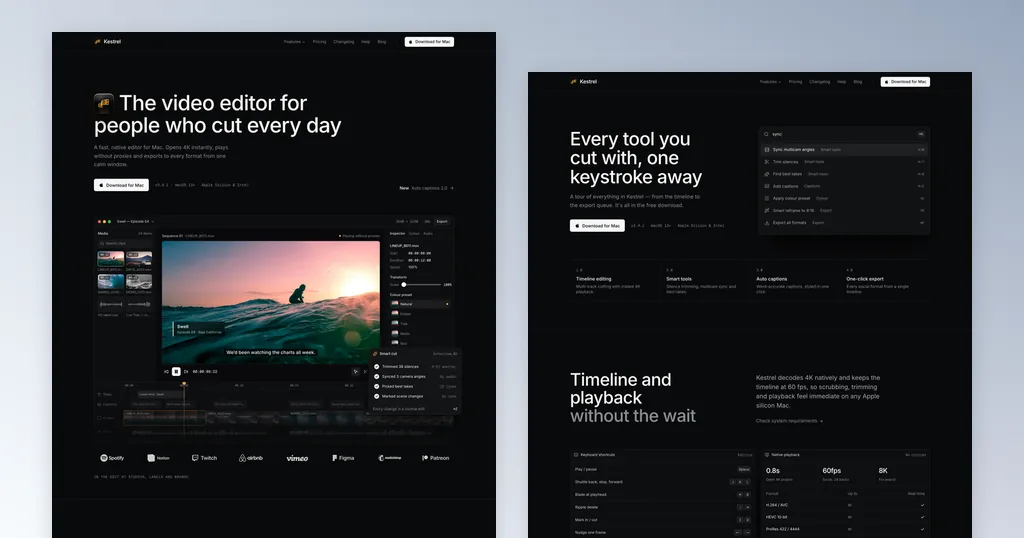
Dark Next.js site for a Mac and iPad app, with a clickable editor mock-up
cruip.comExplore the product
AT A GLANCE
Details about Kestrel
KEY POINTS
- Tailwind CSS v4
- Figma file
- MDX support
Short verdict: Kestrel gives a Mac app, with or without an iPad version, a dark website whose product shots are working code: clips, colour presets, smart-tool tabs and caption styles respond to clicks, and all of it holds still for visitors who ask for reduced motion. The download, pricing, changelog and help pages are complete designs, but their download links, checkout and contact form are placeholders. It suits an indie developer or small studio launching a creative or developer tool for Apple platforms. It is the wrong buy for a Windows or phone app; if you need the HTML, Vue or Astro edition Cruip lists, ask Cruip first, as we could not verify them.
How we reviewed it: On 24 November 2026 we used the live Next.js demo, without Cruip's purchase banner, on a 1440 px desktop and a 390 px phone screen, with and without reduced motion. We clicked through the editor mock-up, pricing, help search and the contact form while logging network requests, loaded the download page as five operating systems and read the markup of all 15 sitemap pages. Lighthouse 12.8.2 ran once per page on the home and download pages. We did not buy the template, so the source code, the Figma file and the other editions are untested; prices and license terms are from cruip.com that day.
Disclosure: Our links to Cruip carry a referral tag.
What you get for $49
| Price | $49 one-time. Also in Cruip's Modern Bundle with 12 other Modern templates: $149, or $74.50 during Cruip's Black Friday sale. |
|---|---|
| Version | None published. Cruip gives no version number or release date; Kestrel was not among the Modern templates on cruip.com on 23 October 2026. |
| Size | 10 pages, per Cruip. The demo's sitemap lists 15 URLs: eight main pages, four blog posts and three legal pages (privacy, terms and an EULA), plus a custom 404 page. |
| Stack | Next.js 16 (the demo runs 16.4.6), React, Tailwind CSS v4 and shadcn/ui. An MDX blog and a Figma file “solely as a visual reference”, per Cruip. Cruip also lists HTML, Vue and Astro editions, but only the Next.js demo exists; the other three demo addresses return 404. |
| Design | Dark only: one palette, no light theme or theme switch. Inter and Geist Mono type. |
| License | Unlimited end products, including client work. Not allowed: use in site builders or theme generators, reselling or redistributing the template, or sharing your access. One year of support; no refunds unless the files are defective or won't download. License terms |
What we found in the demo
An editor mock-up you can click
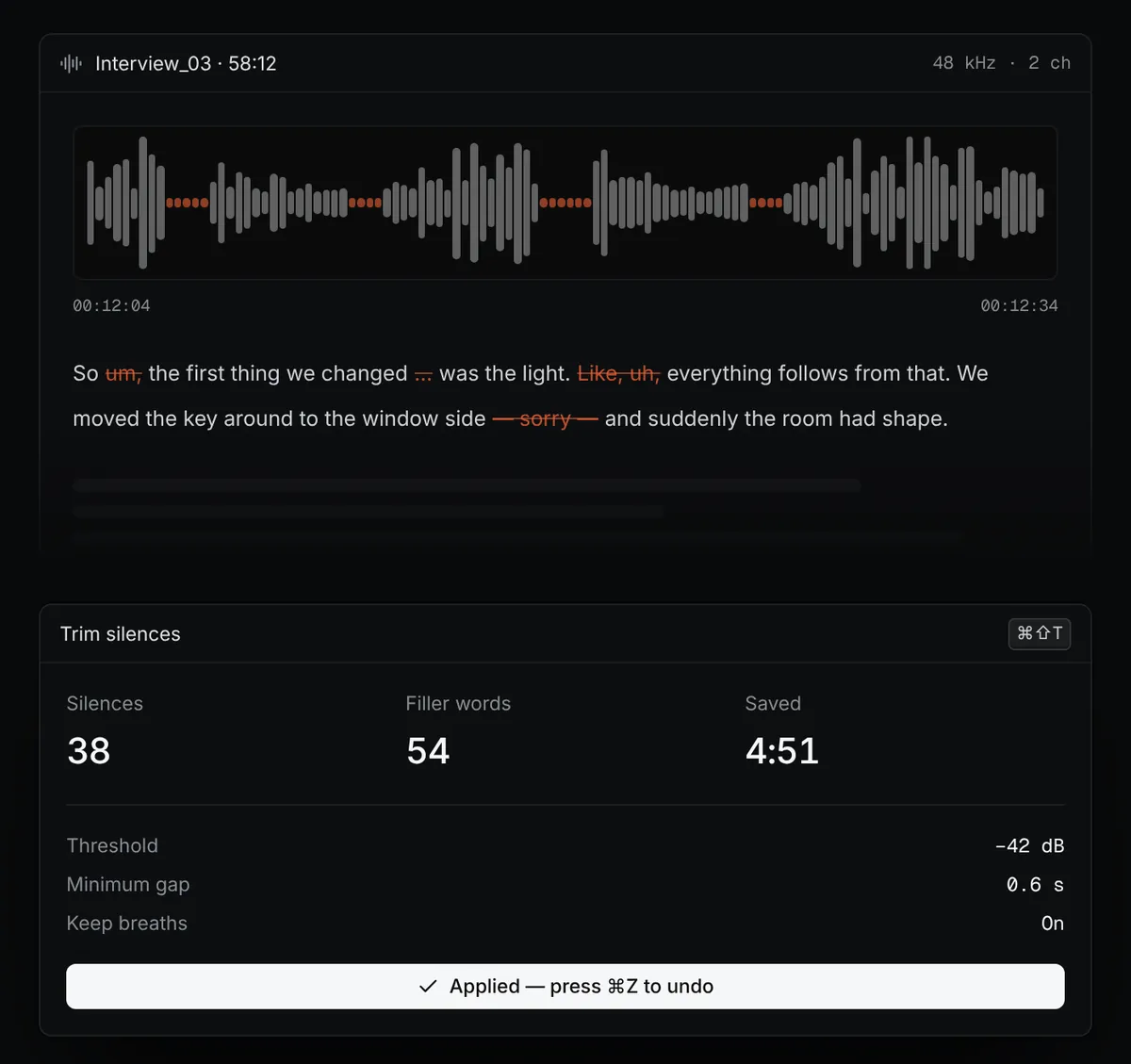
The home page opens on a full editor window built from HTML: media bin, viewer, inspector and a five-track timeline, with 29 buttons in the hero alone. Picking a clip in the media bin moves the playhead and swaps the picture, colour presets apply CSS filters, timeline items switch the inspector between video settings and a level meter, and the transport buttons work. Further down, the smart-tools panel has four tabs, captions switch between Clean, Bold and Boxed, and the six testimonials change when you click a name. One label overpromises: “Remove 92 cuts” becomes “Applied — press ⌘Z to undo”, but ⌘Z does nothing.
The command palette is only an animation
The features page leads with a command palette that types queries such as “sync” and “export” by itself and re-sorts seven commands. There is no input: typing does nothing, and ⌘K or Ctrl+K opens nothing, although the page lists “Command menu ⌘K” among its shortcuts.
Reduced motion switches everything off
By default the home page keeps moving: the hero plays with a running timecode and captions, transcript words light up, export bars fill, a sync log updates and testimonials rotate. With reduced motion on, we counted zero running animations and zero page changes over six seconds on the home and features pages; the hero waits, paused on a complete frame, until you press Play. No page uses canvas, WebGL or video.
A download page with placeholders where the files go
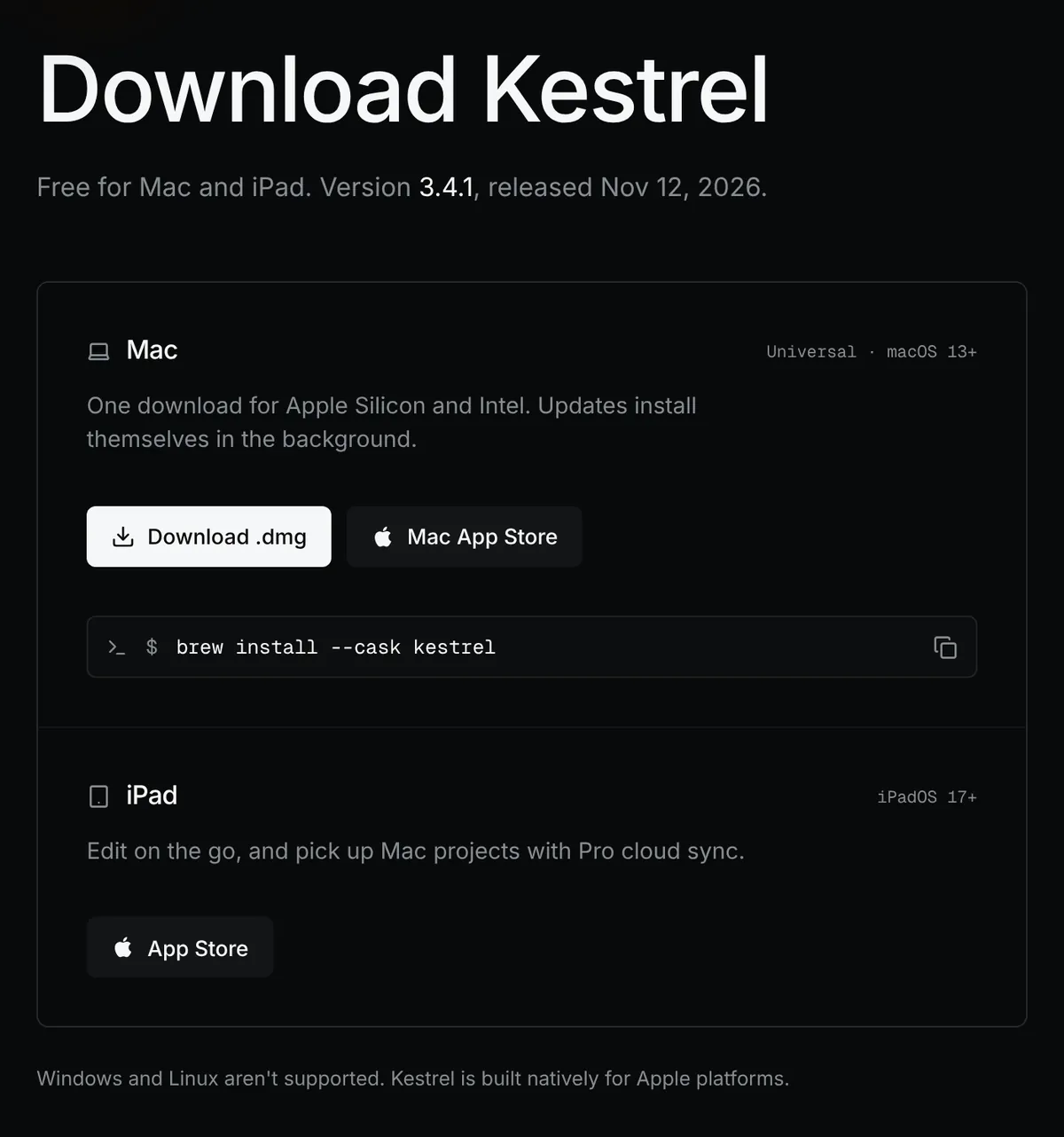
The download page has a Mac card with “Download .dmg”, “Mac App Store” and a Homebrew command with a working copy button, an iPad card, three install steps drawn as macOS windows, and a requirements table (macOS 13 or later, 8 GB of memory, 1.2 GB of disk; iPadOS 17 or later). “Download .dmg” links to “#”, and both store buttons open the App Store's front page. Loaded as macOS, Windows, Linux, iPadOS and Android, the page was identical each time: no system detection, only a fixed line saying Windows and Linux aren't supported.
Pricing with yearly, monthly and one-time plans
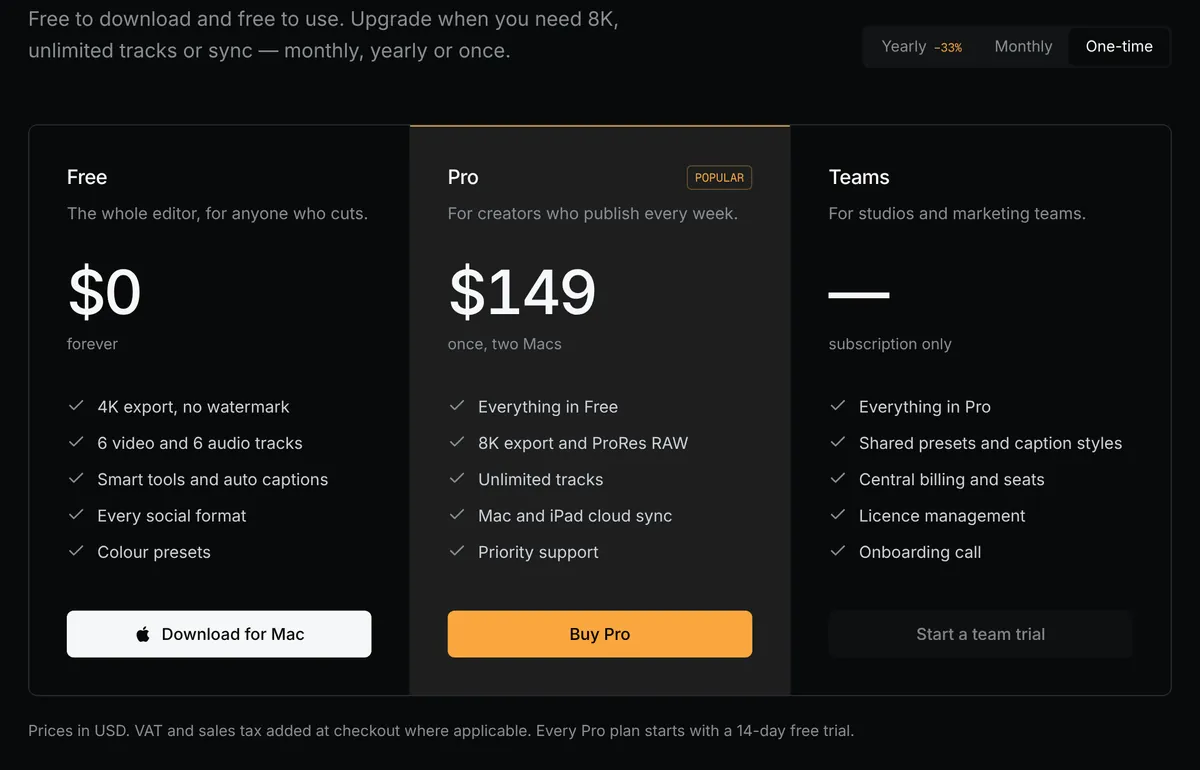
Free, Pro and Teams sit under a Yearly, Monthly and One-time switch. Yearly, the default, shows Pro at $8 a month billed $96 and Teams at $14 per seat; Monthly shows $12 and $18; One-time shows Pro at $149 for two Macs and Teams as subscription only. The “−33%” badge fits Pro ($96 against $144 a year), but Teams saves 22%. A comparison table and five FAQs follow. “Buy Pro” leads to the download page and “Start a team trial” to the contact form: there is no checkout.
Changelog, help centre and the smaller pages
The changelog lists six releases, from 3.0.0 (22 July 2026) to 3.4.1 (12 November 2026), with 26 New, Improved and Fixed items; the home page shows the latest four. Cruip says a simple data file drives it; we couldn't see the source to confirm that.
The help centre groups 18 articles into six categories, but every article link only jumps to the FAQ list; search filters articles and FAQs as you type. The contact form validates name, email and a 10-character message, then shows “Message sent” without making any request. Also included: an about page, four blog posts, and EULA, privacy and terms pages marked as sample text.
Performance and SEO
One Lighthouse 12.8.2 run per page, 24 November 2026:
| Page | Performance | Accessibility | Best practices | SEO |
|---|---|---|---|---|
| Home, mobile | 90 | 95 | 100 | 92 |
| Home, desktop | 94 | 95 | 100 | 92 |
| Download, mobile | 95 | 100 | 100 | 100 |
| Download, desktop | 100 | 100 | 100 | 100 |
The home page transfers 1.9 MB on mobile and 2.9 MB on desktop, 81% and 86% of it images. The demo serves its photos as 1,600 px JPEGs without Next.js image optimization, even as 84 px thumbnails and 20 px colour swatches; on desktop four of them download twice under two addresses (about 1.1 MB), and a 201 KB PNG fills a 48 px icon. Lighthouse estimates 753 KiB saved on mobile from modern formats alone. The mobile largest paint was the headline, at 3.6 s, 82% of it render delay.
The home page lost accessibility points for 11 px grey labels at 3.41:1 contrast and a jump from H1 to H3, and SEO points for three “Learn more” links. No page carries structured data, so no sample ratings hide in SoftwareApplication or AggregateRating markup. Canonical URLs, the sitemap, robots.txt and the Open Graph image point to kestrel.example.com, and the home page has no canonical tag.
What you still have to build
Downloads. A notarized .dmg, store URLs and a Homebrew cask, plus system detection if you want one adaptive button.
Checkout and licences. A store or licensing service behind Buy Pro and the team trial.
Support. A form service for the contact form and pages behind the 18 help links.
Social proof and claims. The logo row shows eight real brands (Spotify, Notion, Twitch, Airbnb, Vimeo, Figma, Mailchimp and Patreon) under “In the edit at studios, labels and brands”: presenting them as customers is a launch risk unless they are. Replace the claimed 4.9 rating from 6,400 Mac App Store ratings, the six testimonials and benchmark lines such as “Measured on a MacBook Air M3”.
Site details. Your domain in the metadata, the “© 2026 Cruip.com” footer and Cruip link, social icons pointing at the home pages of X, YouTube, Instagram and TikTok, and your own legal texts.
Pros and cons
Pros
The product UI is code you can restyle, and most of it responds to clicks.
Reduced motion is handled properly: nothing moves, and the paused states look finished.
Download, pricing, changelog, help and EULA pages cover what a desktop app needs at launch.
No sideways scrolling on the 12 pages we checked at 390 px, and 100 in every Lighthouse category for the download page on desktop.
Cons
Download links, checkout and the contact form are placeholders.
The command palette looks interactive but is only an animation.
A heavy home page, mostly oversized JPEGs, some loaded twice.
Real brand logos and an App Store rating to remove before launch.
Dark only, and the Next.js edition is the only one we could check.
How Kestrel compares
Nook ($49) is Cruip's light, warm sibling for Mac and iPhone apps: a voice-notes app with one-time licence pricing and a waitlist on its download page. Choose it for a consumer app, Kestrel for a pro tool sold by subscription. During Cruip's sale the Modern Bundle ($74.50) includes both.
Appy ($49, or in Cruip's Classic Bundle at $39.50 during the sale) is an older Cruip landing page for phone apps with a light and dark switch and, per Cruip, HTML, Next.js and Vue editions. Its demo has no download, pricing or changelog page and still shows lorem ipsum.
Kinto by Shadcnblocks ($79, or $47 with its current sale code) includes Next.js and Astro editions, 18 pages, a theme toggle, sign-in screens and App Store and Google Play buttons. It sells sign-ups rather than downloads: choose it for a phone app with accounts, or if you need Astro.
See all dark mode templates for more options.
Who should buy Kestrel
Buy it if you are launching a Mac app, with or without an iPad version, for creators or developers, want visitors to see the product working, and have a developer to wire up downloads, payments and the contact form. Look elsewhere if your app runs on Windows, Linux or phones, or if your brand needs a light theme.
FAQ
Do Kestrel's download buttons work out of the box?
No. In the demo, Download .dmg links to # and both App Store buttons open the App Store's front page. Add your own .dmg, store URLs and Homebrew cask, and build operating-system detection yourself if you want it.
Can I get Kestrel as HTML, Vue or Astro?
Cruip lists all four editions, but only the Next.js demo exists: the HTML, Vue and Astro demo addresses returned 404 on 24 November 2026. Ask Cruip before paying if you need one of them, because it gives no refunds unless the files are defective or won't download.
Does Kestrel have a light mode?
No. It ships one dark palette and no theme switch. For a light design, Cruip's Nook is the closest sibling.
Can I use Kestrel for a client's app?
Yes. Cruip's license allows unlimited end products, including client work. You can't resell the template or use it in a site builder or theme generator.
Is the Modern Bundle the better deal?
If you want a second Modern template, yes. During Cruip's Black Friday sale the bundle costs $74.50 (normally $149) for 13 templates including Kestrel, less than two single templates at $49 each.
New templates like Kestrel, in your inbox
The best developer tools, templates and UI components added to Tailkits, each reviewed by an editor. Free, unsubscribe in one click.
26 new in the last 30 days322 products reviewed so farSee what you get
KEEP EXPLORING
More templates Good company for Kestrel.
Do you make Kestrel? Get a badge for your site
An optional "Featured on Tailkits" badge that links to this page. Pick light or dark and paste the code into your site, for example in the footer.