
Next.js and Astro single-product store with a model picker and checkout UI
Felix
Next.js personal site with playable project demos, essays, notes and a resume
cruip.comExplore the product
AT A GLANCE
Details about Felix
KEY POINTS
- Tailwind CSS v4
- Figma file
- MDX support
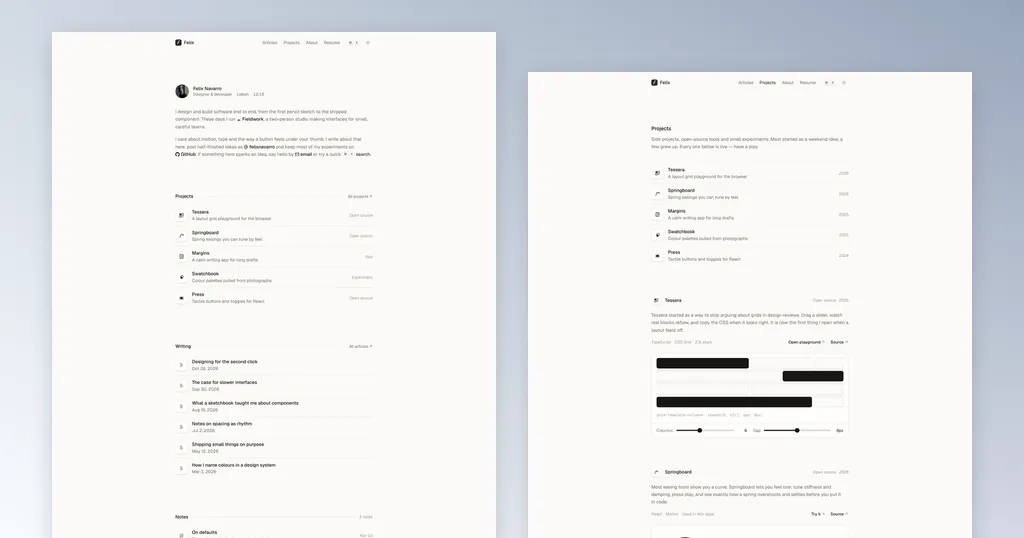
Short verdict: Felix is a quiet, text-first personal site for a designer or developer who writes: essays, short notes, a resume page with print styles and a projects page where each of five sample projects is a working demo rather than a screenshot. It is also light, at about 300 KiB for the home page. The gaps: the newsletter form sends nothing, there is no RSS feed or structured data, and the command menu skips the notes. Buy it as a calm home for your writing and side projects if you can wire up a newsletter in Next.js. Skip it if you need case studies, a contact form or a tested HTML, Vue or Astro edition.
How we reviewed it: On 25 November 2026 we used Cruip's live Next.js demo, without its purchase banner, on a 1440 px desktop and a 390 px phone. We played with the five project demos, searched the command menu, subscribed to the newsletter while logging network requests, printed the resume in both themes, and retested with reduced motion and without JavaScript. Lighthouse 12.8.2 ran once per page on the home and projects pages. We did not buy the template, so we could not see its source, Figma file or other editions. Prices and terms are from cruip.com that day.
Disclosure: Our links to Cruip carry a referral tag.
What you get for $49
| Price | $49 one-time, per Cruip. Felix is also one of 13 templates in Cruip's Modern Bundle: $149, or $74.50 in Cruip's Black Friday sale (no end date given). |
|---|---|
| Editions | Cruip's sidebar lists separate HTML (with Alpine.js), Next.js, Vue and Astro downloads, while its description covers only the Next.js build. Only the Next.js demo exists: the HTML, Vue and Astro demo addresses answered 404, so we could not check those editions. |
| Version | No version number or release date. Cruip's changelog has no entry for Felix, which appeared on cruip.com after 23 October 2026. |
| Size | 9 pages, per Cruip. The demo's sitemap lists 16 URLs: home, articles, projects, about, resume, contact, colophon, six essays and three notes. A custom 404 page comes on top. |
| Stack | Next.js 16 (16.4.6 in the demo's code), React 19 and Tailwind CSS 4, with the Geist and Geist Mono fonts. Essays are MDX, per Cruip. Cruip also lists shadcn/ui: only the command menu renders Radix dialog parts, the library shadcn/ui builds on, while the stylesheet carries the classes of its field, select, accordion and card components, which no page uses. |
| Design file | A Figma file "solely as a visual reference", without auto layout or components, per Cruip. We did not see it. |
| License | Unlimited end products for yourself or your clients. No reselling or redistributing, no use in website builders or theme generators, and no sharing your access; Cruip lists no team license. One year of support, and no refunds unless the files are defective or won't download. License terms |
What we found in the demo
Five sample projects you can play with
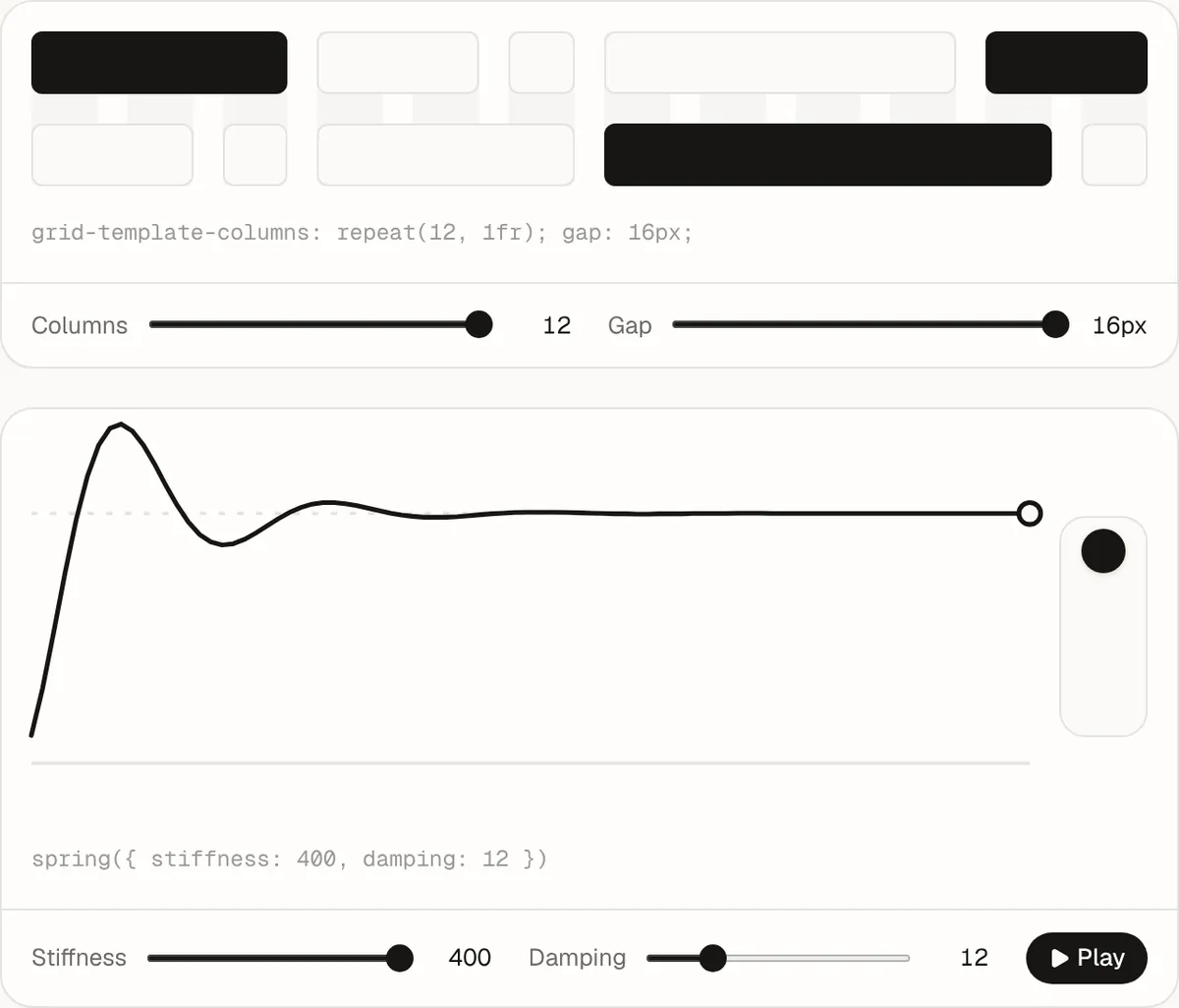
The projects page sets Felix apart: each sample project comes with a working widget. Tessera's sliders reflow a block grid from 2 to 12 columns and 0 to 16 px gaps and rewrite the CSS line under it. Springboard draws and plays a spring from its stiffness and damping. Margins dims all but one paragraph of a draft in focus mode, though the text can't be edited. Swatchbook copies its five colors to the clipboard and marks where each sits in a photo of a Lisbon tram, and Press has a like button, a switch and a segmented control.
The widgets have rough edges. Swatchbook's markers are fixed positions, not read from the photo, and two miss: Tram yellow points at the grey street, while the Limestone marker sits on the yellow tram. Press's like count rises on every click (12, 13, 14), its Haptics switch never calls the vibration API, and the arrow keys don't move between Day, Week and Month. The eight project links go to example.com or github.com's home page.
A command menu for pages, essays and projects
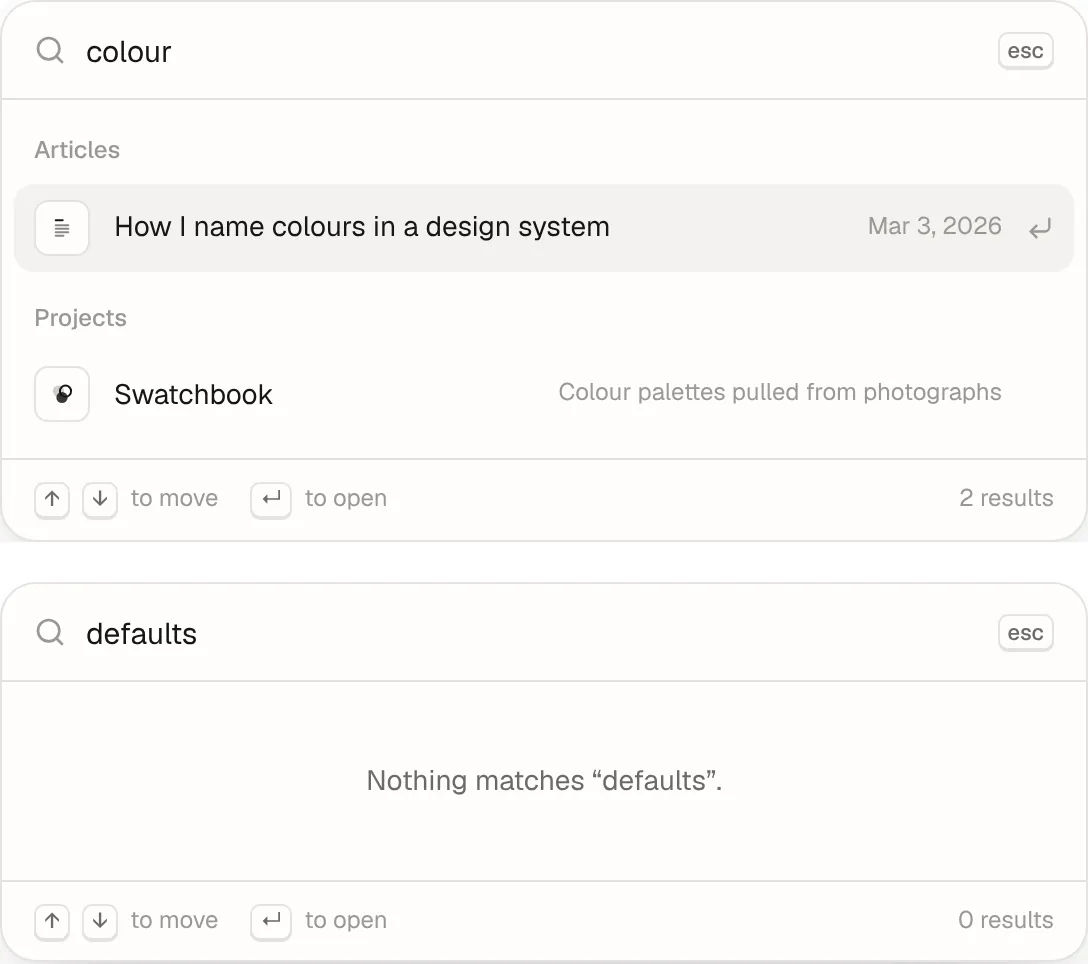
⌘K, Ctrl+K or the header's search button opens a menu of 20 entries: seven pages, six essays, five projects and two actions that work, Switch to dark mode and Copy email address. Typing filters titles and descriptions; arrows and Enter work. "colour" found an essay and Swatchbook, but the three notes are not indexed: "defaults" found nothing, although one note is called On defaults.
Essays, notes and a newsletter that sends nothing
The articles index lists six essays, all from 2026, then three short notes. Each essay shows its date and reading time (1 or 2 minutes) and has a code block with a working Copy button and a pull quote; only one has an image.
The Field Notes sign-up on the home page, the articles index and every essay refuses an empty or malformed address and shows "Subscribed" for a valid one, but no request left the page, and "1,846 readers already get it" is a sample claim. The contact page offers [email protected] with a Copy button and links to the bare X, GitHub, Bluesky and Read.cv home pages; Read.cv's address answered with an error page.
A resume that prints well, in light mode
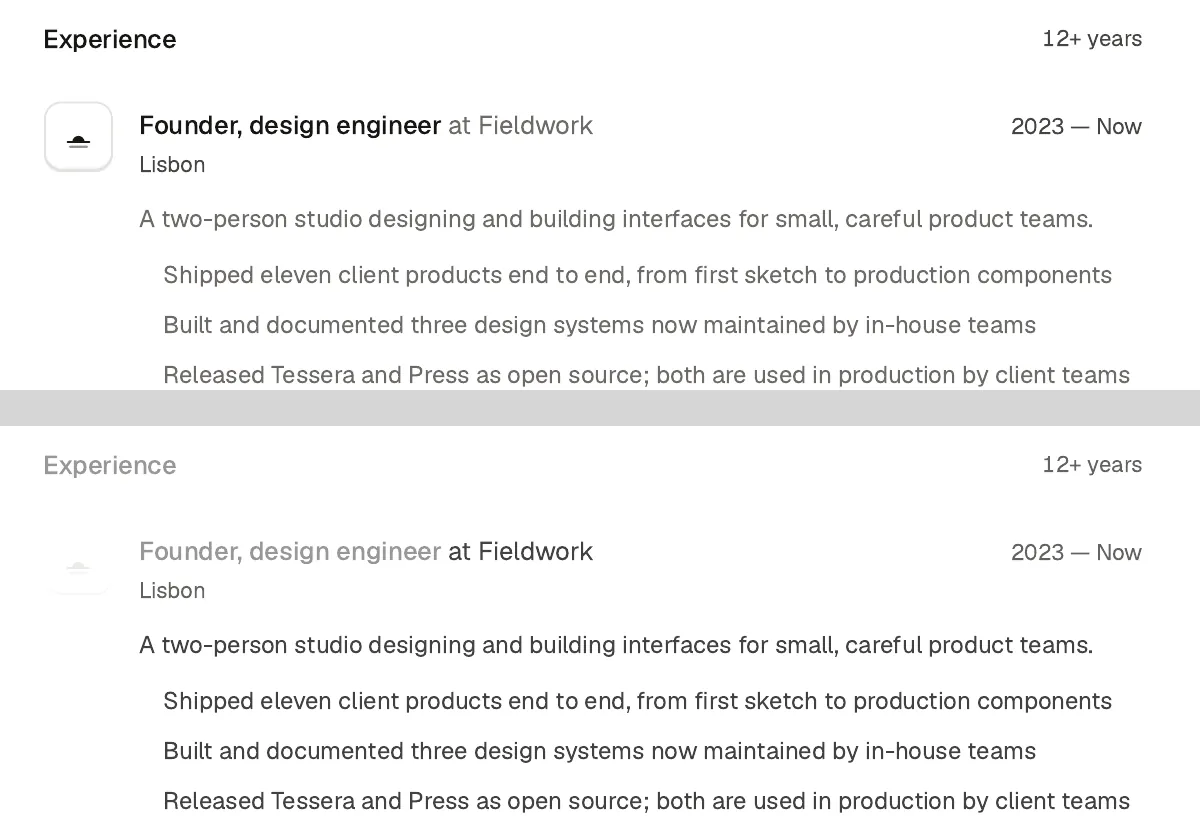
The resume's Download PDF button opens the print dialog. Felix's print rules hide the header, footer, contact block and newsletter and stop the fade-ins, so with the light theme Chromium printed two clean A4 pages, email included. With the dark theme the page turns white but keeps its text colors: headings and job titles printed pale grey, fainter than the text under them, and the company icons nearly vanished. Anyone browsing in dark mode prints that version.
Theme, motion and small screens
Felix follows the system's light or dark setting on a first visit and saves a choice made in the header or the menu (theme in localStorage). Content rises in with a 0.7-second CSS fade, so pages still show everything without JavaScript, and reduced motion stops the fades and Springboard's animation. At 390 px none of the eight pages we checked scrolled sideways, and the menu opens below the header and closes with Escape.
Performance and SEO
One Lighthouse 12.8.2 run per page on 25 November 2026:
| Page | Performance | Accessibility | Best practices | SEO |
|---|---|---|---|---|
| Home, mobile | 95 | 96 | 100 | 100 |
| Home, desktop | 100 | 96 | 100 | 100 |
| Projects, mobile | 92 | 96 | 100 | 100 |
| Projects, desktop | 100 | 96 | 100 | 100 |
The home page transfers 306 KiB on mobile, 190 KiB of it JavaScript and 52 KiB self-hosted Geist fonts, with a 2.2 s largest contentful paint. None of the pages we checked contacted another host: there are no analytics or third-party fonts, as the colophon says. The projects page weighs 643 KiB because Swatchbook's tram is a 1,200 by 800 px JPEG of 356 KiB; Lighthouse estimates that sizing it for the screen would save 256 KiB, the first fix to make.
Accessibility lost points for contrast only. The lighter of Felix's two greys, #9a9895, measures 2.75:1 on the #fbfaf7 paper, below the 4.5:1 minimum. It carries dates, counts and tags, and causes all 9 failures on the home page and 29 of 31 on the projects page.
Felix outputs a sitemap, robots.txt, titles, descriptions and a social image, but no structured data, no canonical tag on the home page, no RSS or Atom feed at the usual addresses, and no Open Graph image on five of the six essays. The sitemap, robots file, canonical links and social image point to felixnavarro.example.com until you set your domain.
What you still have to build
A newsletter service. Connect the form to your email provider and drop the 1,846-reader count.
Feed and search basics. An RSS feed, a canonical tag on the home page, Open Graph images for every essay and, if you want, Article markup.
Your projects. Replace or adapt the five widgets, which demonstrate fictional products, and point the project links at real pages.
Fixes. Give print the light theme's colors, darken the lighter grey and resize the tram photo.
Sample content and settings. The name, studio, resume, talks, awards and star counts are samples, and the colophon says some photos come from Unsplash. Set your domain and replace the email address, the social links and the Cruip footer credit by hand; Cruip lists no CMS.
Pros and cons
Pros
A projects page where each project is a working demo, not a screenshot.
Light and fast: a 306 KiB home page that scored 95 on mobile and 100 on desktop.
Dark mode that follows the system and remembers a choice, and pages that work with reduced motion or without JavaScript.
A keyboard-friendly command menu, copyable code blocks and a resume that prints cleanly in light mode.
$49, or $74.50 for the 13-template Modern Bundle during the sale.
Cons
The newsletter form sends nothing, and there is no RSS feed or structured data.
The command menu leaves out the notes.
Visitors in dark mode print a faded resume.
The lighter grey fails contrast, and the tram photo is served at full size.
Only the Next.js edition can be tried, and the demo widgets need tidying.
How Felix compares
Maren, also from Cruip ($49) and in the same bundle, is an editorial portfolio for designers with five color-coded case studies, carousels, filterable notes and a resume, light only. Pick it if your work is visual. Bought separately, the two cost $98, more than the bundle in the sale.
DevSpace, Cruip's older personal blog for developers ($49, in the Classic Bundle), has six pages per Cruip: articles sorted by topic, an about page and a newsletter page, in HTML, Next.js and Vue. Pick it for a plain blog without projects or a resume.
Digital Garden is a free, MIT-licensed Next.js blog with MDX posts, a projects page, an Atom feed and a MailerLite newsletter hookup, on Next.js 14 and Tailwind CSS 3, last changed in March 2026. Pick it if you want those wired at no cost and can accept the older stack.
See all portfolio templates and blog templates for more options.
Who should buy Felix
Buy Felix if you are a designer, front-end developer or design engineer who writes and wants a quiet, fast site for essays, notes, side projects and a resume, with Next.js skills at hand. Look elsewhere if you need case studies, a contact form, a newsletter that works out of the box or a tested HTML, Vue or Astro edition.
FAQ
Does Felix's newsletter sign-up work?
No. The form checks the address and then shows "Subscribed", but in our test nothing was sent. Connect it to your email service, and replace the sample count of 1,846 readers.
Does Felix have an RSS feed?
No. The demo has a sitemap and robots.txt, but we found no RSS or Atom feed at any of the usual addresses, so add one if your readers follow by feed.
Which editions does the $49 cover?
Cruip lists HTML, Next.js, Vue and Astro downloads, but only the Next.js edition has a public demo and Cruip's own description covers only that build. If you need another one, ask Cruip before buying: it refunds only defective or undownloadable files.
Can I use Felix for client projects?
Yes. Cruip's license covers unlimited end products for you or your clients, but not website builders, theme generators or resale. Access is for one person; Cruip lists no team license.
Is Felix in a Cruip bundle?
Yes. The Modern Bundle includes Felix and 12 other templates for $149 one-time, or $74.50 during Cruip's Black Friday sale, with lifetime updates and unlimited projects.
New templates like Felix, in your inbox
The best developer tools, templates and UI components added to Tailkits, each reviewed by an editor. Free, unsubscribe in one click.
27 new in the last 30 days323 products reviewed so farSee what you get
KEEP EXPLORING
More templates Good company for Felix.
Do you make Felix? Get a badge for your site
An optional "Featured on Tailkits" badge that links to this page. Pick light or dark and paste the code into your site, for example in the footer.