Next.js and Astro single-product store with a model picker and checkout UI
Trendspotter
Astro AI tools directory with combined filters, editor reviews and lists
PaidTemplates
lexingtonthemes.comExplore the product
AT A GLANCE
- Website
- lexingtonthemes.com
- Pricing
- Paid
- Categories
- Templates
- Listed
- Apr 2025
- Updated
- Oct 2026
Details about Trendspotter
KEY POINTS
- Tailwind CSS v4
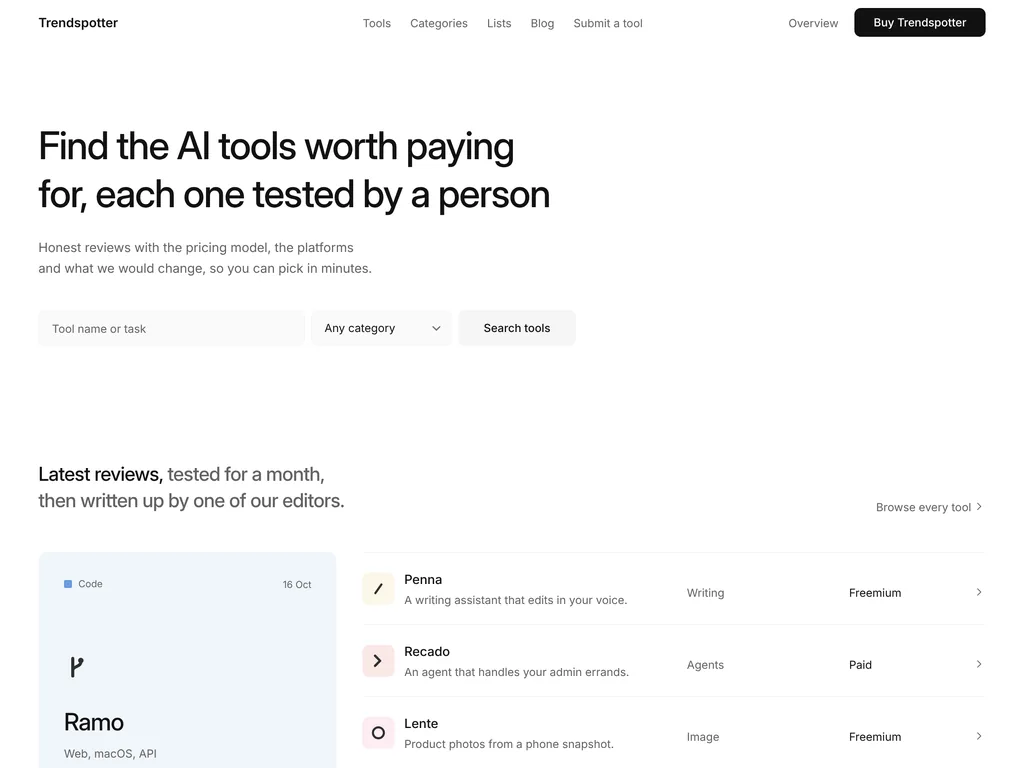
Short verdict: Trendspotter is now a calm, light directory of AI tools in which every listing shows a pricing model, its platforms and a review signed by an editor. Browsing is well done: filters combine, live in the URL and survive a reload, and tool pages, lists and editor profiles link to each other. Selling is only drawn: submissions and paid listings have pages but no backend, every form just reloads its page with the answers in the address bar, and all 86 pages share the placeholder title "Your Page Title". Buy it to launch an edited, review-led directory if you can wire up forms, payments and per-page SEO; skip it if you need accounts, bookmarks or self-serve paid listings, which the October 2026 rebuild removed.
How we reviewed it: On 30 October 2026 we used the live Astro demo, which Lexington rebuilt on 17 October 2026, in Chromium at desktop widths from 1,000 to 1,440 px and on a 390 px phone viewport. We crawled all 86 linked pages, combined filters and reopened the resulting URLs, sent the submit, contact, newsletter, sign-in and sign-up forms while logging network requests, and ran Lighthouse 12.8.2 once each on the home and tools pages. We did not buy the theme, so we can't judge the source code, and the Sanity and EmDash editions have no public demo. Prices and license terms come from Lexington Themes on the same day.
Disclosure: Our links to Lexington Themes carry a referral tag.
What you get for $89
| Price | $89 one-time for the Astro edition, $129 for the Astro + Sanity or Astro + EmDash edition. Full Access Personal costs $99 one-time (shown as 50% off $198) and includes all 53 Lexington Astro themes, so for $10 more you get Trendspotter and every other theme: Lexington Themes Full Access. |
|---|---|
| Version | Astro 7.4.1 and Tailwind CSS 4.3.3, per Lexington; the demo's CSS reports Tailwind v4.3.3. First released in October 2024, rebuilt from scratch on 17 October 2026. |
| Size | 10 static pages and 6 content collections (tools, categories, lists, editors, blog, legal pages), per Lexington. The demo's sitemap lists 85 URLs, among them 40 tool pages, 8 categories, 6 lists, 3 editor profiles, 6 blog posts and a 5-page style guide. |
| Stack | Astro and Tailwind CSS with a few small vanilla scripts and Lenis smooth scroll. No Alpine.js or UI framework is loaded. Content lives in Markdown collections. |
| Delivery | Access to a private GitHub repository, bought through Polar.sh, with a README, AGENTS.md, Cursor rules and a design skill for AI coding tools, per Lexington. It builds to a static site for Netlify, Vercel or any static host. |
| License | Unlimited websites for yourself and for clients, commercial use without attribution. You can't resell it as a template or use it as the interface of a site builder. License terms |
What we found in the demo
Filters that combine and stay in the URL
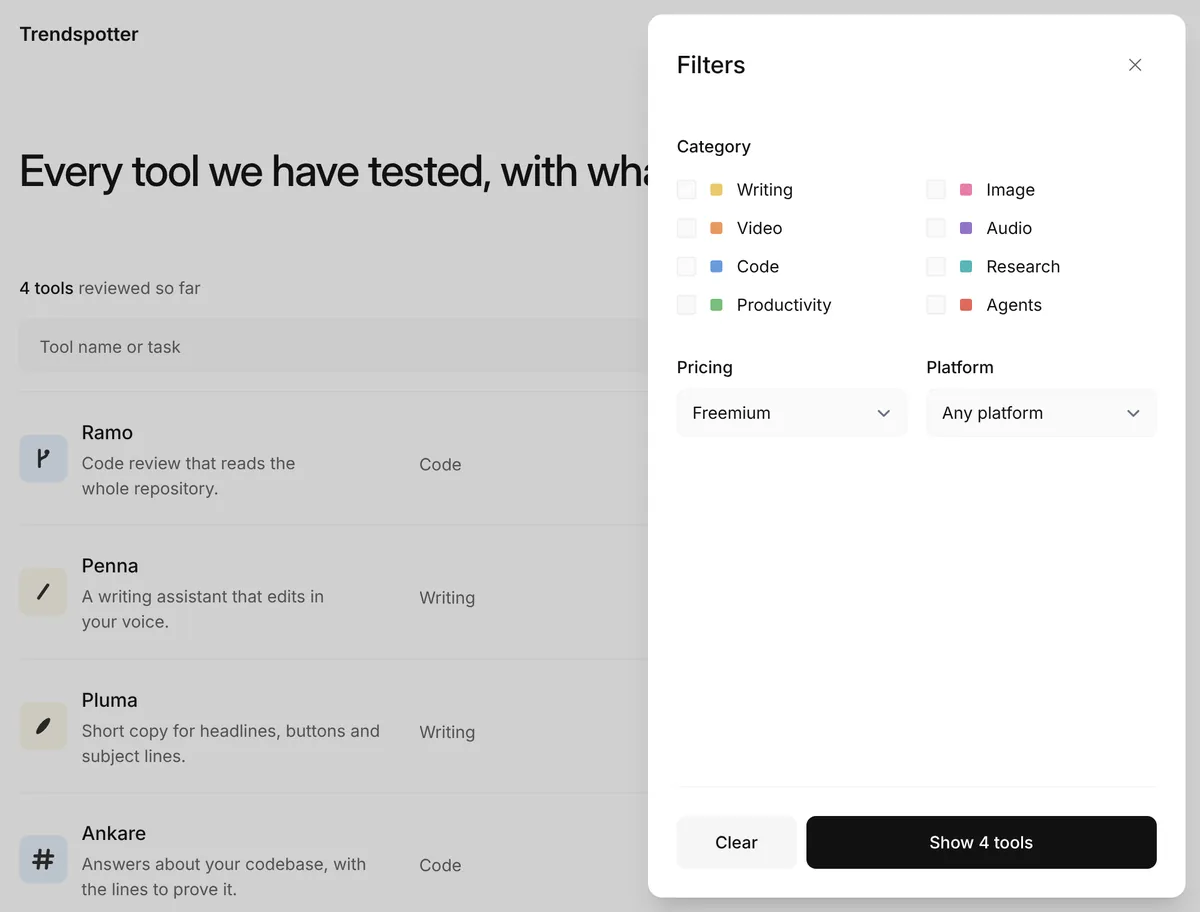
The tools page lists all 40 sample tools as rows: a logo on a tile tinted in the category's color, the tagline, the category, the pricing model and the platforms. There are five tools in each of eight categories; 19 are freemium, 15 paid and 6 free. A filter drawer combines several categories with one pricing model and one platform, and a sort switches between newest and A to Z. Writing and Code gave 10 tools, adding Freemium 4 and adding API 1. Every change rewrites the address (?category=writing&category=code&pricing=freemium&platform=api), and opening that URL in a new tab restored the same result, so filtered views can be shared.
Search is part of the same filter: it matches the exact text you type against each tool's name, tagline and short description, with no typo tolerance, and it doesn't cover blog posts or lists. The home page search box hands its query and category to the tools page, where "voice" in Audio returned 3 tools.
Checked boxes you can't see in light mode
In the default light theme, a checked checkbox or radio button looks the same as an unchecked one: the check mark is white on a near-white field. It affects the filter drawer, the pricing and platform choices on the submit form and the terms box on the sign-up page. Dark mode shows the marks. Until that is fixed, only the result count tells visitors which filters are on.
Tool pages, lists and editors that link to each other
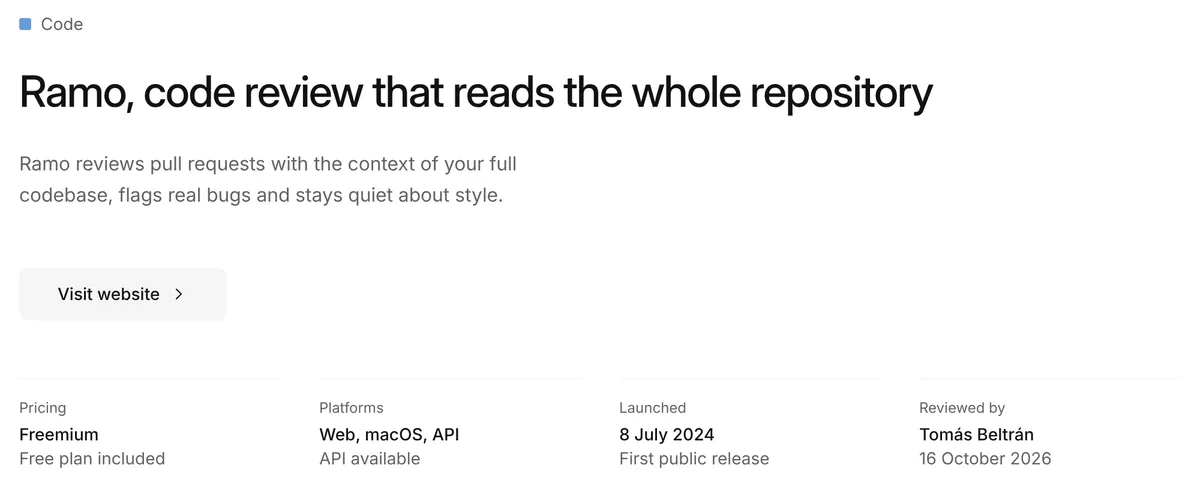
Each tool page opens with four facts: the pricing model with a note such as "Free plan included", the platforms, the launch date, and the editor who reviewed it with the review date. Then come the review, "What works" and "What does not" lists, and three alternatives. Editor profiles list every review that editor wrote (10 for Elin Bergqvist) and the lists they picked, and each of the 6 lists explains its picks. Lexington says these are linked Markdown collections, so one edit shows everywhere a tool appears, and the demo's cross-links fit that. The "Visit website" button points to #_ on every tool page, so outbound links, and any affiliate tags, are yours to add.
Pages that sell listings, with nothing behind them
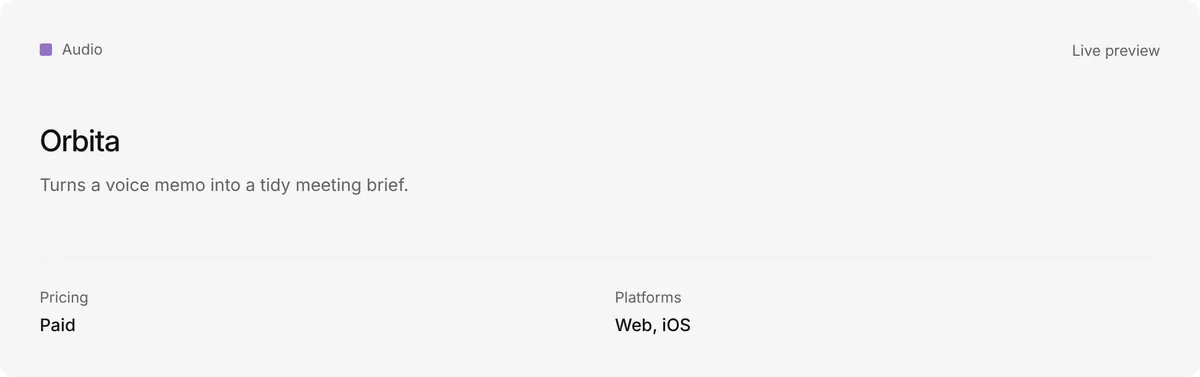
The submit page is one long form in four numbered steps, not a wizard, and a preview card shows the tool as it would appear in the catalog while you type. The pricing page offers a free listing, a featured listing at €49 a month and sponsored placements from €390, and the advertise page describes placements on the home page, at the top of a category and in the Friday email. "Get featured" and "Ask for the rates" both lead to the contact form.
None of these forms sends anything. Submitting a tool reloaded /submit/ with every answer in the URL, and the only other request was for the Inter font. The contact, newsletter, sign-in and sign-up forms do the same, and the last two put the password in the URL, where it would land in server logs if deployed as is.
Dark mode, mobile and scripts
A Light, Dark and System switch sits in the footer. The choice is saved in localStorage under theme and applied by an inline script before the page draws, so a reload in dark mode doesn't flash white. At 390 px the home, tools, tool, submit and pricing pages had no sideways scrolling, and the filters open as a full-height sheet with a "Show 5 tools" button. We found no x-data attribute or Alpine.js script on any of the 86 pages.
Performance and SEO
One Lighthouse 12.8.2 run per page, 30 October 2026:
| Page | Performance | Accessibility | Best practices | SEO |
|---|---|---|---|---|
| Home, mobile | 99 | 100 | 96 | 100 |
| Home, desktop | 100 | 100 | 96 | 100 |
| Tools, mobile | 83 | 98 | 96 | 100 |
Both pages weigh about 400 KB, 345 KB of it the Inter variable font from rsms.me. Its stylesheet loads from that server before anything can draw, which delayed the tools page's first paint to 3.5 s on mobile; self-hosting the font is the fix worth making. The tools page lost accessibility points for a skipped heading level, and every page loses best-practices points to favicons and a manifest that return 404.
All 86 pages share the title "Your Page Title" and the description "A detailed description of your page content.", every canonical tag points to https://yourwebsite.com/current-page, and the sitemap lists its URLs on yourwebsite.com. Lighthouse doesn't check for duplicate titles, so its SEO score hides this. We couldn't see whether the layout takes a title per page; either way, a directory that wants its 40 tool pages to rank needs a title, description and canonical URL on each. No page outputs structured data.
What you still have to build
Form handling. Connect the submit, contact and newsletter forms to a form service, an email provider or a database, and send them by POST.
Payments. Featured listings and sponsored placements need a checkout and invoices.
Accounts. Sign-in and sign-up are screens only; Lexington's changelog says the rebuild removed the dashboard, bookmarks, profiles and password reset.
SEO basics. Per-page titles, descriptions and canonical URLs, your domain in the sitemap, and the favicons and manifest that now return 404.
Links and content. "Visit website" and the social links (all
#_), your own tools, reviews and editors, and prices in your currency instead of euros.The checked style for checkboxes and radio buttons in light mode.
Pros and cons
Pros
Combined filters with shareable URLs that survive a reload.
Tool pages built for comparison: pricing model, platforms, reviewer, what works and what doesn't, alternatives.
Submission, featured, sponsored and advertising pages are already designed, with a live preview on the submit form.
Light pages: about 400 KB with 6 KB of JavaScript, and 99 for mobile performance on the home page.
Dark mode without a flash, and a filter sheet that works on a phone.
Cons
No backend: every form reloads its page with the answers, passwords included, in the URL.
The same placeholder title, description and canonical URL on every page.
Checked checkboxes and radio buttons are invisible in light mode.
No accounts, bookmarks or user dashboard since the rebuild.
Search only matches exact text in tool names and descriptions.
How Trendspotter compares
Carbon ($89) is Lexington's other directory theme, described as a quiet, black and white directory of websites and the studios behind them. Pick it for a design showcase rather than a review site.
Carriera ($89) is Lexington's dark job board theme with a salary on every listing, for a directory of roles instead of products.
JobBoard by Cruip ($49) has a filterable listing, a detail page, a form for creating a listing and sign-in, in HTML, Next.js and Vue versions with a Figma file, and Cruip says it also works as a general directory. Choose it for a React or Vue codebase if you don't need reviews, lists or editor pages.
See all templates for more options.
Who should buy Trendspotter
Buy it to run an edited directory of software where the reviews are the product, if you or a developer can connect a form backend, payments and per-page SEO. Look elsewhere if makers should pay and publish on their own, or if visitors need accounts and saved lists.
FAQ
Does Trendspotter take tool submissions and payments?
No. The submit, contact and newsletter forms only reload the page with the answers in the URL, and the featured and sponsored plans link to the contact form. You connect a form backend and a payment provider yourself.
Should I buy Trendspotter alone or Lexington Full Access?
Trendspotter alone costs $89, while Full Access Personal costs $99 one-time and includes all 53 Lexington Astro themes, Trendspotter among them, plus future themes and updates. If you might use a second theme, Full Access is the better buy.
Can I still get the old Trendspotter with the user dashboard?
Lexington says the previous version of a redesigned theme stays available as a tagged release in the GitHub repository. The current design has no dashboard, bookmarks, store or password reset.
Can I use Trendspotter for client projects?
Yes. The license covers unlimited websites for yourself and for clients, for commercial use and without attribution. You can't resell the theme as a template, share repository access beyond the seats you bought, or use it as the core interface of a site builder.
Which edition of Trendspotter should I buy?
The Astro edition ($89) keeps tools, lists and posts in Markdown files in the repository. The Sanity and EmDash editions ($129 each) add a visual editor, and the EmDash one deploys to Cloudflare Workers. Only the Astro edition has a public demo, so we couldn't test the other two.
KEEP EXPLORING
More templates