Next.js and Astro single-product store with a model picker and checkout UI
Carriera
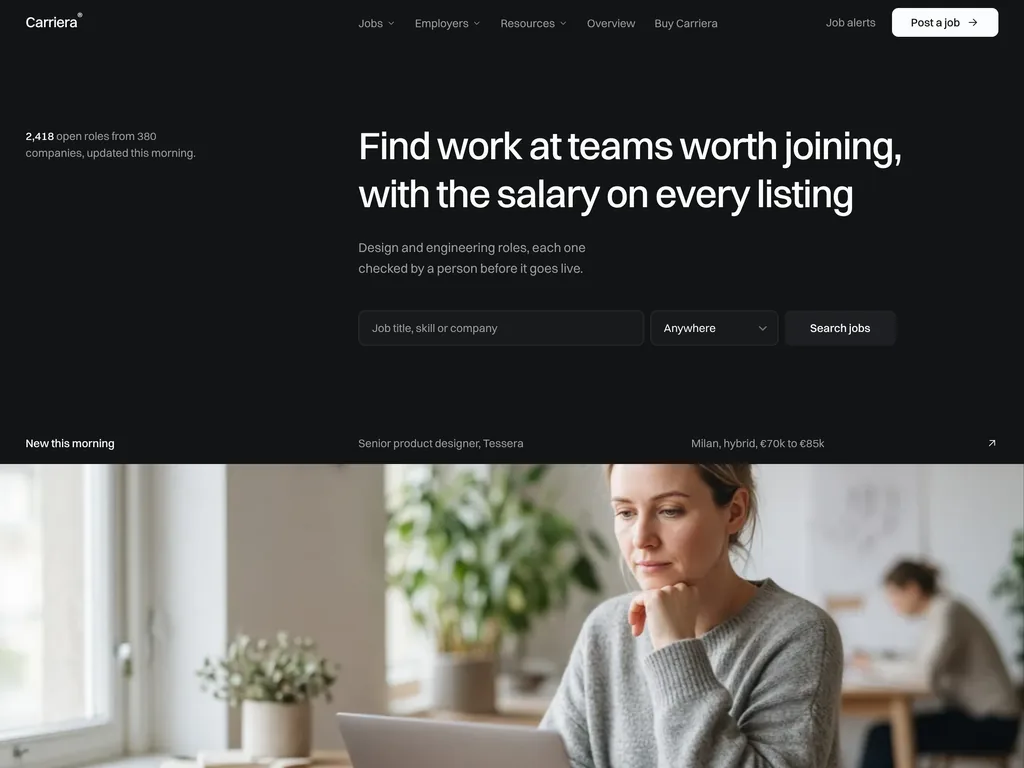
Dark Astro job board theme with a salary on every listing and a salary guide
PaidTemplates
lexingtonthemes.comExplore the product
AT A GLANCE
- Website
- lexingtonthemes.com
- Pricing
- Paid
- Categories
- Templates
- Listed
- Sep 2023
- Updated
- Oct 2026
Details about Carriera
KEY POINTS
- Tailwind CSS v4
Short verdict: Carriera looks like a finished job board for a salary-first niche: 16 sample roles that all show their pay, filters and a salary sort that work in the browser, company and city pages, a salary guide with a live lookup, and an employer side with pricing and a five-step posting form. It lacks any way to apply, pay or send anything: "Apply for this role" links to #_, and every form only reloads a page with your answers in the address bar. Buy it for a small, hand-reviewed board if you have a developer for applications, payments and email; skip it if you need employer accounts and paid self-serve posting on day one.
How we reviewed it: On 30 October 2026 we used the live Astro demo on a 1440 px desktop screen and a 390 px phone screen. We filtered and sorted the job list, opened job, company, city and category pages, used the salary lookup, and submitted the post-a-job, job alert, newsletter and contact forms while logging every network request. We cite one Lighthouse 12.8.2 run each for the home page and a job page. We did not buy the theme, so we can't judge the source code or the Sanity and EmDash editions, which have no public demo. Prices, versions and license terms come from Lexington Themes' site on the same day.
Disclosure: Our links to Lexington Themes carry a referral tag.
What you get for $89
| Price | $89 one-time for the Astro edition, $129 for the Sanity or EmDash edition. Lexington Themes Full Access Personal is $99 one-time (shown as 50% off $198) and includes all 53 Astro themes, so for $10 more you get Carriera and every other theme. |
|---|---|
| Version | Astro 7.4.1 and Tailwind CSS 4.3.3, per Lexington. First released in September 2023 and rebuilt from scratch as a dark job board on 4 October 2026. |
| Size | 12 static pages plus collections for jobs, companies, categories, locations, a blog, a team and legal pages, per Lexington. The demo's sitemap lists 77 URLs, including 16 job pages, 8 company pages and 5 style guide pages. |
| Stack | Astro and Tailwind CSS, with Lenis for smooth scrolling. Interactivity is plain JavaScript; the demo loads no Alpine.js or other framework. Fields of work and cities live in data files, so one edit updates filters, menus and landing pages. |
| Delivery | Access to a private GitHub repository after paying through Polar. Builds to static files for Netlify, Vercel or any static host, and ships with AGENTS.md, Cursor rules and a design skill for AI coding tools. |
| License | Unlimited sites for yourself and for clients, commercial use without attribution. You can't resell the theme as a template, and one seat is one person. License terms |
What we found in the demo
A job list you can filter, sort and share
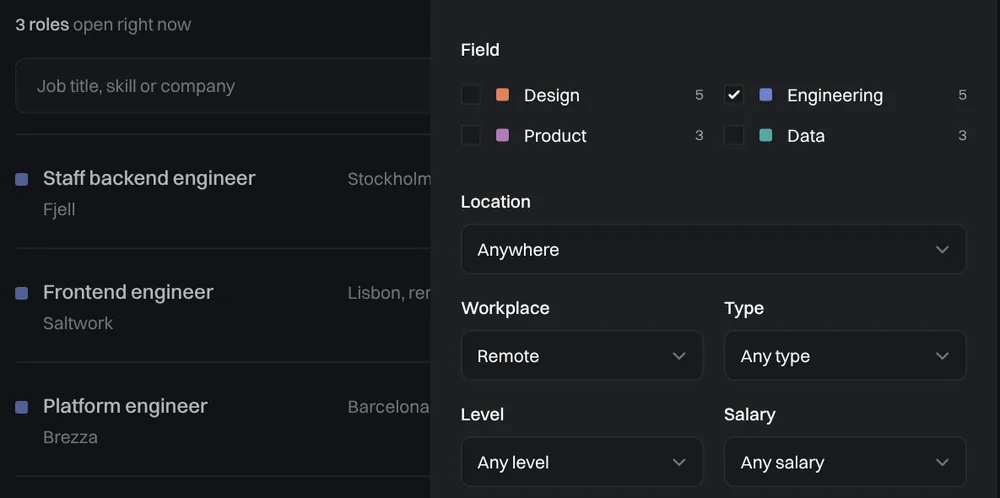
The jobs page lists 16 roles across four fields of work (5 in design, 5 in engineering, 3 in product, 3 in data), each row with place, level, contract and pay. A search box sits above a filter drawer with field checkboxes and counts, location, workplace, type, level and a minimum salary from €40k to €100k. Ticking Engineering and choosing Remote left 3 roles and changed the address to ?field=engineering&workplace=remote, so filtered views can be shared. The salary filter and the highest-salary sort both use the middle of each range, and the one day-rate contract (€450 to €550 a day) ranks as if it paid €110,000 a year, top of the highest-salary sort. With 16 roles everything fits on one page, so we did not see the pagination Lexington lists.
Job pages lead with pay, but the apply button is a placeholder
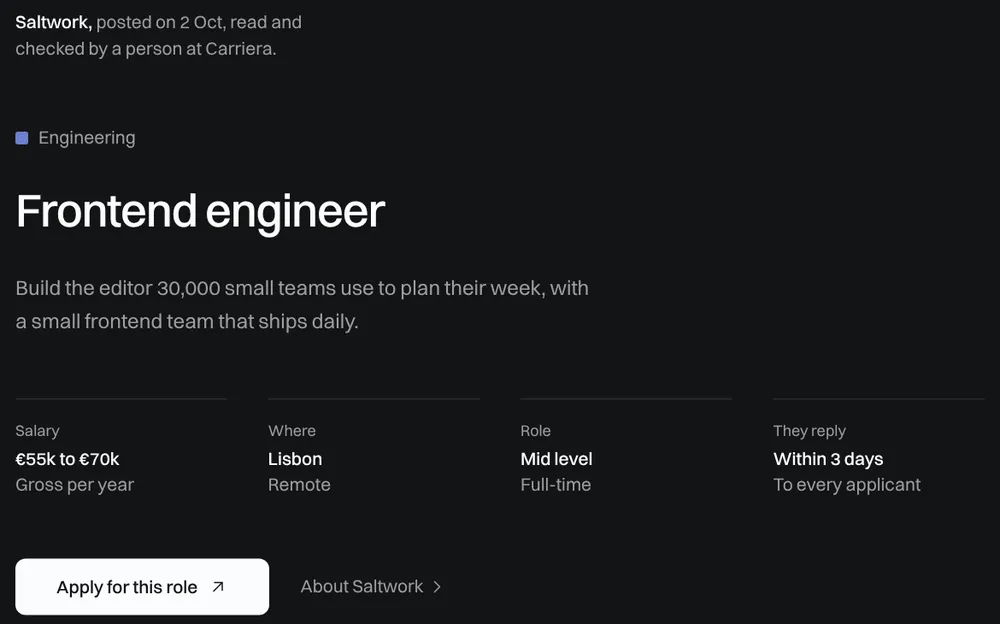
Every job page opens with four facts: the salary (gross per year), the place and workplace, the level and contract, and how fast the team replies ("Within 3 days"). Below come the team in its own words, the work, each hiring step and three similar roles. Both "Apply for this role" buttons, however, link to #_. The demo has no application form, email address or link to an employer's hiring tool, although the employers page says "applications land in your inbox or your hiring tool".
An employer side with prices, a posting form and a preview
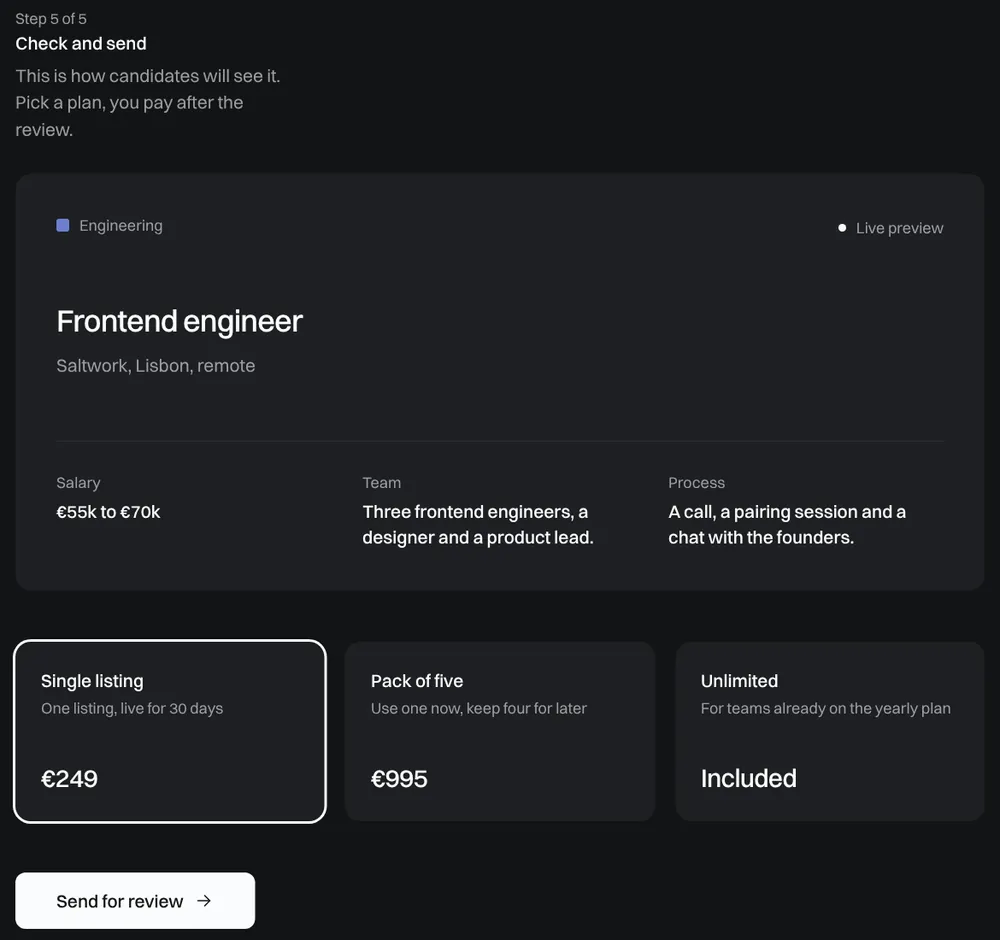
The pricing page carries three sample plans: a single listing at €249 for 30 days, a pack of five at €995 and an unlimited yearly plan at €3,900, then a comparison table and three add-ons from €59 to €149. "Post a job" is one long form in five numbered steps: the role, the salary range per year or per day, the team and hiring process, the company, and a check step with a live preview that updates as you type, next to the plan picker. When we sent it, the browser opened the thank-you page with every answer, the work email included, in the address (/thank-you/?title=…&email=…). The page read them back and promised a reply, but no request left the browser and there is no payment step.
Salary guide, companies and city pages
The salary guide takes one of 10 roles, 4 levels and 8 cities and shows a median, a range, the difference from the European figure and a listing count: a senior frontend engineer in Lisbon came out at €70k, with most offers between €62k and €79k. The browser works these out from sample medians and factors per level and city. Eight company pages show size, founding year, reply time, perks and open roles, and each field, city and remote work has a landing page.
Alerts, contact and help, none of them connected
The job alerts page asks for fields, a city, a level, a minimum salary and an email, and counts down to the next Tuesday 8:00 email, Milan time. Submitting reloaded the page with the answers in the URL, as does the footer signup. The contact form names who will answer each topic and shows whether the Milan office is open, and it too only reloads with the message in the URL. A help center with 16 answers, a blog with RSS and four team profiles complete the site. At 390 px we found no sideways scrolling on the pages we checked, and the filters open as a full-height drawer. The theme is dark only; the redesign removed the colour modes.
Performance and SEO
One Lighthouse 12.8.2 run per page, 30 October 2026:
| Page | Performance | Accessibility | Best practices | SEO |
|---|---|---|---|---|
| Home, mobile | 99 | 100 | 96 | 100 |
| Home, desktop | 99 | 100 | 96 | 100 |
| Job page, mobile | 83 | 100 | 96 | 100 |
| Job page, desktop | 100 | 100 | 96 | 100 |
The home page transfers about 130 KB on mobile and the job page about 98 KB, 6 KB of it JavaScript. On the job page, mobile first paint came at 3.3 s, held back by the render-blocking Switzer stylesheet from Fontshare (the home page measured 1.7 s), so self-hosting the font is the first fix. Lexington lists 100 in all four categories without naming the page or device. Best practices lost points for console errors: the demo's favicon and web manifest files return 404.
Every page we checked has the title "Your Page Title", the description "A detailed description of your page content." and the canonical URL https://yourwebsite.com/current-page, and the sitemap lists its 77 URLs on yourwebsite.com. Lighthouse only checks that these tags exist, so its SEO score of 100 means little. The demo also outputs no structured data: there is no JobPosting markup on job pages, which is what Google reads to show listings in its job search. The fields it needs (title, salary, location, contract type, posting date) are already on every job page.
What you still have to build
Applications. An apply link or email per listing, or an application form with a backend.
Posting and payment. A backend for the post-a-job form, the review step, payment for plans and add-ons, and taking listings down after 30 days.
Alerts and contact. An email service for the weekly alerts and a handler for the contact form, both sent by POST so emails stay out of URLs and server logs.
SEO. Your domain for the sitemap and canonical URLs, a title, description and image per page, the missing icons, and JobPosting markup.
Real numbers. Replace sample claims such as 2,418 open roles from 380 companies, 48,000 newsletter readers and a salary guide "built from 13,290 real listings".
Pros and cons
Pros
Pay is part of the data: every listing, card and company page shows a range, and visitors can filter and sort by it.
Filters run in the browser and live in the URL, so filtered views can be shared.
The employer side is designed: pricing with a comparison table and add-ons, a five-step posting form with a live preview, and a help center.
Light pages with no framework JavaScript, and 100 for accessibility on both pages we tested.
Cons
No application flow: the apply button is a placeholder.
Every form only reloads a page, with personal details in the URL.
No JobPosting markup, and placeholder SEO tags on every page.
No accounts: employers can't edit or renew their listings, and the redesign removed candidate pages, sign-in and site search.
How Carriera compares
Hirewise ($89), also from Lexington, is a careers site for one company, with roles grouped by team, salary bands per level, an apply form with CV upload and a talent pool, per Lexington. Pick it if you hire for your own company rather than run a board.
Cruip JobBoard ($49 one-time) costs less and comes as HTML, Next.js and Vue code with a Figma file, but has four pages: a job list with filters, a job post, a create-a-job form and sign-in. Pick it for a React or Vue starting point you will design further yourself.
See all templates for more options.
Who should buy Carriera
Buy it if you run, or plan to run, a curated job board where every listing carries a salary and a person reviews each post, and you have a developer to connect applications, payments and email. Look elsewhere if you need employer accounts, self-serve paid posting or candidate profiles without backend work, or a light design.
FAQ
Can candidates apply for jobs through Carriera?
No. In the demo the Apply for this role button links to #_ and there is no application form. Add each employer's application link or email to the job template, or connect a form backend.
Does Carriera take payments for job posts?
No. The pricing and post-a-job pages show sample plans from €249, but submitting the form only opens a thank-you page with the answers in the URL. Payment, the review step and listing expiry are yours to connect.
Will Carriera's listings appear in Google's job search?
Not as shipped. The demo outputs no JobPosting structured data and uses placeholder titles and canonical URLs on every page. You add the markup and real SEO tags before launch.
Should I buy Carriera alone or Lexington Full Access?
Carriera alone costs $89 one-time. Full Access Personal costs $99 one-time and includes all 53 Lexington Astro themes, including Carriera and Hirewise, so for $10 more you get the whole catalog.
Can I use Carriera for client projects?
Yes. Lexington's license allows unlimited sites for yourself and for clients, with no attribution. You can't resell or redistribute the theme as a template, and each seat is one named person.
KEEP EXPLORING
More templates