Next.js and Astro single-product store with a model picker and checkout UI
Brightlight
Calm Astro theme for invoicing apps, with painted WebGL tiles
PaidTemplates
lexingtonthemes.comExplore the product
AT A GLANCE
- Website
- lexingtonthemes.com
- Pricing
- Paid
- Categories
- Templates
- Listed
- Mar 2023
- Updated
- Oct 2026
Details about Brightlight
KEY POINTS
- Tailwind CSS v4
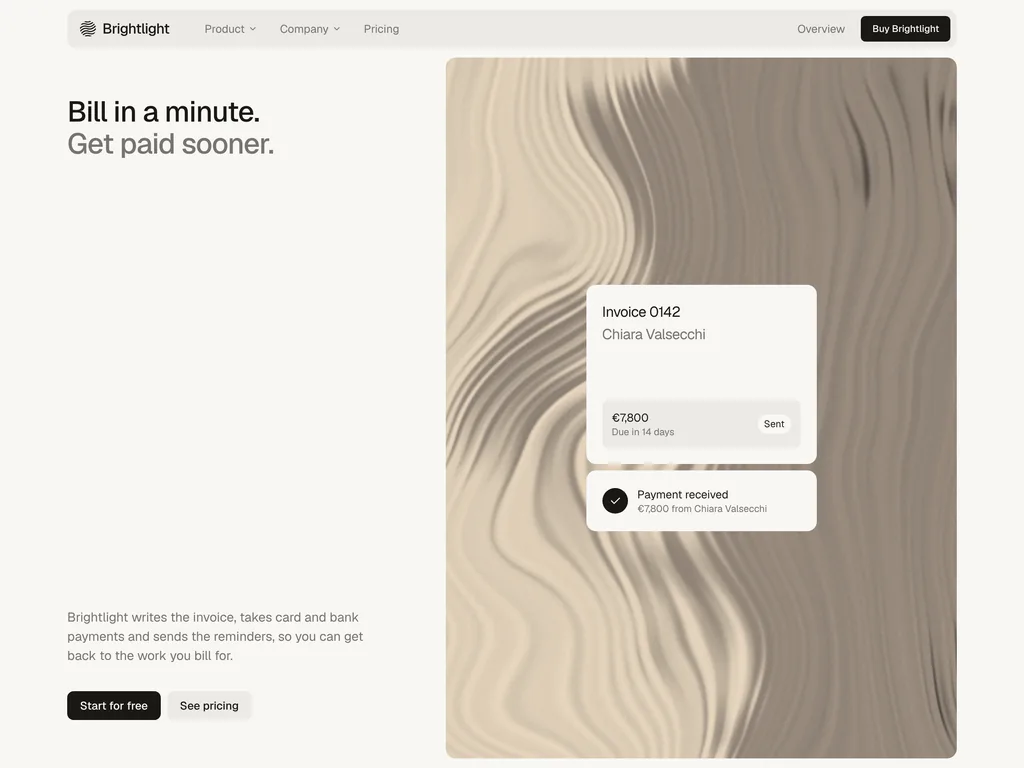
Short verdict: Brightlight is now a quiet, warm site for an invoicing or billing app: off-white grounds, flat grey panels, one typeface (Geist), no accent color, and painted WebGL tiles that each hold a small product card. The home page does most of the selling, with a hero tile that stays put while you scroll, product cards for each step and pricing with a monthly and yearly switch; customer stories, an integrations directory, a help center, a changelog and a blog fill out the site. The drawbacks: no form is connected, every page carries placeholder SEO tags, the muted grey text falls just short of contrast guidelines, and its eight shader tiles run at full frame rate. Buy it for an invoicing, billing or freelancer tool; skip it if you need a separate pricing page, a status page or a dark design.
How we reviewed it: On 30 October 2026 we went through the live Astro demo in headless Chromium at 1280 px and at 390 px phone width, crawled all 47 pages, switched the pricing period, opened both mega menus and the phone menu, submitted every form while logging network requests, measured what the shader tiles cost the browser and ran Lighthouse 12.8.2 on the home page and a customer story. We did not buy the theme, so we could not read the source code or test the Sanity and EmDash editions, which have no demo. Prices, editions and license terms come from Lexington Themes on the same day.
Disclosure: Our links to Lexington Themes carry a referral tag.
What you get for $89
| Price | $89 one-time for the Astro edition; the Sanity or EmDash edition costs $129. Lexington Themes Full Access Personal costs $99 one-time (shown as 50% off $198) and includes all 53 Astro themes, so $10 more buys Brightlight and every other theme. |
|---|---|
| Editions | Astro; Astro + Sanity (the same design wired to Sanity with live preview editing); Astro + EmDash (the admin built in, deployed to Cloudflare Workers), per Lexington. |
| Version | Astro 7.4.1 and Tailwind CSS 4.3.3, per Lexington; the demo's stylesheet confirms Tailwind 4.3.3. Released July 2023, rebuilt in May 2025 and redesigned on 9 October 2026 (see the changelog). |
| Size | Six static pages and six content collections, per Lexington. The demo's sitemap lists 46 URLs, including 4 blog posts, 4 customer stories, 8 integrations, 6 help guides, 6 changelog releases, 2 legal pages and 6 style-guide pages, one of them for the shader palettes. |
| Stack | Astro and Tailwind CSS v4, GSAP with ScrollTrigger and Lenis for the hero and scrolling, and a hand-written WebGL shader; the rest is vanilla JavaScript, with no Alpine.js or React in the demo. Geist comes from Google Fonts. |
| Delivery | A private GitHub repository through Polar.sh, to fork or download. Lexington's setup guide still says Node.js 20 or later, but Astro 7.4 requires 22.22 or newer. It builds to static files for Netlify, Vercel or any static host. Comes with AGENTS.md, a design skill for Cursor, Claude Code and Codex, and Cursor rules. No Figma file. |
| License | Unlimited sites for yourself and for clients, including white-label work. No reselling it as a template and no using it as the core UI of a site builder. Refunds only if the theme differs materially from the demo, or if you have not accessed the repository within 14 days. License terms |
What we found in the demo
An invoicing app for freelancers, shown in product cards
The sample product sends invoices in euros, takes card and bank payments, chases late payers and sets money aside for tax. Instead of screenshots, each home section shows it in small cards on painted tiles: an invoice with its line items, three ways to send it, a payout moving from "Paid by card" to "In your bank", a reminder email, a year of earnings and a quarterly tax pot. The hero tile stays pinned for several hundred pixels of scrolling while the text moves past it; with reduced motion turned on, it scrolls normally and Lenis smooth scrolling is off. It reads as a real product, and the cards are plain HTML you can edit.
Pricing with a monthly and yearly switch
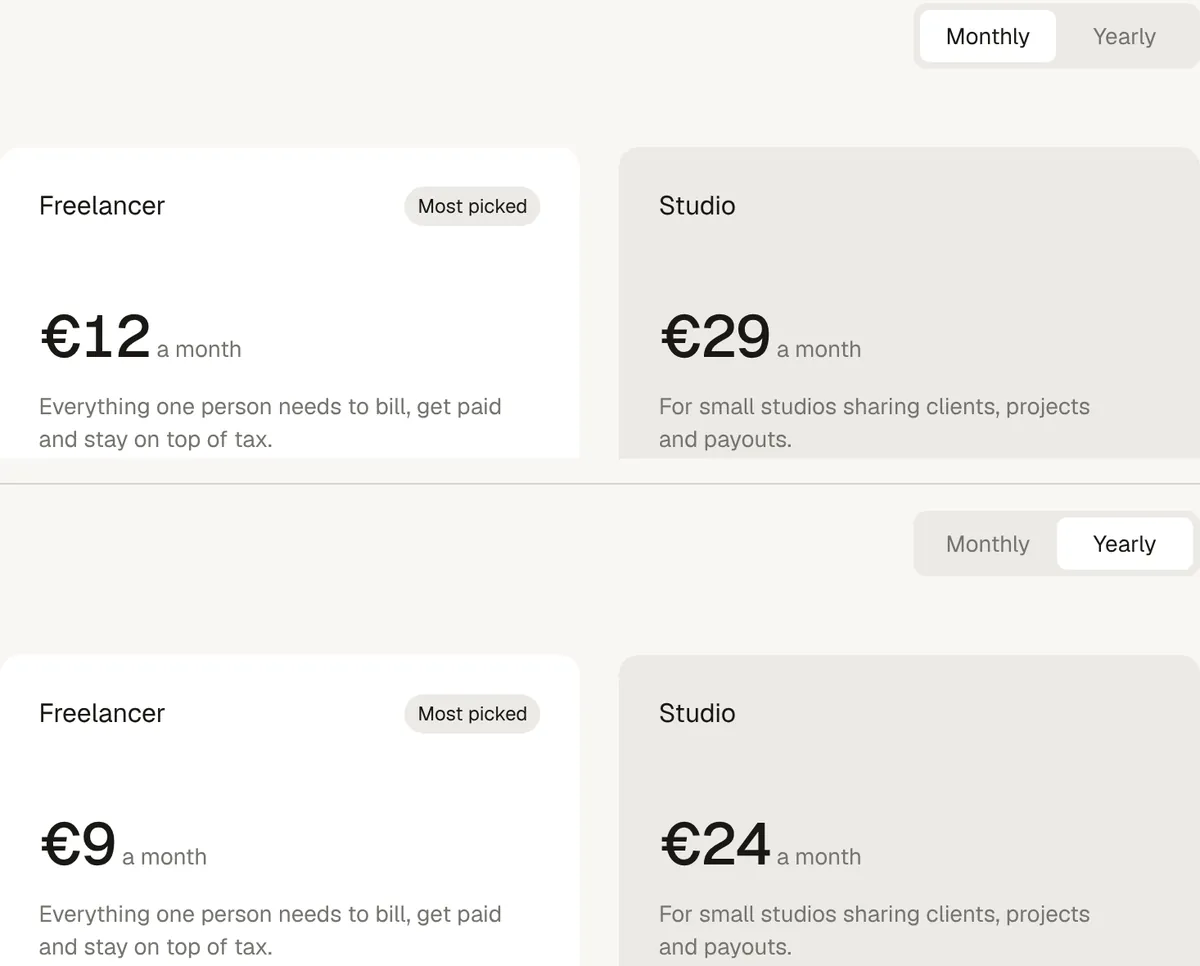
The three plans cost €0, €12 and €29 a month. The switch slides to Yearly and changes the paid plans to €9 and €24 a month, 25% and about 17% less, but the cards still say "a month" without stating that the year is billed up front, and the choice resets on reload. Pricing lives on the home page; the menu's Pricing link jumps to that section, so there is no pricing page to send people to.
Nine shader palettes and a mega menu
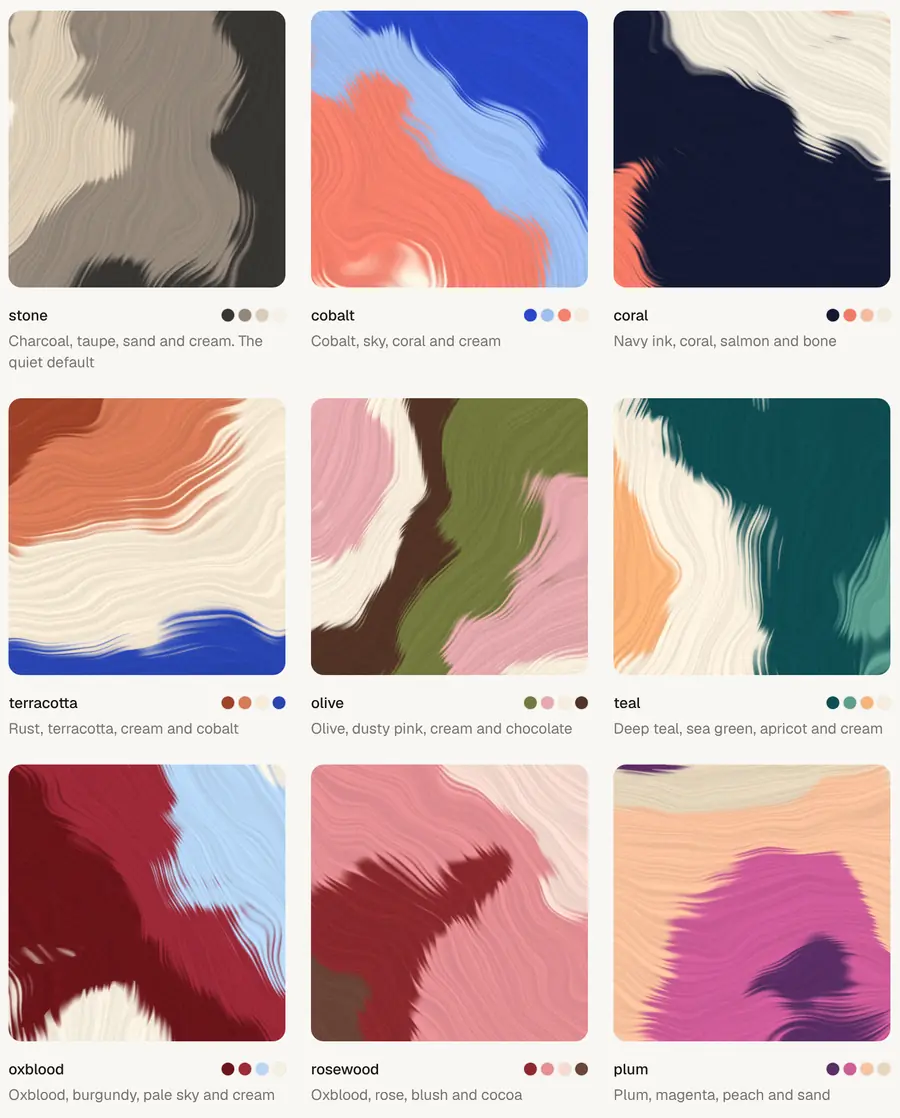
A style-guide page previews the tile shader in all nine palettes, from "stone", the quiet default, to "plum"; a section picks one by name, plus a seed that changes the composition. The palettes are defined in the shader script, so brand colors of your own mean adding one there. On desktop, Product and Company open mega-menu panels with grouped links and a promotional card; on a phone, the menu button opens a dropdown and reports its state to screen readers. None of the 20 pages we checked at 390 px scrolled sideways.
Stories, integrations and help pages
Four customer stories each lead with one number, such as invoices paid 14 days sooner, then a short write-up. The integrations directory groups eight tools under payments, accounting, time tracking and workspace, and uses real product names: Stripe, PayPal, Wise, QuickBooks, Xero, Toggl, Gmail and Notion. Keep only the integrations your product has. The help center offers six guides and a set of common questions, and the legal pages have an "On this page" index.
Forms and accounts are screens only
The contact, newsletter, sign-in and sign-up forms have no action or method, so submitting reloads the page with what you typed in the address bar, password included. No request left the site. "Forgot password?" points to #_, "Continue with Google" does nothing, and the sample addresses use the reserved .test domain.
Performance and SEO
One Lighthouse 12.8.2 run per page, 30 October 2026:
| Page | Performance | Accessibility | Best practices | SEO |
|---|---|---|---|---|
| Home, mobile | 68 | 96 | 96 | 100 |
| Home, desktop | 64 | 96 | 96 | 100 |
| Customer story, mobile | 90 | 96 | 96 | 100 |
| Customer story, desktop | 99 | 96 | 96 | 100 |
The home page is the lightest of the three themes we tested, at 126 KiB in 11 requests, and its largest contentful paint came in at 1.7 s on mobile. Its score falls on total blocking time, 46.2 s on mobile, and most of that comes from our test machine: its headless Chromium has no GPU and draws the eight shader tiles in software. With WebGL switched off, or with reduced motion on, the page produced no long tasks. Unlike Navy and Spaziobianco, though, Brightlight sets up all eight WebGL contexts as the page loads and runs every visible tile at the full frame rate, so it is the one to try on a low-end phone before launch. We could not test a phone with a GPU; Lexington reports 100 for performance. The customer story scored 90 on mobile, held back by a portrait photo that loads at 2.8 s.
Accessibility loses points on every page we measured for the muted grey text: #77746f on the #f8f7f4 background is 4.34:1, below the 4.5:1 guideline, on 68 elements of the home page. One darker color token fixes it. Best practices lost points for six favicon and manifest files that return 404. SEO scores 100, but the tags are placeholders: all 47 pages share the title "Your Page Title", the description "A detailed description of your page content." and the canonical URL https://yourwebsite.com/current-page. The sitemap and RSS feed point at yourwebsite.com, and no page outputs structured data.
What you still have to build
Form handling. Connect the contact and newsletter forms to a form service or your API, and give sign-in a POST method before it handles real passwords.
Accounts. Sign-in, sign-up, password reset and Google sign-in are screens only.
Page metadata. A title, description, canonical URL and social image per page, plus your domain in the Astro config so the sitemap and RSS use it.
Your own numbers. "12,000 freelancers", "€48M invoiced", the customer results and the testimonials are sample copy, and the integration list names real companies.
A pricing page, if you want one, and a line saying yearly plans are billed yearly.
Clean-up. Darken the muted text color, remove the "Buy Brightlight" and "Overview" links and the style-guide pages (they are in the sitemap), and add favicons.
Pros and cons
Pros
The product is shown working, in editable HTML cards, rather than in screenshots you would have to replace.
A monthly and yearly pricing switch, mega menus, a pinned hero and nine shader palettes; the hero and shaders respect reduced motion.
The lightest home page of the three themes we tested, at 126 KiB, with a 1.7 s mobile largest contentful paint.
Customer stories, integrations, help center, changelog and legal pages come filled and consistent.
Cons
No form is connected, and sign-in and sign-up put the password in the URL.
The same placeholder title, description and canonical URL on every page.
Muted text below the 4.5:1 contrast guideline across the site.
Eight WebGL tiles at full frame rate: check them on modest phones.
No separate pricing, status or security page, and no dark mode.
How Brightlight compares
Navy ($89, same maker, tested the same day) is cooler and more structured, with four plan tiers, a comparison table, and status and security pages; it suits monitoring and developer tools better than billing.
Spaziobianco ($89, same maker) is an editorial fintech theme with API tabs, a fees page and the cheapest shader of the three, but its forms end on an error page on static hosts.
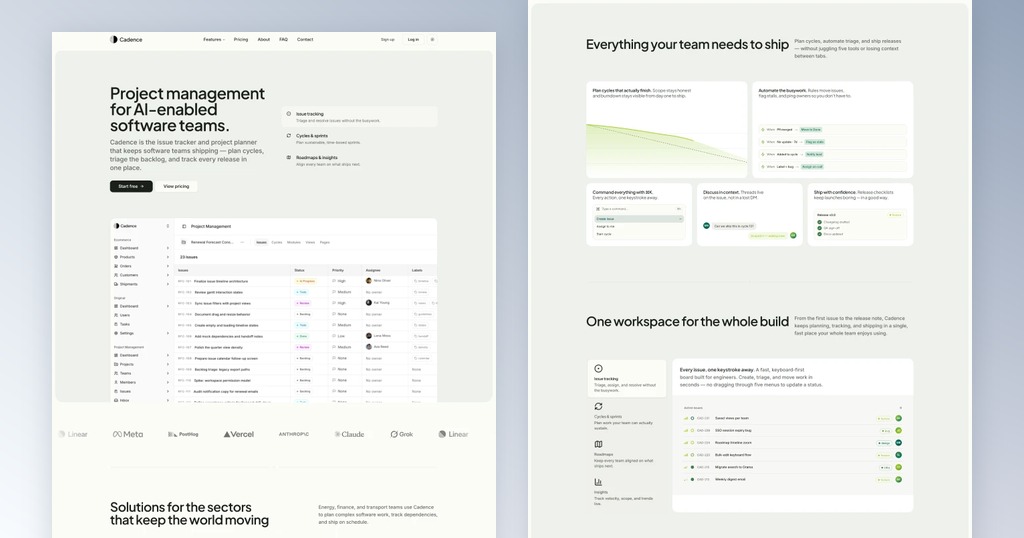
Cadence by Cruip ($79) is another calm product template, with Next.js and Astro versions, 8+ pages, a contact page with a validated form and a Figma file, per Cruip. Choose it if you want a Figma file or React; choose Brightlight for more pages and invoicing-ready copy.
Browse all templates for more options.
Who should buy Brightlight
Buy Brightlight if you are launching an invoicing, billing or finance tool for freelancers and small studios, like a calm, flat design, and have someone to connect forms and fill in real metadata. Look elsewhere if you need a pricing page of its own, status or security pages, a dark design or a Figma file.
FAQ
Do Brightlight's forms work out of the box?
No. In the demo the contact, newsletter, sign-in and sign-up forms have no action, so they only reload the page with the typed values in the URL, including the password on sign-in. You connect them to a form service or your own backend.
Should I buy Brightlight alone or Lexington Full Access?
Full Access Personal is usually the better buy. Brightlight alone costs $89, while Full Access Personal costs $99 one-time (shown as 50% off $198) and includes Brightlight plus all 53 Lexington Astro themes and future ones.
Can I use Brightlight for client projects?
Yes. Lexington's license allows unlimited websites for yourself and for clients, including commercial and white-label work. You can't resell it as a template or use it as the core UI of a site builder.
Does Brightlight include a CMS?
Not the $89 Astro edition, which keeps content in Markdown content collections. The Sanity and EmDash editions cost $129 each; they have no public demo, so we could not test them.
KEEP EXPLORING
More templates