
Self-hostable workflow automation with AI Agent nodes and an agent builder
Lindy
Hosted AI assistant for Slack and email, taught with plain-English routines
PaidAgents
lindy.aiExplore the product
AT A GLANCE
Details about Lindy
Short verdict: Lindy started as a no-code AI agent builder with a visual editor; since August 2026 it is one hosted assistant, the "AI employee", that lives in Slack, email, text messages, meetings and a Chrome extension. You no longer draw flows: you build what other tools call agents by writing routines (a trigger, a plain-English prompt and a destination) and skills (playbooks), or by recording your screen with Watch and Learn. That makes it the quickest way on this list to get an agent working on your inbox and calendar, with SOC 2 Type II and HIPAA on Enterprise. The costs are opacity and lock-in: credits are $0.01 each but Lindy publishes no cost per task, every active user is a $49.99 seat, the free plan lasts seven days, and nothing can be self-hosted. It suits small teams on Slack and Google or Microsoft mail; developers and anyone who needs predictable costs should look elsewhere.
How we reviewed it: We did not create a Lindy account, connect any mailbox or let Lindy send anything. On 12 November 2026 we read Lindy's home and pricing pages, its documentation (quickstart, routines, skills, Watch and Learn, pricing, usage, phone calls, integrations and security), its changelog, and an interview with its CEO from 10 August 2026. Everything below is Lindy's own description unless we say otherwise; we could not measure credit use, answer quality or reliability.
What Lindy costs and includes
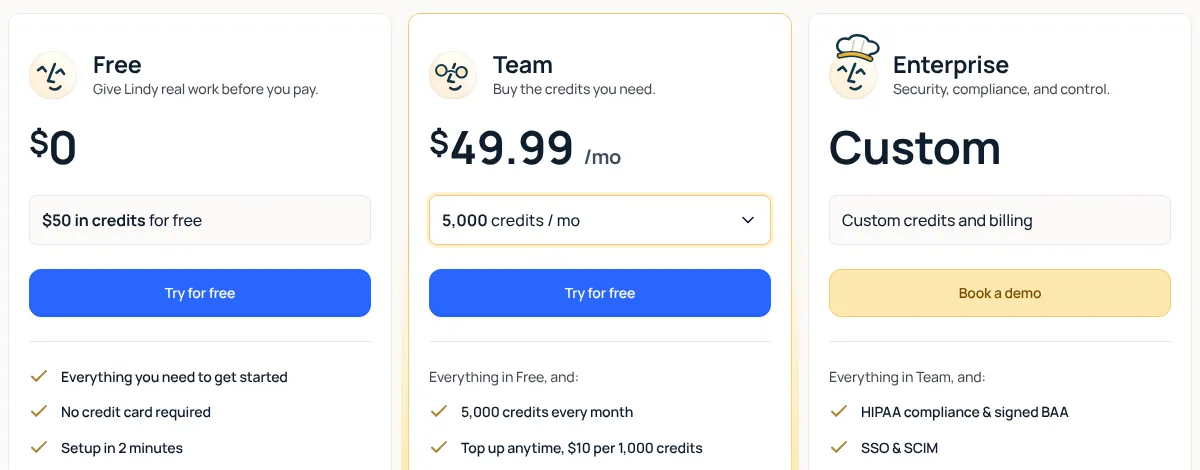
| Item | Lindy, 12 November 2026 |
|---|---|
| Free | $50 of credits, no credit card, valid for 7 days (a trial, not a lasting free tier) |
| Team | $49.99 a month per active user with 5,000 credits each, pooled across the workspace; larger credit tiers up to 1,750,000 credits for $9,999.50 a month; top-ups $10 per 1,000 credits |
| Enterprise | Custom: HIPAA with a signed BAA, SSO and SCIM, audit logs, dedicated support |
| Credits | $0.01 each; plan credits reset monthly, bought top-ups never expire; "bigger jobs use more", with no published cost per action |
| How you build | Chat requests, routines, skills, Watch and Learn screen recordings, apps and hosted pages built by Lindy |
| Channels | Slack, email (Gmail and Outlook), iMessage and SMS, phone calls, meetings on Google Meet, Zoom and Teams, Chrome extension; Microsoft Teams chat is "coming soon" |
| Integrations | "3,000+" on the home page, "1,500+" in the docs, plus remote MCP servers |
| Models | Lindy picks a model per task; paid plans can choose one |
| Hosting and compliance | Hosted only. SOC 2 Type II; GDPR and PIPEDA verified; data "never used to train models", per Lindy |
What we found
Agents are now routines and skills, not flows
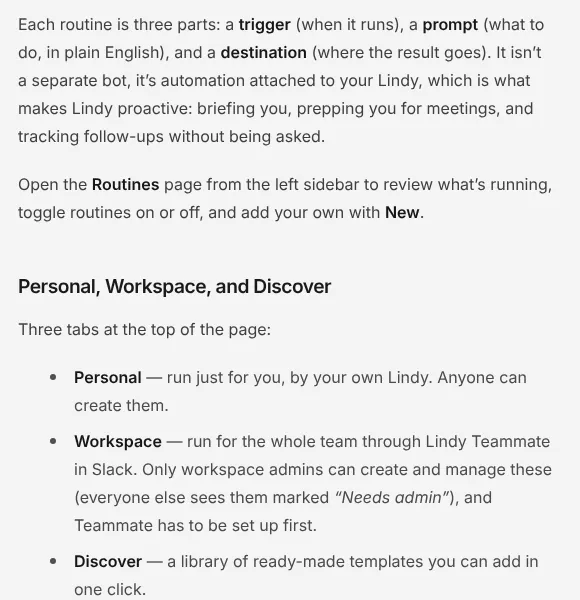
Lindy's docs describe each routine as three parts: a trigger (a schedule, or an event such as an email, a Slack message or a meeting ending), a prompt in plain English, and a destination such as a Slack thread, a text message or Lindy's chat. You type something like "Every weekday at 9, summarize my unread email and Slack mentions" and Lindy fills in the trigger and schedule; a Smart Filter narrows event triggers in plain English. Skills are reusable playbooks Lindy picks up when a request calls for them, and Watch and Learn turns a screen recording of you doing a task into a skill and a routine. Eight routines ship built in, from daily briefs to email drafting and meeting prep. The docs we read no longer mention the visual agent editor that earlier versions used; Lindy's CEO announced the change to a Slack-based teammate on 10 August 2026.
Dry runs and scripts make routines safer and cheaper
Two features stand out for anyone letting an agent act alone. A dry run fires a routine on your real data and shows what it would have sent, without sending. "Run this as a script" converts a routine's instructions into Python that runs on each trigger and wakes Lindy only when the script leaves a note or crashes, which Lindy says is faster and cheaper; scripts cannot use your connected Gmail, Slack or calendar accounts, so they suit checks like watching a public status page.
Slack first, and admins decide
Workspace routines run through Lindy Teammate in Slack, and only workspace admins can create them. The CEO said in the August interview that setup crawls the full Slack history and usually needs an admin to install it. Teams on Microsoft Teams chat or without Slack get the personal assistant in email, text and the browser only.
Costs you cannot estimate in advance
Credits cost a cent each, but Lindy publishes no rate per email, call or minute of browser use; its usage page explains that heavy tasks pause when the pooled credits run out, until a top-up or the next cycle. Every active user is billed, and new teammates who join through Slack get one free week before their seat is charged. The docs' pricing page still names Plus, Pro and Max plans that the pricing page has replaced with Team, so check the billing page in the app before you commit.
Phone, apps and a fast release pace
The changelog added phone calls (14 October 2026), Watch and Learn (12 October), Lindy Apps, small apps Lindy builds and hosts from a chat (28 October), and webhooks for those apps (29 October). Phone calls to other people only happen between 8 AM and 9 PM in their time zone, per the docs.
What you still have to set up
Connections and permissions. Mail, calendar, Slack and each tool, plus the guardrails Lindy offers per integration.
Credit limits. Per-person caps on the shared pool, so one heavy routine does not pause everyone.
Testing. A dry run of every routine before it sends anything unattended.
Compliance paperwork. An Enterprise contract if you need a BAA, SSO or audit logs.
Pros and cons
Pros
Agents are written in plain English, with dry runs before they act.
Works where people already are: Slack, email, text, phone and meetings.
SOC 2 Type II, and HIPAA with a BAA on Enterprise.
Routines can be turned into scripts to cut repeat costs.
Cons
No published cost per task, and the free plan ends after seven days.
Per-user billing from $49.99 a month, and no self-hosting or exportable agents.
Workspace features depend on Slack; Microsoft Teams chat is not available yet.
Docs and pricing page disagree on plan names and integration counts.
How Lindy compares
n8n lets you build agents on a visual canvas or in a form, self-host for free and pay per execution on its cloud from $24 a month for unlimited users. Choose it when you want to see and control every step.
Dify builds agents by chatting too, but each agent is an app you publish, with a sandbox and knowledge bases, and the cloud has a free plan. Choose it for customer-facing assistants and RAG.
Claude and OpenAI dots are general assistants from model makers that also run tasks on their own; choose them if one person, not a team in Slack, needs the help.
See all AI agents.
Who should use Lindy
Lindy fits small and mid-sized teams that live in Slack and email and want an assistant to triage mail, prepare meetings and chase follow-ups, set up in plain English without anyone building flows. Look elsewhere if you need to self-host, want to know what each task costs before it runs, or want to design agents step by step.
FAQ
Is Lindy free?
Only for a week. As of 12 November 2026 new users get $50 of credits with no credit card, valid for 7 days. After that the Team plan costs $49.99 a month per active user with 5,000 credits each, and top-ups cost $10 per 1,000 credits.
How do you build an AI agent in Lindy?
You describe it in plain English. Lindy's routines combine a trigger (a schedule or an event such as a new email), a prompt and a destination, and skills are playbooks it reuses; you can also record your screen with Watch and Learn. Since its August 2026 relaunch, Lindy's docs no longer describe a visual flow editor.
How many credits does a task use?
Lindy does not publish a rate. Credits cost $0.01 each, Lindy says bigger jobs use more, and work pauses when the shared pool runs out until you top up or the month resets. Watch usage during the trial before choosing a credit tier.
Does Lindy work without Slack?
Partly. Each user can work with Lindy by email, text message, phone, the web app and a Gmail Chrome extension, but workspace routines and the shared teammate run through Slack, and Microsoft Teams chat was listed as coming soon on 12 November 2026.
Is Lindy HIPAA compliant?
On the Enterprise plan, which includes HIPAA compliance with a signed BAA, per Lindy's pricing page. Lindy also states SOC 2 Type II and verified GDPR and PIPEDA compliance and says customer data is never used to train models.
KEEP EXPLORING
More AI agents Good company for Lindy.
Hosted AI agent that turns prompts into research, slides, sites and videos

Self-hosted open-source AI agent that writes its own skills, in 20+ chat apps