
Self-hostable workflow automation with AI Agent nodes and an agent builder
Dify
Open-source LLM app platform with sandboxed agents and a chat build mode
FreemiumAgents
dify.aiExplore the product
AT A GLANCE
Details about Dify
Short verdict: Dify is an open-source platform for LLM apps that now builds agents two ways: a new Agent (beta) with its own Linux sandbox, which you configure in a form or simply describe in a build chat, and an Agent node that drops the same agent into a visual workflow. Knowledge bases, tools from a plugin marketplace, MCP servers and logs come in the same console, and the cloud has a free Sandbox plan. Self-hosting is heavier than the README suggests: 15 containers and 11.4 GB of images in our run, no model provider until you install one from the marketplace, and anonymous telemetry on by default. Its license is Apache 2.0 with conditions that forbid running a multi-tenant service and removing Dify's logo. It suits teams building chat assistants, RAG and agent workflows for their own company; it does not suit anyone planning to resell it as a SaaS.
How we reviewed it: On 12 November 2026 we cloned Dify 1.19.0, started it with Docker Compose as the README describes, created a local admin account and built an agent at 1440 x 900, with every outside request from the browser blocked and logged. We read the source for what the containers send out. We did not install a model provider or add an API key, so no agent ran a task, and we did not sign up for Dify Cloud: cloud plans and limits come from Dify's pricing page and docs on the same day.
What Dify costs and includes
| Item | Dify, 12 November 2026 |
|---|---|
| Self-hosted | Community Edition: free, one workspace, under the Dify Open Source License |
| Cloud Sandbox (free) | 200 message credits, 1 member, 5 apps, 50 knowledge documents (50 MB), 30 days of logs |
| Cloud Professional | $59 a month or $590 a year per workspace: 5,000 message credits a month, 3 members, 50 apps, 5 GB of knowledge storage |
| Cloud Team | $159 a month or $1,590 a year: 10,000 message credits, 50 members, 200 apps, 20 GB |
| Enterprise | Custom price: several workspaces, SSO, SLAs. Students and teachers get Professional free for a year, per Dify |
| Agent building | New Agent (beta) with a Linux sandbox and build-by-chatting; legacy Agent apps (function calling or ReAct); Agent node in workflows and chatflows |
| Models | Any provider installed as a plugin: OpenAI, Anthropic, Gemini, xAI, DeepSeek, Tongyi and more; your own keys |
| License | Apache 2.0 with added conditions: no multi-tenant service without written permission, no removing the logo or copyright from the console |
| Project health | 161.1k GitHub stars; 1.19.0 released 4 November 2026, 1.18.0 on 23 October |
What we found
An agent you describe instead of wire up
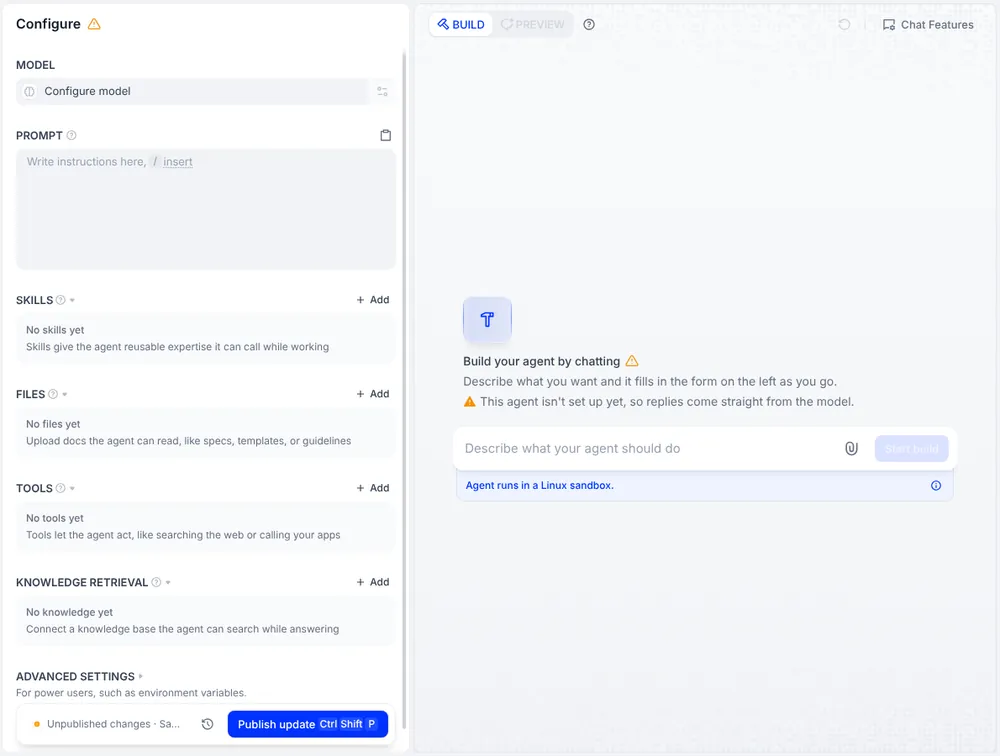
The Agents page (marked Beta) asks only for a name, an optional role and a description. The agent then opens in Configure: model, prompt, skills (uploaded SKILL.md packages), reference files, tools, knowledge retrieval and environment variables. On the right, Build mode lets you describe the agent in a chat and, per Dify's docs, it fills in the prompt, skills and files itself while you test it; Apply keeps the changes. The panel notes that the agent runs in a Linux sandbox, which Dify's docs size at 20 GB of storage, where it can install programs and handle files, so it can take on open-ended work rather than only the tools you configured. A published agent becomes a web app, an API or a step in a workflow, and its version history can be restored on paid cloud plans.
No model until you visit the marketplace
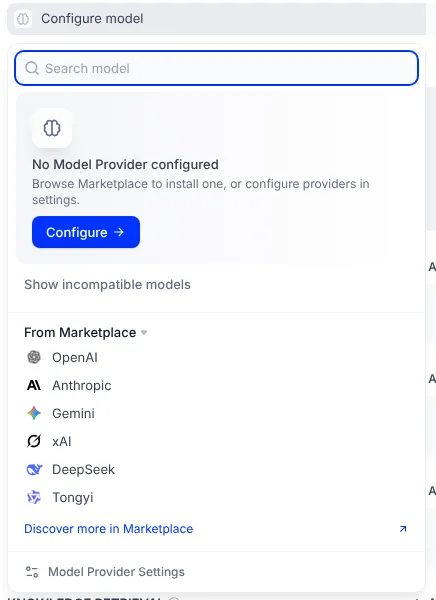
A fresh install has no model providers at all. Configure model showed "No Model Provider configured" and a list of marketplace plugins: OpenAI, Anthropic, Gemini, xAI, DeepSeek and Tongyi. Each provider is a plugin the plugin daemon downloads from marketplace.dify.ai, so an air-gapped server needs plugin packages copied in by hand. The Integrations page also called the marketplace from the browser (two requests, which we blocked); nothing else in our session tried to leave the browser.
Self-hosting means 15 containers
The README asks for 2 CPU cores and 4 GB of RAM. Our default Compose profile pulled 12 images, 11.4 GB on disk, and started 15 containers: API, worker, scheduler, web, nginx, Postgres, Redis, Weaviate, the plugin daemon, a code sandbox, the agent backend, a local agent sandbox, two proxies and a websocket service. Idle, they used about 3 GB of memory. Pulling all images at once hit Docker Hub's rate limit; pulled one at a time, they took 153 s, and docker compose up then took 7 s. The agent sandbox needs a token you generate with OpenSSL first, a step added in 1.18.0.
Telemetry and update checks are on by default
Since a migration dated 23 July 2026, the API sends an anonymous install event and a daily heartbeat to otel.dify.ai with an instance ID, version, edition, OS and CPU architecture, according to its source code. DISABLE_TELEMETRY=true or DO_NOT_TRACK=true turns it off. The bundled Weaviate vector database also ships with its own telemetry enabled (WEAVIATE_DISABLE_TELEMETRY=false), and the API checks updates.dify.ai. Our containers could not complete outside TLS connections, so we saw the heartbeat task run but not what Dify received.
The license limits SaaS, not internal use
Dify's license is "a modified version of the Apache License 2.0". Without written permission you may not use the source "to operate a multi-tenant environment", where one tenant is one workspace, and if you use the console frontend you may not remove or change the logo or copyright. Dify can also make the terms stricter or looser, and may use contributed code commercially. One company running its own workspace is fine; selling workspaces to customers is not.
What you still have to set up
A model provider plugin and keys. Installed from the marketplace, or copied in for offline servers.
Telemetry opt-outs.
DISABLE_TELEMETRYandWEAVIATE_DISABLE_TELEMETRYif nothing should leave.Production hardening. HTTPS, backups of Postgres and the volumes, and the staged Weaviate upgrades the release notes call for.
A sandbox decision. The local agent sandbox, or E2B as a hosted backend (added in 1.17.0).
Pros and cons
Pros
Agents can be built by describing them, then tested in the same screen.
Each agent gets a Linux sandbox, so it can install tools and work with files.
Knowledge bases, workflows, logs and monitoring in one open-source console.
Free cloud tier and an active release cycle (four releases since 25 August 2026).
Cons
Fifteen containers and 11.4 GB of images for a default install.
No models out of the box; providers come from an online marketplace.
Telemetry on by default in Dify and in the bundled Weaviate.
Modified license bans multi-tenant hosting; the new Agent is still beta.
How Dify compares
n8n is a general automation tool with an AI Agent node and a new Agents builder, about 570 node types and free self-hosting under a fair-code license. Choose it when the agent is one step in a business process; cloud starts at $24 a month.
Lindy is a hosted assistant for Slack, email and text, taught with plain-English routines, from $49.99 a month per user. Choose it if you do not want to host anything.
CrewAI and Mastra are code frameworks (Python and TypeScript) for developers who want agents in their own codebase.
Flowise, often compared with Dify, is no longer an option: it froze development on 29 July 2026 and ended support on 31 August 2026.
See all AI agents.
Who should use Dify
Use Dify if you want an open-source AI agent builder with knowledge bases and workflows, and either a free cloud workspace to start or a server you control. Look elsewhere if you need a light install, a fully offline setup without extra work, or the right to host it for many customers.
FAQ
Is Dify free?
Yes, in two ways. The self-hosted Community Edition is free under the Dify Open Source License, and Dify Cloud has a free Sandbox plan with 200 message credits, 1 member and 5 apps. As of 12 November 2026, paid cloud plans are Professional at $59 a month ($590 a year) and Team at $159 a month ($1,590 a year).
Is Dify open source?
Its source is public under Apache 2.0 with extra conditions: you may not run a multi-tenant service (one tenant is one workspace) without Dify's written permission, and you may not remove the logo or copyright from the console. Using it inside your own company is allowed.
How do you build an agent in Dify?
Open Agents, create an agent with a name and role, then either fill in its model, prompt, skills, files, tools and knowledge by hand or describe what it should do in Build mode, where the agent sets itself up while you test it. A published agent runs as a web app, through the API, or as an Agent node inside a workflow.
What does it take to self-host Dify?
Docker with Compose 2.35 or later, at least 2 CPU cores and 4 GB of RAM per Dify. In our test the default setup pulled 12 images (11.4 GB) of images and ran 15 containers using about 3 GB of memory at idle. You also need to install a model provider plugin, which comes from the Dify marketplace.
Does self-hosted Dify send data out?
By default, yes: version 1.19.0 sends an anonymous install event and a daily heartbeat (instance ID, version, edition, OS and architecture) to Dify, checks for updates, and the bundled Weaviate has its own telemetry on. Set DISABLE_TELEMETRY=true and WEAVIATE_DISABLE_TELEMETRY=true to stop the telemetry.
KEEP EXPLORING
More AI agents Good company for Dify.
Hosted AI agent that turns prompts into research, slides, sites and videos
Self-hosted open-source AI agent that writes its own skills, in 20+ chat apps