
Self-hostable workflow automation with AI Agent nodes and an agent builder
Claude
Anthropic's AI agent for files, browser and scheduled tasks, from $20
PaidAgents
claude.comExplore the product
AT A GLANCE
- Website
- claude.com
- Pricing
- Paid
- Categories
- Agents
- Listed
- Nov 2026
- Updated
- Nov 2026
Details about Claude
Short verdict: Claude, Anthropic's app for desktop, web and mobile, now works as an agent: you hand it a goal, and it works through your files, connectors, a browser and, on the desktop, your own folders and screen, then returns a document, spreadsheet or deck to review. Agent tasks and scheduled tasks come with every paid plan from $20 a month, the cheapest entry of the three big-lab agents compared here, and scheduled tasks run in the cloud with your laptop closed. It does not act unprompted the way OpenAI dots or Grok Bot do, and agent work spends the same limits as chat, faster. It suits people who want an agent for files and recurring reports at a low price; people who want an agent that watches their apps and acts on its own should look at the other two.
How we reviewed it: We did not sign in to Claude or run a task. On 12 November 2026 we read Anthropic's Claude product page, its pricing page, the earlier product page for these features, Anthropic's article on the merge, and the help center articles on getting started and on scheduled tasks. We could not test task quality, how fast agent work uses up a plan, or computer use.
What Claude's agent features cost and include
| Item | Claude, 12 November 2026 |
|---|---|
| Type | Anthropic's Claude app with agent features for multi-step knowledge work; Anthropic says they use the same agentic approach as Claude Code |
| History | These features launched as Claude Cowork, a mode next to chat. On 16 September 2026 Anthropic began merging them into Claude, starting with Pro, Max and Ultra; the unified Claude became generally available for Enterprise on 23 October and for Team on 12 November 2026 |
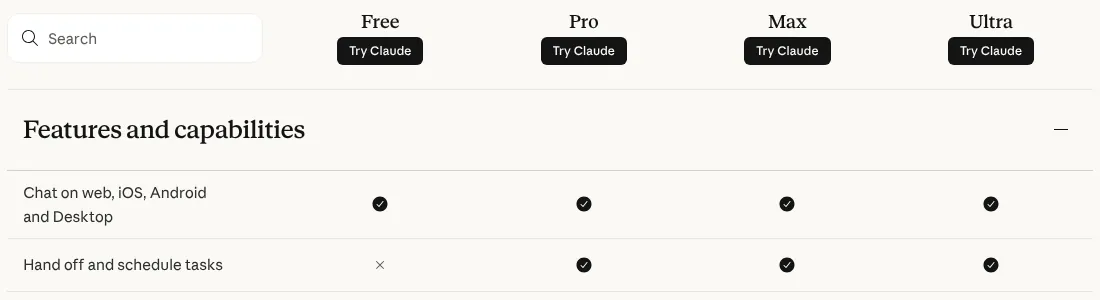
| Plans with agent tasks | Pro ($20 a month, or $17 billed annually at $200), Max ($100), Ultra ($200), Team (standard seat $25 a month, or $20 billed annually) and Enterprise; the Free plan has chat but not "Hand off and schedule tasks" |
| How usage is limited | Claude's 5-hour and weekly limits, shared with chat; Max gets 5x Pro per week, Ultra 10x |
| Where it runs | Cloud sessions saved to your account; tasks on local files, the desktop browser or your screen need the desktop app open and connected |
| Apps | Desktop for macOS and Windows, Linux in beta; web, iOS and Android; agent features on web and mobile for Pro, Max, Ultra and Team (beta on Team), Enterprise when an owner enables them |
| Tools | Files and folders you grant, connectors, plugins, skills, sub-agents, a built-in browser (since 26 August 2026), Claude in Chrome, computer use (beta) |
| Scheduling | Hourly, daily, weekly, weekdays or manual; runs remotely with the computer asleep, except tasks that need local files or apps |
What sets Claude apart as an agent
It works in your files
On the desktop app Claude reads and writes files in folders you grant, with no uploads, and handles Word, Excel, PowerPoint, PDF, CSV, images, notebooks and code. Anthropic's examples are work-shaped: a folder of contracts reviewed against your playbook, regional exports reconciled into a spreadsheet, a quarter of call notes turned into a memo. By default it asks before permanently deleting files.
Integrations first, your screen last
Anthropic says Claude reaches for connectors first, a browser second and your screen only as a last resort. The built-in browser opens sites in a side panel separate from your own logins, or you can import cookies; computer use, which asks before each application, is still in beta and needs the macOS or Windows app.
Scheduled work in the cloud
Type /schedule or open Scheduled to set a task to run hourly, daily, weekly or on weekdays, with its own prompt, approval mode, model and folder. New scheduled tasks run remotely, so they continue while your computer sleeps; on Pro, Max and Ultra, local scheduled tasks created before 6 October keep running on your machine.
One app instead of a separate mode
Since the merge you no longer choose between chat and an agent mode: Claude decides when a request needs files, a browser or a longer task, and chats, projects, connectors and skills carry over. Manual, Auto and Skip permission modes set how often it asks first, and Team and Enterprise admins can set access by team and stream activity to a SIEM through OpenTelemetry.
Limits to watch
It spends chat limits. Every step costs tokens from the same 5-hour and weekly limits as chat; Anthropic says agentic tasks use more capacity than regular chat and pitches Pro for quick tasks and Max for everyday use.
It does not take initiative. Claude runs a task when you ask or on a schedule; unlike dots and Grok Bot, it does not watch your apps and offer work on its own.
Local work needs the desktop app. Folder, browser and computer tasks stop when the desktop app is closed or disconnected, and computer use is in beta.
Training is opt-out on personal plans. Claude's pricing page lists model training as "Opt-out" on Free, Pro, Max and Ultra and "None by default" on Team and Enterprise.
Still settling. The merged app reached Team only on 12 November 2026, and help pages still describe both the old and new layouts; agent sessions cannot be shared, only their artifacts.
How Claude compares with OpenAI dots and Grok Bot
| 12 November 2026 | OpenAI dots | Grok Bot | Claude |
|---|---|---|---|
| Computer | Its own cloud computer; connecting your computer is optional | One persistent cloud computer per user (browser, files, terminal), shared by all your Bots; commands on your desktop only if you allow them | Isolated cloud sessions; the desktop app adds your local folders and computer use (research preview, macOS and Windows) |
| Browser | Works on its own computer; OpenAI does not detail the browser | Browser on the cloud computer; can route traffic through your own connection | Built-in browser in the desktop app, or your Chrome through Claude in Chrome |
| Apps | ChatGPT's connected apps you choose, plus Codex for code | App catalog (Gmail, Calendar, Drive, Slack, Notion, GitHub and more), custom MCP servers, 1Password | Connectors, plugins and skills |
| Where you talk to it | ChatGPT web, mobile and desktop, Slack, Microsoft Teams; texting "coming next" | Desktop app (macOS, Windows, Linux), iOS, Android, Slack, Microsoft Teams, X, video calls | Claude desktop, web and mobile apps |
| When it runs | Always on: keeps working between conversations and raises things on its own | Always on: routines on a schedule or on events (a Slack or Teams message, an email, a Linear issue), and Bots that take initiative | On demand, plus scheduled tasks (hourly, daily, weekly, weekdays) that run in the cloud with your laptop closed |
| Cheapest plan that includes it | ChatGPT Pro 100, $100 a month; Business Premium seat $100 a month billed annually, 2-seat minimum | The X Subscription Premium, $30 a month ($300 a year) | Claude Pro, $20 a month ($17 billed annually) |
| Free tier | No | No; some accounts get a trial credit with a 7-day window | No |
| Training on your data | Personal plans: follows "Improve the model for everyone"; Business and Enterprise: off by default | Follows your Cursor privacy setting: with Privacy Mode on, no training | Pro, Max and Ultra: used unless you opt out; Team and Enterprise: off by default |
Pros and cons
Pros
Agent tasks are included in every paid Claude plan, from $20 a month.
Works directly in folders on your computer, and on web and mobile.
Scheduled tasks run in the cloud with your laptop closed.
Three permission modes, and it asks before permanently deleting files.
Cons
Agent work spends chat limits faster; heavy use pushes you to Max or Ultra.
No proactive mode: nothing runs unless you start or schedule it.
Computer use and the Linux app are in beta.
Personal plans train on your data unless you opt out.
Alternatives to Claude
Grok Bot gives you several always-on Bots on a shared cloud computer, with routines that start on events, from $30 a month. Choose it for agents that keep watching Slack, email or your tools.
OpenAI dots is a proactive agent in ChatGPT, Slack and Teams, from $100 a month on Pro. Choose it if you already pay for ChatGPT Pro or Business Premium.
Claude Code is Anthropic's coding agent on the same plans; use it when the work is in a code repository.
For other agents, see AI agents.
Who should use Claude as an agent
Claude fits people who already pay for it and spend their days in documents, spreadsheets, decks and research, especially recurring reports they can schedule. Look elsewhere if you want an agent that acts without being asked or sits in Slack as a teammate, or if a $20 plan's limits would run out on long tasks.
FAQ
Which Claude plans include agent tasks?
Every paid plan: Pro ($20 a month, or $17 billed annually), Max ($100), Ultra ($200), Team and Enterprise, as of 12 November 2026. The Free plan includes chat but not handing off and scheduling tasks. On Enterprise, web and mobile access to agent features depends on an owner enabling it.
Does Claude keep working when my laptop is closed?
Yes for cloud work: sessions and new scheduled tasks run remotely and continue with your computer asleep. Tasks that use local folders, the desktop browser or computer use need the desktop app open and connected.
Do agent tasks use my Claude usage limits?
Yes. They share the same 5-hour and weekly limits as chat and, according to Anthropic, use more capacity because each step uses tokens. Max includes 5 times and Ultra 10 times Pro's weekly usage.
Does Anthropic train on my Claude tasks?
On Free, Pro, Max and Ultra, Claude's pricing page lists model training as opt-out, so turn it off in your privacy settings if you do not want it. On Team and Enterprise there is no model training on your content by default.
KEEP EXPLORING
More AI agents Good company for Claude.
Hosted AI agent that turns prompts into research, slides, sites and videos
Self-hosted open-source AI agent that writes its own skills, in 20+ chat apps