
Self-hostable workflow automation with AI Agent nodes and an agent builder
Grok Bot
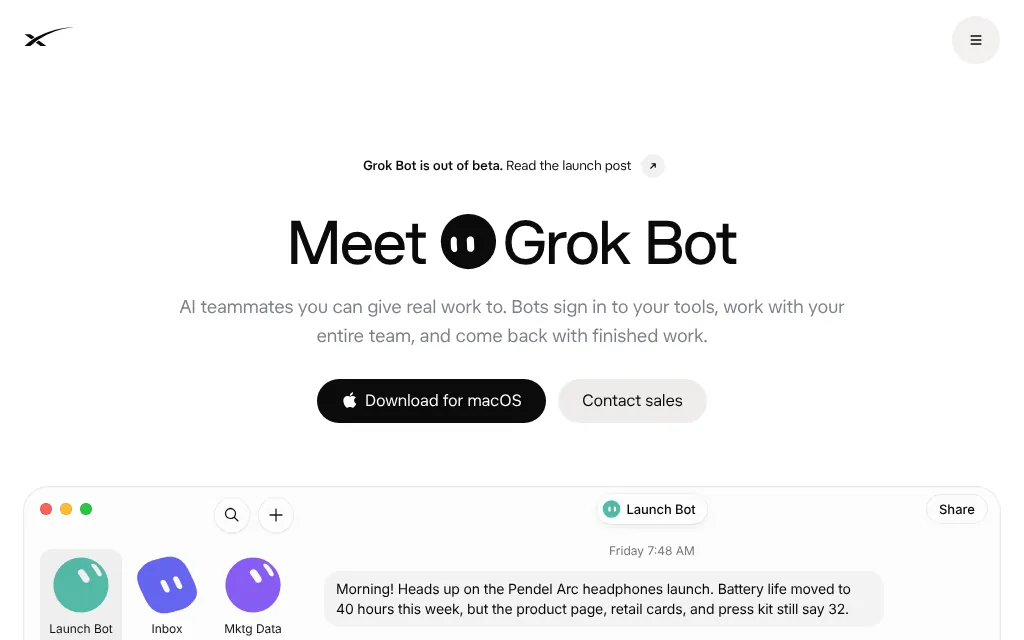
xAI's always-on Bots on a shared cloud computer, from $30 a month
PaidAgents
AT A GLANCE
Details about Grok Bot
Short verdict: Grok Bot gives you a team of named AI agents ("Bots") that share one persistent cloud computer with a browser, files and a terminal, work in your apps, run routines on a schedule or when something happens, and keep going with your laptop closed. It left beta with version 1.0 on 2 November 2026 and is included from The X Subscription's Premium plan at $30 a month, far below OpenAI dots. The trade-offs: all your Bots share one computer and every login on it, you cannot pick the model, and usage comes out of the same weekly pool as Grok chat, Grok Build and Cursor. It suits people who want several always-on agents for little money; teams that need separation between agents should look closely at the security model first.
How we reviewed it: We did not install Grok Bot or sign in. On 12 November 2026 we read the Grok Bot page, the 1.0 launch post, the changelog, xAI's pricing page, the Grok Bot docs (getting started, how it works, FAQ, approvals and privacy, teams) and The X Subscription docs. We could not test how well Bots work, how fast they use the weekly pool, or the trial. xAI now signs its pages SpaceXSI (SpaceX Super Intelligence); we use xAI, as on our Grok Build review.
What Grok Bot costs and includes
| Item | Grok Bot, 12 November 2026 |
|---|---|
| Type | Agents with a shared cloud computer, from xAI and Cursor; desktop and phone apps |
| History | Early beta on 11 August 2026; Grok Bot 1.0, "out of beta", on 2 November 2026; app version 1.0.1 on 11 November 2026 |
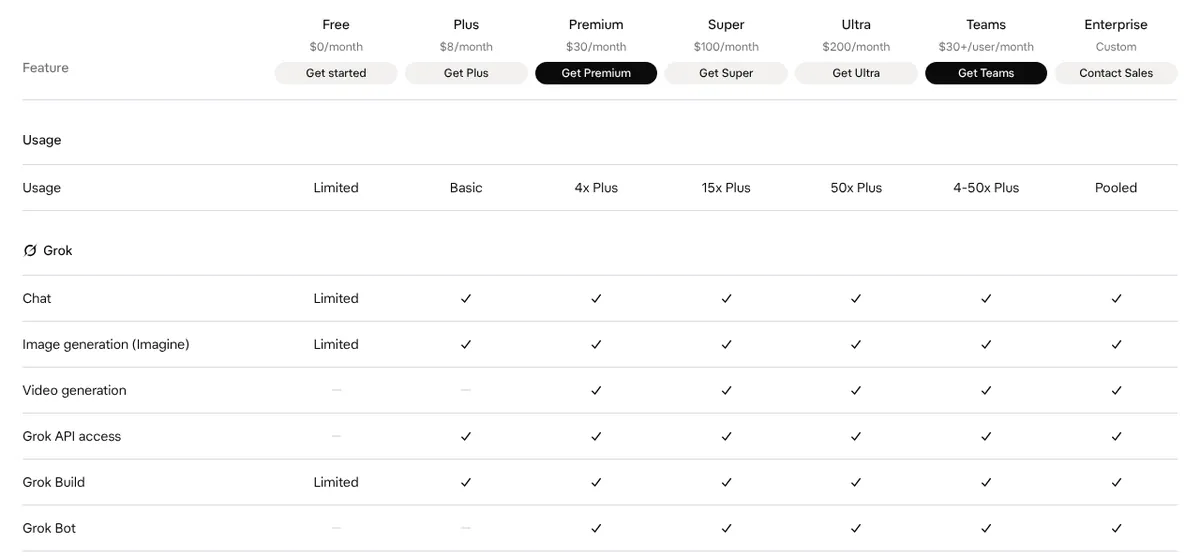
| Plans | The X Subscription Premium ($30 a month or $300 a year), Super ($100 or $1,000) and Ultra ($200 or $2,000); team seats at $30, $100 or $200; not on Free or Plus ($8) |
| Older plans | Legacy Cursor Pro, Pro+, Ultra and self-serve Teams include it; SuperGrok, SuperGrok Plus, SuperGrok Heavy and X Premium+ can be linked |
| How usage is limited | One weekly pool per seat shared with Grok chat, Imagine, Voice, Grok Build and Cursor; Premium gets 4x Plus, Super 15x, Ultra 50x; then paid top-ups |
| Trial | Some accounts get a trial: a usage credit with a 7-day window that never turns into a paid plan |
| Apps | macOS, Windows and Linux desktop; iPhone (iOS 18+) and Android (9+); Slack, Microsoft Teams, X Chat and @bot on X |
| Account | Signs in with a Cursor account; Grok Bot usage is metered there |
| Models | Chosen per task by Grok Bot, with no model picker; xAI or third-party models from Cursor's sub-processor list |
What sets Grok Bot apart
Several Bots, one job each
Your first Bot is a primary Bot that checks in with you and coordinates the others. xAI's docs recommend giving every further Bot one job (expenses, leads, a morning brief) so it builds memory for that job. Bots hand work to each other, can share a group chat, and a marketplace offers prebuilt ones such as Overheard, which watches Reddit, Hacker News and X for mentions of your brand. Team Bots, shared by a whole team, need a Team or Enterprise plan.
A real computer that stays on
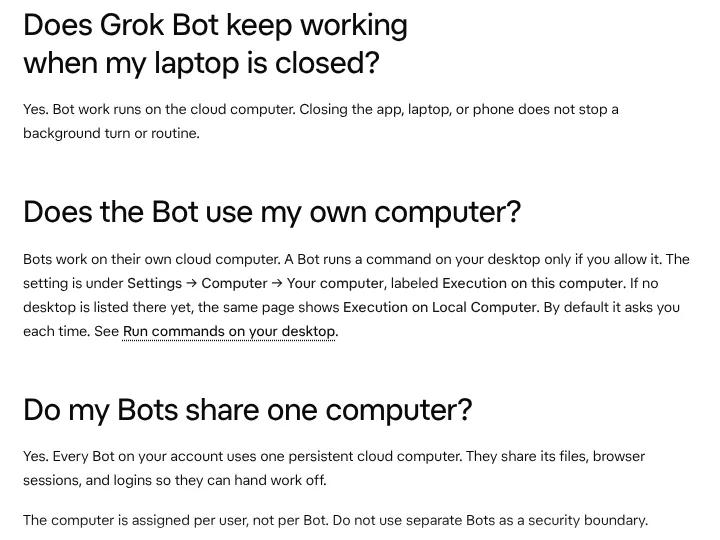
Every Bot on your account works on one persistent cloud computer with a browser, filesystem and terminal; each gets its own screen, and you can watch or take control from desktop or phone. Logins come from Vault, 1Password or a Secure Form, and xAI says the Bot never sees the password. A Bot runs commands on your own desktop only if you allow it, and by default it asks each time.
Routines that start on events
Show a Bot a task once, save it as a skill, then turn it into a routine. Routines run on a schedule or start from an event: since 12 August 2026 a Microsoft Teams message, a Linear issue, a Sentry alert or a PagerDuty incident can start one, and the docs also list Slack messages and emails to your Bot. With 1.0, Bots can also offer to take on work nobody asked for.
Approvals you can tune
Auto Review checks every command, app action and computer action and is on by default; most actions go ahead and the rest wait on an approval card. You can add plain-language "Ask first" or "Allow automatically" rules, and approvals for work you did not start yourself, such as a routine, expire after about 30 minutes.
Limits and risks to watch
No isolation between Bots. When one Bot signs in to a site, the others are signed in too, and they can use a card saved in Vault. xAI's own advice is to treat anything on the computer as available to all your Bots.
A shared, unpublished allowance. Bot work draws from the same weekly pool as Grok chat, media, Grok Build and Cursor, and xAI publishes multiples of Plus, not absolute numbers.
No model choice. Grok Bot routes each task to a model it picks, possibly from a third party, and does not show which; a team's Cursor model allowlist does not apply.
Tied to Cursor. Grok Bot uses your Cursor account, its privacy settings and its terms; deleting Grok Bot means deleting the Cursor account, and the older Privacy Mode (Legacy) setting blocks it.
Two pricing systems. New customers start on The X Subscription, while legacy Cursor and SuperGrok plans keep their own rules; moving onto The X Subscription is permanent.
How Grok Bot compares with OpenAI dots and Claude
| 12 November 2026 | OpenAI dots | Grok Bot | Claude |
|---|---|---|---|
| Computer | Its own cloud computer; connecting your computer is optional | One persistent cloud computer per user (browser, files, terminal), shared by all your Bots; commands on your desktop only if you allow them | Isolated cloud sessions; the desktop app adds your local folders and computer use (research preview, macOS and Windows) |
| Browser | Works on its own computer; OpenAI does not detail the browser | Browser on the cloud computer; can route traffic through your own connection | Built-in browser in the desktop app, or your Chrome through Claude in Chrome |
| Apps | ChatGPT's connected apps you choose, plus Codex for code | App catalog (Gmail, Calendar, Drive, Slack, Notion, GitHub and more), custom MCP servers, 1Password | Connectors, plugins and skills |
| Where you talk to it | ChatGPT web, mobile and desktop, Slack, Microsoft Teams; texting "coming next" | Desktop app (macOS, Windows, Linux), iOS, Android, Slack, Microsoft Teams, X, video calls | Claude desktop, web and mobile apps |
| When it runs | Always on: keeps working between conversations and raises things on its own | Always on: routines on a schedule or on events (a Slack or Teams message, an email, a Linear issue), and Bots that take initiative | On demand, plus scheduled tasks (hourly, daily, weekly, weekdays) that run in the cloud with your laptop closed |
| Cheapest plan that includes it | ChatGPT Pro 100, $100 a month; Business Premium seat $100 a month billed annually, 2-seat minimum | The X Subscription Premium, $30 a month ($300 a year) | Claude Pro, $20 a month ($17 billed annually) |
| Free tier | No | No; some accounts get a trial credit with a 7-day window | No |
| Training on your data | Personal plans: follows "Improve the model for everyone"; Business and Enterprise: off by default | Follows your Cursor privacy setting: with Privacy Mode on, no training | Pro, Max and Ultra: used unless you opt out; Team and Enterprise: off by default |
Pros and cons
Pros
Included from $30 a month, with Grok chat, Grok Build and Cursor in the same plan.
Several named Bots on a persistent cloud computer that keeps working with your laptop closed.
Routines start on schedules or on events from Slack, Teams, email and developer tools.
Apps on every desktop and phone platform, plus Slack, Teams and X.
Cons
All Bots share one computer, its files and its logins.
Not on Free or Plus; the weekly pool is shared with every other xAI and Cursor product.
No model picker and no visibility into which model ran.
Training depends on your Cursor Privacy Mode setting rather than a Grok Bot setting.
Alternatives to Grok Bot
OpenAI dots is one proactive agent per user, with its own cloud computer, inside ChatGPT, Slack and Teams, from $100 a month. Choose it if you already pay for ChatGPT Pro or Business Premium.
Claude runs agent tasks from $20 a month and works in folders on your own computer through the desktop app; scheduled tasks run in the cloud. Choose it for document and spreadsheet work you start or schedule yourself.
Grok Build is xAI's terminal coding agent, included from Plus at $8; use it rather than Grok Bot for work in a code repository.
For other agents, see AI agents.
Who should use Grok Bot
Grok Bot fits people and small teams who want several always-on agents for marketing, inbox, sales or operations work, already use Cursor or Grok, and are comfortable with one shared computer per person. Look elsewhere if you need agents isolated from each other, a choice of model, or published usage numbers.
FAQ
Which plans include Grok Bot?
As of 12 November 2026, The X Subscription's Premium ($30 a month), Super ($100) and Ultra ($200) plans and their team seats include Grok Bot; Free and Plus ($8) do not. Legacy Cursor Pro, Pro+, Ultra and self-serve Teams plans also include it, and SuperGrok, SuperGrok Plus, SuperGrok Heavy and X Premium+ subscriptions can be linked.
Is Grok Bot still in beta?
No. Grok Bot launched as an early beta on 11 August 2026, and xAI announced Grok Bot 1.0, out of beta, on 2 November 2026. Inference hooks for Enterprise teams are still labeled beta.
Does Grok Bot share usage with Grok and Cursor?
Yes. On The X Subscription, Grok Bot draws from the same weekly pool as Grok chat, Imagine, Voice, Grok Build and Cursor; Premium gets 4 times the Plus allowance, Super 15 times and Ultra 50 times. When the pool runs out you can buy top-up credits or wait for the weekly reset.
Are my Bots isolated from each other?
No. Every Bot on your account uses one persistent cloud computer and shares its files, browser sessions and logins, and xAI's docs say not to use separate Bots as a security boundary. Saved logins and cards in Vault fill into pages without the Bot seeing them.
Does Grok Bot train on my data?
That follows your Cursor account settings, because Grok Bot signs in with a Cursor account. With Privacy Mode on, Cursor does not use your data for training; with it off, Cursor's data-use page says it may use prompts and other data to train its models.
KEEP EXPLORING
More AI agents Good company for Grok Bot.
Hosted AI agent that turns prompts into research, slides, sites and videos
Self-hosted open-source AI agent that writes its own skills, in 20+ chat apps