
Self-hostable workflow automation with AI Agent nodes and an agent builder
LangGraph
MIT Python framework that runs agents as graphs with checkpointed state
FreeAgents
langchain.comExplore the product
AT A GLANCE
- Website
- langchain.com
- Pricing
- Free
- Categories
- Agents
- Listed
- Nov 2026
- Updated
- Nov 2026
Details about LangGraph
Short verdict: LangGraph is the low-level, MIT-licensed Python framework from LangChain for building agents as graphs of nodes and state, and it was the lightest of the three agent frameworks we installed: 38 packages, 89 MB and 8.5 s from an empty cache. Our tool-calling test agent ran with a fake model, no API key and no network traffic at all. The catch sits around it, not in it: the dev server is under the Elastic License 2.0, its Studio UI lives on LangChain's LangSmith site, and LangChain's paid product is LangSmith, which carries the tracing and hosted Agent Server. It suits Python teams who want explicit control over every step and checkpoint; people who want ready-made multi-agent roles or a visual builder should look elsewhere.
How we reviewed it: On 12 November 2026 we installed LangGraph 1.2.21 in a fresh Python 3.13 virtual environment on a shared 4-core Linux machine, followed the official quickstart as far as it goes without a model key, and built the same small spec we used for CrewAI and Mastra: a weather agent with one get_weather tool, driven by a scripted fake model that first calls the tool and then answers. We timed installs and imports, ran the local dev server, and pointed every proxy setting at a logger that recorded and refused outbound requests. We did not use a model API key, create a LangSmith account or deploy anything, so LangSmith features and prices come from LangChain's own pages.
What you get for $0
| Price | Free, MIT license. The paid layer is LangSmith (tracing, evaluation, deployment), priced separately below. |
|---|---|
| Version | 1.2.21, released 12 November 2026; 1.0 shipped on 17 October 2025. 10 stable releases in the last 90 days, per PyPI. |
| Languages | Python 3.10+; a JavaScript version ships as @langchain/langgraph (1.7.4). |
| Models | Any chat model with a LangChain integration (Anthropic, OpenAI, Google, local models and others), or your own code in a node. |
| Runs on | Anywhere Python runs, inside your own app; or LangChain's Agent Server, self-hosted or on LangSmith. |
| Project health | 13,876,217 PyPI downloads in the week of 2 to 8 November 2026 (plus 4,882,642 npm downloads for the JS version); 44,842 GitHub stars. |
What we found
A small install, and the quickstart pulls in LangChain
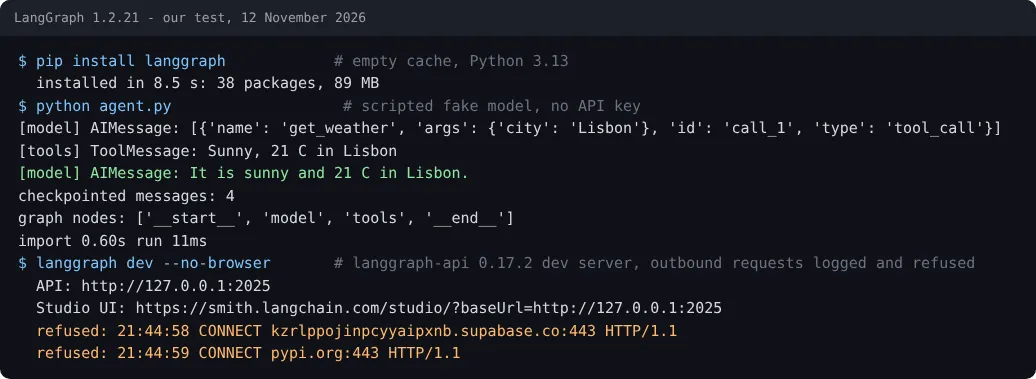
pip install langgraph took 8.5 s with no cache and added 38 packages and 89 MB, including langchain-core and the langsmith client. The official quickstart installs langgraph, langchain and langchain-anthropic together, because the prebuilt agent and the @tool decorator now live in langchain; that brought the total to 44 packages and 125 MB. The quickstart stops for an Anthropic key at step 3, which is where we switched to a fake model. Importing langgraph.graph took 0.67 s and the create_agent import 0.77 s (medians of five).
The test agent ran with a fake model and showed every step
LangChain ships fake chat models for tests. GenericFakeChatModel does not implement tool binding, so we subclassed it with a two-line bind_tools and fed it two scripted messages. The 37-line script built the agent with create_agent and an in-memory checkpointer, and streaming the run printed each node's update: the model's tool call, the tool's result and the final answer, in 8 to 11 ms after the first run. The graph had four nodes (__start__, model, tools, __end__), and the checkpoint held all 4 messages under our thread ID, which is what lets LangGraph resume a conversation or pause for human approval.
No telemetry in the library, two requests from the dev server
With every proxy variable pointed at our logger, the agent script made zero outbound connections; LangSmith tracing stays off until you set LANGSMITH_TRACING and a key. langgraph dev, which needs pip install "langgraph-cli[inmem]" (83 packages, 229 MB in total), started in about 1 s, served our graph over a local REST API and answered a /runs/wait request correctly. On startup it tried to post a usage event to a Supabase project used by the CLI's analytics module and to check PyPI for updates; LANGGRAPH_CLI_NO_ANALYTICS=1 turns off the first, per the CLI source. The Studio link it prints opens on smith.langchain.com, so the visual debugger is a LangSmith web page that talks to your local server.
Open-source library, source-available server
The langgraph package is MIT. The server behind langgraph dev, langgraph-api 0.17.2 and its in-memory runtime, is licensed Elastic-2.0, which is source-available rather than open source and bars offering it as a managed service. Its own startup banner says the in-memory server is for development and points to LangSmith Deployment for production. LangChain's standalone server guide lists a LangSmith license key among the settings for self-hosting the Agent Server. You can still run a compiled graph inside your own FastAPI or worker process with any checkpointer you like; what you give up is LangChain's server, queue and Studio integration.
LangSmith is where the money is
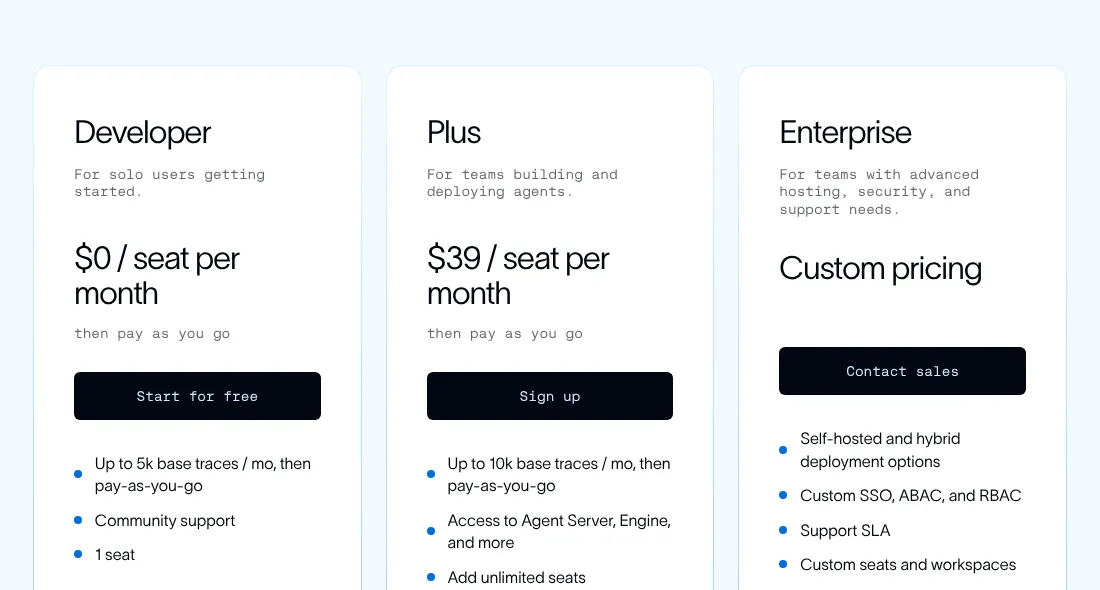
Per the pricing page on 12 November 2026: Developer is $0 for 1 seat and 5,000 base traces a month; Plus is $39 per seat per month with 10,000 base traces, unlimited seats and one small serverless Agent Server at no charge; Enterprise is custom, with self-hosted and hybrid options. Usage beyond that is billed in LangSmith units at $1.00 each: the calculator showed 0.005 units per additional trace, and Agent Server runtime costs 0.0675 units per vCPU-hour and 0.0090 per GiB-hour. Base traces are kept 14 days, extended traces 180.
Output and build
| Measurement | LangGraph | CrewAI | Mastra |
|---|---|---|---|
| Framework install, empty cache | 8.5 s; 38 packages; 89 MB | 48.9 s; 137 packages; 950 MB | 16.3 s; 146 packages; 160 MB |
| Import time (median of 5) | 0.67 s | 2.28 s | 0.53 s |
| Same weather agent, scripted model | 8-11 ms; 37 lines | 44-51 ms; 39 lines | 110-127 ms; 41 lines |
| Outbound requests from the agent run | 0 | 8 telemetry attempts | 0 |
Single runs on one machine; the CrewAI and Mastra numbers come from their reviews. The agent run is the framework's own overhead around a model that answers instantly; with a real model, network latency will dominate.
What you still have to build
A model key and provider package: the quickstart assumes Anthropic, and nothing runs for real without one.
Persistence:
InMemorySaverforgets everything on restart; production needs a Postgres or SQLite checkpointer.A server: either your own API around the graph, or LangChain's Agent Server with its license terms.
Observability: LangSmith or your own tracing; the library logs nothing by default.
Pros and cons
Pros
Smallest install and fastest run of the three frameworks we tested.
Explicit graph of nodes and checkpointed state, visible in every streamed step.
Tests without a key: LangChain ships fake chat models.
No telemetry from the library itself.
Frequent releases: 10 stable versions in 90 days.
Cons
The quickstart needs
langchaintoo, and the API surface moved between the two packages at 1.0.The dev server is Elastic-2.0 and self-hosting it in production needs a LangSmith license key.
Studio is a LangSmith web page, not a local app.
The CLI sends usage analytics unless you opt out.
How LangGraph compares
CrewAI works at a higher level: you describe agents by role, goal and backstory and it writes the agent prompt for you, at the cost of a 950 MB install and telemetry that is on by default. Choose it when you want multi-agent crews quickly. Mastra is the TypeScript option, with agents, workflows and a local Studio in one package; choose it when your product is a Node app. The OpenAI Agents SDK and the Claude Agent SDK are thinner, vendor-backed alternatives tied more closely to one model provider. If you would rather drag nodes than write them, Dify and n8n are visual builders you can self-host. See all AI agents.
Who should use LangGraph
Python developers building agents that must pause, resume, branch or wait for a human, and who want to see and test each step, will get the most from LangGraph, and they pay nothing until they add LangSmith. Teams that want an agent working by this afternoon with roles and tasks already modeled, or that build in TypeScript first, will find CrewAI or Mastra quicker to start with.
FAQ
Is LangGraph free?
Yes. The langgraph library is MIT-licensed and free for any use. LangChain charges for LangSmith, its tracing, evaluation and deployment platform: Developer is $0 for 1 seat and 5,000 traces a month, Plus is $39 per seat per month, as of 12 November 2026.
What is the difference between LangGraph and LangChain?
LangGraph is the low-level runtime that runs an agent as a graph of nodes with saved state; LangChain is the higher-level library of model integrations and the prebuilt create_agent function, which runs on LangGraph. The official LangGraph quickstart installs both.
Can I test LangGraph without an API key?
Yes. LangChain ships fake chat models such as GenericFakeChatModel. We subclassed it with a two-line bind_tools method and ran a tool-calling agent end to end with no key and no network traffic.
Can I self-host LangGraph in production?
The library, yes: run the compiled graph inside your own Python service with a Postgres or SQLite checkpointer. LangChain's Agent Server is different: it is licensed Elastic-2.0, and LangChain's self-hosting guide lists a LangSmith license key among its settings.
Does LangGraph send telemetry?
The library sent nothing in our test. The langgraph dev command tried to post a CLI analytics event and check PyPI for updates; set LANGGRAPH_CLI_NO_ANALYTICS=1 to turn off the analytics.
KEEP EXPLORING
More AI agents Good company for LangGraph.
Hosted AI agent that turns prompts into research, slides, sites and videos

Self-hosted open-source AI agent that writes its own skills, in 20+ chat apps