
TailwindBuilder.ai
AI builder for Tailwind forms, tables and charts
- Unlimited Export
What Is the TailwindBuilder.ai?
TailwindBuilder.ai is an AI UI generator focused on three things: validated forms, data tables, and charts. You describe what you want in plain English, then it outputs code you can copy into a Tailwind + shadcn/ui project.
What features does TailwindBuilder.ai include ✨?
It’s built to speed up repetitive UI work: you prompt, it generates, you tweak. The main value is getting structured, styled components without starting from scratch.
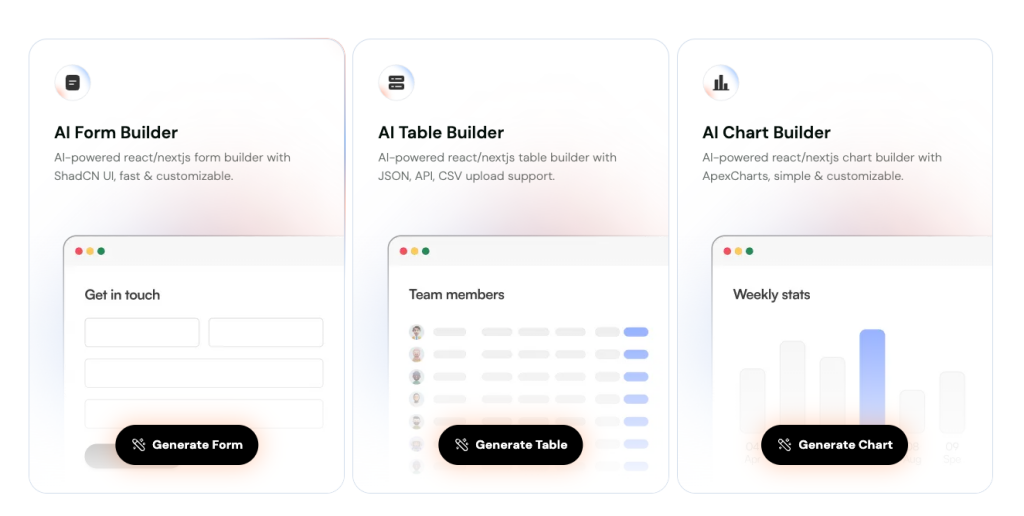
Form generation with shadcn/ui styling and “production-ready” positioning
Table builder that supports JSON / CSV / API inputs
Chart builder powered by ApexCharts (line, bar, pie, scatter, area, more)
Copy-paste workflow with room to customize layout, fields, columns, and styles
Pricing tiers based on monthly credits (Free, Silver, Gold, Platinum)
What are the pros and cons?
If you mainly need “repeatable UI chunks,” it’s a time-saver. If you want broader page generation, design systems, or end-to-end flows, it may feel narrow.
Pros ✅
Very focused on high-frequency UI elements (forms, tables, charts)
Tables support JSON/CSV/API workflows
Charts come with a known library foundation (ApexCharts) and many chart types
Clear free entry point ($0/mo, 50 credits)
Cons ⚠️
Credit-based usage means heavy use may push you to paid tiers
You still need to adapt generated code to your app conventions (types, state, data fetching)
Chart output requires installing the relevant chart package (extra dependency step)
Integration
Integration is straightforward: generate, copy, paste, then adjust to match your project’s structure. Expect a quick dependency check for tables/charts and normal “fit-and-finish” edits.
Generate the component (Form, Table, or Chart)
Copy the code into your React/Next.js project
Tables: confirm TanStack Table setup aligns with your app
Charts: install the ApexCharts package as required
Replace placeholder data with your real data source (API/CSV/JSON)
Tweak styling and behavior (columns, validation rules, labels, interactions)
FAQ
Is there a free plan?
Yes, there’s a $0/month plan that includes 50 monthly credits.
Can I build tables from CSV or an API?
Yes, the table builder supports CSV, JSON, and API inputs.
Do charts require any extra setup?
Yes, you’ll need to install the ApexCharts package for the chart output.
What powers the table builder under the hood?
It uses TanStack Tables.