Next.js and Astro single-product store with a model picker and checkout UI
Alfred
Calm Astro SaaS theme for security startups, with status and incident pages
PaidTemplates
lexingtonthemes.comExplore the product
AT A GLANCE
- Website
- lexingtonthemes.com
- Pricing
- Paid
- Categories
- Templates
- Listed
- Sep 2023
- Updated
- Oct 2026
Details about Alfred
KEY POINTS
- Tailwind CSS v4
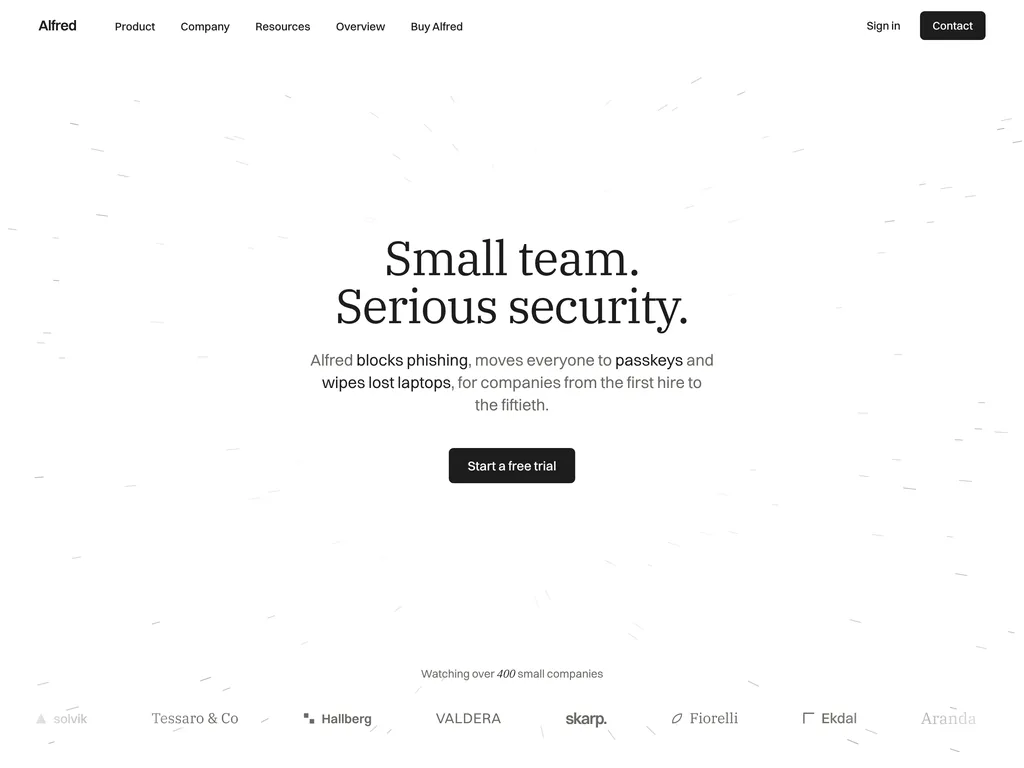
Short verdict: Alfred is a light, calm SaaS theme for security, identity and device-management products sold to small companies: charcoal on white and warm grey, two-tone serif headings and thin line drawings instead of dashboards. It has the most complete set of SaaS pages of the three Lexington themes we tested, with a pricing page and comparison table, a security page, a status page and written incident reports, and its sample content is current. The catch is that the trust signals are part of the design: compliance seals, uptime figures and "audited every year" claims sit on several pages and must be true for your company or removed. It suits a security startup that wants to sound reassuring; skip it if you need a dark theme, an annual billing switch or product screenshots up front.
How we reviewed it: On 30 October 2026 we used the live Astro demo at 1440 px, at 1024 px and on a 390 px phone screen. We opened the three menus and the mobile menu, filtered the incident list, scrolled the six-check section, read the pricing table, crawled all 50 pages and submitted the contact, sign-in and sign-up forms while logging every request. We read the hero animation code and ran Lighthouse 12.8.2 on the home and pricing pages. We did not buy the theme, so we can't judge the source code or the Sanity and EmDash editions, which have no public demo. Prices, editions and license terms come from Lexington Themes on the same day.
Disclosure: Our links to Lexington Themes carry a referral tag.
What you get for $89
| Price | $89 one-time for the Astro edition, $129 for the Sanity or EmDash edition. Lexington Themes Full Access Personal costs $99 (shown as 50% off $198) and includes all 53 Lexington Astro themes, so for $10 more you get this theme and every other one. |
|---|---|
| Editions | Astro (the public demo), Astro + Sanity ("the same designs wired to Sanity, with live preview editing") and Astro + EmDash (an admin built in, deployed to Cloudflare Workers), per Lexington. |
| Version | Astro 7.4.1 and Tailwind CSS 4.3.3, per Lexington; the demo's stylesheet confirms Tailwind 4.3.3. Redesigned on 21 October 2026, after an earlier redesign on 5 October. |
| Size | 50 pages in the demo, counting the 404: 15 static pages (home, features, pricing, security, status, about, contact, sign-in, sign-up, 404 and five style-guide pages) plus 7 blog posts, 5 releases, 4 customer stories, 4 incident reports, 6 help guides, 3 legal pages and their index pages. |
| Stack | Astro and Tailwind CSS 4, with vanilla JavaScript for the menus, Lenis smooth scrolling, the hero animation and the incident filter. No React, Vue or Alpine.js, and no MDX since the October redesign. |
| Delivery | A private GitHub repository through Polar.sh, with AGENTS.md, Cursor rules and a design skill for AI coding tools, per Lexington. No Figma file. |
| Deploys to | Any static host, such as Netlify or Vercel. Lexington's setup guide still says Node.js 20 or later, but Astro 7.4 requires 22.22 or newer. |
| License | Unlimited sites for yourself and for clients, including commercial and white-label work, with no attribution. No reselling as a template and no use as the core of a site builder; one seat per named person. License terms |
What we found in the demo
Line drawings instead of dashboards
The home page opens with a serif headline over a canvas of short grey streaks drifting toward it, then explains the product in three setup steps and six nightly checks (passkeys, email, devices, secrets, updates, backups). In the six-check section a sticky list of the checks highlights whichever one is in view, and each check has its own line drawing. The drawings are inline SVG colored with currentColor from the theme's five color tokens, so they follow a rebrand, as Lexington says. The streak animation draws a single still frame for visitors who prefer reduced motion, but otherwise keeps running after you scroll past it, where Buio's shaders pause.
Pricing per person, with a comparison table
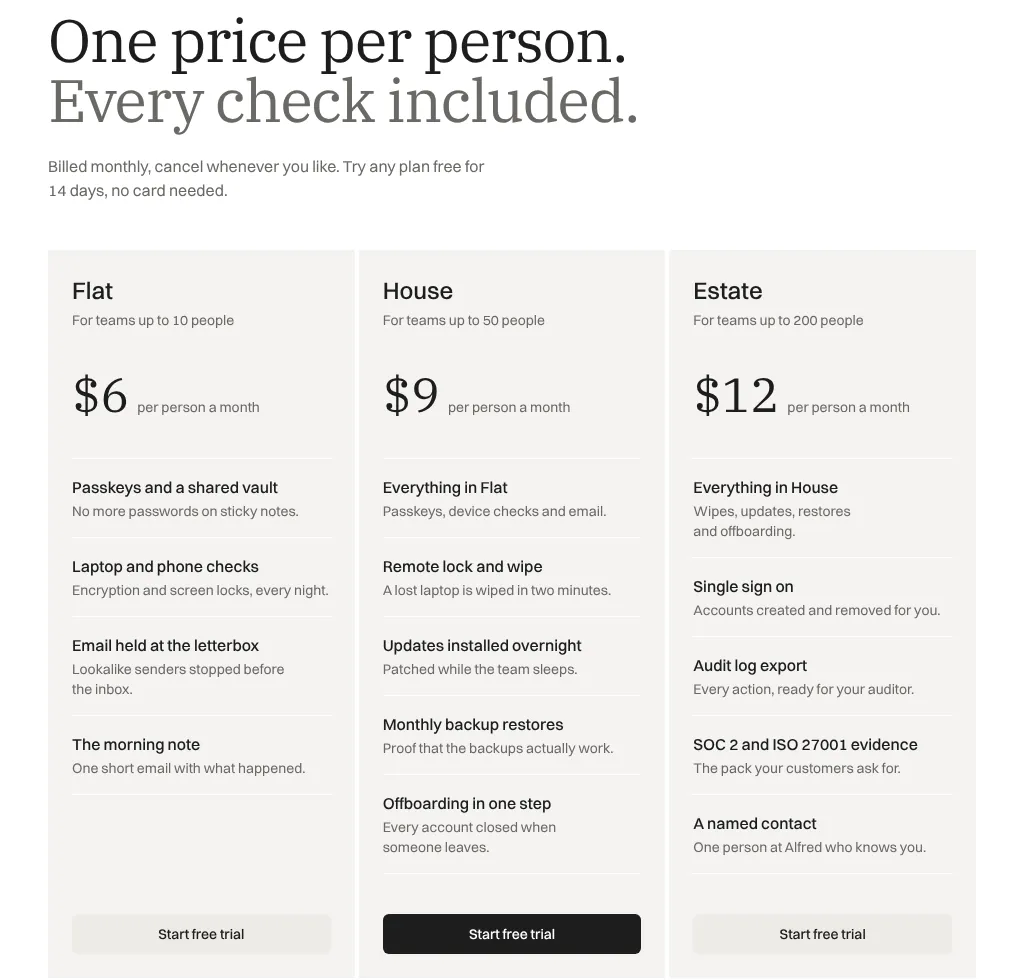
The pricing page sells three per-person plans: Flat at $6 a month for teams up to 10, House at $9 for up to 50 and Estate at $12 for up to 200, each with a 14-day trial. A comparison table lists 12 features in three groups (every plan, House and up, Estate), and six FAQs answer questions such as what counts as a person. Prices are monthly only: the annual switch from the 5 October version is gone.
Status, incidents and a security page
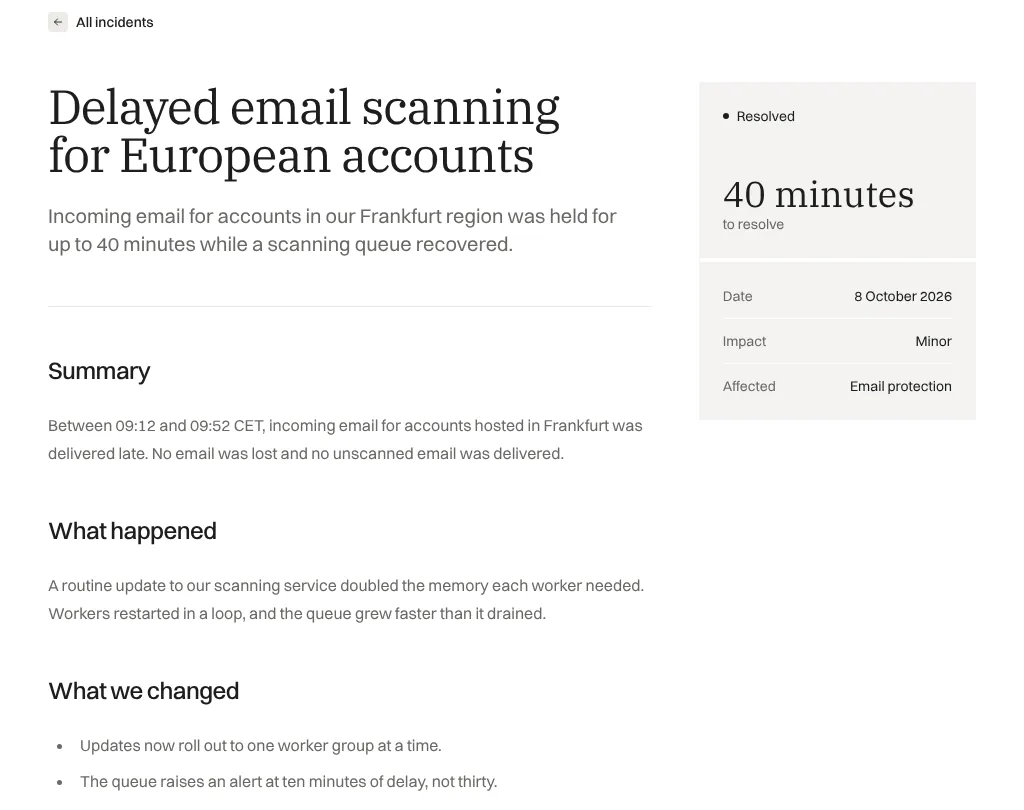
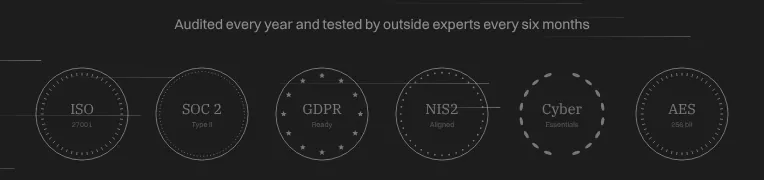
The status page shows 99.98% uptime, a 41 ms median response time and six services, each with 90-day uptime. Below it, four past incidents can be filtered by All, Major and Minor (1 major, 3 minor in the sample), and each opens a written report with a summary, what happened, what changed, and a sidebar with the time to resolve, date, impact and affected service. Like the rest of the site, the status figures are static text. The security page lists what Alfred reads and never touches, offers reports for auditors and carries a row of seals: ISO 27001, SOC 2 Type II, GDPR, NIS2, Cyber Essentials and AES 256-bit.
Current sample content
Unlike Buio's, Alfred's content was rewritten with the redesign. The seven blog posts, five releases (v2.0 to v2.4) and four incidents are dated July to October 2026; customer stories pair a photo with three result figures and a quote; the help center groups six guides under four topics; and the legal pages, written for the sample brand, have an overview with FAQs. The about page tells a founding story and introduces eight team leads. Two sample figures disagree: the home page watches over 400 small companies, the about page counts 1,240.
Menus, forms and mobile
Three megamenus (Product, Company, Resources) each end with a featured card, and on a 390 px screen a compact menu opens with no sideways scrolling; the desktop bar fits at 1024 px. None of the forms is connected. Contact, sign-in and sign-up point to #_, so submitting reloads the page with every field in the URL, the password included. Nothing is sent, although the contact page promises that details are stored in Frankfurt.
Performance and SEO
One Lighthouse 12.8.2 run per page, 30 October 2026, on a shared test machine:
| Page | Performance | Accessibility | Best practices | SEO |
|---|---|---|---|---|
| Home, mobile | 81 | 96 | 96 | 100 |
| Home, desktop | 99 | 96 | 96 | 100 |
| Pricing, mobile | 83 | 94 | 96 | 100 |
| Pricing, desktop | 98 | 94 | 96 | 100 |
The home page transferred 150 KiB on mobile and the pricing page 128 KiB, most of it fonts (IBM Plex Serif from Google Fonts, Switzer from Fontshare) and only 6 KiB of JavaScript. What holds the mobile scores back is text waiting for those fonts: the largest paint came at 3.5 s on the home page and 3.3 s on pricing. Accessibility lost points for one low-contrast label on both pages and, on pricing, a heading that skips a level; best practices for favicon and manifest files the layout links to but the demo lacks. Lexington's product page lists 100, 96, 100 and 100.
SEO scores 100, but only because Lighthouse checks that tags exist. All 50 pages share the title "Your Page Title", the description "A detailed description of your page content." and a canonical link to https://yourwebsite.com/current-page. The sitemap (49 URLs) and RSS feed (7 posts) are generated for the same placeholder domain until you set your site URL, and no page has structured data.
What you still have to build
Trust claims. Keep only the certifications, audits, uptime figures and data-location promises your company can back up. A security site showing seals it doesn't hold is a legal and reputational risk.
Status and incidents. Connect the status page to a monitoring service, or commit to updating it and the incident reports by hand.
Forms and accounts. Endpoints for contact, sign-in and sign-up, sent by POST; the trial sign-up and Google button need an auth provider.
Page metadata. Real titles, descriptions, canonical URLs and share images, your domain in the site config, and the missing favicon files.
Annual pricing. Add a billing switch if you offer yearly plans.
Pros and cons
Pros
The pages a security SaaS needs: pricing with a comparison table, security, status, incident reports, help and legal.
Content dated 2026 and written for the sample product, so layouts show realistic copy.
Line drawings follow the five color tokens, so a rebrand recolors the illustrations too.
Light pages: 150 KiB for the home page and 128 KiB for pricing, with 6 KiB of JavaScript.
Cons
Compliance seals and uptime claims are baked into the design and need careful editing.
Forms send nothing and put passwords in the URL until you wire them.
Placeholder titles and canonical links on every page.
Light only, monthly pricing only, and no place for product screenshots without new sections.
How Alfred compares
Flabbergasted ($89, also by Lexington) is dark and technical, for voice AI and developer APIs, with five plans, an annual switch and a comparison table on the home page. Pick it if your buyers are developers.
Buio ($89, Lexington) is dark and monochrome, for Web3, with a status page and a whitepaper but no pricing page.
Taskly by Getastrothemes ($79, $59 during a launch offer on 30 October 2026) is a light Astro SaaS theme for task and collaboration products with three homepages, pricing with a monthly and yearly switch, a status page template and English and French pages, per its maker. Pick it if you need annual pricing or a second language.
See all Tailwind templates for more options.
Who should buy Alfred
Buy it if you sell security, identity, device-management or compliance software to small companies, want a site that sounds calm rather than alarming, and need pricing, security, status and incident pages from the start. Look elsewhere if your product sells on screenshots, your brand is dark, or you can't yet back the trust claims the design is built around.
FAQ
Are Alfred's compliance badges real certifications?
No. The ISO 27001, SOC 2, GDPR, NIS2 and Cyber Essentials seals, the uptime figures and the audit claims are sample text. Keep only the ones your company can back up before you launch.
Does Alfred have a dark mode?
No. Alfred is a light theme with one dark section on the security page, and there is no switch between modes. Flabbergasted and Buio are Lexington's dark SaaS themes.
Is Alfred cheaper as part of Lexington Full Access?
Usually, yes. Alfred alone costs $89, while Full Access Personal costs $99 (shown as 50% off $198) and includes all 53 Lexington Astro themes, so for $10 more you get this theme and every other one.
Can I still get the earlier Alfred design?
Lexington redesigned Alfred twice in October 2026, on 5 October and again on 21 October, and says the previous version of a redesigned theme stays available as a tagged release in its GitHub repository. Only the current design has a public demo.
Can I use Alfred for client projects?
Yes. Lexington's license allows unlimited websites for yourself and for clients, including commercial and white-label work, without attribution. You can't resell the theme as a template, and each seat covers one named person.
KEEP EXPLORING
More templates