
How Claude Skills Improve Your Frontend Workflow
Build distinctive UIs with Claude's design Skills
If you've used Claude to build a landing page and noticed it defaulting to Inter fonts, purple-to-blue gradients, and rounded cards on white backgrounds — you've encountered what designers now call "AI slop." It's not a Claude problem. It's a distributional convergence problem: models trained on the internet gravitate toward the most statistically common design patterns, which happen to be the most forgettable ones.
Claude Skills are the fix.
Available across Claude.ai, Claude Code, and the API, Skills are specialized folders containing instructions and resources that Claude dynamically loads when relevant to the task at hand. For frontend developers and UI designers, the right combination of Skills transforms Claude from a generic template machine into a precise design collaborator.
What are Claude Skills?
Claude Skills are reusable, installable prompt packages that give Claude specialized instructions for repeatable tasks — like building accessible components, enforcing design systems, or generating production-grade frontend code.
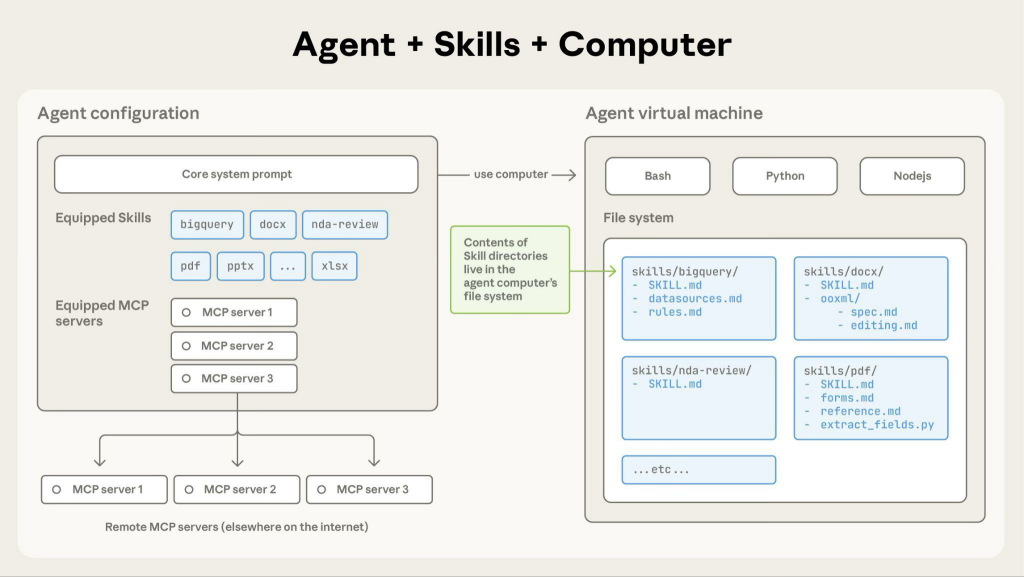
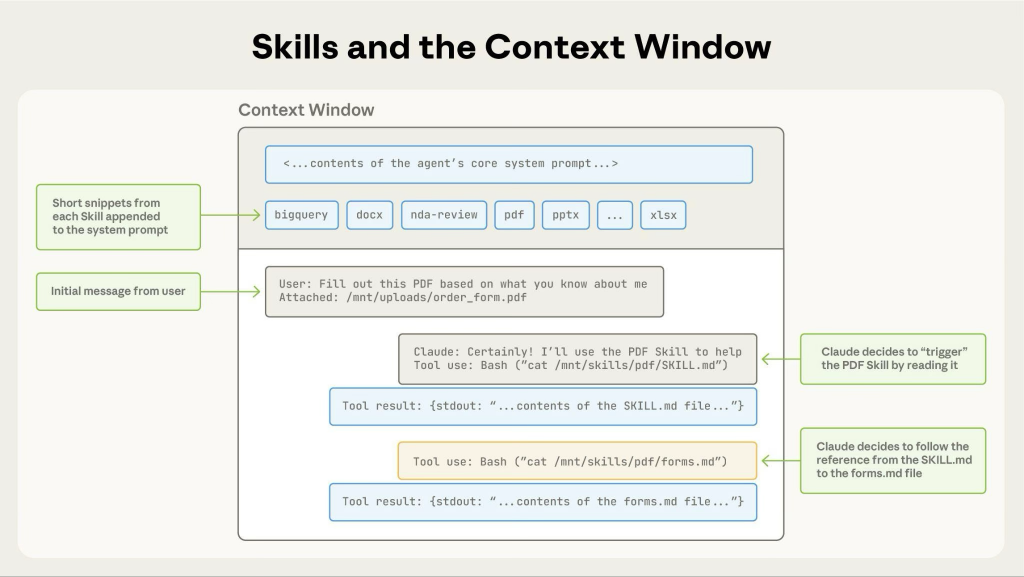
Skills use a progressive disclosure architecture: roughly 100 tokens load during metadata scanning, and the full instructions (under 5,000 tokens) load only when Claude determines the Skill applies. This keeps context lean without sacrificing quality.
Think of them as persistent expertise. Instead of re-prompting Claude with your design preferences every session, a Skill encodes those preferences once and applies them automatically.
Why does Claude produce generic output by default?
Without direction, Claude samples from the statistical center of its training data — which skews toward safe, universally acceptable design choices.
During sampling, models predict tokens based on statistical patterns in training data. Safe design choices dominate web training data. Without direction, Claude samples from this high-probability center. The result: Inter everywhere, muted palettes, identical card layouts. For teams building customer-facing products, this generic aesthetic undermines brand identity and makes AI-generated interfaces immediately recognizable — and dismissible.
The good news is that Claude is highly steerable with the right prompting. Skills encode that steering once, so you never have to repeat it.
Which Skills matter most for UI and web development?
The highest-impact Skills address four different layers: aesthetics, architecture, correctness, and consistency. Stack them for best results.
frontend-design (Anthropic official)
Anthropic's answer to AI aesthetic monoculture. Before writing any code, the Skill instructs Claude to commit to a bold aesthetic direction — editorial, brutalist, retro-futuristic, luxury/refined, or playful — then enforces that direction across typography, color, motion, and backgrounds. No design should ever look the same across generations.
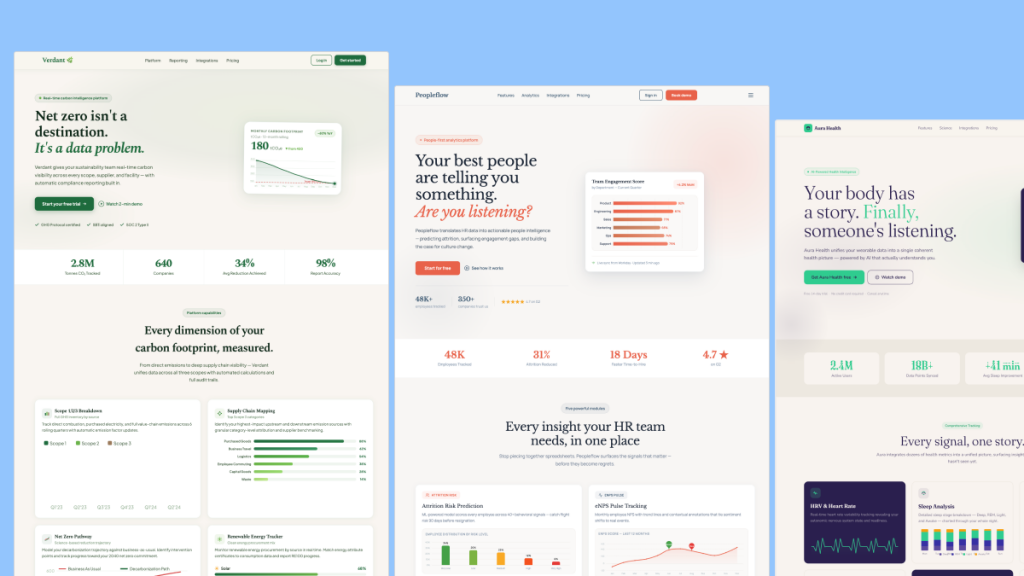
The difference is visible. Without the Skill: standard admin dashboard, minimal visual hierarchy, forgettable. With it: bold typography, cohesive dark theme, purposeful motion — same prompt.
Install: anthropics/skills → frontend-design
web-artifacts-builder (Anthropic official)
Where frontend-design governs aesthetics, web-artifacts-builder governs architecture. Built specifically for React + Tailwind CSS + shadcn/ui projects, it teaches Claude component composition patterns, responsive design, dark mode, proper shadcn/ui theming, and modern React patterns including hooks, context, and TypeScript types.
Without it: a functional but minimal task management app. With it: a fully structured component with a "Create New Task" form, category assignment, due dates, and filter buttons — no extra prompting required.
Install: anthropics/skills → web-artifacts-builder
web-design-guidelines (Vercel)
Where frontend-design focuses on creative direction, this Vercel Skill focuses on correctness. It reviews your existing UI code against the Web Interface Guidelines — a set of 100+ rules covering accessibility, performance, and UX best practices. It fetches the latest guidelines from the source repo so rules stay current. This catches ARIA violations, contrast failures, and focus management issues that ship unnoticed under deadline pressure.
Install: vercel-labs/agent-skills → web-design-guidelines
bencium-ux-designer (community)
The most thorough single-Skill treatment of UX design fundamentals in the ecosystem. At over 28,000 characters, it covers design thinking, visual standards, interaction design, and accessibility in one package. The dual-variant approach is what makes it practical: the "innovative" variant pushes Claude toward experimental layouts, the "controlled" variant enforces systematic consistency. For teams working on both marketing pages and product dashboards, both variants installed means Claude always applies the right register.
Install: bencium/bencium-claude-code-design-skill
AccessLint (community)
Unlike skills that treat accessibility as one concern among many, AccessLint makes it the entire focus. It includes four Skills — contrast-checker, refactor, use-of-color, and link-purpose — plus a bundled MCP server for programmatic color contrast analysis and an AI reviewer agent that performs comprehensive multi-step accessibility code reviews. Essential for any interface used by real customers.
Install: accesslint/claude-marketplace
interface-design (Dammyjay93)
When you build UI with Claude across multiple sessions, design decisions drift. Spacing values chosen in one session don't carry to the next. This Skill prevents that through a persistent system.md file that stores your design tokens across conversations. /interface-design:init sets up your principles, /interface-design:audit checks any file against the system, and /interface-design:extract pulls patterns from existing code so the Skill learns what you've already built. A spacing value chosen once becomes a pattern. A depth strategy becomes an identity.
Install: Dammyjay93/interface-design
ui-skills (community, via npx)
A set of small, composable polishing Skills designed to chain together after the main build step. The workflow is clean:
/frontend-design Build src/pages/Dashboard.vue
→ /baseline-ui @Dashboard.vue
→ /fixing-accessibility @Dashboard.vue
→ /fixing-motion-performance @Dashboard.vue
Each step applies fixes directly to the file and ends with a short QA checklist. Works identically in Claude Code CLI, VS Code, and Cursor.
Install: npx ui-skills add baseline-ui (repeat for each)
webapp-testing (Anthropic official)
Building a component is half the job. Knowing it works in the browser is the other half. This Skill gives Claude actual Playwright browser interaction — clicking elements, checking states, capturing screenshots, validating behavior. Skills live in the repo under .claude/skills/, so new environments get them on clone. Type /webapp-test and it works.
Install: anthropics/skills → webapp-testing
Can Skills be combined?
Yes, they're designed to complement, not conflict. The most effective approach stacks aesthetics, architecture, and accessibility Skills together.
A practical stack for a production React project:
frontend-designfor distinctive aestheticsweb-artifacts-builderfor shadcn/ui and Tailwind architectureweb-design-guidelinesorAccessLintfor correctness
The core insight from Anthropic's team: any domain where Claude produces generic outputs despite having broader understanding is a candidate for Skill development. Identify the convergent defaults, provide concrete alternatives, structure guidance at the right altitude, and make it reusable.
Quick Reference
Skill | Best for | Source |
|---|---|---|
| Distinctive aesthetics, avoiding AI slop | Anthropic |
| React + Tailwind + shadcn/ui architecture | Anthropic |
| 100+ UI/UX compliance rules | Vercel |
| Full UX design reference, dual mode | Community |
| Dedicated WCAG accessibility auditing | Community |
| Persistent design tokens across sessions | Community |
| Composable post-build polishing chain | Community |
| Playwright browser testing for components | Anthropic |
What's the risk of over-relying on Skills?
Skills improve output quality significantly — they don't eliminate the need for a final human review.
91% of UX researchers worry about AI output accuracy. The community consensus is consistent: Claude with Skills is excellent for first-draft components, scaffolding, and systematic auditing. It still trips over bespoke interactions and nuanced brand requirements. The key insight: if you find yourself typing the same design prompt repeatedly across multiple conversations, it's time to install — or create — a Skill.

Yucel is a digital product creator and content writer with a knack for full-stack development. He loves blending technical know-how with engaging storytelling to build practical, user-friendly solutions. When he's not coding or writing, you'll likely find him exploring new tech trends or getting inspired by nature.