Drag-and-drop shadcn/ui page composer that installs pages with the shadcn CLI
Paper.design
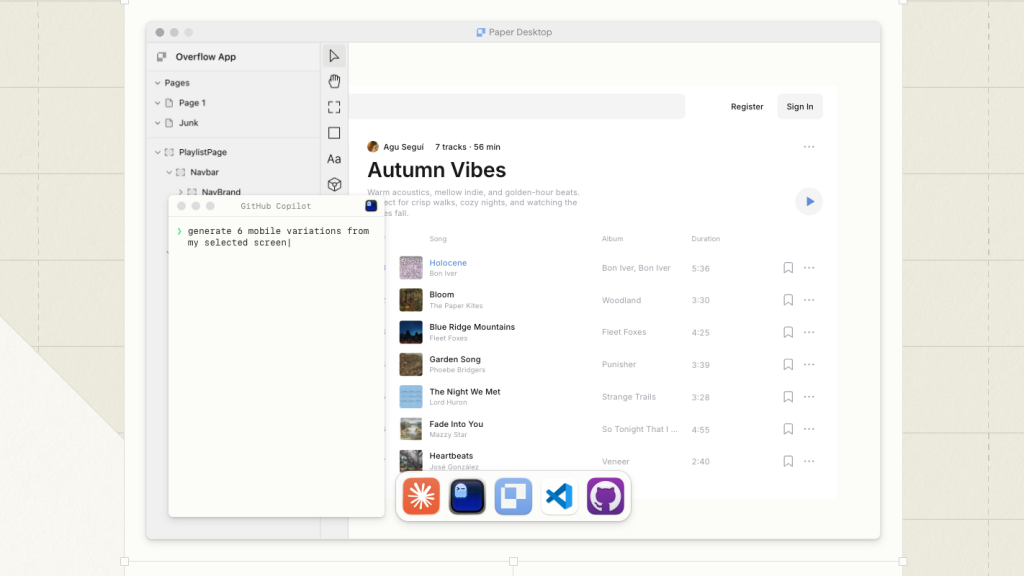
HTML and CSS design canvas that AI agents edit over MCP; Pro $20/editor
FreemiumDesign
paper.designExplore the product
AT A GLANCE
- Website
- paper.design
- Pricing
- Freemium
- Categories
- Design
- Listed
- Mar 2026
- Updated
- Nov 2026
Details about Paper.design
KEY POINTS
- MCP
- Code export
- Web app
- Seat-based billing
Short verdict: Paper is a design tool whose canvas is real HTML and CSS, built so that coding agents such as Claude Code, Codex and Cursor can read and edit your designs through an MCP server. The free plan is generous to teams, with unlimited editors and viewers, but caps agents at 100 MCP tool calls a week; Pro costs $20 per editor a month, or $16 billed yearly, and raises that to a million. It is still young: the desktop app is at version 0.5.19, and reusable components, CSS Grid and per-file permissions are on the roadmap rather than in the product. It suits designers and developers who already work with a coding agent and want designs the agent can turn into code. Teams that rely on component libraries and settled handoff should stay with Figma for now.
How we reviewed it: On 22 November 2026 we read Paper's pricing page, MCP documentation, support FAQ and keyboard shortcuts, monthly build log, roadmap, downloads page, terms of service (updated 11 October 2026) and subprocessor list (updated 16 November 2026). We opened the web app, which sends visitors to a sign-in page, and did not create an account, so we could not design, connect an agent, count tool calls or inspect the code Paper copies. Without an account we used the public Paper Shaders editor and bundled one shader from its npm package. Prices and limits are from Paper's site on the same day.
What Paper costs and includes
| Maker | Lost Coast Labs, Inc., doing business as Paper. It announced a $34M Series A from Accel and ICONIQ. |
|---|---|
| Apps | Paper Web in the browser, and Paper Desktop 0.5.19 (13 November 2026) for Windows x64, macOS on Apple silicon, and Linux on x64 and ARM (AppImage, deb, rpm). The local MCP server runs with the desktop app. |
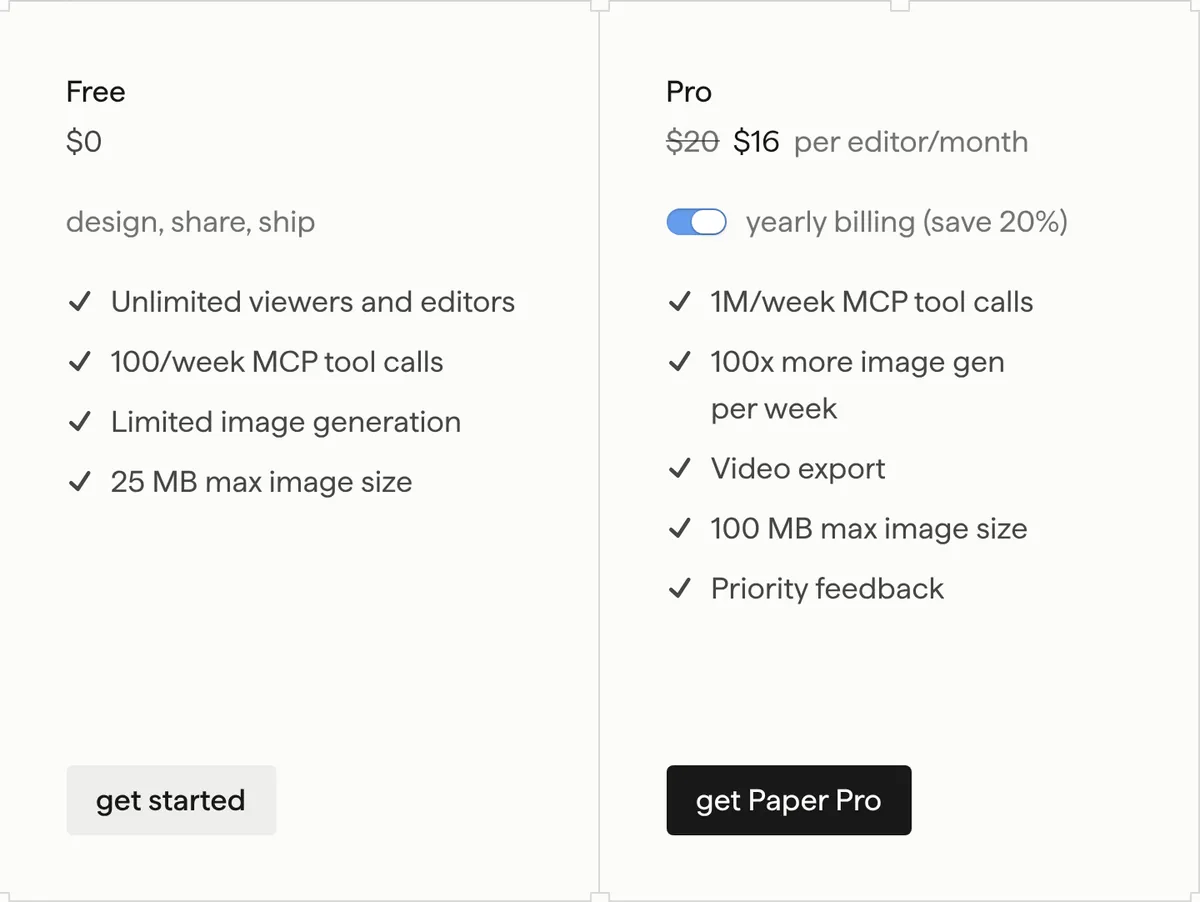
| Free | $0: unlimited viewers and editors, 100 MCP tool calls a week, "limited" image generation and a 25 MB image limit |
| Pro | $20 per editor a month, or $16 billed yearly: 1M MCP tool calls a week, "100x more" image generation, video export and a 100 MB image limit. Viewer seats stay free. Pricing |
| Organizations | Custom price, with SAML/SSO, admin controls and custom contracts |
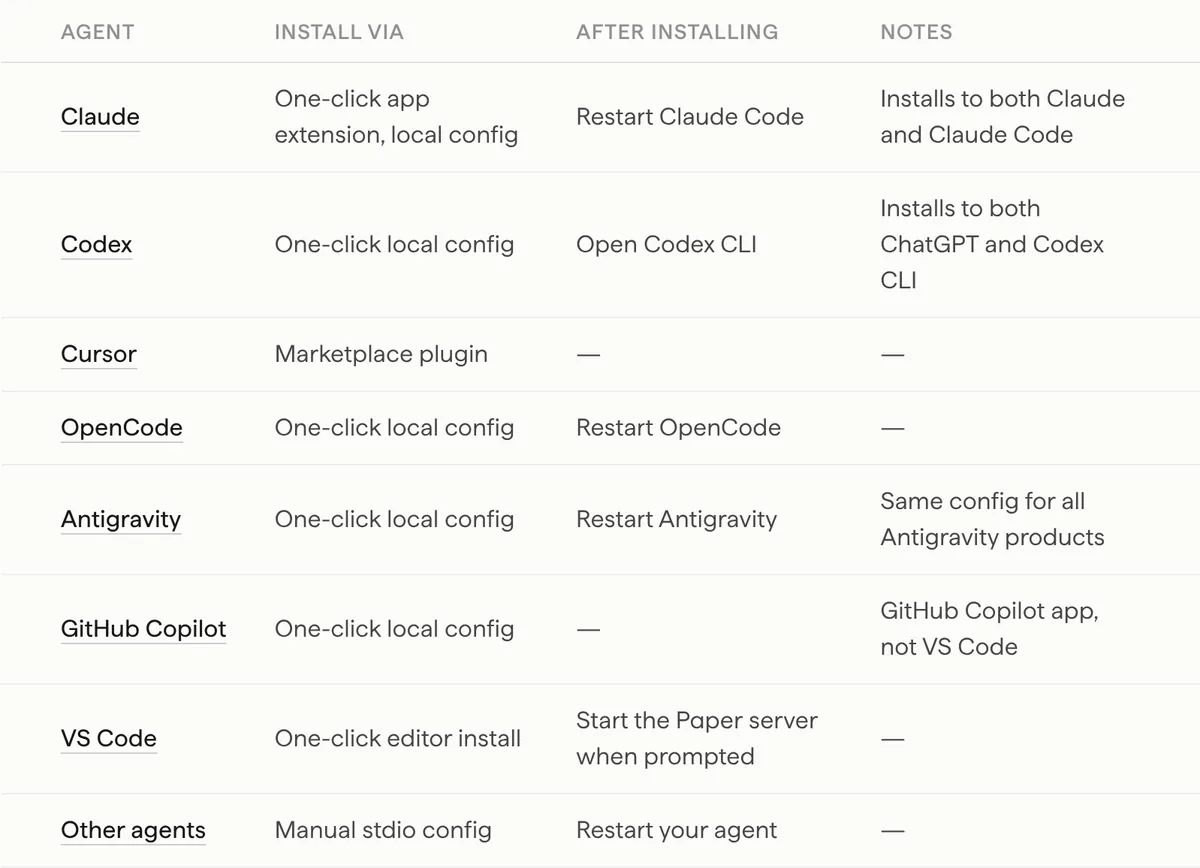
| Agents | Setup steps for Claude and Claude Code, Codex and ChatGPT, Cursor, OpenCode, Antigravity, the GitHub Copilot app and VS Code, plus a stdio config for any other agent. A remote server at mcp.paper.design is in early access. |
| Code out | Copy a selection as Tailwind classes or as React CSS, or as a PNG; image export; video export on Pro |
| Terms | Paper doesn't claim ownership of your content. Fees are non-refundable. Terms of service |
What we found
Everything starts with an account
The web app at app.paper.design sends signed-out visitors to a sign-in page with two choices, email or Google. We found no demo file, public gallery or guest mode, and the local MCP server needs Paper Desktop running with a file open. A free account costs nothing, but you can't judge the canvas or the agent workflow before you sign up; the docs and the build log are all a buyer can read first.
Your agent does the AI work
Paper's argument is that language models already understand HTML and CSS, so they read and write its canvas more accurately than a proprietary format. The work runs in the agent you connect, on that agent's own plan: Paper's subprocessor list names AI providers only for image generation (OpenAI, Replicate, xAI, Recraft and Quiver AI). The MCP docs give setup steps for seven agents and a manual config for the rest. Opening the desktop app installs a small CLI, paper mcp, so agents can see Paper's tools while the app is closed; reads and writes still need it open.
The free plan allows 100 MCP tool calls a week. Every read or write the agent makes through Paper's server counts, and Paper doesn't say how many calls a typical request uses; we couldn't measure it without an account. Pro's million a week removes the question. The remote server, for cloud agents that work while your computer is off, is metered the same way during early access, and Paper says long-term pricing will follow "in about a month", without a date.
Code comes out as copies, not components
Paper doesn't export React components or a code project. You can copy a selection as Tailwind classes or as what Paper calls React CSS, from the right-click menu or, since September 2026, the export panel. For real code, Paper's own guide has your agent read the selected frame through MCP and write React and Tailwind in your repository, and it advises starting small with flex layouts, because "the larger the thing you're trying to build, the more likely the agent will get stuff wrong". Two roadmap items marked "in progress" would change this: using your own code components on the canvas, and a native Tailwind integration built with the Tailwind team.
Missing pieces a Figma user will notice
The 2026 roadmap lists components with slots as "coming soon" and CSS Grid as "planned", and the September build log still had per-file permissions under "coming soon". So there are no reusable components with overrides yet, and layouts are built with flex. The pieces that did ship came quickly: pasting from Figma in May 2026, tokens and a pen tool in June, comments, desktop tabs and free editors in August, and rich text, the Paper Mono font and file management for agents in October. The macOS download is for Apple silicon only, so Intel Macs are limited to the browser app.
Free for teams, limited for AI
Since August 2026 free teams can invite unlimited editors, and viewers are free on every plan. What the free plan limits is AI and media: 100 MCP tool calls a week, image generation with no stated number, a 25 MB image limit and no video export. Pro is priced per editor, so five editors cost $100 a month, or $80 a month billed yearly.
What you can use without an account
Paper Shaders works without signing up: 30 shaders and image filters, from mesh gradients to halftone and liquid metal, each with presets, sliders and a React snippet that updates with your settings. The @paper-design/shaders-react package, version 0.0.82, is Apache-2.0 licensed and depends only on Paper's shader core. Bundled with esbuild, one MeshGradient added 8.4 KB gzipped (React excluded) and the whole package 81 KB. The Paper Snapshot Chrome extension, which copies sections of a live site into Paper as editable layers, has 10,000 users and a 4.7 rating from 18 ratings in the Chrome Web Store.
Terms worth reading
Paper's terms say it doesn't claim ownership of your content and uses it to run the service. They also let Paper de-identify and aggregate your content and usage data and use the result "for any purpose", and they say nothing about training AI models. Fees are non-refundable, and an account inactive for 180 days can be closed.
What you still have to set up
An agent and its plan. Claude Code, Codex, Cursor or another MCP client, paid separately; Paper only meters the tool calls.
Paper Desktop. The local MCP server runs with it, or you join the early-access remote server.
Your design system. Agents can create tokens from your CSS variables through MCP; reusable components have to wait.
The code. Copied classes or agent-written components in your repository, which someone still reviews.
Pros and cons
Pros
Designs are HTML and CSS, the same language your agent writes and your site runs on.
Agent setup is documented for seven clients, and any stdio MCP client works.
Unlimited free editors and viewers.
Monthly releases, each written up in the build log.
Cons
Nothing can be tried without an account.
100 MCP tool calls a week on the free plan, with no guide to what a task uses.
No reusable components or CSS Grid yet, and the desktop app is still before version 1.0.
Code comes out as copied CSS or agent output, not exported components.
The macOS app needs Apple silicon.
How Paper compares
Figma charges the same as Paper Pro for a Professional Full seat, $20 a month or $16 billed yearly, and has a free Starter plan. The Full seat includes Dev Mode with an MCP server and Figma Make, alongside components and team libraries. Pick Figma for an established design system and handoff to developers who don't work through agents.
Subframe also puts HTML and React on its canvas. It runs Claude or Codex inside the app on your own subscription and has an MCP server; the free plan covers one project, and Pro costs $20 per editor a month, per its site. Pick it if you want the agent inside the design tool.
pen.dev, where pencil.dev now redirects, is an agent canvas: you design with Claude, ChatGPT and other models on the canvas or through MCP and a CLI, and it imports Figma files. A web version is free to try. Pick it if you want to try an agent canvas before paying.
See all design tools.
Who should use Paper
Try Paper if you design next to a coding agent, want designs it can read as HTML and CSS, and don't mind signing up to find out: the free plan covers a whole team, and Pro at $20 per editor a month makes agent use practically unlimited. Stay with Figma, or wait, if your work depends on reusable components with overrides, detailed permissions or a tool past version 1.0.
FAQ
Is Paper free?
Yes, with limits. The free plan includes unlimited viewers and editors, 100 MCP tool calls a week, limited image generation and images up to 25 MB. Pro costs $20 per editor a month, or $16 billed yearly, and raises MCP tool calls to 1M a week.
Does Paper export React code?
Not as components. You can copy a selection as Tailwind classes or as React CSS, or have your agent read a frame through MCP and write the code in your project. Using your own code components and a native Tailwind integration are on Paper's roadmap as in progress.
Which AI agents work with Paper?
Paper's MCP docs cover Claude and Claude Code, Codex and ChatGPT, Cursor, OpenCode, Antigravity, the GitHub Copilot app and VS Code, plus any agent that accepts a stdio MCP config. The local server needs Paper Desktop; a remote server is in early access.
Does Paper have components like Figma?
Not yet. Paper's roadmap lists components with slots as coming soon. Today you can copy and paste elements and copy a file's tokens and theme into another file.
Does Paper run on Intel Macs?
Only in the browser. The macOS desktop download is for Apple silicon; Windows x64 and Linux builds are also available. The local MCP server needs the desktop app.
Get new tools like Paper.design weekly
Every Monday: the templates, components and tools added to Tailkits that week, each checked by an editor. Free, unsubscribe in one click.
17 new in the last 30 days313 products reviewed so farSee what you get
KEEP EXPLORING
More design tools