
Shadcn Page Builder
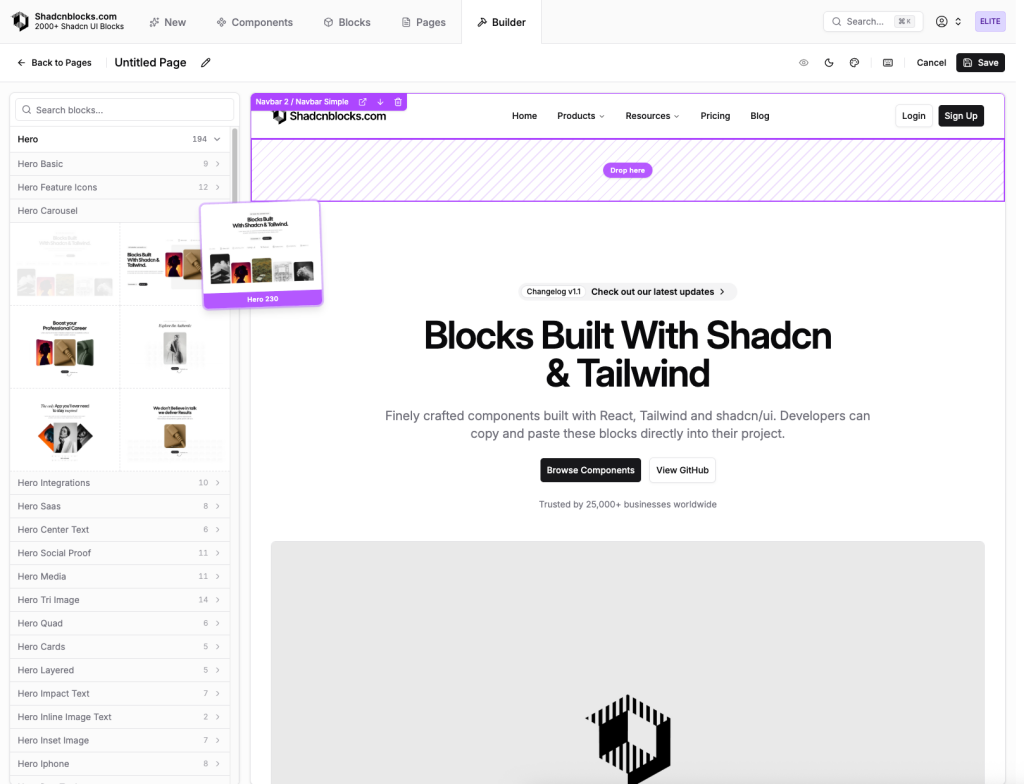
Drag, reorder, save, and install shadcn pages
- Design Templates
- Drag and Drop
- Code Export
Shadcn Page Builder is a visual builder inside Shadcnblocks that helps developers assemble complete pages from ready-made shadcn/ui blocks.
It is useful for landing pages, pricing pages, product pages, and other layouts where you want to move faster without starting from a blank file.
What Is the Shadcn Page Builder?
Shadcn Page Builder is a visual page-building tool for creating full pages with Shadcnblocks components. Instead of manually stitching sections together, you can add blocks, reorder them, adjust the page structure, and then install the result into your project.
It works best for developers who already use React, Tailwind CSS, and shadcn/ui, but want a faster way to build page layouts.
What Features Does the Shadcn Page Builder Offer? ✨
Visual page composition from shadcn/ui blocks
Drag and drop block arrangement
Pre-built page browsing
Section reordering
Dedicated builder/editor workflow
shadcn CLI installation support
Works alongside Shadcnblocks pages, blocks, and components
Useful for creating landing pages, marketing pages, and product layouts
What Components Are Included? 📒
Pre-built pages
Hero sections
Feature sections
Pricing sections
CTA sections
FAQ sections
Footer sections
Page layouts installable through the shadcn CLI
Blocks built with React, Tailwind CSS, and shadcn/ui
What Are the Pros and Cons?
Pros ✅
Speeds up page layout creation
Reduces manual block stitching
Keeps the workflow close to the existing Shadcnblocks library
Good for developers building landing pages quickly
CLI install makes it easy to move layouts into a real project
Helps preview page structure before adding final content
Cons ⚠️
Page Builder is desktop-focused
Best value is for users already using Shadcnblocks
It is not a full no-code website builder
Final customization still happens in your codebase
Advanced saving or full functionality may depend on account or plan access
How Does the Shadcn Page Builder Integrate?
Uses the shadcn/ui CLI workflow
Works with React projects
Fits Tailwind CSS-based interfaces
Supports Shadcnblocks pages, blocks, and components
Lets developers bring generated page layouts into their own codebase
Works well for Next.js, Astro, and other modern frontend setups that support React-style component workflows
FAQ
Is Shadcn Page Builder a no-code tool?
Not fully. It helps you build layouts visually, but developers still customize and maintain the final code.
Who is Shadcn Page Builder best for?
It is best for React and shadcn/ui developers who want to build pages faster from ready-made blocks.
Can I install the generated page into my project?
Yes. The page is designed to work with the shadcn CLI workflow.