
Shadcn IDE Extension
Install shadcn/ui blocks without leaving your IDE
- Design Templates
- Code Editor
- Code Export
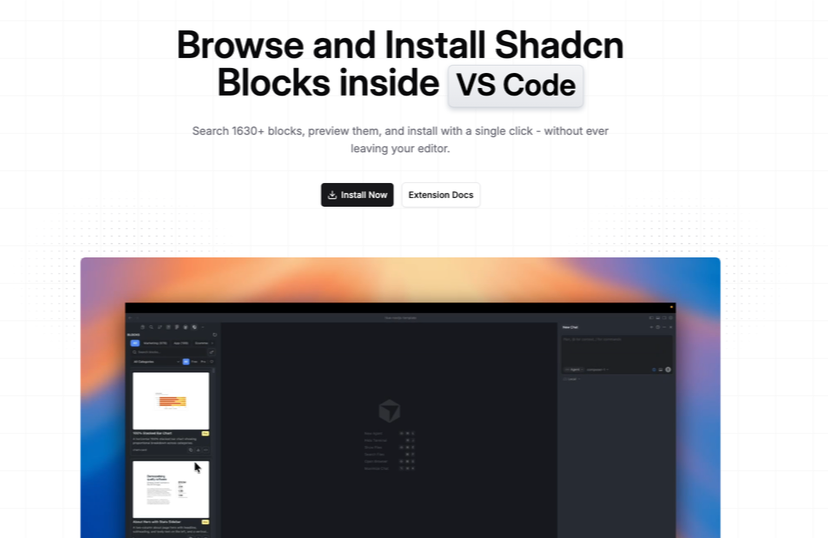
Shadcnblocks IDE Extension helps developers browse, preview, and install shadcn/ui blocks without leaving their editor.
It is useful if you build with React, Tailwind CSS, and shadcn/ui, and want faster access to ready-made UI sections directly inside VS Code, Cursor, Windsurf, Antigravity, or any editor that supports VS Code extensions.
What Is the Shadcnblocks IDE Extension?
The Shadcnblocks IDE Extension is an editor extension for browsing and installing Shadcnblocks UI blocks directly from your development environment. It lets you search 1665+ blocks, preview them, inspect source code, and add them to your project with a single click.
Instead of switching between browser tabs, docs, and your terminal, you can stay inside your IDE and work from a sidebar panel. The extension uses the shadcn CLI under the hood, so blocks are added in a workflow that already feels familiar to shadcn/ui users.
Features ✨
The extension focuses on speed, search, and smoother block installation. Its main value is reducing context switching while you build landing pages, dashboards, pricing sections, testimonials, CTAs, and other interface sections.
Search and explore 1665+ shadcn/ui blocks
Filter blocks by category, archetype, keyword, free, or pro status
Preview block thumbnails before installing
View source code before adding a block
Install blocks with one click through the shadcn CLI
Copy CLI commands when you prefer manual control
Save favorite blocks for later
Access new blocks automatically as the library grows
Works with VS Code, Cursor, Windsurf, Antigravity, and VS Code-compatible editors
Included Components 📒
The extension gives access to the wider Shadcnblocks library from inside your editor. That includes blocks, components, pages, and templates built around shadcn/ui, Tailwind CSS, and React.
Included library access:
1665+ blocks for layouts and page sections
1684 components for UI building
49 pages for larger layout examples
16 templates for full project starting points
Free and pro block filtering
Source preview for checking code before install
API key support for pro access
What Are the Pros and Cons?
The Shadcnblocks IDE Extension is best for developers who already use shadcn/ui and want faster access to production-ready blocks. It is less useful for teams that do not use React, Tailwind CSS, or the shadcn CLI workflow.
Pros ✅
Saves time by keeping block discovery inside the editor
Strong block library size with 1665+ blocks
One-click install makes prototyping faster
Source preview helps developers inspect code first
Favorites make repeated block use easier
Works across several VS Code-compatible editors
Good fit for landing pages, SaaS pages, dashboards, and marketing UI
Cons ⚠️
Best suited to shadcn/ui, React, and Tailwind users
Pro blocks require an API key
Developers outside the VS Code extension ecosystem may not benefit as much
Teams still need to adapt blocks to their own design system
It does not replace product design decisions or custom UX work
Integration
The integration is simple: install the extension, open the sidebar panel, search for a block, preview it, then install it into your project. The install action runs the shadcn CLI, so the block lands in your codebase instead of being locked inside a package.
Install from VS Code Marketplace or supported editor extension flow
Open the Shadcnblocks sidebar from the activity bar
Search or filter blocks by use case
Preview the block before adding it
Click install to add it with the shadcn CLI
Add an API key if you want pro block access
Use favorites to save blocks you often reuse
FAQ
Does it use the shadcn CLI?
Yes. One-click install runs the shadcn CLI under the hood, so blocks are added directly to your project.
Can I preview code before installing a block?
Yes. The extension includes source preview so you can inspect implementation and dependencies before adding a block.
Does it work with Cursor?
Yes. The page lists Cursor as a supported editor, along with VS Code, Windsurf, and Antigravity. (Shadcnblocks.com)