Drag-and-drop shadcn/ui page composer that installs pages with the shadcn CLI
Font Awesome
Icon toolkit with 1,992 free icons, React and Vue packages, Pro from $48/yr
FreemiumDesign
fontawesome.comExplore the product
AT A GLANCE
- Website
- fontawesome.com
- Pricing
- Freemium
- Categories
- Design
- Listed
- Mar 2026
- Updated
- Nov 2026
Details about Font Awesome
KEY POINTS
- React package
- Figma plugin
- Seat-based billing
Short verdict: Font Awesome is more toolkit than icon set: 1,992 free icons by our count, more than 60,000 in the paid plans per Font Awesome, official packages for React, Vue, Angular and more, and a webfont that needs one stylesheet. The catches are in the details. Its React route bundles a 90 KB core before your first icon, its injected CSS overrides Tailwind CSS 4's size-* utilities, and free Kits switch off after 10,000 pageviews a month. It suits teams that want one familiar set across several stacks, brand logos included, or need the Pro styles. If you only need line icons in a Tailwind project, the free sets compared below cost far fewer bytes.
How we reviewed it: On 22 November 2026 we installed Font Awesome Free 7.3.1 from npm in an empty folder (Node.js 22.23, npm 10.9, empty npm cache), bundled the same 10 icons we use for every icon library with esbuild 0.28.2, and rendered them in Chromium with Tailwind CSS 4.3.3. We loaded the free webfont and SVG+JS files from cdnjs and recorded what the browser downloaded, searched fontawesome.com, and read the plans, license and support pages. We did not create an account or buy a plan, so Kits, the Icon Wizard, Pro packages and the Figma plugin are described from Font Awesome's pages, not tested.
What you get for free and from $48 a year
| Price | Free: $0. Starter: $8 a month or $48 a year. Solo: $16 a month or $96 a year. Team (3 seats, up to 250): $32 a month or $192 a year, $20 per extra seat. No lifetime plan. |
|---|---|
| Icons | "60k+" in "30+" styles, per Font Awesome. Free: 2,163 per Font Awesome, which counts each style; we counted 1,992 distinct icons (1,422 Solid, 169 Regular, 572 brand logos). |
| Version | 7.3.1, released 15 July 2026. react-fontawesome 3.5.0, 20 July 2026. |
| Delivery | npm packages, self-hosted webfont or SVG+JS files, Kits (one script tag on Font Awesome's CDN), SVG and PNG downloads per icon. |
| Packages | Official React, Vue, Angular, Svelte (0.2.4), React Native and Ember packages, plus a WordPress plugin. Figma plugin for Pro icons on annual Solo and Team. |
| AI tools | Free agent skills for Claude Code, Cursor, Copilot and others, and an fa CLI. No MCP server. |
| License | Free: icons CC BY 4.0, fonts SIL OFL 1.1, code MIT; the attribution is the comment already in the files. Pro: per seat. Pro license terms |
What we found testing Font Awesome Free
Free covers common UI icons, but Regular is thin
All 10 of our test icons (house, magnifying glass, gear, user, cart, arrow right, check, X, bell and trash) exist in free Solid. Only four of them exist in free Regular: house, user, bell and trash can. With 1,422 Solid icons against 169 Regular ones, an outline-style interface on the free tier mixes styles quickly. Light, Thin, Duotone, Sharp and the other families on the icon pages need a paid plan, and the Pro+ packs such as Chisel, Jelly and Notdog need Solo or Team.
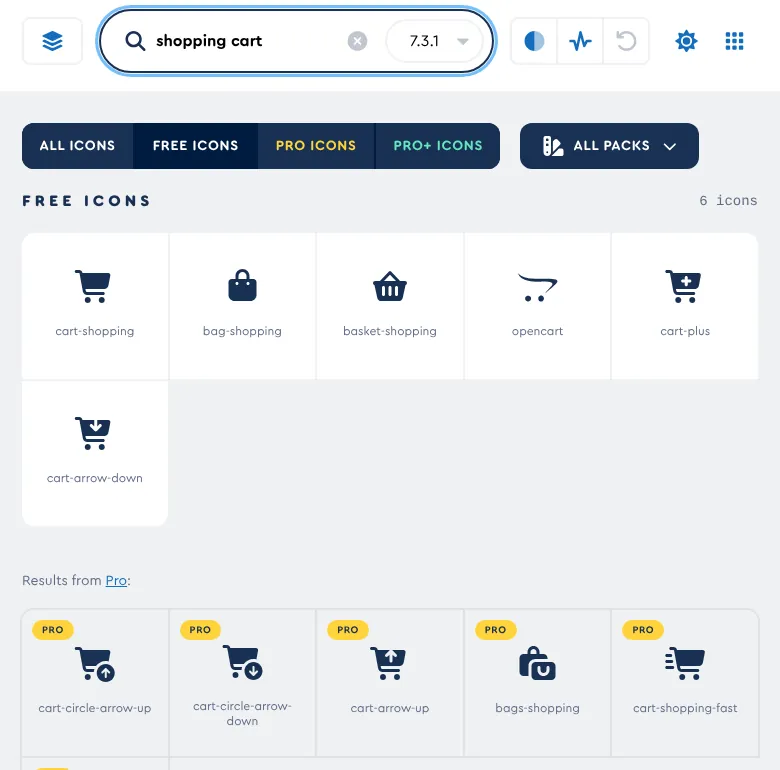
Searching fontawesome.com for "shopping cart" returned 393 results across all packs and 6 in Free. "Settings" returned 1,300 and 28, "chart" 1,474 and 34. The all-pack totals count every style of an icon as a separate result. Free icons offer HTML, React, Vue and SVG snippets, SVG and PNG downloads and an /add-icon prompt for the agent skills.
The React route carries a 90 KB core
Installing @fortawesome/react-fontawesome, @fortawesome/fontawesome-svg-core and @fortawesome/free-solid-svg-icons took 1.5 seconds and added five packages, React included. Our 10 icons bundled to 100,777 bytes minified and 27,218 gzipped. The icons are 4,141 bytes of that; the SVG core is 89,951 bytes, a fixed cost that pays for features such as stacking, transforms, animations and duotone.
Tailwind CSS 4 needs text-* sizes
Icons use fill="currentColor", so text-indigo-600 colors them. Sizing is the catch. With className="size-6", the React icons rendered at 20 by 16 pixels instead of 24 by 24. The CSS that the SVG core injects (height: 1em) sits outside any cascade layer, so it beats Tailwind CSS 4's utilities, which sit in one. text-2xl worked (30 by 24, because icons are 1.25em wide by default), and so did the important modifier, size-6!. The webfont behaves the same way: size the <i> tag with text-* classes.
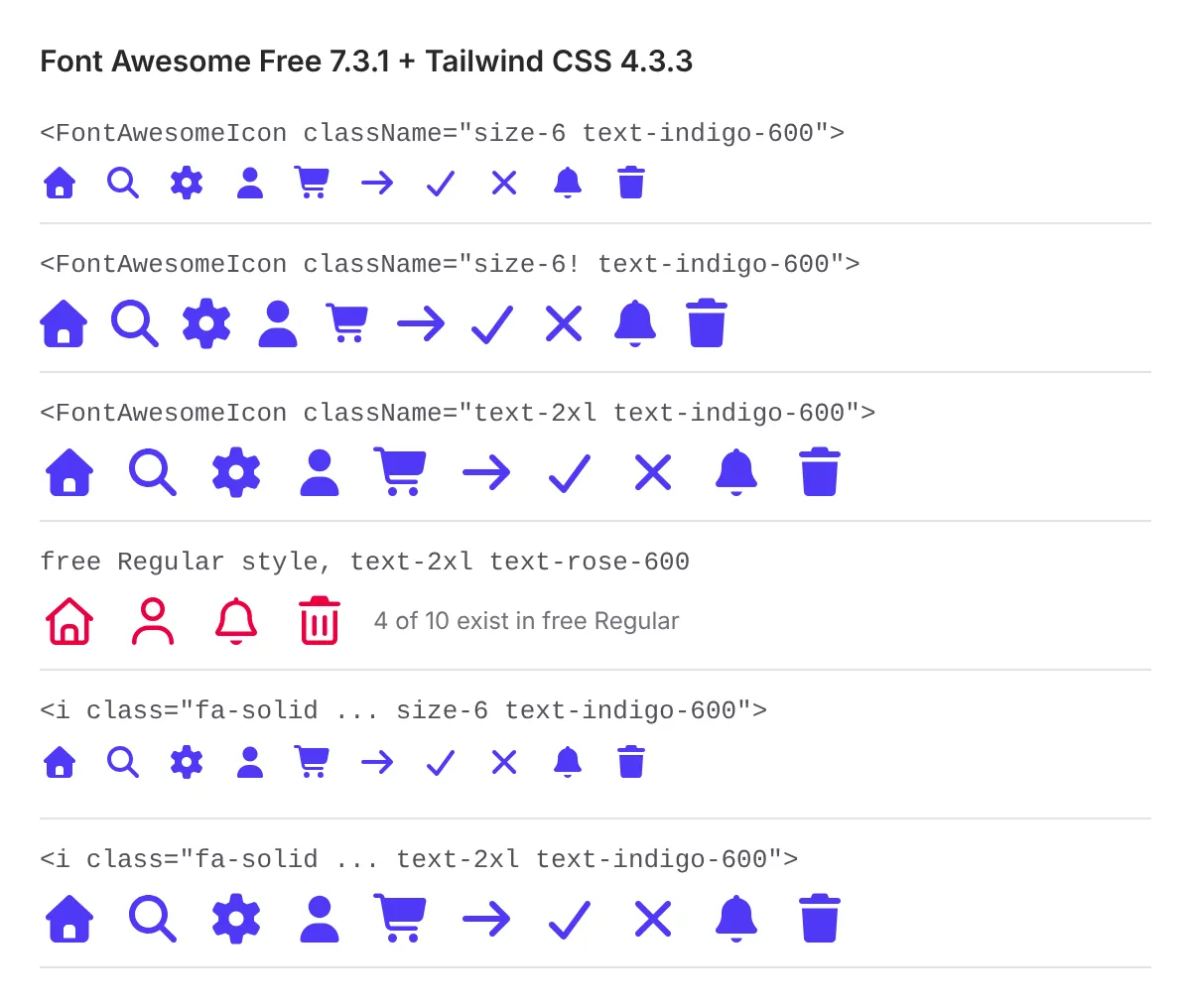
size-6 has no effect, size-6! and text-2xl do.The React and SVG+JS output adds aria-hidden="true" and role="img" to every icon, so decorative icons are hidden from screen readers. Webfont <i> tags carry nothing, so add aria-hidden yourself. The SVG you copy from an icon page has no fill attribute and renders black until you add fill-current; the SVG files in the npm package already use currentColor.
Free Kits stop at 10,000 pageviews a month
Font Awesome's home page leads with Kits: one script tag that loads your icons from its CDN, set up with an account. Free Kits include 10,000 pageviews a month, Starter 50,000, Solo 1 million and Team 2 million. Font Awesome's support pages say every successful load counts, including localhost, bots and crawlers, and that a Kit without metered billing is switched off for the rest of the month once it reaches the limit, which "may result in icon interruptions". Paid plans can turn on metered billing at $2 per extra 250,000 pageviews. For a free project with real traffic, use the npm packages or self-hosted files, which have no pageview count.
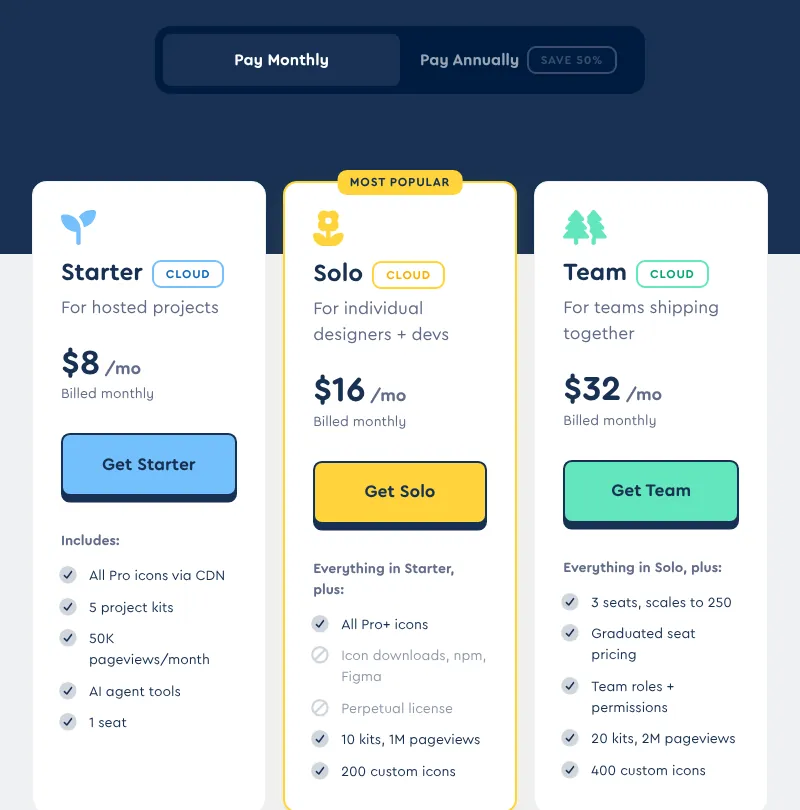
Monthly plans and Starter are CDN-only
Annual billing halves the price, and it also changes what you get. Starter and every monthly plan are labeled Cloud: Pro icons from the CDN, without downloads, npm packages, Figma or a perpetual license. Only annual Solo and Team include those, and let you keep the icons released during your subscription after it ends. On Starter or a monthly plan, the license says you may not use Pro icons once the subscription ends.
The Pro license is per seat. Font Awesome's support FAQ says clients who receive a finished site need nothing, but a client who edits content with Pro icons counts as a creator and needs a seat. Pro icons cannot go into open-source repositories, themes or plugins you distribute; Font Awesome recommends Free for those.
Output and build
Measured on 22 November 2026, one run each, ten Solid icons:
| What we measured | Result |
|---|---|
| React install, empty npm cache | 5 packages, 1.5 s, 19 MB on disk (5.8 MB of files) |
10 icons, esbuild --bundle --minify | 100,777 bytes, 27,218 gzipped |
Webfont from cdnjs: all.min.css and the Solid font | 137,929 bytes transferred (18,441 + 119,488) |
SVG+JS from cdnjs: all.min.js | 415,795 bytes transferred (1.6 MB uncompressed) |
SVG+JS from cdnjs: fontawesome.min.js and solid.min.js | 202,653 bytes transferred |
| npm downloads, react-fontawesome, 9-15 November 2026 | 2,674,821 |
The webfont is the cheapest route when a page shows many icons: 138 KB covers all 1,422 Solid icons, and the browser only fetches the font files for styles you use. The SVG+JS build is the most expensive, because it ships every icon's path data as JavaScript. On disk, free-solid-svg-icons is 3,998 small files, so du reports 19 MB for 5.8 MB of data. The GitHub repository has 77,000 stars and 295 open issues.
What you still have to set up
A delivery route. npm packages for apps, self-hosted webfont files for content sites, or a Kit if you accept its pageview limits. If you use a Kit, restrict it to your domains.
A sizing convention. In Tailwind CSS 4 projects, size icons with
text-*classes or the important modifier, and tell your team why.Accessible names. Put an
aria-labelon icon-only buttons; addaria-hiddento webfont icons.Pro access in CI. Pro and Pro+ packages need a token from an annual Solo or Team plan, and Pro+ icons only install through a Kit package, per the docs.
Seats. Count everyone, clients included, who will edit content that uses Pro icons.
Pros and cons
Pros
1,422 free Solid icons plus 572 free brand logos under licenses that allow commercial and client work.
Official packages for React, Vue, Angular, Svelte, React Native and Ember, and a webfont for sites without a build step.
Icons inherit
currentColor, and the SVG output is hidden from screen readers by default.Annual Solo and Team include a perpetual license for the icons released during your subscription.
Cons
The React route cost 27,218 gzipped bytes for 10 icons, nearly all of it the SVG core.
size-*utilities don't work in Tailwind CSS 4 without the important modifier.Only 169 icons in free Regular, so outline-style interfaces need a paid plan.
Free Kits switch off after 10,000 pageviews a month, and Starter and monthly plans leave you with no icons when you cancel.
Clients who edit content need their own seats.
How Font Awesome compares
Phosphor Icons is free under MIT with 1,512 icons, each in six weights from Thin to Duotone, and no paid tier. The same 10-icon React test came to 31,798 bytes minified, 8,175 gzipped. Choose it if you want outline and filled weights without paying.
Hugeicons gives away one full style, Stroke Rounded, with 6,000+ icons under MIT, and sells nine more styles from $99 a year. Our 10 icons bundled to 7,638 bytes minified, 2,869 gzipped. Choose it for a large free line set; copying SVGs on its site needs a free account.
Lucide has 2,095 stroke icons under the ISC license, per its site, and its React package was updated on 20 November 2026. Choose it for a free stroke-only set that ships updates often.
Heroicons, from the makers of Tailwind CSS, has 316 icons in four styles under MIT. Choose it for a small, Tailwind-native set.
See all design tools, including the other icon libraries we tested.
Who should use Font Awesome
Use Font Awesome Free if you want a broad, familiar set with brand logos, official packages for more than one framework and a webfont for sites without a build step, and Solid can be your main style. Pay for annual Solo if you need the Pro styles in code and Figma and want to keep the icons when you stop paying. Look elsewhere if every kilobyte counts in a React app with a handful of icons, if you want outline icons for free, or if clients will edit sites that use Pro icons.
FAQ
Is Font Awesome free for commercial projects?
Yes. Font Awesome Free's icons are CC BY 4.0, its fonts SIL OFL 1.1 and its code MIT, so you can use them in commercial and client projects. The attribution those licenses ask for is the comment already inside the files, so leave it in place.
What happens when a free Kit passes 10,000 pageviews?
Font Awesome switches the Kit off for the rest of the month, so icons can disappear from your site. Localhost, bot and crawler loads count too. Installing the npm packages or self-hosting the files avoids the limit.
Can I keep using Pro icons after I cancel?
Only on annual Solo or Team plans, which include a perpetual license for the icons released while you subscribed. Starter and all monthly plans serve icons from the CDN only, and the license says you may not use Pro icons once those subscriptions end.
Do my clients need a Font Awesome license?
Not if they only receive the finished site. If a client edits content that uses Pro icons, Font Awesome counts them as a creator who needs a seat on a plan.
Does Font Awesome work with Tailwind CSS?
Yes for color: icons use currentColor, so text-* classes work. For size in Tailwind CSS 4, use text-* classes or the important modifier (size-6!); in our test, size-6 alone left the icons 16 pixels tall.
Get new tools like Font Awesome weekly
Every Monday: the templates, components and tools added to Tailkits that week, each checked by an editor. Free, unsubscribe in one click.
17 new in the last 30 days313 products reviewed so farSee what you get
KEEP EXPLORING
More design tools