Free at any volume and tied to Google Ads; 153 KB tag, 2 cookies
Umami
Open-source cookieless analytics with free funnels; $20 for 1M events
FreemiumAnalytics
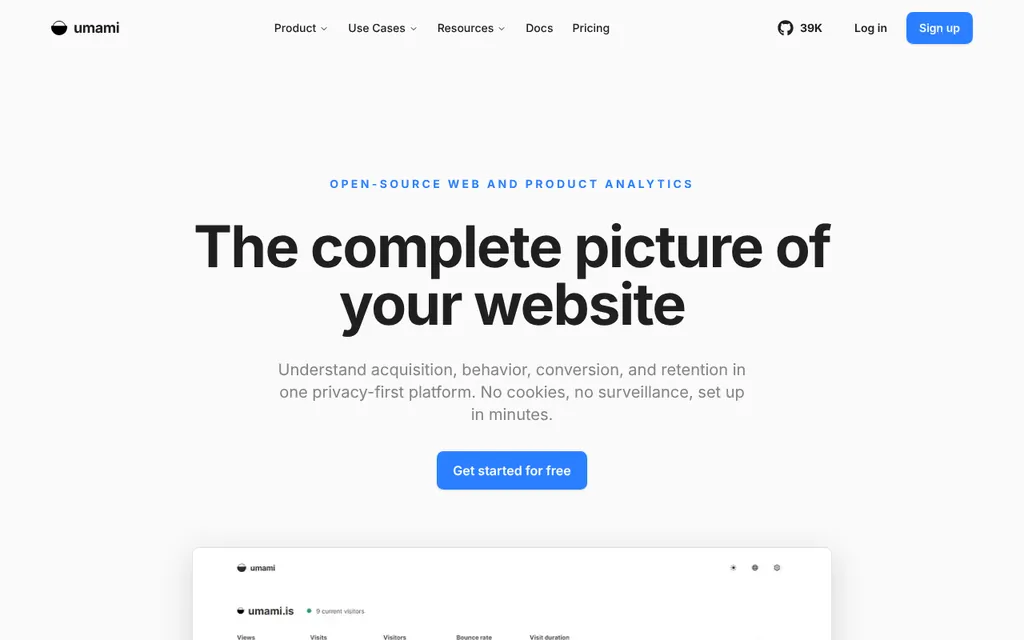
umami.isExplore the product
AT A GLANCE
Details about Umami
Short verdict: Umami is open-source (MIT), cookieless analytics. Its free Cloud plan includes funnels, retention and revenue reports, and in our test its script weighed 2.4 KB and set no cookies. On Umami Cloud, 10,000 monthly pageviews cost $0. At 100,000 the free plan only works if you track nothing else, because 100,000 events is its exact cap, and 1 million costs $20. The weak spots are trust and fine print: no SOC 2 or ISO 27001, a status page that stayed at 100% through a 5-6 hour EU data gap, and no documented rule for a free account over its cap. It suits developers and small teams who want product-style reports without cookies, or who want to self-host. Teams that need certifications, or an uptime SLA without an Enterprise contract, should look elsewhere.
How we reviewed it: We did not create an account or send data to Umami. On 21 October 2026 we loaded Umami's documented snippet on a test page in headless Chromium 141 with a placeholder site ID. Every outgoing request except the script download was blocked, so nothing reached Umami, and we recorded what the script downloads, stores and tries to send. We also read its pricing page, docs, GitHub releases and status page, and used its public demo at 1440x900. We did not test the logged-in dashboard, count accuracy, imports, replay or support. Prices are monthly in USD.
Disclosure: tailkits.com runs Umami Cloud and Google Tag Manager on every page; both are loaded in our site layout. That is first-hand context, not a sponsorship, and this page carries no referral tag.
What Umami costs and includes
| Free plan | Hobby, $0 with no time limit: 100,000 events a month, 1 website, 6 months of data. Umami's sign-up docs ask for an email code and a data region, not a card. |
|---|---|
| 10,000 pageviews a month | $0 (Hobby) |
| 100,000 pageviews a month | $0 on Hobby, but exactly at its cap; $20 (Pro) once you track any custom event |
| 1,000,000 pageviews a month | $20 (Pro, 1 million events included), then $0.00003 per event, or $30 per extra million |
| What is billed | "Events": each pageview, custom event and stored event property, per Umami's pricing page. Its Cloud FAQ adds stored session data. |
| Trial and card | 14-day trial of Pro or Business through Stripe checkout, billed when it ends unless cancelled |
| Hosting | US or EU, chosen at sign-up. Umami Software, Inc. is based in San Francisco. |
| Cookies (our test) | None, and no localStorage or sessionStorage |
| Script (our test) | 2.4 KB compressed, 4.8 KB uncompressed |
| Self-hosting | Free, MIT license, PostgreSQL only since v3 (November 2025) |
| API and MCP | Cloud API and a read-only MCP server with 23 tools from Pro; both included when self-hosting (MCP from v3.4) |
| Business | $200: 10 million events, unlimited sites, 5 years of data, session replay (5,000 a month) and heatmaps. Umami pricing |
What we found in Umami's pricing, script, demo and status page
100,000 is an event cap, and properties count
Umami bills "events", and its pricing FAQ says each stored event property counts as one more. Read literally, that makes umami.track('signup', { plan: 'pro' }) 2 events, and a revenue event with its required revenue and currency fields 3; we could not check this against a real bill. A site with 100,000 pageviews fills the Hobby plan before it tracks a single button.
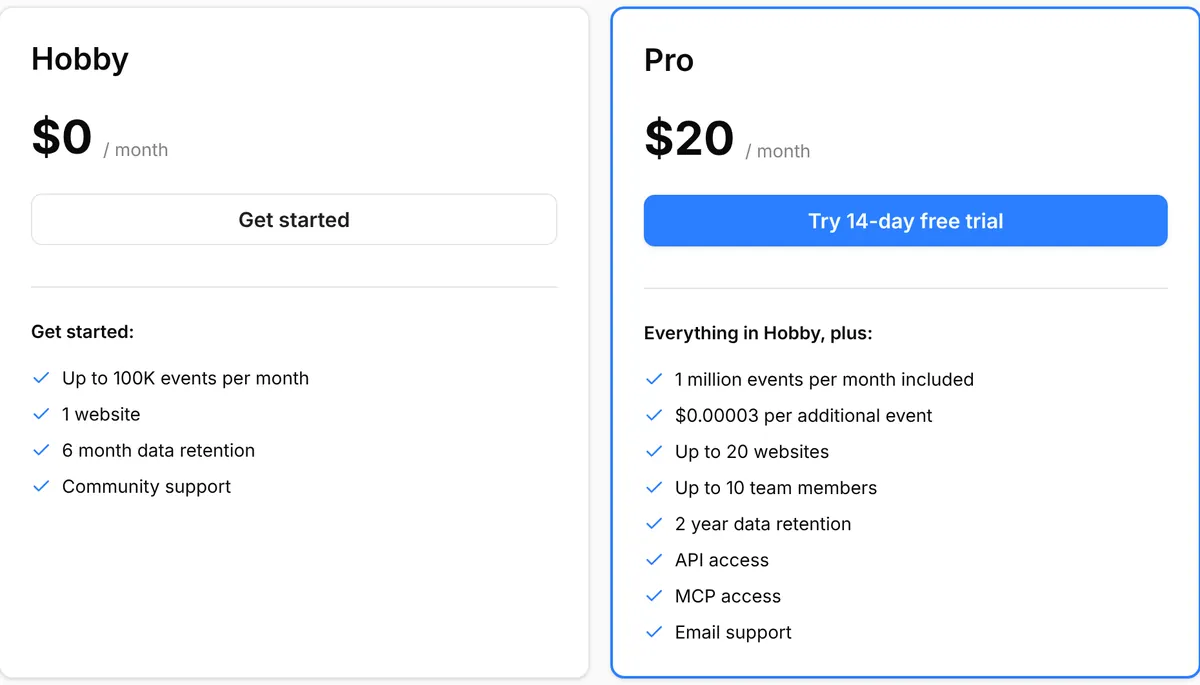
Pro covers 1 million events for $20 and bills $30 for each extra million. At 7 million events Pro and Business both cost $200, so Business is cheaper above that. Paid plans keep collecting and bill the extra, unless you set a spending budget, which stops recording once passed. We found no page that says what happens when a Hobby site goes past 100,000. The Cloud FAQ mentions annual billing, but no annual price is published.
What the script did on our test page
The script sent one POST to gateway.umami.is/api/send. It carried the site ID, screen size, language, page title, hostname, URL and referrer. It set no cookies and wrote nothing to web storage. A history.pushState route change produced a second pageview with no configuration. An outbound link click was not tracked: outbound links and downloads need data-umami-event attributes or a snippet from the docs.
The script has no automated-browser check; Umami's docs say bots are filtered on the server by default. Visitors are counted by hashing the site ID, IP address and User-Agent with a salt that rotates monthly by default, not daily. People sharing an IP address and browser, as on an office VPN, merge into one visitor unless you send a distinct ID.
Product reports on the free plan, and the same code to self-host
Hobby already includes funnels, goals, journeys, retention, UTM, revenue, attribution and custom dashboards. The MIT-licensed self-hosted version includes replay (v3.1), heatmaps (v3.2) and the MCP server (v3.4, off until you set MCP_ENABLED=1). Umami's docs list email reports as the only Cloud-only feature. Its pricing FAQ adds a "Streaming API", which we found no documentation for, and its Platform page says "Same features either way". Self-hosting needs PostgreSQL, so MySQL installs from v2 must migrate first. The GitHub repository has 39.5k stars; v3.4.0 shipped on 17 September 2026.
The public demo is umami.is's own traffic
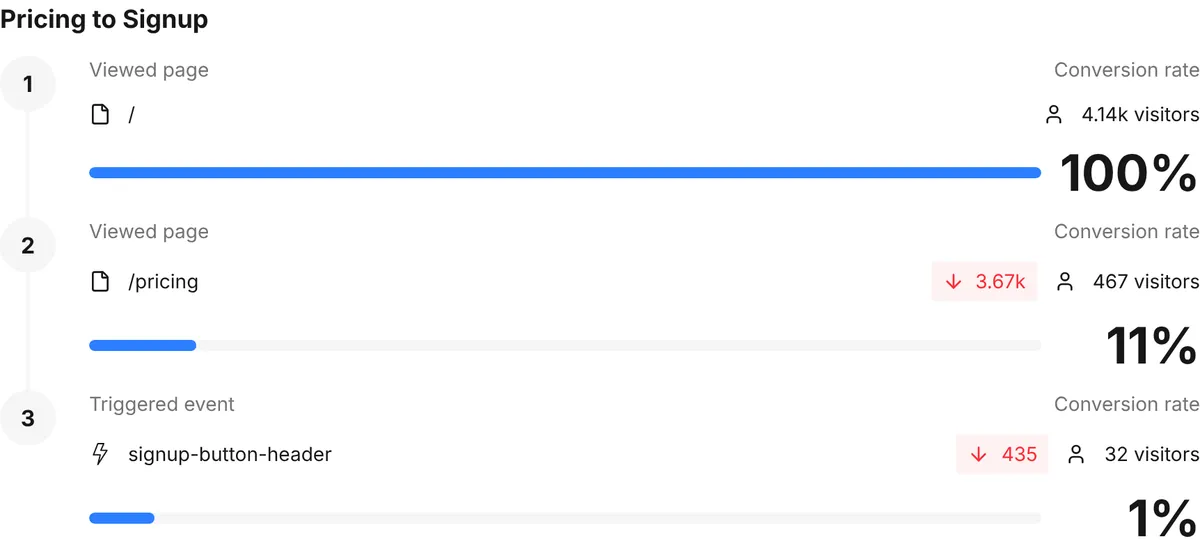
The live demo is umami.is's own dashboard in the EU region, linked from Umami's product-analytics page and GitHub README. It has 14 reports, from Overview and Realtime to Funnels, Retention, Revenue and Attribution. Filters work: clicking Germany reloaded every card for that country (372 visitors in 24 hours) and kept the filter in the URL.
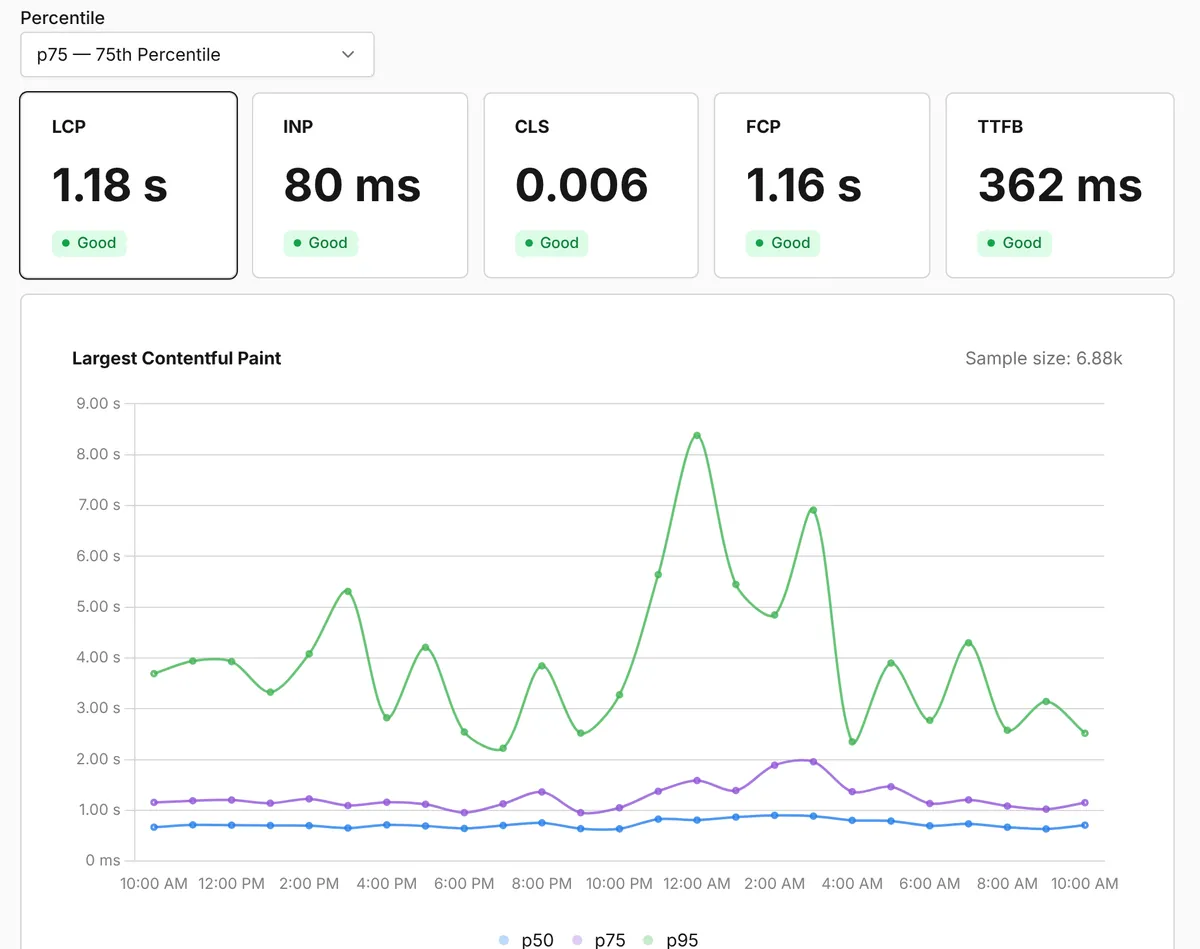
The Performance report shows real-user Web Vitals by page and device once you add data-performance="true". Replays, heatmaps and boards are not shared, session rows can't be opened, and leftover test funnels such as "new funel" clutter the list.
Fine print: imports, consent wording and security paperwork
Umami's Platform page says you can migrate data "from Google Analytics, Plausible, Matomo, and other sources". Its import docs list only Umami exports and CSV files, imported by Umami staff on request from Pro up. On consent, the pricing FAQ says you can use Umami "without needing to display a cookie consent banner". The docs FAQ says GDPR compliance "depends on how you configure and use it". Umami's security page states that it has no SOC 2 or ISO 27001 certification and has not completed an independent penetration test.
Script weight, privacy and reliability
| Tool (our test) | Transfer | Uncompressed | Main-thread time, 4x CPU | Cookies | Route changes tracked by default |
|---|---|---|---|---|---|
| Umami | 2.4 KB | 4.8 KB | 11 ms | None | Yes |
| Plausible (script.js) | 1.3 KB | 2.8 KB | 15 ms | None | Yes |
| Fathom | 2.2 KB | 7.0 KB | 11 ms | None | No, needs data-spa |
| Google Analytics 4 | 153-156 KB | 443 KB | 216 ms | 2 | Not observed |
Differences under about 1 KB or 10 ms are noise, so Umami, Plausible and Fathom cost a page about the same; Google Analytics downloads more than 60 times as much JavaScript. Whether you need a consent banner depends on your jurisdiction and your other scripts. Umami says its tracker needs none, and we are not giving legal advice.
Umami's status page showed 100% uptime over 90 days for the API, the Cloud app and ingestion in both regions. Its only incident in that window, "EU data collection" on 25 August 2026, says data was missing for "approximately 5-6 hours". It was logged as resolved with impact "none" and no affected component. Its one update promised a follow-up on the backfill; none had appeared by 21 October. An uptime SLA comes only with Enterprise.
| Package | Version | npm downloads, 28 Sep-4 Oct 2026 |
|---|---|---|
@umami/node (server-side events) | 0.4.0, 19 August 2024 | 8,182 |
@umami/api-client | 0.81.0, 10 September 2026 | 6,099 |
@umami/mcp | 0.2.0, 10 September 2026 | 64 |
Browser tracking needs only the script tag; the dependency-free Node client was last updated in August 2024.
What you still have to set up
Events and goals. Add
data-umami-eventattributes orumami.track()calls, then build goals and funnels on them. Keep properties few, since each one is billed.Revenue. Send
revenueandcurrencyon an event, for payments from your webhook to/api/send; the docs list no Stripe integration.Personal data. Distinct IDs and event properties you send are your responsibility, per Umami's docs;
data-before-sendcan filter payloads.Ad blockers. Proxy the script and
/api/sendthrough your own domain togateway.umami.is, the Cloud endpoint since 6 June 2026, and setdata-host-url.Your own visits. Run
localStorage.setItem('umami.disabled', 1)in each browser. IP filters need Pro, orIGNORE_IPwhen self-hosting.Self-hosting. Provide PostgreSQL, change the default
admin/umamilogin and setAPP_SECRET. The docs still say Node.js 18.18, but the current release uses Next.js 16, which requires Node.js 20.9 or later.
Pros and cons
Pros
Funnels, retention, journeys, revenue and attribution on the free plan.
A 2.4 KB script with no cookies or storage that tracks route changes without setup.
MIT self-hosting that includes replay, heatmaps and the MCP server.
$20 for 1 million events, with published per-event overage.
A public demo with real traffic and working filters.
Cons
A free cap of exactly 100,000 events, billing per event property, and no documented rule for going over on Hobby.
No SOC 2, ISO 27001 or penetration test, and an uptime SLA only on Enterprise.
A 5-6 hour EU data gap was logged with impact "none" while the status page stayed at 100%.
Marketing pages contradict the docs on Google Analytics import, consent banners and Cloud-only features.
Outbound links and downloads need manual tagging; we found no Stripe or Search Console integration.
How Umami compares
Plausible has no free plan: Starter costs $9 at 10,000 pageviews, $19 at 100,000 and $69 at 1 million. Funnels and revenue need Business, from $19, and its self-hosted AGPL edition leaves them out. Choose it for EU-only hosting.
PostHog is free up to 1 million events and adds feature flags, experiments and surveys. Its script was 104 KB and set a cookie in our test. Its default page-leave event doubles the event count, which makes 1 million pageviews cost $50. Choose it for a full product suite.
Fathom costs $15 up to 100,000 pageviews and $60 at 1 million, with every feature on every plan. It has no free plan, no funnels and no current self-hosted edition. Choose it for simple fixed tiers.
See all analytics tools.
Who should use Umami
Use Umami if you want cookieless analytics with free funnels and retention, 1 million events for $20, or MIT self-hosting; budget for Pro once a site near 100,000 pageviews tracks events. Look elsewhere if you need SOC 2 or ISO paperwork, an SLA below Enterprise, a self-serve Google Analytics import or a provider without US subprocessors.
FAQ
Is Umami free?
Yes, with a cap. The Hobby plan on Umami Cloud is $0 with no time limit for 100,000 events a month, 1 website and 6 months of data, and self-hosting is free under the MIT license. Every pageview, custom event and stored event property counts toward the 100,000.
How much does Umami cost for 1 million pageviews a month?
$20 a month on the Pro plan, which includes 1 million events, as of 21 October 2026. Extra events cost $0.00003 each, or $30 per million, and the $200 Business plan becomes cheaper above 7 million events.
Does Umami need a cookie banner?
Umami sets no cookies, and our test found no cookies or web storage. Umami's pricing page says you can use it without a consent banner, while its docs say compliance depends on how you configure it. The answer depends on your jurisdiction and your other scripts, so check with your own adviser.
Can I self-host Umami or keep data in the EU?
Yes to both. The self-hosted version is MIT-licensed and needs PostgreSQL, since MySQL support was dropped in v3. On Umami Cloud you choose a US or EU data region when you sign up.
Can I import my Google Analytics data into Umami?
Not on your own. Umami's import docs list exports from another Umami instance and CSV files, which Umami staff import on request from the Pro plan up. Its Platform page mentions Google Analytics imports, but there is no self-serve connector.
KEEP EXPLORING
More analytics tools