Free at any volume and tied to Google Ads; 153 KB tag, 2 cookies
DataFast
Analytics that ties Stripe and other payments to traffic sources; from $9/mo
PaidAnalytics
datafa.stExplore the product
AT A GLANCE
Details about DataFast
Short verdict: DataFast pulls payments from your payment provider and shows revenue next to every traffic source, page, country and device, which is the reason to choose it over a plain visitor counter. At 100,000 monthly pageviews it costs $19 a month for one site, or $39 for more sites or teammates. The trade-offs: the default script sets four cookies and DataFast's own terms tell you to show a consent banner, data is hosted mostly outside the EU, and there is no free plan and no status page. It suits founders selling through Stripe, LemonSqueezy, Polar, Paddle or Shopify who want to know which channel brings paying customers; for EU hosting or a free plan without cookies, look at Plausible or Umami.
How we reviewed it: We did not create an account or send data to DataFast. On 21 October 2026 we loaded its documented snippet on a test page in headless Chromium with every outgoing request blocked, so nothing reached DataFast, and recorded what it downloads, stores and tries to send (the script switches itself off in automated browsers, so we masked that flag). We read the script's source, the pricing, terms, DPA and docs, and clicked through the two public dashboards at 1440 px wide. We did not test the logged-in dashboard, payment connections, the accuracy of counts or attribution, imports or support. Prices are monthly in USD.
What DataFast costs and includes
| Free plan | None. A 14-day trial without a card; without a subscription the dashboard locks and data is deleted 7 days after the trial, per the terms |
|---|---|
| 10,000 pageviews a month | $9 (Starter, up to 10,000 events) |
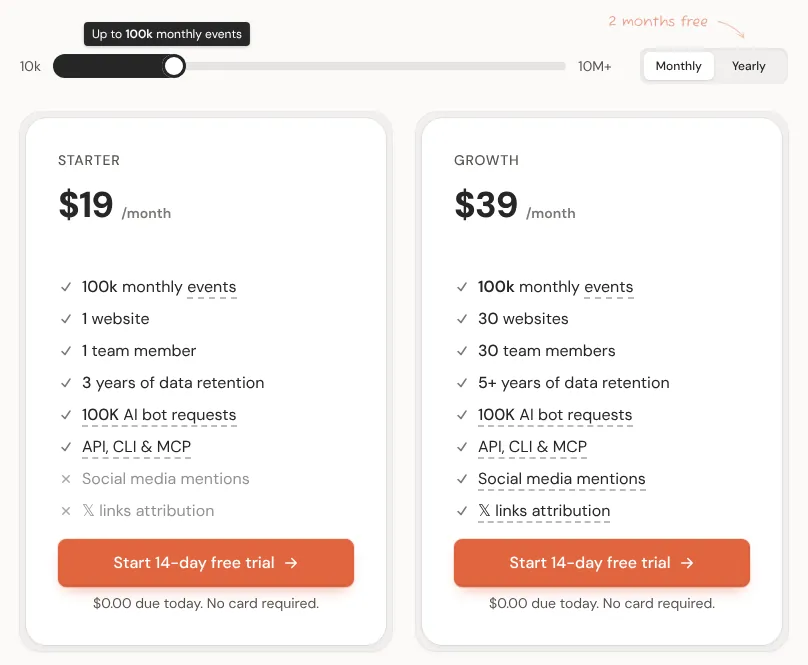
| 100,000 pageviews a month | $19 (Starter 100k) |
| 1,000,000 pageviews a month | $69 (Starter 1M) |
| What is billed | "Events": pageviews, payments and goals, pooled across all your sites. The script also sends every outbound-link click as an event |
| Plans | Starter: 1 website, 1 team member, 3 years of data. Growth ($19 / $39 / $139 at the same volumes): 30 websites, 30 team members, "5+ years", X and Reddit mentions, X link attribution. Yearly billing costs 10 times the monthly price |
| Hosting | "Most of our infrastructure is located outside the EU, including in the United States," per DataFast's DPA. No EU option. The company is JustShipIt Pte. Ltd. in Singapore |
| Cookies (our test) | 4 first-party cookies by default; an optional cookieless script since April 2026 |
| Script size (our test) | 5.3 KB compressed, 15.4 KB uncompressed |
| Self-hosting | No; DataFast is closed source |
| API and AI tools | REST API (60 requests a minute per key), a CLI and a remote MCP server with 67 tools, on both plans. DataFast pricing |
What we found in DataFast's docs, script and demo
What you pass to checkout, and which providers count
First you connect a provider: Stripe through a read-only restricted key (rk_), LemonSqueezy or Paddle through an API key, Polar through an access token. Shopify (via a custom app) and WooCommerce (via the WordPress plugin) then attribute orders without code. For the others, the docs give four ways to tie a payment to a visitor:
Checkout metadata, the method the docs recommend: when your server creates the checkout, read the
datafast_visitor_idanddatafast_session_idcookies and pass them inmetadata(Stripe Checkout, Stripe PaymentIntents, Polar),custom(LemonSqueezy) orcustom_data(Paddle). DataFast says no webhook is needed.Success-page redirect, without code: add
?session_id={CHECKOUT_SESSION_ID}to a Stripe Payment Link,?order_id=[order_id]to a LemonSqueezy link or?checkout_id={CHECKOUT_ID}to a Polar link. It only works if the buyer returns in the same browser.By email:
window.datafast("payment", { email })on the thank-you page.Payments API for any other provider:
POST /api/v1/paymentswith amount, currency, transaction ID and visitor ID.
Using metadata and redirects together records each payment twice; data-disable-payments="true" fixes it. The docs never name the attribution model (first visit, last visit or other); a guide only says DataFast "ties every payment back to the visit that caused it". Revenue attribution guide
Revenue on every report in the public demo
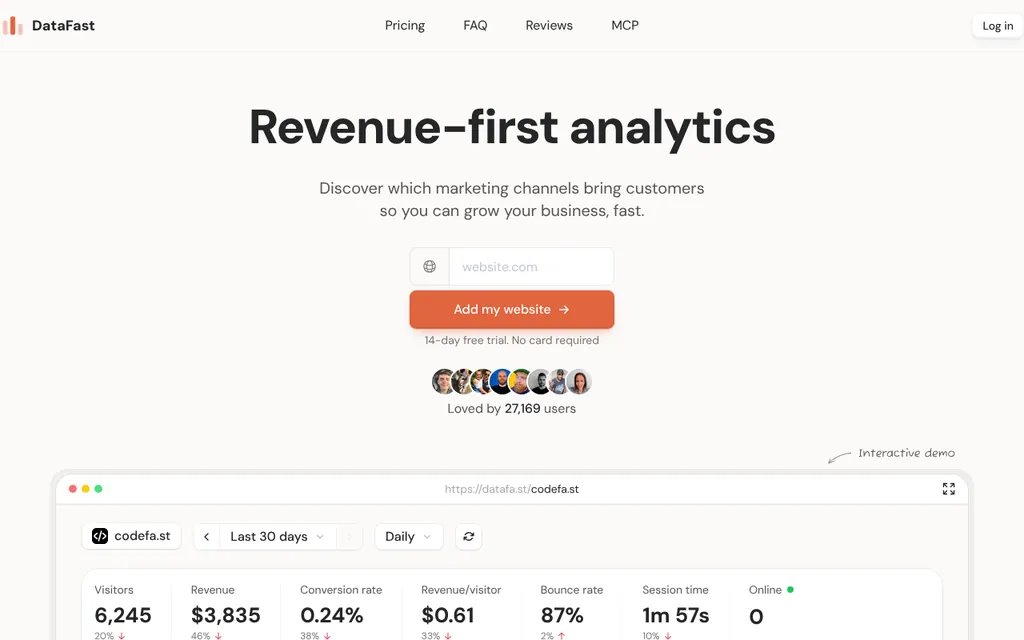
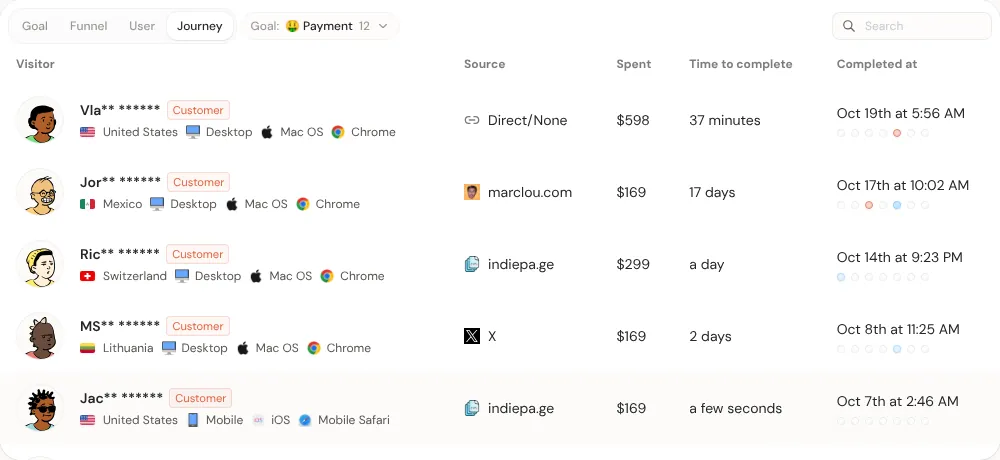
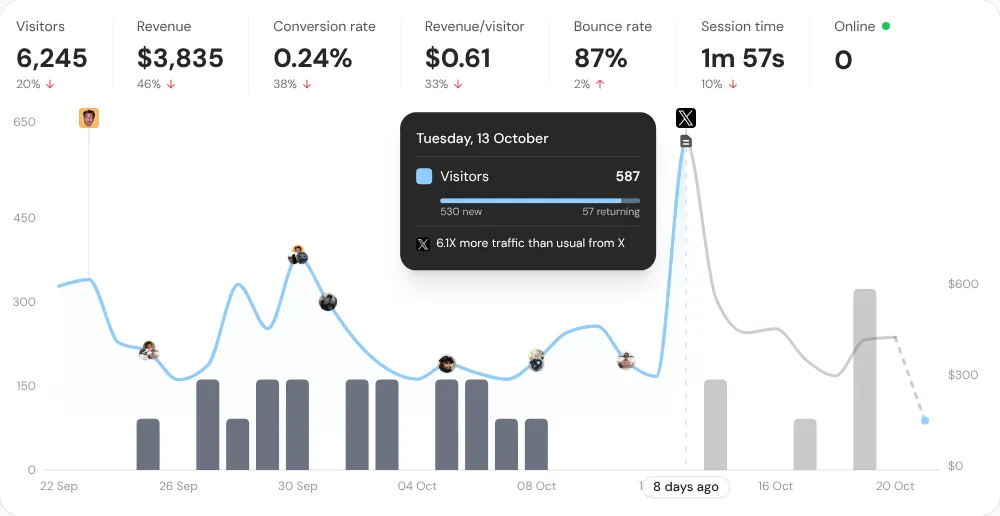
Both public dashboards show codefa.st, another product by DataFast's maker, Marc Lou. For the last 30 days they showed 6,245 visitors, $3,835 in revenue, a 0.24% conversion rate and $0.61 per visitor, with visitors as a line and revenue as bars. Hovering 13 October showed 587 visitors (530 new) and an automatic note: "6.1X more traffic than usual from X". A referrer row's tooltip gives visitors, revenue, revenue per visitor and conversion rate, and its filter icon recalculates the whole page: X sent 1,641 visitors and $169, with a 94% bounce rate. The /demo version adds Search Console keywords, a visitor list and the Journey tab. The shared dashboard's period menu has seven presets and no custom range.
What the script does on a page
In our test the script set four cookies on the root domain: datafast_visitor_id, datafast_visitor_first_seen_at and datafast_visitor_session_count for 365 days, and datafast_session_id for 30 minutes, renewed with each event. On load it tried one POST to datafa.st/api/events carrying the URL, referrer, screen and viewport size, language, time zone, visitor ID, session ID, first-seen time and session number. A client-side route change sent a second pageview, and an outbound click sent an external_link event with the link's URL and text, both without setup.
Events, the 100% lock and add-ons
Starter climbs in flat tiers from $9 (10,000 events) to $199 (more than 10 million); Growth costs about twice as much at each step. Because goals, payments and outbound clicks count, a site at exactly 10,000 pageviews fills the $9 tier and any goal pushes it onto the $19 tier. DataFast emails you at 75%; at 100% the dashboard locks until you upgrade to a tier that covers the month, while tracking continues. An opt-in "Pause tracking at limit" setting stops recording instead, although the terms say DataFast never stops tracking "under any circumstances".
Server-side AI crawler tracking includes 100,000 requests per account per billing cycle since 15 September 2026, then $9 a month per extra million.
An MCP server that can also make changes
The remote MCP server at https://datafa.st/api/mcp accepts OAuth sign-in (since 6 September 2026) or a scoped token, and its reference lists 67 tools. Beyond analytics, they record goal events and create funnels, alerts, notes, websites and API keys. Irreversible or credential-issuing actions need explicit confirmation; deleting websites and connecting payment providers stay in the dashboard. MCP tool reference
Script weight, privacy and reliability
| Script | Compressed | Main-thread time (4x CPU) | Cookies | SPA route change | Outbound click |
|---|---|---|---|---|---|
| DataFast | 5.3 KB | 8 ms | 4 | Tracked | Tracked |
| Plausible (script.js) | 1.3 KB | 15 ms | 0 | Tracked | Needs an option |
| Umami | 2.4 KB | 11 ms | 0 | Tracked | Not tracked |
| Fathom | 2.2 KB | 11 ms | 0 | Needs data-spa | Not tracked |
Our test, 21 October 2026, median of 5 cold loads. At 5.3 KB the script is four times Plausible's but far below Google Analytics 4's 153 KB.
Consent depends on your jurisdiction, and DataFast's pages disagree. For the default script, the FAQ says you "may need a cookie banner", while the terms say you "must display a cookie consent banner" before collecting any data. DataFast says its cookieless script is designed so you "typically do not need a cookie banner". It hashes signals such as IP address and user agent with a salt that rotates about every 24 hours, so visits on different days can count as different visitors and the User and Journey tabs disappear. The checkout guides read cookies this script never sets, and DataFast itself advises keeping the default script if revenue matters. We are not lawyers. DataFast on cookieless tracking
DataFast publishes no status page, uptime figure or SLA, and status.datafa.st does not resolve. Its DPA names eight subprocessors, including AWS, Vercel and OpenAI. The datafast npm package (3.0.18, 9 June 2026) had 8,985 downloads from 28 September to 4 October 2026.
What you still have to set up
Revenue. Connect each provider and add either the cookie values to your checkout code or the redirect parameter to your payment links, not both.
Goals. Call
window.datafast("signup")or adddata-fast-goalto a button; names are lowercase, up to 64 characters, with up to 10 parameters.Consent. A banner for the default script where your law requires it, or the cookieless script with weaker attribution.
Ad blockers. The managed proxy needs a CNAME from a neutral subdomain to
proxy.datafast.io, thensrcanddata-api-urlpointed at it.Your own visits. Set
localStorage.datafast_ignore=trueper browser, or exclude IPs and paths.History and team. Only Plausible exports can be imported. Starter has one seat. The quickstart's "See all installation guides" link returns a 404 page, so use the docs sidebar.
Pros and cons
Pros
Revenue comes from the payment provider, with documented setups for Stripe, LemonSqueezy, Polar, Paddle, Shopify and WooCommerce and an API for the rest.
A 5.3 KB script that tracks route changes and outbound clicks without configuration.
A 67-tool MCP server with OAuth, plus API and CLI, on both plans.
No overage fees; events keep recording past the limit.
Cons
Four cookies by default; cookieless mode weakens attribution.
No free plan, no EU hosting, no self-hosting.
The dashboard locks at 100% of events, and outbound clicks count.
No status page, and the attribution model is undocumented.
A second site means Growth at about twice the price.
How DataFast compares
Plausible charges the same $9, $19 and $69; its Starter and Business price ladders use the same numbers as DataFast's Starter and Growth from 10,000 to 10 million. Revenue needs Business ($39 at 100,000) and comes from amounts you send in custom events; there is no Stripe connection. Choose it for EU-only hosting and no cookies.
Umami Cloud is free up to 100,000 events and costs $20 at 1 million. Revenue is an event you send yourself. Choose it for a free plan, no cookies or self-hosting.
PostHog is free up to 1 million events and adds replays, experiments and a Stripe revenue view still in beta, with a script of about 104 KB. Choose it for product analytics beyond traffic.
See all analytics tools, including Google Analytics and Fathom.
Who should use DataFast
Use DataFast if you sell through a supported provider, want revenue per channel and page without building reports, and can show a consent banner or accept cookieless mode's weaker attribution. Look elsewhere if you need EU hosting, cookie-free tracking by default, a free plan, a status page, or analytics for a site that takes no payments.
FAQ
Is DataFast free?
No. DataFast has a 14-day free trial that needs no card, then plans start at $9 a month for 10,000 events. If you don't subscribe, the dashboard locks and the trial data is deleted 7 days after the trial ends, per DataFast's terms.
How much does DataFast cost for 100,000 pageviews a month?
$19 a month on Starter for one website and one team member, or $39 on Growth for up to 30 websites, as of 21 October 2026. At 10,000 it costs $9, and at 1 million $69. DataFast bills events, so goals, payments and outbound-link clicks count alongside pageviews, and yearly billing costs 10 times the monthly price.
Does DataFast need a cookie banner?
DataFast's terms say yes for the default script, which sets 4 cookies; its FAQ says you may need one depending on jurisdiction and setup. DataFast says its optional cookieless script is designed so you typically don't need one, but it drops cross-day journeys and makes revenue attribution less accurate. This is not legal advice.
Which payment providers does DataFast work with?
Stripe, LemonSqueezy, Polar, Paddle, Shopify and WooCommerce have documented integrations, and the docs also cover Dodo Payments and Easytool. Other providers can send payments through DataFast's Payments API with the visitor ID from the datafast_visitor_id cookie.
Can DataFast keep data in the EU or be self-hosted?
No to both. DataFast's DPA says most of its infrastructure is outside the EU, including in the United States, and there is no EU region or self-hosted edition. Plausible (EU only) and Umami (US or EU, or self-hosted) are the options in our reviews.
KEEP EXPLORING
More analytics tools