

Email API with no approval queue, React Email support; $35 for 100,000 emails
Postmark
Transactional email API with separate streams, inbound parsing and 45-day logs
FreemiumEmail
postmarkapp.comExplore the product
AT A GLANCE
- Website
- postmarkapp.com
- Pricing
- Freemium
- Categories
- Listed
- Sep 2026
- Updated
- Oct 2026
Details about Postmark
Short verdict: Postmark is a sending API built around transactional email, with a separate stream for newsletters, inbound mail parsed into JSON and 45 days of full message history on every plan. Its weak spots are setup and price: every new account is reviewed by hand, there is no EU hosting, and at 100,000 emails a month it costs several times what Amazon SES or Mailtrap charge. Its status page publishes no uptime figure, and in September one batch of accepted messages waited about 49 hours. It suits apps sending tens of thousands of transactional emails a month, not teams that need EU hosting, HIPAA or the lowest bill at volume.
How we reviewed it: We did not create an account or send email through Postmark. On 21 October 2026 we read the pricing page and moved its calculator through every stop, read the support center, developer docs, quickstart and the official MCP server's README, installed the postmark Node SDK without calling the API, and read 90 days of incidents from Postmark's status page and its public API. Deliverability and inbox speed can't be tested without sending, so claims about them are Postmark's. Other services' prices come from our comparison of seven email APIs, checked the same day.
What Postmark costs and requires
| Free plan | 100 emails a month, no overages; never expires and needs no credit card, per Postmark. No plan between 100 and 10,000 emails. |
|---|---|
| 10,000 emails a month | $15 (Basic). $16.50 on Pro if you need inbound mail. |
| 100,000 emails a month | $115 (Basic, 125,000 tier). $125.50 with inbound (Pro 50,000 tier plus overage). |
| 1,000,000 emails a month | $775 (Basic, 1,500,000 tier). $852.50 with inbound (Pro). |
| What counts as an email | Every sent message, sandbox test and processed inbound message, plus each CC and BCC address. Unused emails don't roll over. |
| Before you email customers | A work email at sign-up (Gmail and Yahoo addresses are refused), a usage review by Postmark staff, and a verified sender address or domain. |
| Hosting | A data center near Chicago plus AWS (region not stated). No EU servers, and Postmark says it has no plans for them. |
| SDKs and tools | Official libraries for Node.js and TypeScript, Python, Ruby, Rails, .NET, Java and PHP, a CLI, and an official MCP server. |
| Billing | Monthly only, no annual plans; cards only, no PayPal or purchase orders. Postmark pricing |
What we found in the pricing, docs and status page
The cheapest bill often means buying the next tier up
Postmark sells three paid plans in six volume tiers, from 10,000 to 1,500,000 emails a month, each with a fixed price and an overage rate per 1,000 extra emails. At 10,000, Basic is $15 plus $1.80 per 1,000, Pro $16.50 plus $1.30 and Platform $18 plus $1.20. The calculator only stops at the tiers, so we did the arithmetic for 100,000 and 1,000,000. At 100,000 a month, the Basic 50,000 tier plus overage costs $55 + 50 × $1.80 = $145, while the 125,000 tier costs $115 flat. At 1,000,000, the 700,000 tier plus overage costs $455 + 300 × $1.70 = $965, against $775 for the 1,500,000 tier. The bigger tier saves $30 and $190 a month, even with emails left unused.
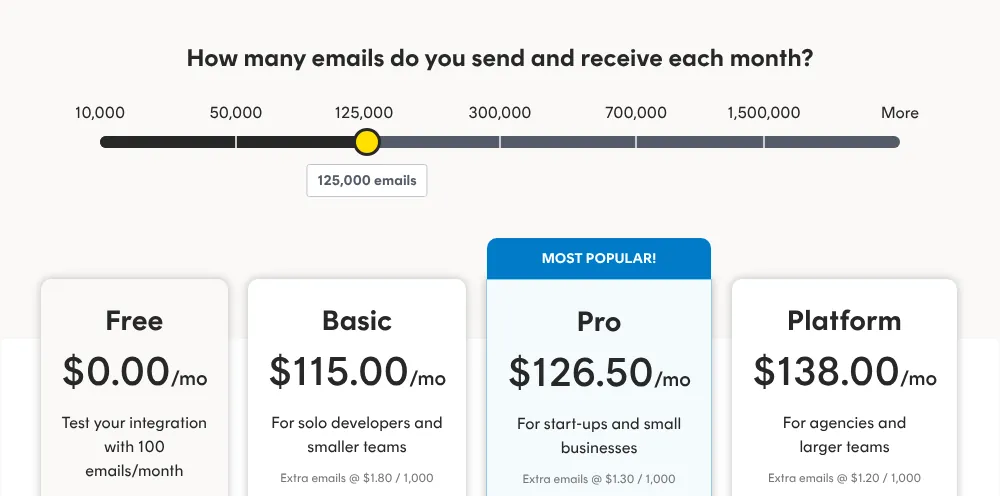
Basic is the only paid plan without inbound processing and allows 5 sending domains and 4 users; Pro allows 10 and 6. Platform, with no limits, costs $126 at 100,000 a month, $11 more than Basic.
Three gates before you can email a customer
Postmark refuses sign-ups from Gmail, Yahoo and other public domains, and staff review each new user's description of how they will use it, per a Postmark blog post. Until the account is approved, the support center says, you can only email addresses on domains you have verified, and link tracking stays off; the review takes "less than 24 hours on weekdays." You also need a verified sender: one address confirmed by email, or a domain with a DKIM TXT record and a Return-Path CNAME, which can take up to 48 hours to show as verified.
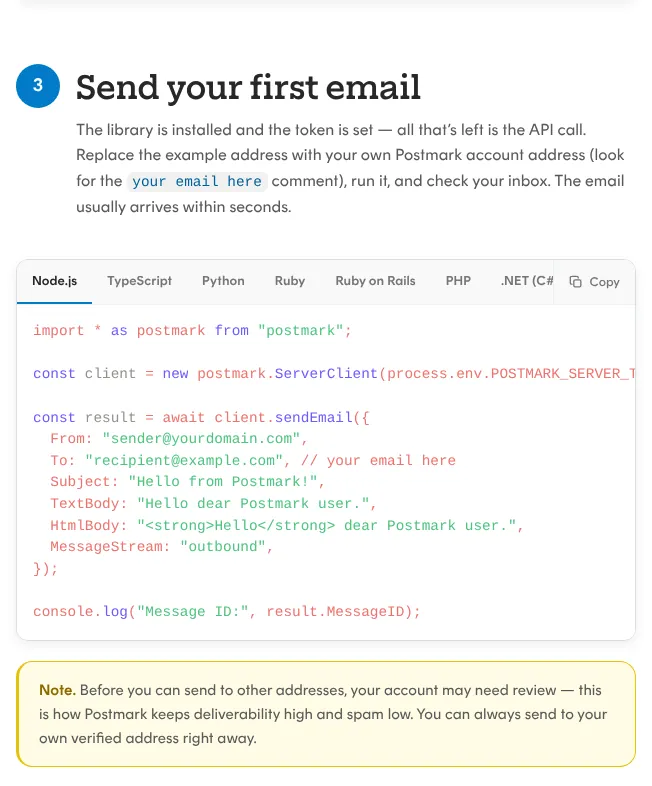
The docs disagree about the wait: the quickstart's build spec for AI agents says sends reach only "the account owner's own verified address." Plan for a working day before your first customer email.
Separate streams, inbound mail and 45 days of history
Every message names a stream: outbound for transactional mail or broadcast for newsletters. Postmark says the two use separate IP pools, so a newsletter can't hurt your password resets; broadcast streams require an unsubscribe link. Batches take up to 500 messages per call.
Full message content and events are kept for 45 days and statistics indefinitely; a paid add-on on Pro and Platform changes retention to 7-365 days ($5 to $12 a month at the 10,000 tier). Inbound mail is parsed into JSON and posted to your webhook on Free, Pro and Platform.
Limits in the fine print
No scheduled sending. Any delay has to live in your own job queue.
Unsigned webhooks. No HMAC signatures; Postmark recommends HTTP Basic Auth plus allowlisting its IP ranges.
No HIPAA. Postmark says it is not HIPAA-compliant and cannot sign a BAA.
No SOC audit of its own. "Postmark itself has not undergone a SOC audit," per its support center; its data center has.
Dedicated IPs only at volume. $50 per IP a month, from 300,000 emails a month.
Reliability and developer experience
Incidents are listed, uptime is not
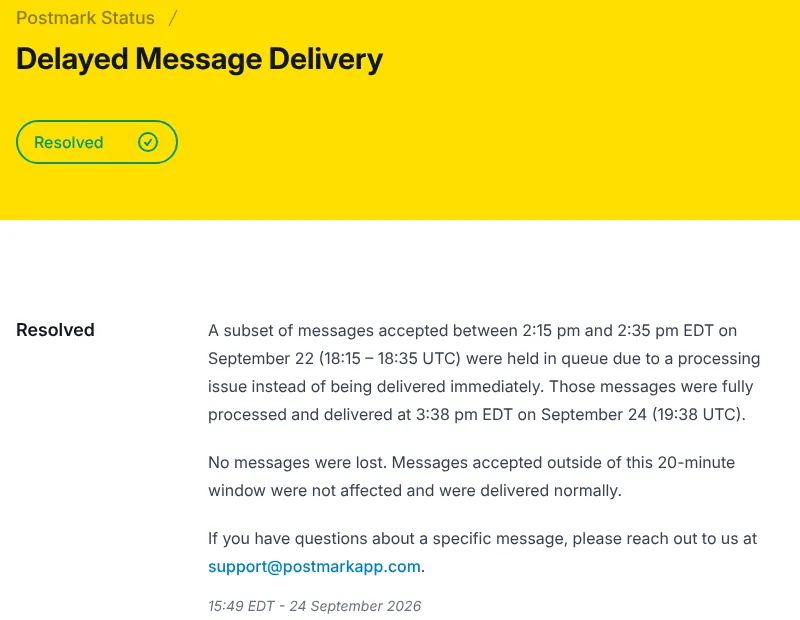
Postmark's status page shows incident history but no uptime percentage, and its public API has none either. In the 90 days to 21 October 2026 it listed seven unplanned incidents and four maintenance windows. Three delayed outbound mail: on 14 August and 28 September, mail from windows of under an hour was queued until a backlog cleared.
The third, on 22 September, is the one to weigh for password resets. Messages accepted between 18:15 and 18:35 UTC were held in a queue and delivered at 19:38 UTC on 24 September, about 49 hours later. The notice was first posted on 24 September, so the status page showed nothing while the mail was stuck. Postmark says no messages were lost.
A small Node SDK with no dependencies
| Package | postmark 5.1.0, released 10 July 2026, MIT license |
|---|---|
| Size | 387 KB unpacked, 185 files; our install added 1 package and 1.0 MB in about 1 second |
| Dependencies | None at runtime; version 5 uses Node's built-in fetch (version 4 depended on axios) |
| Requirements | Node.js 18 or later; TypeScript types included |
| Downloads | 1,396,221 in the week of 28 September to 4 October 2026, the last week with complete npm data |
Two rough edges in the docs: the quickstart's Node.js example uses top-level await, which only runs in an ES module, without saying so, and the TypeScript guide's "batch send" makes one request per recipient instead of using the batch endpoint.
An official MCP server, and a fake one
Postmark's MCP server, @activecampaign/postmark-mcp 2.1.1, runs locally through npx and gives an AI assistant 24 tools, from sending and templates to diagnoseDelivery, which reports whether a message reached someone. It acts with the full rights of the server token, which can't be scoped down, so the README suggests a separate Postmark server for MCP traffic. Official MCP server on GitHub
Check the package name before you install. On 25 September 2025 Postmark warned that an unofficial npm package called postmark-mcp had impersonated it and, from version 1.0.16, secretly sent a BCC copy of emails to an outside server. npm shows it was removed the same day.
What you still have to set up
Domain authentication. DKIM and Return-Path records for each sending domain, plus DMARC; Postmark's DMARC monitoring add-on is $14 a month per domain.
Bounce and complaint webhooks. Protect the URL with Basic Auth and IP allowlisting, and make the handler idempotent, because Postmark retries failed deliveries.
Suppression sync. Postmark suppresses hard bounces and spam complaints per stream; mirror them in your own user records.
Templates. Postmark's templates use its own Mustachio syntax, or send HTML built with React Email or Maizzle.
Scheduling and approval. A job queue for anything sent later, and the approval request well before launch day.
Pros and cons
Pros
A free plan that never expires and needs no card.
45 days of full message history on every plan, and inbound parsing on every plan except Basic.
Transactional and broadcast mail in one account, on separate streams.
A Node SDK with no runtime dependencies and bundled types.
An official MCP server whose tools are marked read-only or destructive.
Cons
Costs more than Amazon SES, Mailgun and Mailtrap at 100,000 and 1,000,000 emails a month.
A manual review, a work-email rule and DNS records before your first customer email.
No published uptime, and a 49-hour hold in September posted two days late.
No EU hosting, no HIPAA and no SOC audit of Postmark itself.
Unsigned webhooks and no scheduled sends.
How Postmark compares
Amazon SES costs $16.38 for 100,000 emails a month and $163.84 for 1,000,000, against Postmark's $115 and $775, and runs in 29 regions, 5 of them in the EU. Each region starts in a sandbox and needs a manual review. Choose it when price at volume or an EU region decides.
Mailgun costs $15, $75 and $700 at 10,000, 100,000 and 1,000,000 emails, and hosts each domain in the US or the EU. It asks for SMS verification and a card to send from your own domain. Choose it for EU hosting in a packaged plan.
Mailtrap costs $15 at 10,000 and $30 at 100,000, the cheapest packaged plan at that volume, but $750 at 1,000,000. Its free plan sends 4,000 emails a month (150 a day). Choose it for mid-volume sending on a budget.
See all email tools, including template frameworks and other sending services.
Who should use Postmark
Use Postmark if your app sends tens of thousands of transactional emails a month, you want inbound parsing and 45 days of searchable history without building them, and you can wait a working day for approval. Choose Mailgun or Amazon SES if your data must stay in the EU, and look elsewhere if you need HIPAA, signed webhooks or scheduled sends.
FAQ
Is Postmark free?
Partly. The free Developer plan includes 100 emails a month, never expires and needs no credit card, but it allows no overages. The next step is Basic at $15 a month for 10,000 emails; there is no plan in between.
How much does Postmark cost for 100,000 emails a month?
$115 a month on Basic, if you choose the 125,000-email tier; the 50,000 tier plus overage would cost $145. If you also need inbound email, the cheapest option is Pro at $125.50. Prices checked 21 October 2026.
Why can't I email customers right after signing up for Postmark?
Postmark reviews every new account by hand. Until it approves yours, you can only send to addresses on domains you have verified, and link tracking is off. Postmark says the review takes less than 24 hours on weekdays. You also need a work email address to sign up.
Does Postmark store data in the EU?
No. Postmark hosts data in a data center near Chicago and on AWS, without naming the AWS region, and says it has no plans to add EU servers. Its GDPR data processing addendum, with standard contractual clauses, is part of its terms of service.
Is the postmark-mcp package on npm official?
No. Postmark's official MCP server is @activecampaign/postmark-mcp. An unofficial package called postmark-mcp impersonated Postmark and, from version 1.0.16, secretly copied emails to an outside server; Postmark warned about it on 25 September 2025 and npm removed it the same day.
KEEP EXPLORING
More email tools Good company for Postmark.
SaaS email priced by contacts, with unlimited transactional sends from $49
Free React components for email, with Tailwind inlining and a local preview