Email API with no approval queue, React Email support; $35 for 100,000 emails
Mailtrap
Email API at $30 for 100,000 emails, plus a test sandbox billed separately
FreemiumEmail
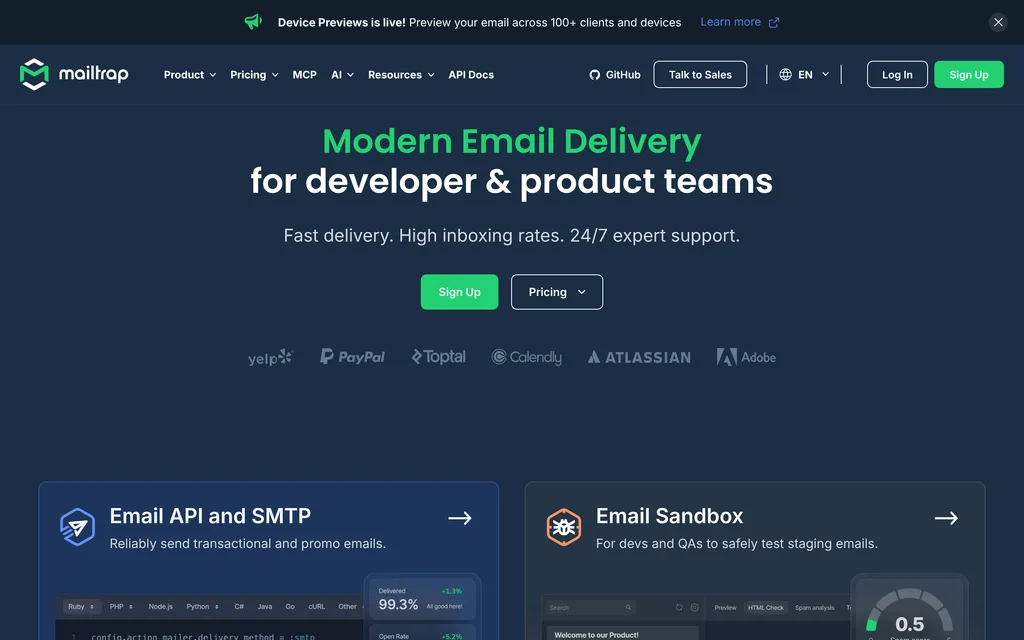
mailtrap.ioExplore the product
AT A GLANCE
- Website
- mailtrap.io
- Pricing
- Freemium
- Categories
- Listed
- Sep 2026
- Updated
- Oct 2026
Details about Mailtrap
Short verdict: Mailtrap sells two products under one login: an email API and SMTP service for sending, and a sandbox that catches test email. Sending is cheap up to 100,000 emails a month ($30 on Basic), but the published price for 1,000,000 is $750. The sandbox is a separate subscription from $17 a month, all data stays in the US, and every new sending domain goes through a compliance check. It suits small and mid-size teams that want testing and sending from one vendor and have no EU hosting requirement. Teams that need EU storage, or that send a million emails a month on a budget, should compare Mailgun and Amazon SES first.
How we reviewed it: We did not create an account or send email through Mailtrap. On 21 October 2026 we moved the pricing calculator through its volume stops and read the billing, limits, domain setup, sandbox and quickstart docs. We downloaded the mailtrap 5.0.0 Node SDK and the mcp-mailtrap 0.10.0 MCP server from npm and read their code without running it, and we read 90 days of notices on the status page. We could not test deliverability, the dashboard, the sandbox interface or Device Previews.
What Mailtrap's two products cost
| Email API/SMTP (sending) | Email Sandbox (testing) | |
|---|---|---|
| Free plan | 4,000 emails a month, at most 150 a day; 1 domain, 1 user, 3 days of logs | 50 test emails a month in 1 sandbox that keeps the last 10; 1 user |
| Paid plans | $15 for 10,000 emails (Basic), $30 for 100,000 (Basic), $85 for 100,000 with a dedicated IP (Business), $750 for 1,500,000 (Enterprise) | $17 for 500 test emails (Basic), $42 for 5,000 (Team), $123 for 50,000 (Business), $498 unlimited (Enterprise) |
| Billing details | Every recipient counts, CC and BCC included; inbound mail uses the same quota; yearly prices only through sales | Up to 20% off with yearly billing; Device Previews is a paid add-on on Business and Enterprise |
| Before you start | Your own domain, 5 DNS records, a sender form and a compliance check; new accounts send 150 emails an hour | An account; no domain needed |
| Data location | US only (AWS us-east-1 and Google servers in the US); EU storage is "coming soon" | |
| SDKs | Node.js, Python, PHP, Ruby, Go, Java, .NET and Elixir; Node package mailtrap 5.0.0 | |
| AI and tooling | Official MCP server mcp-mailtrap 0.10.0 (local, 125 tools), a CLI and a Terraform/OpenTofu provider | |
| Uptime | 100% over the status page's 30 days; 99.92% for sending over 90 days by our arithmetic | |
What we found in the pricing, docs and code
Sending is cheapest at 100,000 emails
Mailtrap's calculator puts 10,000 emails a month on Basic at $15, and 100,000 on Basic at $30 ($0.30 per 1,000). At 100,000 it also shows Business at $85, which adds a dedicated IP, 15 days of logs instead of 5, 100 users instead of 3, SSO and 24/7 chat.
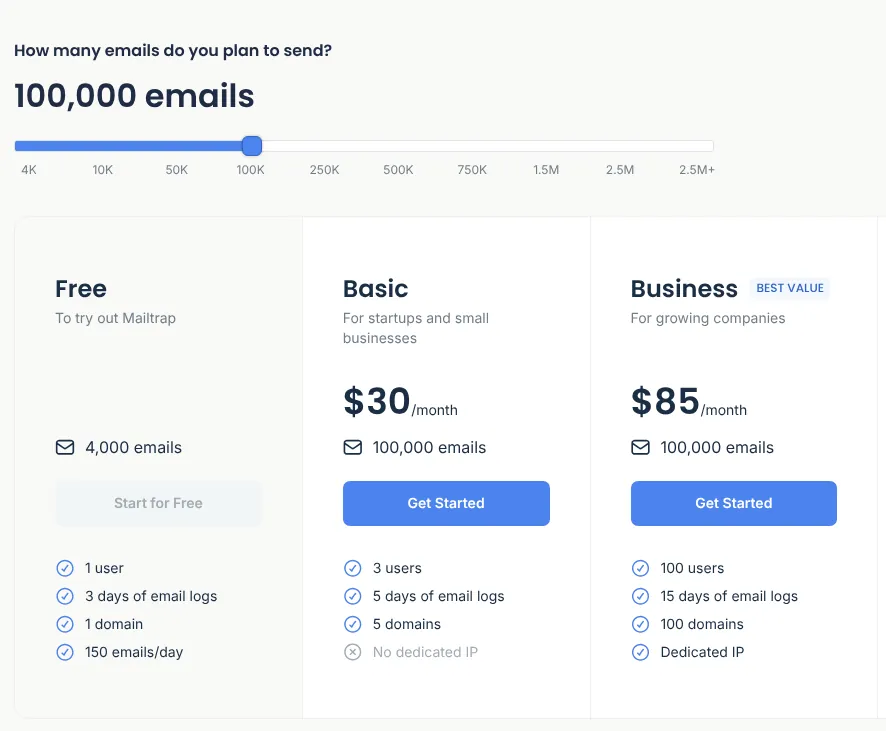
The calculator has no stop at 1,000,000. Business at 750,000 ($450) plus overage would cost $450 + 250 × $0.88 = $670, but Mailtrap caps overage at an unpublished level and says it is "not intended to be used as an extended allowance", so we count Enterprise 1.5M at $750. Every recipient counts, so an email with one To and three CC addresses uses four, and inbound mail comes out of the same quota.
The testing sandbox is a second subscription
Email Sandbox is a fake SMTP server and API that keeps test messages in sandboxes your team can share, with an HTML check based on Can I Email data, a SpamAssassin score, a blacklist report and header inspection, per Mailtrap's docs. It has its own plans. The free one keeps only the last 10 of its 50 monthly test emails, and paid plans run from $17 to $498 a month. Device Previews, screenshots in more than 100 client configurations, is a paid add-on on Business and Enterprise with no published price. In the SDK, sandbox: true and an inbox ID send the same send() call to the sandbox, and testing never counts against sending.
To catch mail on your own machine for free, there is Mailtrap Local (MIT, released 28 July 2026, macOS and Linux only) or Mailpit, a self-hosted MIT tool with HTML, link and SpamAssassin checks and a REST API, per its site. Mailpit's site shows a "Supported by Mailtrap" badge.
Every sending domain passes a compliance check
You cannot send without your own domain. The domain guide lists five DNS records, which Mailtrap says can take up to 24 hours to detect. Next comes a sender form, as a business or a person, which you can switch only once, and then a compliance check. Mailtrap says the automatic part usually takes a couple of minutes, but some domains get a questionnaire, and some a manual review that can end in rejection.
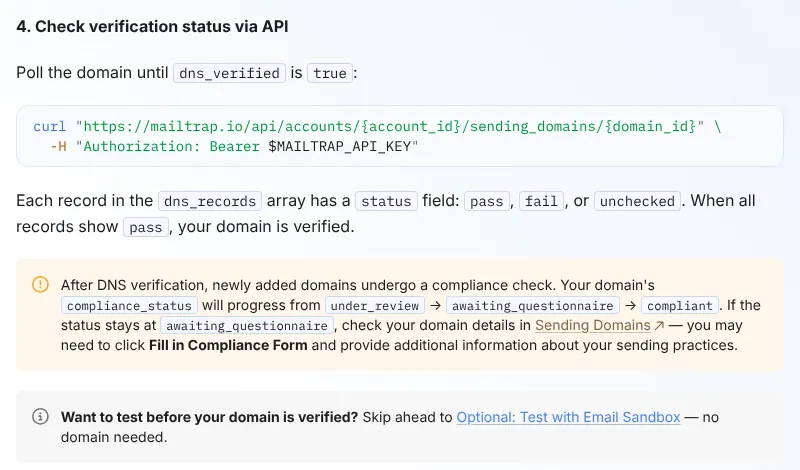
New accounts send 150 emails an hour, with the rest queued, and the Free plan rejects anything over 150 a day. If your emails link to another domain you own, you must verify that domain too, and it counts against your plan's domain limit (1 on Free, 5 on Basic).
The docs trail the code
The quickstart's Go command, go get github.com/railsware/mailtrap-go, names a module the Go proxy cannot find; the SDK lives at github.com/mailtrap/mailtrap-go. The Sandbox overview's Node example calls client.testing.send(), which does not exist in mailtrap 5.0.0. The quickstart and the domain guide list different DNS records. The quickstart also asks for an API token with Admin access to the whole account, though each domain already gets a token limited to that domain. And version 5.0.0 (8 October 2026) moved client.templates to endpoints Mailtrap calls experimental.
The MCP server can manage your account, not only send
The docs describe mcp-mailtrap as a way to send email, read the sandbox and manage templates. Version 0.10.0 registers 125 tools, 43 of them marked destructive, including creating and deleting API tokens, changing user permissions and replying to inbound mail, which sends real email. It runs locally with a token you supply, so give it one limited to what the assistant needs.
Reliability and developer experience
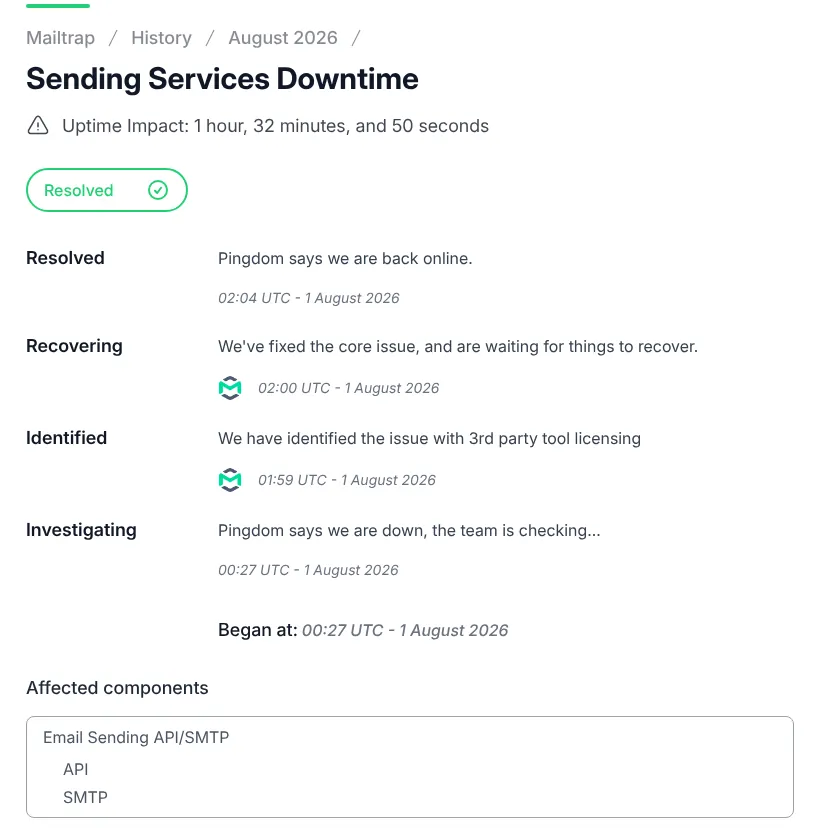
Mailtrap's status page shows 100% uptime for sending over its default 30 days. It has no 90-day view for sending, but the notices from 23 July to 21 October 2026 add up to 1 hour 44 minutes of sending impact, or 99.92% by our arithmetic. On 1 August the sending API, SMTP and inbound email were down for 1 hour 33 minutes, caused by "3rd party tool licensing", per Mailtrap. Two outages of about 6 minutes each followed on 16 September. No uptime SLA is published.
| Package | Version | Size and dependencies | Downloads, 28 Sep to 4 Oct 2026 |
|---|---|---|---|
mailtrap (Node SDK) | 5.0.0, 8 October 2026 | About 310 KB unpacked; axios and qs; Nodemailer optional; TypeScript types included | 65,939 |
mcp-mailtrap | 0.10.0, 9 October 2026 | 469 KB unpacked; built on the Node SDK and the MCP SDK | 211 |
The SDK accepts any axios from 0.27 up (>=0.27), future major versions included, so pin axios yourself. It has had nine releases in 2026. Every docs page also comes as Markdown, with llms.txt files for AI assistants.
What you still have to set up
Domain authentication. DNS records for every sending domain and every domain your emails link to, plus the sender form.
Scoped tokens. The per-domain token or one with sending rights only, with an expiry (365 days by default).
Webhooks for bounces and complaints. Verify the HMAC-SHA256
Mailtrap-Signatureheader (the Node SDK has a helper). After 40 failed retries, 5 minutes apart, Mailtrap pauses the webhook.Batch errors. The batch endpoint takes 500 messages and returns HTTP 200 even when some fail, so check each response.
Suppressions and streams. Hard bounces, unsubscribes and complaints are suppressed automatically, per stream. Marketing mail must use the Bulk Stream.
Templates. Mailtrap hosts Handlebars templates, or you can keep them in code with React Email or Maizzle.
Pros and cons
Pros
$30 for 100,000 emails, the lowest plan price at that volume among the seven services we compared (only Amazon SES's usage-based $16.38 is lower).
Testing and sending in one account, switched by one SDK option.
Webhooks, inbound email, hosted templates and the Bulk Stream on every plan, Free included.
Markdown docs, an official MCP server, a CLI and a Terraform provider.
Cons
US-only data storage.
The sandbox is a second bill, and its free plan keeps 10 messages.
Compliance checks per domain and a 150-an-hour start.
Quickstart errors and an Admin token by default.
$750 at 1,000,000 emails, more than Mailgun's $700.
How Mailtrap compares
Postmark costs $15 at 10,000 emails but $115 at 100,000 and $775 at 1,000,000. Its free 100 emails a month never expire, it reviews new accounts by hand, and it has no EU hosting either. Choose it for transactional-first sending if the price at volume is acceptable.
Mailgun costs $15, $75 and $700, with US or EU hosting per domain on every plan. It needs SMS verification and a card for custom domains, and its status page shows two critical EU outages in the same 90 days (27 August and 4 September). Choose it if data must stay in the EU.
Amazon SES costs $1.64, $16.38 and $163.84 in 29 regions, 5 in the EU. Each region starts in a sandbox that needs a manual review, and you build event handling yourself. Choose it for the lowest per-email price if setup time matters less.
See all email tools.
Who should use Mailtrap
Use Mailtrap if you send up to about 100,000 transactional emails a month, have no EU data requirement, want a hosted sandbox your QA team can share, and can wait for a compliance check before the first send. Budget for the sandbox separately and give your app and the MCP server scoped tokens. Look elsewhere if data must stay in the EU or you send a million emails a month on a tight budget. To catch mail on one developer's machine, Mailtrap Local or Mailpit is free.
FAQ
Is Mailtrap free?
Yes, with two separate free plans. Sending allows 4,000 emails a month but rejects anything over 150 in a day, with 1 domain and 3 days of logs. The sandbox allows 50 test emails a month in one sandbox that keeps the last 10. Mailtrap says neither needs a credit card.
How much does Mailtrap cost for 100,000 emails a month?
$30 a month on the Basic plan, as of 21 October 2026. Business costs $85 for the same volume and adds a dedicated IP, 15 days of logs, more users and 24/7 support. 10,000 emails cost $15, and 1,000,000 cost $750 on the Enterprise 1.5M plan. Every recipient counts, including CC and BCC.
Is the testing sandbox included in a sending plan?
No. Email Sandbox is billed separately, from $17 a month for 500 test emails to $498 for unlimited, with up to 20% off yearly. Testing volume does not count against sending. Mailtrap Local is a free, open-source alternative that runs on your own machine.
Can Mailtrap keep my data in the EU?
No. Mailtrap's docs say data is hosted in the US on AWS us-east-1 and Google servers, and its Data Regions page says EU storage is coming soon. It offers a data processing agreement with EU standard contractual clauses.
How long before I can send email with Mailtrap?
It depends on DNS and the compliance check. You add five DNS records, which Mailtrap says can take up to 24 hours to detect, fill in a sender form and pass a compliance check. Mailtrap says the check usually takes minutes but can require a questionnaire or a manual review. New accounts are limited to 150 emails an hour.
KEEP EXPLORING
More email tools