Full-page shadcn/ui examples for Next.js: dashboards, apps and email templates
AlignUI
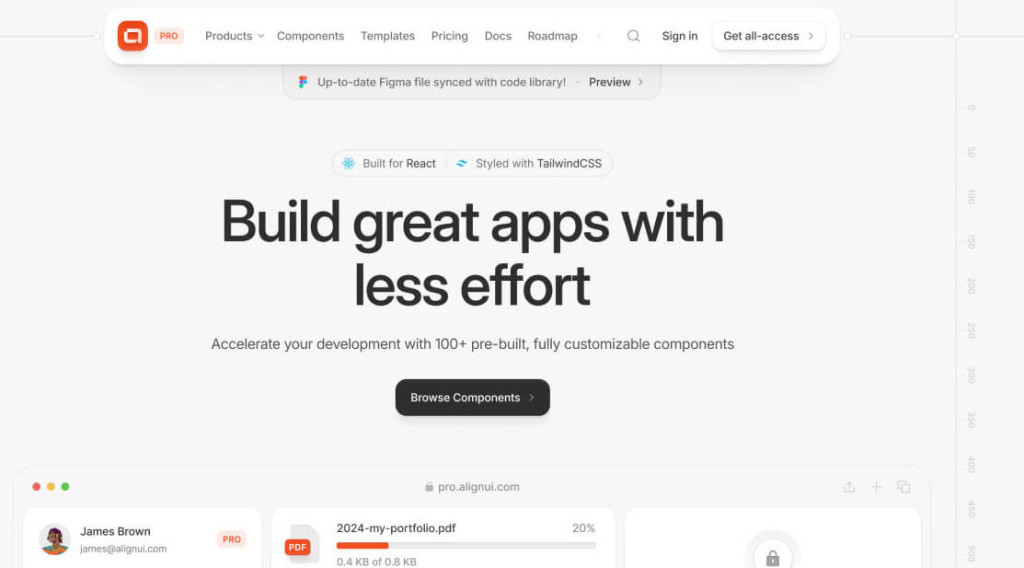
React and Tailwind design system: 49 free components, 276 Pro blocks from $299
FreemiumComponents
pro.alignui.comExplore the product
AT A GLANCE
- Website
- pro.alignui.com
- Pricing
- Freemium
- Categories
- Components
- Listed
- Mar 2026
- Updated
- Nov 2026
Details about AlignUI
KEY POINTS
- Copy & paste
- Dark mode
- Theming
- Figma file
Short verdict: AlignUI is a React and Tailwind CSS design system in two parts: 49 free, MIT-licensed base components built on Radix UI, and AlignUI Pro, which sells 276 blocks and four dashboard templates for $299 one-time. The free Select, Datepicker and Modal we installed worked and switched to dark mode with one class, but on a current Next.js app the documented setup broke in three places: a peer-dependency error, a helper that no longer compiles, and a select list that loses its width under Tailwind CSS 4. Pro code cannot be tried before buying and there are no refunds, and three of the four templates are still on Next.js 14 and Tailwind CSS 3.4. It suits teams building SaaS dashboards who want code that matches a Figma system and can maintain copied files. Look elsewhere if you want npm packages, a trial of the paid code, or everything on Tailwind CSS 4 today.
How we reviewed it: On 22 November 2026 we created a Next.js 16.4.6 app with create-next-app (React 19.3, Tailwind CSS 4.3), followed AlignUI's Next.js installation guide, including npx @alignui/cli tailwind, and installed the Select, Datepicker and Modal base components with the code and commands from their docs pages. We built the app and used each component at 1,280 and 390 px, in light and dark mode. We counted the Pro blocks and templates on pro.alignui.com, tried the pricing options and ran Lighthouse 12.8.2 once on three pages. We did not buy Pro, so we could not read or install Pro blocks or templates or open the Figma file. Prices and license terms come from pro.alignui.com and figma.alignui.com on the same day.
What AlignUI costs and includes
| Price | Base components are free. AlignUI Pro all-access costs $299 one-time for one developer or $399 for five, plus local taxes; Enterprise is on request. With the Figma file the two plans cost $339 and $599. Single templates are $149 each. Lifetime updates are included. |
|---|---|
| Free tier | 49 base components in the docs (AlignUI says 40+), from buttons, inputs and a date picker to a data table, command menu, drawer and modal, plus four helper utilities. MIT license. |
| Pro blocks | 276 in 39 categories by our count: 155 landing-page blocks in 18 categories and 121 app interface blocks in 21, such as command menus, file uploads, filters, modals and tables. 74 are marked New. AlignUI's pages say 100+. |
| Templates | Four dashboard apps: Spectrum (AI), Synergy (HR), Apex Financial (finance and banking) and Catalyst (marketing and sales). A cryptocurrency template is marked Soon. |
| Stack | React, Radix UI, tailwind-variants and Remix Icon, with Tailwind CSS 4.1 per the FAQ. Copy-and-paste source: there is no npm package, only a CLI that writes the design tokens into your CSS. |
| Figma | Sold separately: $119 for one user or $349 for five, per figma.alignui.com. |
| License | Pro: unlimited end products, personal and commercial, including client work delivered to one client. No reselling, no public repositories, and no themes, starter kits, UI kits or site builders made from Pro code. No refunds once the product is accessed. License terms |
What we found
Setup is a token CLI plus manual copying
The guide starts with npx @alignui/cli tailwind, which asks for a primary color (blue, purple, orange or green), a neutral (gray or slate) and a color format, then overwrites your global CSS file. With the defaults it wrote 1,040 lines and 561 CSS variables, from color scales and semantic colors such as bg-bg-white-0 to typography, shadows and a .dark block. It needs an interactive terminal: run from a script, it crashed with a TTY error. It also installed @tailwindcss/postcss and added a PostCSS config next to the Tailwind loader that create-next-app 16.4 already sets up; our build worked with both.
Everything else is copied by hand: four helper files (cn, tv, recursiveCloneChildren and the polymorphic types), Remix Icon, the Inter font, then each component file and its npm packages. Our three components came to five files, because Modal and Datepicker both import Compact Button, which their install steps do not mention, and the Modal example also uses Button.
Three documented steps break on a current Next.js app
The Datepicker page says to run npm install [email protected] date-fns@^3. On our React 19.3 app npm refused with a peer-dependency error, because that react-day-picker version supports React 16 to 18. With --legacy-peer-deps it installed and the calendar worked. The FAQ still says the components target React 18 "as React 19 is not yet officially released"; React 19 shipped in December 2024.
The documented tv helper passes twMergeConfig to createTV. tailwind-variants 4.0, released on 29 October 2026 and what npm install tailwind-variants fetches today, moved that option, so the file failed type checking and next build stopped. Installing tailwind-variants@3 fixed it.
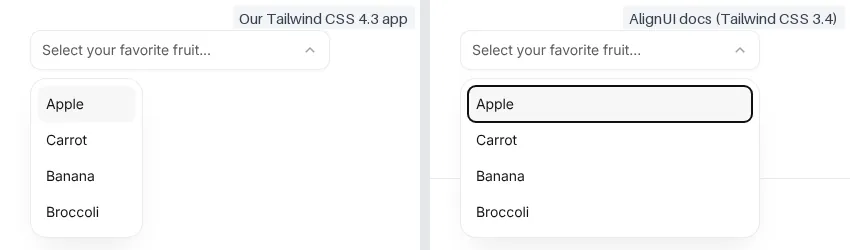
The Select then opened a list 113 px wide under a 300 px trigger. Its classes use Tailwind CSS 3 shorthand for CSS variables (min-w-[--radix-select-trigger-width]), which Tailwind CSS 4 no longer expands, so the minimum width and the maximum height are ignored. AlignUI's docs and Pro sites still run Tailwind CSS 3.4, which is why the same code looks right there, even though the guide tells you to install Tailwind CSS 4. Writing those values as min-w-(--radix-select-trigger-width) is the Tailwind CSS 4 form.
A fourth stop was Next.js's own: its Cache Components setting refused to prerender the date picker, which reads today's date, until we wrapped it in <Suspense>.
Once installed, the components behave well
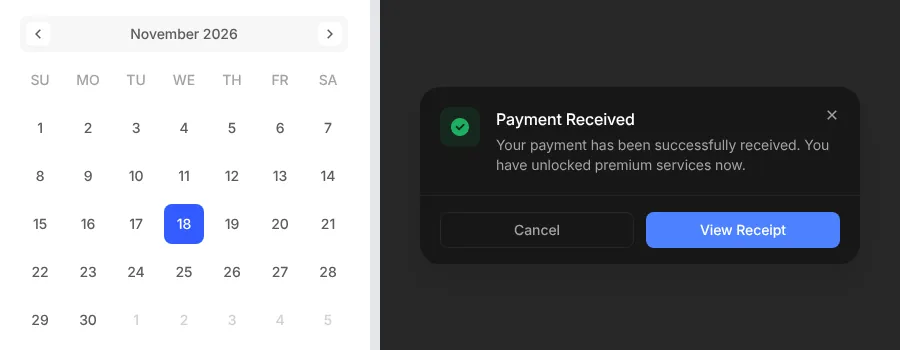
The select kept our choice of Carrot from its four options, the date picker selected 18 November, and the modal moved focus to its Cancel button and closed on Escape. Adding dark to the <html> element switched all three to their dark tokens. At 390 px the calendar is 368 px wide, so with a typical 16 px page margin it runs about 10 px past the edge of the screen.
Pro: 276 blocks you can preview but not try
Each Pro block has a live preview at mobile, tablet and desktop widths, but "Get the code" leads to the pricing page, and the FAQ confirms there are no free Pro samples. With no refunds, the previews and the free base components are all you can judge before paying. The landing-page set covers the usual marketing sections, nine heroes among them; the app set builds on the base components, with nine command menus, eight file uploads and seven modals.
Templates: one current, three older
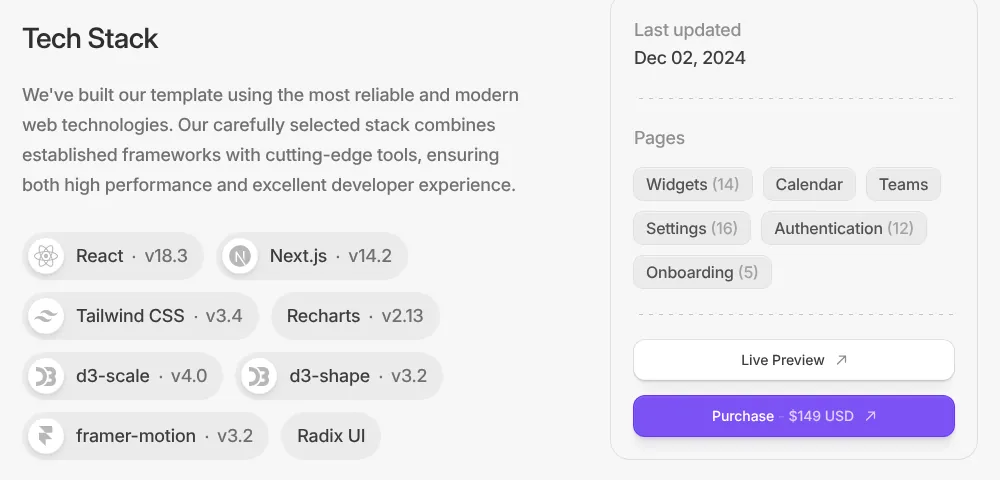
The four $149 templates are complete dashboard apps with live previews. Spectrum, the AI template, lists Next.js 15.5, React 19.1 and Tailwind CSS 4.1 and was updated on 26 January 2026. The HR, finance and marketing templates list Next.js 14.2, React 18.3 and Tailwind CSS 3.4, with last updates between 2 December 2024 and 24 February 2025. The Next.js starter the docs link to is on the same older versions, with its last commit on 16 February 2025.
The Figma file costs extra
AlignUI sells code and design that match, but the Figma file is a separate product. A toggle on the Pro pricing page adds it for $40 more on the one-developer plan and $200 more for five developers, savings of $80 and $150 against buying both, per AlignUI. Two templates on their own cost $298, so all-access makes sense as soon as you want blocks or a third template.
Performance and the AlignUI sites
JavaScript per page in our production build, gzipped:
| Test page | JavaScript |
|---|---|
| Blank page | 132 KB |
| Modal | 170 KB |
| Datepicker | 174 KB |
| Select | 189 KB |
Each component added 37 to 57 KB to a blank page. Lighthouse 12.8.2, one run per page, 22 November 2026:
| Page | Performance | Accessibility | Best practices | SEO |
|---|---|---|---|---|
| Pro home, mobile | 86 | 79 | 79 | 100 |
| Pro home, desktop | 97 | 82 | 78 | 100 |
| Hero blocks, mobile | 53 | 91 | 79 | 92 |
| Select docs, mobile | 55 | 84 | 79 | 92 |
The block pages are heavy: the hero category transferred 5.4 MB on mobile, 3.9 MB of it preview images that Lighthouse estimates could be about 3.3 MB smaller in a modern format. Accessibility lost points for buttons and links without names and for low-contrast text, and every page we tested set third-party cookies from X and Reddit ad pixels. None of this ships with the components.
What you still have to build
A working setup on Tailwind CSS 4. Install the date picker with
--legacy-peer-deps, pintailwind-variants@3, and convert Tailwind CSS 3 variable shorthand such as the Select's width classes.Updates by hand. There is no update command, and every file we copied is labeled version 0.0.0, so compare your copies with the docs when AlignUI changes them.
Template upgrades. Three templates need moving to current Next.js, React and Tailwind CSS versions if you want them.
Small screens. Check wide parts such as the 368 px calendar on phones.
Pros and cons
Pros
A complete token system: 561 variables for color, type and shadows, with dark mode from one class.
Free MIT base components that behaved well once installed, with Radix UI keyboard and focus handling.
A large Pro catalog, 276 blocks against the 100+ advertised, with previews at three widths.
One-time pricing with lifetime updates, and client work is allowed.
Cons
The documented setup broke three times on a current Next.js app with Tailwind CSS 4.
A manual install with unlisted dependencies, such as Compact Button, and no version numbers.
No free Pro samples and no refunds.
Three of four templates, the starter and AlignUI's own sites are still on Tailwind CSS 3.4.
The Figma file costs extra.
How AlignUI compares
Untitled UI has free, open-source React components built on React Aria and Tailwind CSS 4.3 that install with a CLI. Its PRO SOLO license, $349 one-time, adds 5,000+ components and sections and 250+ page examples synced with its Figma kit, sold separately from $129. Pick it for a bigger catalog on current Tailwind; pick AlignUI for its dashboard templates and lower price.
Tremor offers 35+ open-source chart and dashboard components, and its 300+ blocks and templates are now free since its team joined Vercel. Pick it for analytics dashboards on no budget.
See all admin and dashboard component libraries for more options.
Who should buy AlignUI
Buy AlignUI Pro if a small team designs and builds SaaS dashboards, wants blocks and templates that match a Figma system, and can judge from previews instead of a trial. Try the free base components first, and budget time for the fixes above. Look elsewhere if you need a refund window, npm-installed components, a framework other than React, or templates on current Next.js and Tailwind CSS.
FAQ
Is AlignUI free?
Partly. The 49 base components are free under the MIT license. Pro blocks and templates cost $299 one-time for one developer, or $149 per template, and the Figma file is sold separately.
Is the Figma file included with AlignUI Pro?
No. It costs $119 on its own for one user, or $40 more than Pro alone in the one-developer bundle ($339 instead of $299), per AlignUI's pricing pages on 22 November 2026.
Can I use AlignUI Pro for client projects?
Yes, when each project is delivered to one client. You may not resell the blocks or templates, publish them in a public repository, or use them in themes, starter kits or site builders.
Can I get a refund for AlignUI Pro?
No. AlignUI's license says it does not refund digital goods once accessed, and there are no free Pro samples, so judge the live previews and the free base components first.
Does AlignUI work with React 19 and Tailwind CSS 4?
With fixes. In our test the base components ran on React 19.3 and Tailwind CSS 4.3 after installing the date picker with --legacy-peer-deps and pinning tailwind-variants to version 3, and the Select's Tailwind CSS 3 width classes need rewriting.
Get new components like AlignUI weekly
Every Monday: the templates, components and tools added to Tailkits that week, each checked by an editor. Free, unsubscribe in one click.
17 new in the last 30 days313 products reviewed so farSee what you get
KEEP EXPLORING
More components