
Next.js and Astro single-product store with a model picker and checkout UI
ZeroIndex
Astro API docs theme with side-by-side requests and Markdown for AI tools
PaidTemplates
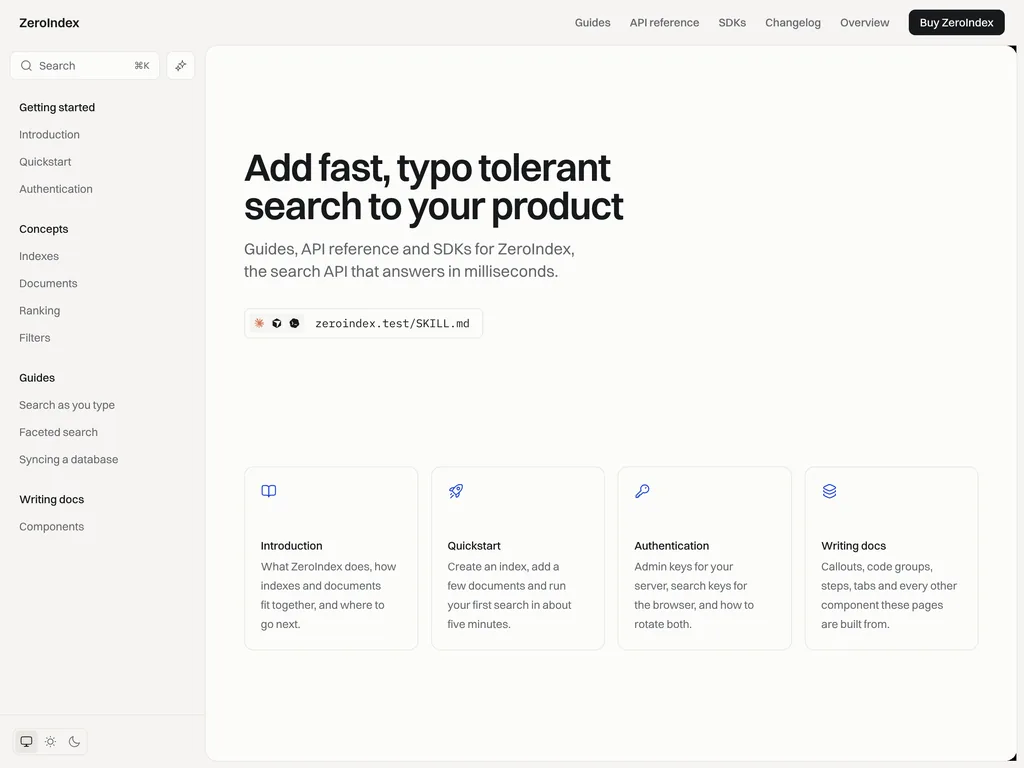
lexingtonthemes.comExplore the product
AT A GLANCE
- Website
- lexingtonthemes.com
- Pricing
- Paid
- Categories
- Templates
- Listed
- Aug 2025
- Updated
- Oct 2026
Details about ZeroIndex
KEY POINTS
- Tailwind CSS v4
- MDX support
Short verdict: ZeroIndex is now a complete documentation site for an API product: guides, an API reference with one page per endpoint and the request and response side by side, SDK pages, a changelog and a status page, in a calm two-panel layout with light and dark modes. The extras for AI readers work: any page can be copied as Markdown, opened in ChatGPT or Claude, or read as a .md file. Two parts fall short of the pitch: the search only matches titles, descriptions and headings, with no typo tolerance, and the AI assistant and the feedback buttons are interface only. Buy it if you document an API or SDK and want an Astro site you fully own; look at Starlight first if you need translations or full-text search without extra work.
How we reviewed it: On 30 October 2026 we used the live Astro demo, which Lexington rebuilt on 19 October 2026, in Chromium at desktop widths from 1,280 to 1,440 px and on a 390 px phone viewport. We crawled all 48 linked pages, ran 10 searches, copied code and whole pages, asked the assistant a question and sent page feedback while logging network requests, and ran Lighthouse 12.8.2 once each on the home page and the Search endpoint page. We did not buy the theme, so we can't judge the source code, and the Sanity and EmDash editions have no public demo. Prices and license terms come from Lexington Themes on the same day.
Disclosure: Our links to Lexington Themes carry a referral tag.
What you get for $89
| Price | $89 one-time for the Astro edition, $129 for the Astro + Sanity or Astro + EmDash edition. Full Access Personal costs $99 one-time (shown as 50% off $198) and includes all 53 Lexington Astro themes, so for $10 more you get ZeroIndex and every other theme: Lexington Themes Full Access. |
|---|---|
| Version | Astro 7.4.1 and Tailwind CSS 4.3.3, per Lexington; the demo's CSS reports Tailwind v4.3.3. First released in June 2025, rebuilt from scratch on 19 October 2026. |
| Size | 3 static pages (home, status, 404) and 4 content collections (docs, API reference, SDKs, changelog), per Lexington. The demo's sitemap lists 45 URLs: 11 guide pages, 16 API reference pages covering 14 endpoints, 5 SDK pages, 6 changelog pages, the home and status pages and a 5-page style guide. |
| Stack | Astro, Tailwind CSS and MDX, with Astro's built-in code highlighting, a few small vanilla scripts and Lenis smooth scroll. No Alpine.js or UI framework is loaded. Fonts: Switzer and IBM Plex Mono. |
| Delivery | Access to a private GitHub repository, bought through Polar.sh, with a README, AGENTS.md, Cursor rules and a design skill for AI coding tools, per Lexington. It builds to a static site for Netlify, Vercel or any static host. |
| License | Unlimited websites for yourself and for clients, commercial use without attribution. You can't resell it as a template or use it as the interface of a site builder. License terms |
What we found in the demo
Navigation in a docs shell
The top bar switches between Guides, API reference, SDKs and Changelog, and each section has its own grouped sidebar (Getting started, Concepts, Guides and Writing docs; or Overview, Indexes, Documents, Search and Keys). Pages scroll in a panel of their own, with a table of contents on the right, previous and next links at the bottom and a "Last updated" date. At 390 px the five pages we checked had no sideways scrolling, and the menu opens as a panel with the section's links.
An API reference with requests and responses side by side
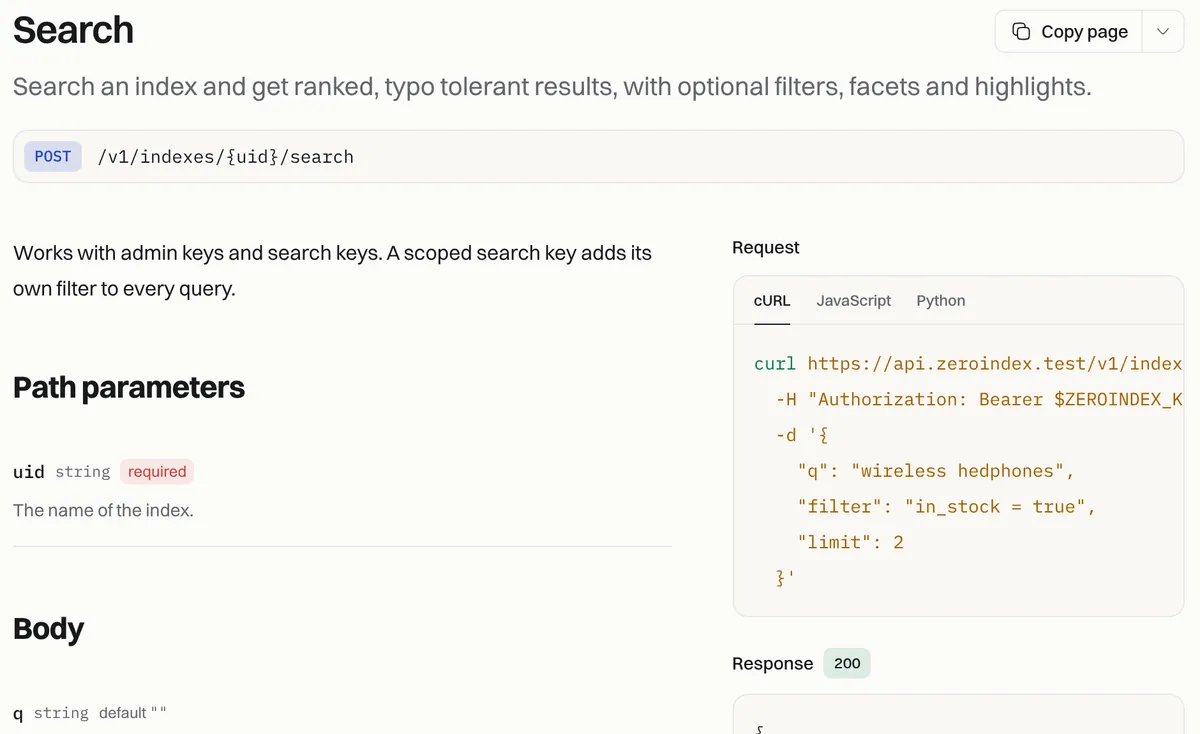
Each of the 14 endpoint pages starts with the method and path, then lists path and body parameters with their type, default value and a "required" badge. On a desktop screen the right column holds the request in cURL, JavaScript and Python tabs and the response with its status code. Code blocks follow the light or dark theme and have two buttons: copy, which put npm install @zeroindex/client on our clipboard, and one that hands the code to the assistant. The tab you pick isn't remembered: after we switched to JavaScript, the next endpoint opened on cURL again. SDK pages show the package, version and requirements, and a Components page shows the 10 MDX components that work without an import, from callouts and steps to tabs and video.
Search that finds pages, not words
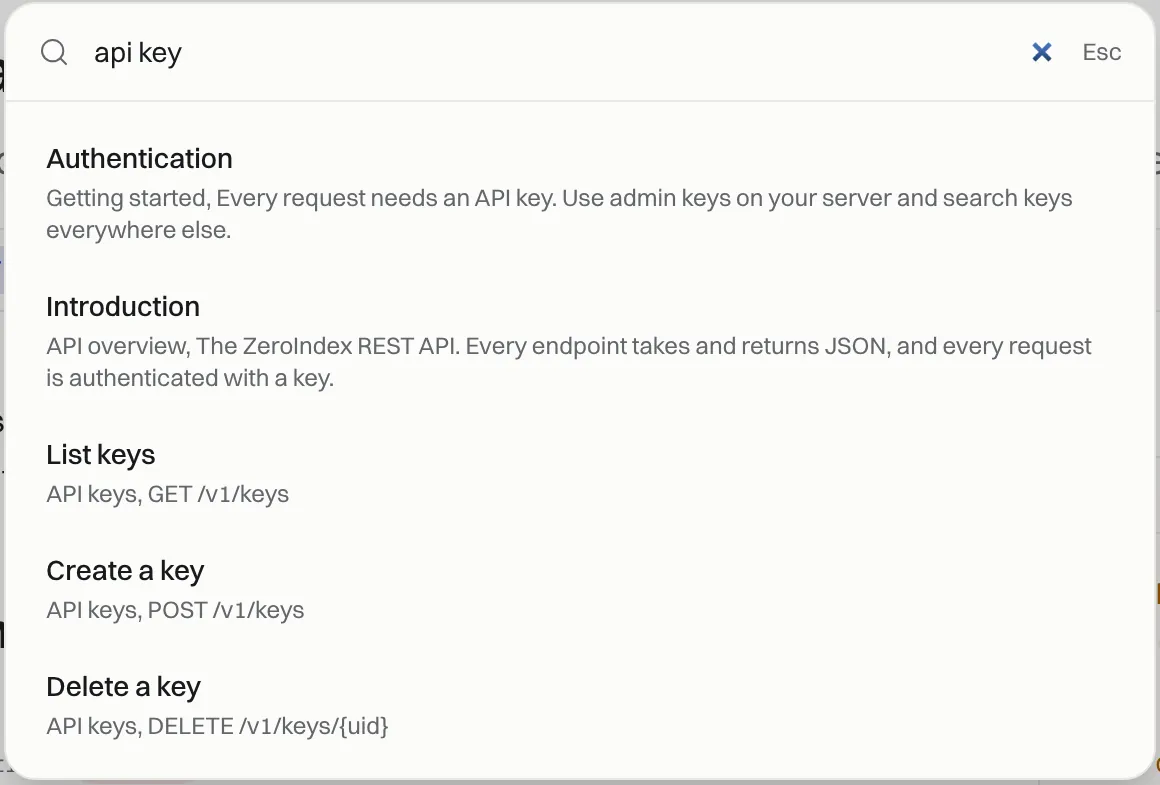
Command or Ctrl + K opens a search box over a list of 36 entries embedded in every page: the title, description, section and headings of each guide, endpoint, SDK and release. Every word you type must appear in those fields. "api key" returned 5 pages and "v2.14" the right release, but "429" found nothing although the Errors page lists that status, and the typo "hedphones" found nothing, which is awkward in docs for a typo-tolerant search API. For 45 pages that is workable; larger docs will want full-text search such as Pagefind or Algolia DocSearch.
AI extras: some work, some are only interface
The Copy page button put the page's source on our clipboard as Markdown (2,036 characters for the Filters page), MDX component tags included. "View as Markdown" opens the same text at a .md address, and "Open in Claude" started a new chat asking Claude to read the page's URL, with a ChatGPT link that works the same way.
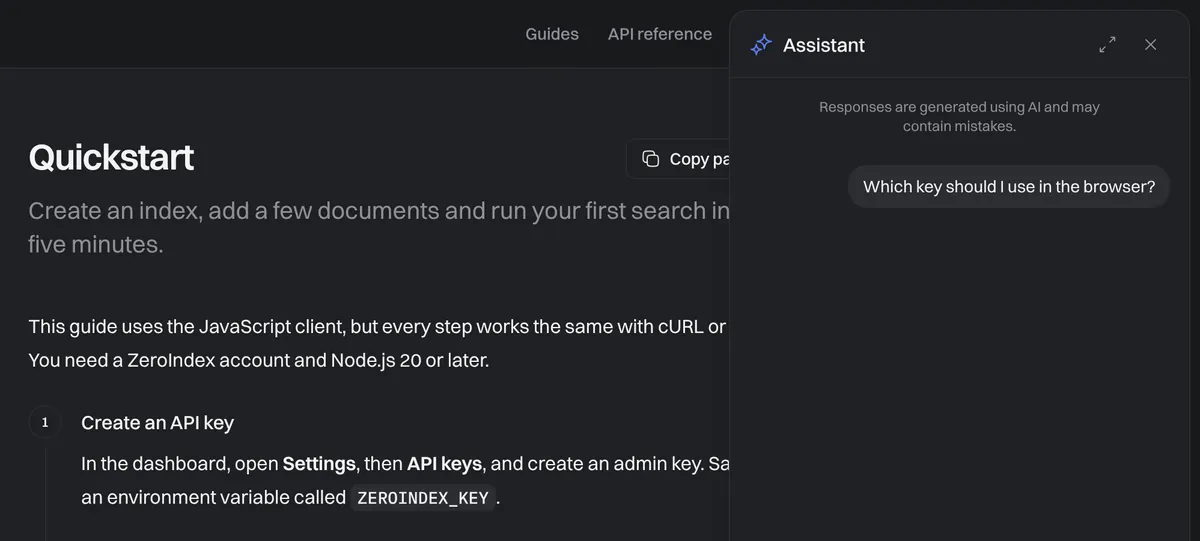
The assistant panel, opened from the sidebar, a code block or Command or Ctrl + I, showed our question and never answered. Sending fires a browser event (assistant:ask) with the question, any attached code and the page path, and waits for an answer event, so the model and the index it searches are yours to connect, as Lexington's "UI, ready to connect" says. "Was this page helpful?" works the same way: a thank-you message and a feedback event, with nothing stored or sent.
Changelog and status, but no versioned docs
The changelog lists 5 dated releases, from v2.11.0 on 20 August 2026 to v2.14.0 on 16 October 2026, each with its own notes page. There is no version switcher, so documenting two API versions at once is yours to build. The status page shows five services with 90-day uptime, four regions and three incidents, all static sample text rather than a feed from monitoring. A System, Light and Dark switch at the bottom of the sidebar saves the choice in localStorage under theme and applies it before the page draws. We found no x-data attribute or Alpine.js script on any page.
Performance and SEO
One Lighthouse 12.8.2 run per page, 30 October 2026:
| Page | Performance | Accessibility | Best practices | SEO |
|---|---|---|---|---|
| Home, mobile | 96 | 100 | 96 | 100 |
| Home, desktop | 95 | 100 | 96 | 100 |
| Search endpoint, mobile | 94 | 96 | 96 | 100 |
The pages are light: about 167 KB for the home page and 200 KB for an endpoint page, roughly half of it fonts from Fontshare and Google Fonts. Their stylesheets block rendering, so first paint on mobile came at 2.3 s on the home page and 2.5 s on the endpoint page; self-hosting the fonts would help. The endpoint page lost accessibility points for the red "required" badge, whose 3.99:1 contrast is below the 4.5:1 minimum, and every page loses best-practices points to favicons and a manifest that return 404.
Every page, the 404 included, shares the title "Your Page Title" and the meta description "A detailed description of your page content.", the canonical tag points to https://yourwebsite.com/current-page, and the sitemap lists its 45 URLs on yourwebsite.com. Lighthouse doesn't check for duplicate titles, so its SEO score hides this. We couldn't see whether the layout takes a title per page; either way, give each page its own title, description and canonical URL before launch. No page outputs structured data.
What you still have to build
Your docs. The sample product is a fictional search API at api.zeroindex.test, down to the SDK names and the status incidents.
The assistant and feedback. Connect a model and a search index to the
assistant:askevent, and sendfeedbackevents to your analytics, or remove both.Search, if your docs grow. Full-text search with typo tolerance, such as Pagefind or Algolia DocSearch.
A status source. Feed the status page from your monitoring, or link to a hosted status page instead.
SEO basics. Titles, descriptions and canonical URLs per page, your domain in the sitemap, and the favicons and manifest that now return 404.
Versioned docs or translations, if you need them.
Pros and cons
Pros
An API reference layout with parameters, request tabs and responses on one screen.
Markdown for AI tools works: copy page, a
.mdaddress for every page, and Open in ChatGPT or Claude.10 MDX components without imports, and code blocks with copy buttons that follow the color mode.
Light pages: under 200 KB each, with 7 KB of JavaScript on an endpoint page.
Changelog and status pages included.
Cons
Search matches titles and headings only, with no typo tolerance.
The assistant and page feedback do nothing until you connect them.
No versioned docs and no translations.
Placeholder title, description and canonical URL on every page.
The chosen code language isn't remembered from page to page.
How ZeroIndex compares
Starlight is Astro's free, open-source docs framework. Its site lists navigation, search, internationalization, code highlighting and dark mode, and its docs say the search is full-text, powered by Pagefind. Pick it for translations or search across every word, if you can do without ZeroIndex's API reference layout and AI extras.
Docbox Astro by Themefisher ($77 for a single-project license with 12 months of downloads and updates) is an Astro and Tailwind CSS docs theme with built-in search, taxonomies and a preconfigured Sitepins CMS. Pick it for general product docs edited in a CMS; ZeroIndex has dedicated endpoint pages with request and response tabs, and its license covers unlimited projects.
Lexington's product page lists no other documentation theme. See all documentation templates for more options.
Who should buy ZeroIndex
Buy it if you document a REST API or an SDK, want a static Astro site you own instead of a hosted docs platform, and want docs that AI tools can read as Markdown. Look elsewhere if your docs need several versions or languages from day one, or run to hundreds of pages that people search word by word.
FAQ
Does the ZeroIndex AI assistant work out of the box?
No. The panel shows your question and fires an assistant:ask browser event with the question, any attached code and the page path, but no model is connected. You wire it to an AI provider and a search index yourself, or remove it.
Does ZeroIndex support versioned docs or translations?
No. It has a changelog with dated, numbered releases, but no version switcher and no language switcher. Starlight, Astro's free docs framework, includes internationalization if you need it.
Should I buy ZeroIndex alone or Lexington Full Access?
ZeroIndex alone costs $89, while Full Access Personal costs $99 one-time and includes all 53 Lexington Astro themes, ZeroIndex among them, plus future themes and updates. If you might use a second theme, Full Access is the better buy.
Can I use ZeroIndex for client or open-source documentation?
Yes. The license covers unlimited websites for yourself and for clients, for commercial use and without attribution. You can't resell the theme as a template or use it as the core interface of a docs or site builder.
How do I add pages to ZeroIndex?
Docs, endpoints, SDKs and releases are content collections, so a new page is one MDX file, per Lexington. The Sanity and EmDash editions ($129 each) add a visual editor; only the Astro edition has a public demo, so we couldn't test them.
New templates like ZeroIndex, in your inbox
The best developer tools, templates and UI components added to Tailkits, each reviewed by an editor. Free, unsubscribe in one click.
18 new in the last 30 days314 products reviewed so farSee what you get
KEEP EXPLORING
More templates Good company for ZeroIndex.
Do you make ZeroIndex? Get a badge for your site
An optional "Featured on Tailkits" badge that links to this page. Pick light or dark and paste the code into your site, for example in the footer.