Next.js and Astro single-product store with a model picker and checkout UI
Taskly
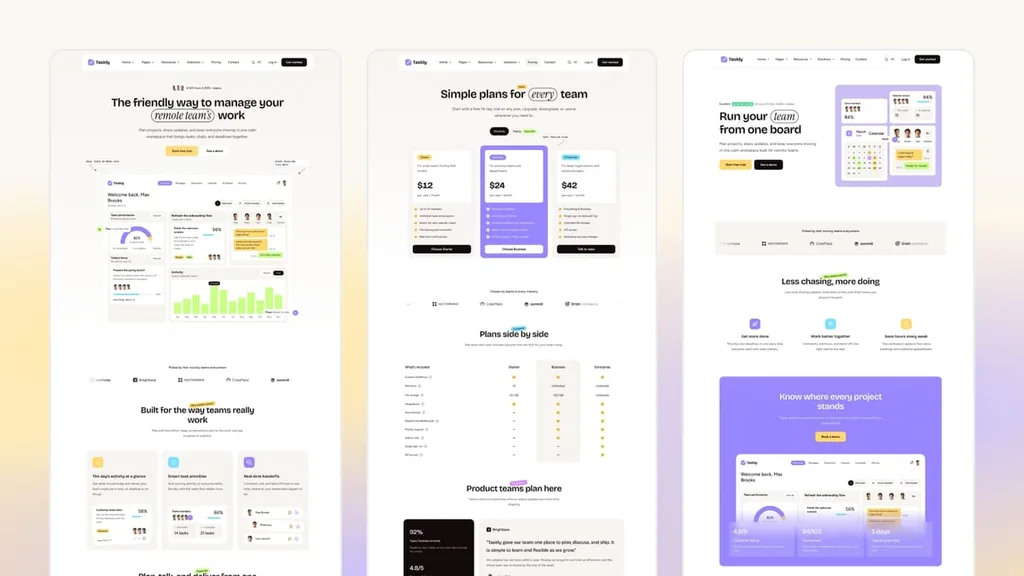
Astro theme for task-app SaaS sites, with 3 homepages in English and French
PaidTemplates
getastrothemes.comExplore the product
AT A GLANCE
- Website
- getastrothemes.com
- Pricing
- Paid
- Categories
- Templates
- Listed
- Oct 2026
- Updated
- Oct 2026
Details about Taskly
KEY POINTS
- Tailwind CSS v4
- MDX support
Short verdict: Taskly is the marketing site for a task-management or team-collaboration product, and it covers more of that site than most SaaS themes: three homepages, a priced plan table with a working monthly/yearly switch, a project-template gallery, solution pages per team, a changelog, a status page and careers, in English and French. The product dashboard, chat and calendar in the heroes are coded HTML, so you edit sample tasks in Markdown instead of retaking screenshots. Everything behind the buttons is yours to build: sign-in, billing, help articles and live status. It suits a startup with an app already running that needs the site in front of it; skip it if you need dark mode or docs inside the site.
How we reviewed it: On 28 October 2026 we used the live demo at 1440 px and on a 390 px phone screen. We switched the pricing toggle, searched with the command palette, submitted the contact form while logging every outgoing request, cycled the hero layouts and opened the project templates, then ran Lighthouse 12.8 once each on Homepage 1 and the pricing page. We did not buy the source code, so we can't judge code quality or the setup steps. Prices, counts and license terms come from the Getastrothemes product page on the same day.
Disclosure: our links to Getastrothemes carry a referral tag, so Tailkits may earn a commission if you buy through them.
What you get for $79
| Price | $79 one-time; $59 during a launch offer on 28 October 2026. Also in the Getastrothemes All-Access plans (from $99 for 12 months of downloads). |
|---|---|
| Version | 1.0.0, released 23 October 2026, on Astro 7.3.8 and Tailwind CSS 4.3.3 |
| Size | 3 homepages, 30 inner page designs and 47 section components, per Getastrothemes. The demo's sitemap lists 154 URLs across both languages; the careers and account pages sit outside it. |
| Stack | Astro, Tailwind CSS 4, Markdown and MDX content, Pagefind search, Preline, Lenis and Lucide icons |
| Deploys to | Static output with configs for Netlify, Vercel and Cloudflare Pages; the demo runs on Cloudflare Pages |
| License | Commercial use on 5 projects, with lifetime updates, per Getastrothemes. The All-Access Essential plan covers 1 project per theme instead. |
What we found in the demo
A pricing page that does the math
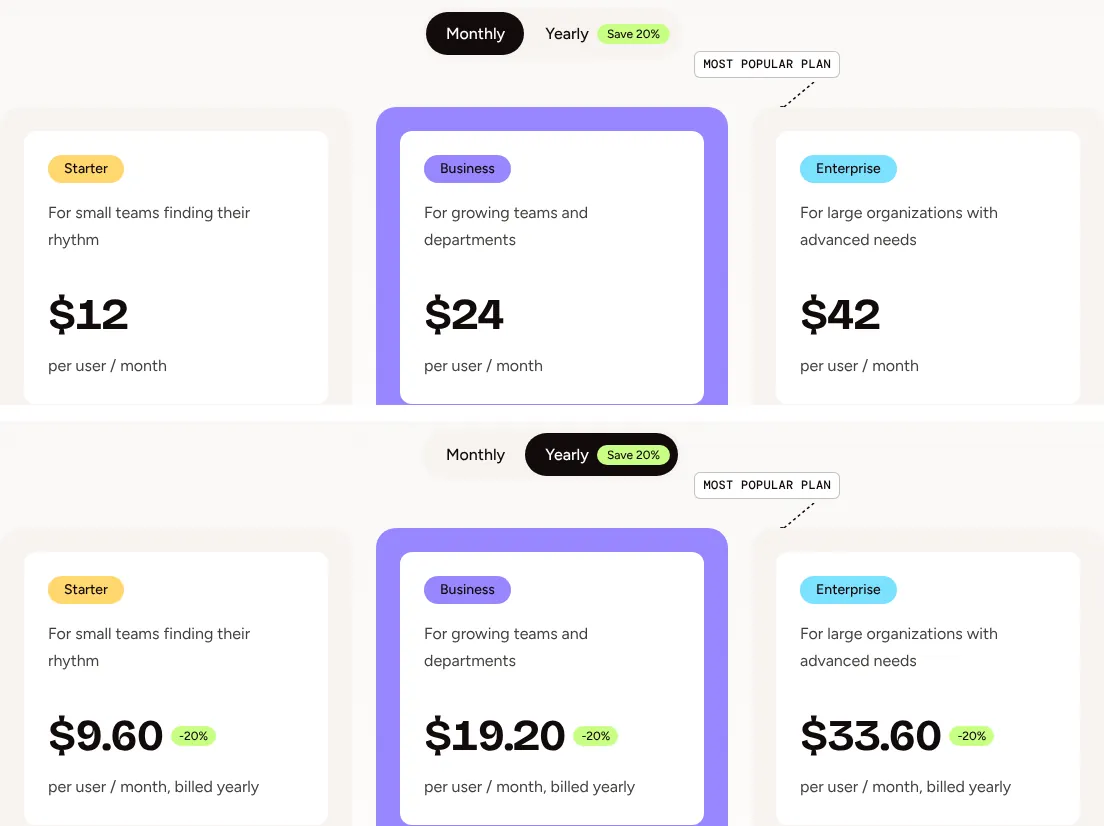
The plan cards show $12, $24 and $42 per user per month. Switching to Yearly changes them to $9.60, $19.20 and $33.60 with a -20% badge and "billed yearly" under each price, which matches the "Save 20%" label exactly. Below the cards, the pricing page adds a plan comparison table. The buttons lead to the sign-up or contact page: there is no checkout behind them.
Three hero layouts, switchable in the demo
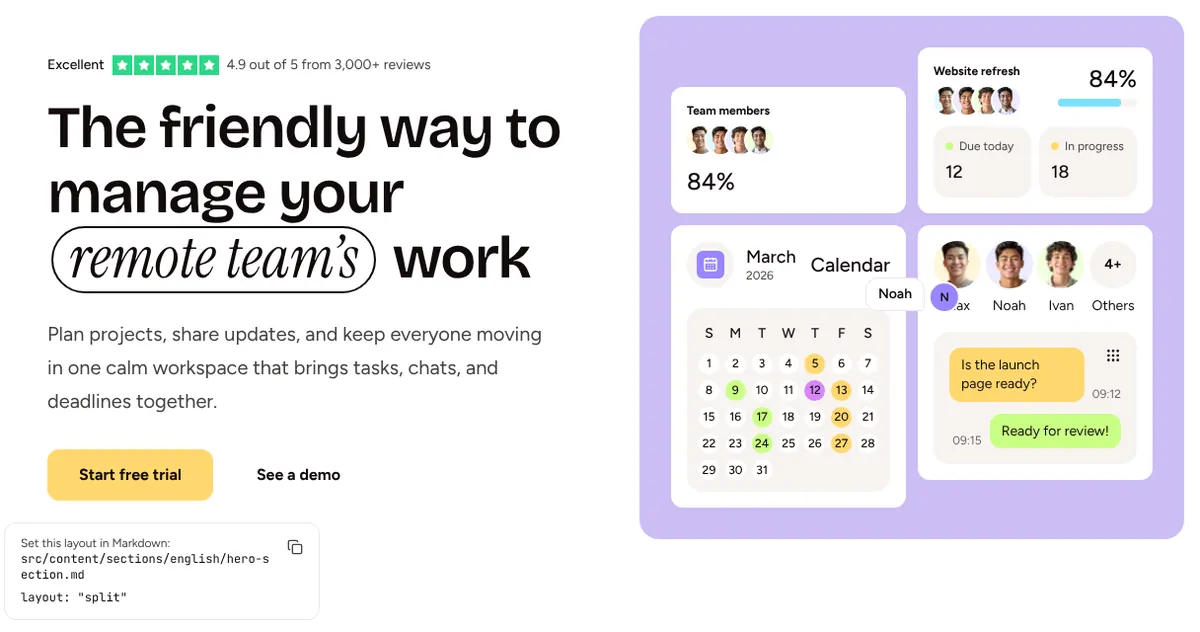
A Change hero layout button in the demo cycles the Homepage 1 hero through its three layouts (default, split and signup) in place, and shows the file and the layout value to set to keep one. Getastrothemes says this button only exists in the demo build. The split layout puts the coded calendar, chat and progress cards next to the headline; none of them is an image.
Project templates as product pages
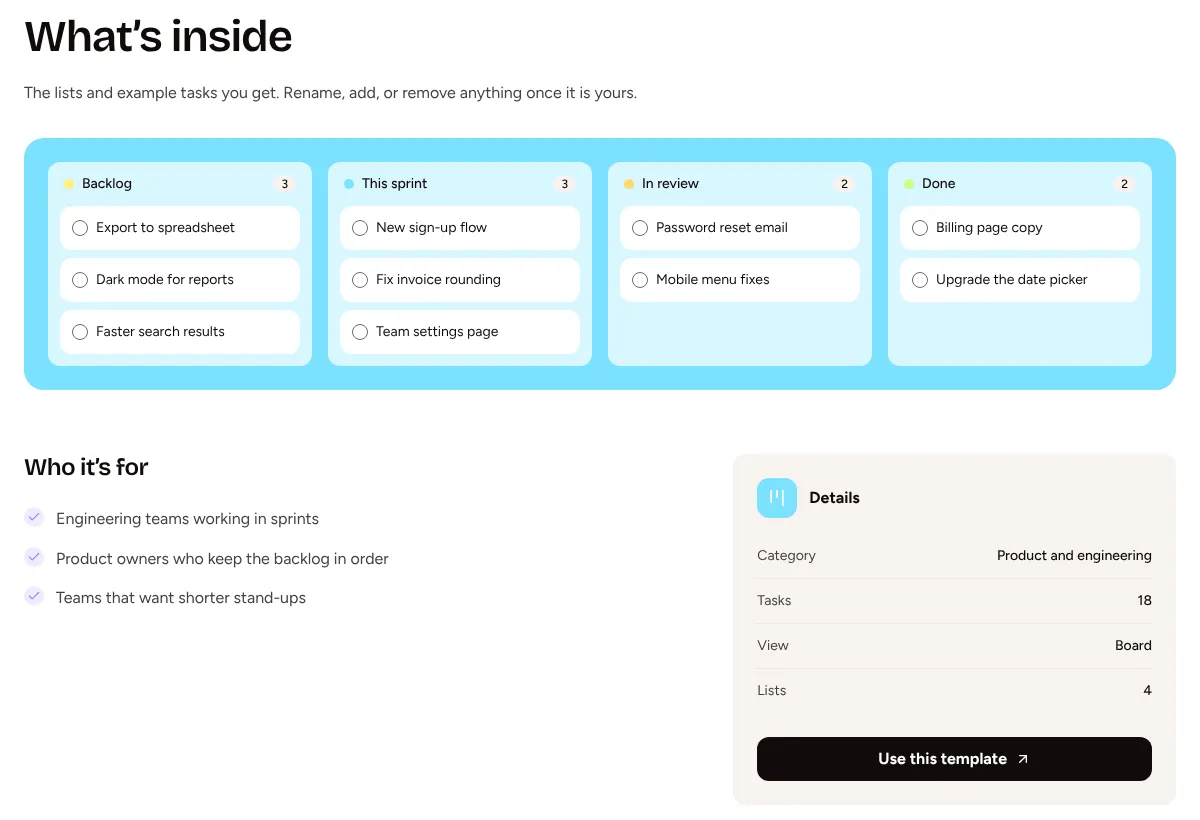
The template gallery has 9 entries (sprint planning, bug triage, OKR tracker, content calendar and others), each with its own page, a coded board, list or timeline preview, a "Who it's for" list and a details card. The sample data does not always add up: the Sprint planning page lists 18 tasks in its details card, while its board shows 10. Fix the counts when you write your own templates, and point the "Use this template" buttons, which go to /signup/, at your app.
Search, forms and consent
Ctrl K opens a Pagefind search that covers the whole site: "calendar" returned the calendar-sync integration, the content-calendar template and the marketing solution page. The contact form sent nothing when we submitted it: the demo shows a thank-you message and explains that on your site the form posts to the service set in config.toml (Formsubmit, Formspree or Netlify Forms). The newsletter forms still point at a placeholder Mailchimp address until you add yours. A cookie banner with Reject all, Accept all and Customize appears on the first visit.
French that goes past the menus
The /fr/ pages translate headings, pricing and blog posts, not only the navigation, and each page carries hreflang tags for both languages. French blog posts keep their English URLs (/fr/blog/the-two-list-method/), so change the slugs if French search traffic matters to you.
Performance and SEO
| Page | Performance | Accessibility | Best practices | SEO |
|---|---|---|---|---|
| Homepage 1, mobile | 78 | 100 | 100 | 92 |
| Homepage 1, desktop | 100 | 100 | 100 | 92 |
| Pricing, mobile | 100 | 100 | 100 | 92 |
| Pricing, desktop | 95 | 97 | 100 | 92 |
Pages are light: Homepage 1 transfers about 200 KB on mobile, 86 KB of it fonts, with 11 KB of JavaScript. The mobile score is held back by 890 ms of total blocking time, mostly style and layout work: the page has 3,753 elements, and the demo build includes the two hidden hero layouts behind the switcher (three H1 tags in the HTML, two of them hidden). We could not check whether a production build drops them. All four runs lost SEO points for the same reason: Lighthouse flags the Content-Signal line in robots.txt as an unknown directive. On desktop, the pricing page shifted layout (CLS 0.134) and failed one color-contrast check.
Structured data is plain and safe: WebPage, WebSite and Organization on every page, FAQPage on the FAQ, BlogPosting on posts. There is no rating markup, but the default hero prints "4.9/5 from 3,000+ teams" and the split hero a five-star "3,000+ reviews" badge as sample text; remove those before launch unless the numbers are yours. The careers job pages are set to noindex in the demo.
What you still have to build
Sign-in, sign-up and password reset: the forms post nowhere until you set an action to your auth provider.
Billing: the plans link to sign-up or contact, with no checkout code.
Help articles: the help center is a landing page whose 33 article and topic links point to
#.Live status:
/status/is a static page with sample services and incidents.Real content: integrations, reviews, logos, prices, job ads and the rating line are samples.
Dark mode, which Taskly does not ship, and a Figma file, which is not included.
Pros and cons
Pros
The pricing toggle, search and cookie consent work in the demo, not only in screenshots.
Coded product mockups you edit in Markdown, so the hero follows product changes without new images.
Pages beyond the usual SaaS set: project templates, solutions per team, changelog, status and careers.
English and French with translated content and hreflang tags.
The demo's contact form is honest about what it does, and sends nothing.
Cons
No dark mode and no Figma file.
Mobile performance of 78 on Homepage 1, from a heavy DOM.
Sample data with errors to clean up, such as 18 tasks listed against 10 shown.
The license covers 5 projects, where some competitors allow unlimited projects.
How Taskly compares
Stella: the same vendor's general SaaS theme, also $79, with 18 pages per Getastrothemes. Choose it if your product is not about tasks or teams and the project-template and status pages would go unused.
Flux: Cruip's $79 SaaS template in Next.js and Astro editions, with dark mode and an unlimited-projects license, per Cruip. Choose it if you need a dark site or a React edition and have no use for the project-template pages.
The Getastrothemes All-Access plan: from $99 for every current theme, Taskly included. Worth it if you would buy two themes, but the Essential plan allows 1 project per theme against Taskly's 5.
More options are in our templates directory.
Who should buy Taskly
Buy Taskly if you run a task, project or collaboration product, already have the app and sign-in, and want a marketing site with pricing, templates, solutions, a changelog and a status page in two languages without designing them. It is a poor fit for developer tools that need docs inside the site, for anyone who needs dark mode, and for teams expecting working auth or billing in the box.
FAQ
Does Taskly include working sign-in or billing?
No. The log in, sign-up and password reset pages are designs, and the pricing plans link to sign-up or contact. You connect your own auth provider and billing.
Does Taskly have dark mode?
No. Taskly ships one light palette. Colors are tokens in one CSS file, so you can build a dark palette yourself.
How many projects can I use Taskly on?
Five, per the Getastrothemes product page, including commercial projects. The All-Access Essential plan allows 1 project per theme.
Can I run Taskly in English only?
Yes. Getastrothemes says one script removes French, and the site then builds in English only. You can also add languages by copying the English content files.
Is the product dashboard an image?
No. The dashboard, chat, calendar and template previews are coded in HTML and Tailwind CSS, with their sample data in Markdown files.
KEEP EXPLORING
More templates