Next.js and Astro single-product store with a model picker and checkout UI
Snowpeak
Bento-style Astro design magazine with drawn covers and a members gate
PaidTemplates
lexingtonthemes.comExplore the product
AT A GLANCE
- Website
- lexingtonthemes.com
- Pricing
- Paid
- Categories
- Templates
- Listed
- Mar 2023
- Updated
- Oct 2026
Details about Snowpeak
KEY POINTS
- Tailwind CSS v4
Short verdict: Snowpeak is a loud, card-based design publication: four color-coded topics, drawn SVG covers instead of photos, an article archive, editor pages, a membership page with three plans, and ready pages for the newsletter, advertisers and contributors. Members-only stories leave their text out of the page, which is the right default. Nothing behind the forms works, though: the newsletter and contact forms reload the page with the reader's email in the address bar, and sign-in posts the password to a static host that answers with a blank error page. Every page also shares a placeholder title and two conflicting canonical links. Buy it for a design or studio journal if a developer will connect accounts, email and metadata; skip it if you want photography up front or a newsletter that works on day one.
How we reviewed it: On 30 October 2026 we used the live Astro demo on a desktop screen and a 390 px phone screen. We crawled all 44 pages, opened the menu, followed the archive filters, submitted every form with the network log running, and read the RSS feed, sitemap and page metadata. We ran Lighthouse 12.8.2 once on the home page and once on an article. We did not buy the theme, so we can't judge the source code, and the Sanity and EmDash editions have no public demo. Prices and license terms come from Lexington Themes on the same day.
Disclosure: Our links to Lexington Themes carry a referral tag.
What you get for $89
| Price | $89 one-time for the Astro edition, $129 for the Sanity or EmDash edition. Lexington Themes Full Access Personal costs $99 (shown as 50% off $198) and includes all 53 Astro themes, so for $10 more you get Snowpeak and every other theme. |
|---|---|
| Editions | Astro, Astro + Sanity ("the same designs wired to Sanity, with live preview editing") and Astro + EmDash (an admin built in, deployed to Cloudflare Workers), per Lexington. Only the Astro edition has a demo. |
| Version | Astro v7.4.1 and Tailwind CSS v4.3.3, per Lexington; the demo's CSS confirms Tailwind v4.3.3. Redesigned on 17 October 2026. |
| Size | Ten static pages and five content collections, per Lexington. The demo's sitemap lists 43 URLs, including 14 articles (4 for members), 3 editors, 4 topics, 4 legal pages and 5 style guide pages. |
| Stack | Astro, Tailwind CSS v4 with the Forms and Typography plugins, Lenis smooth scrolling, native view transitions, the Inter and Stack Sans Notch fonts and one small vanilla script for the menu. No Alpine.js. |
| Delivery and hosting | A private GitHub repository, bought through Polar.sh. It builds to static files for Netlify, Vercel or any static host. Lexington's setup guide still says Node.js 20 or later, but Astro 7.4 requires 22.22 or newer. No Figma file. |
| License | Unlimited sites for yourself and clients, commercial use without attribution, one seat per person. You can't resell or redistribute it as a template. License terms |
What we found in the demo
Rounded cards, four colors and drawn covers
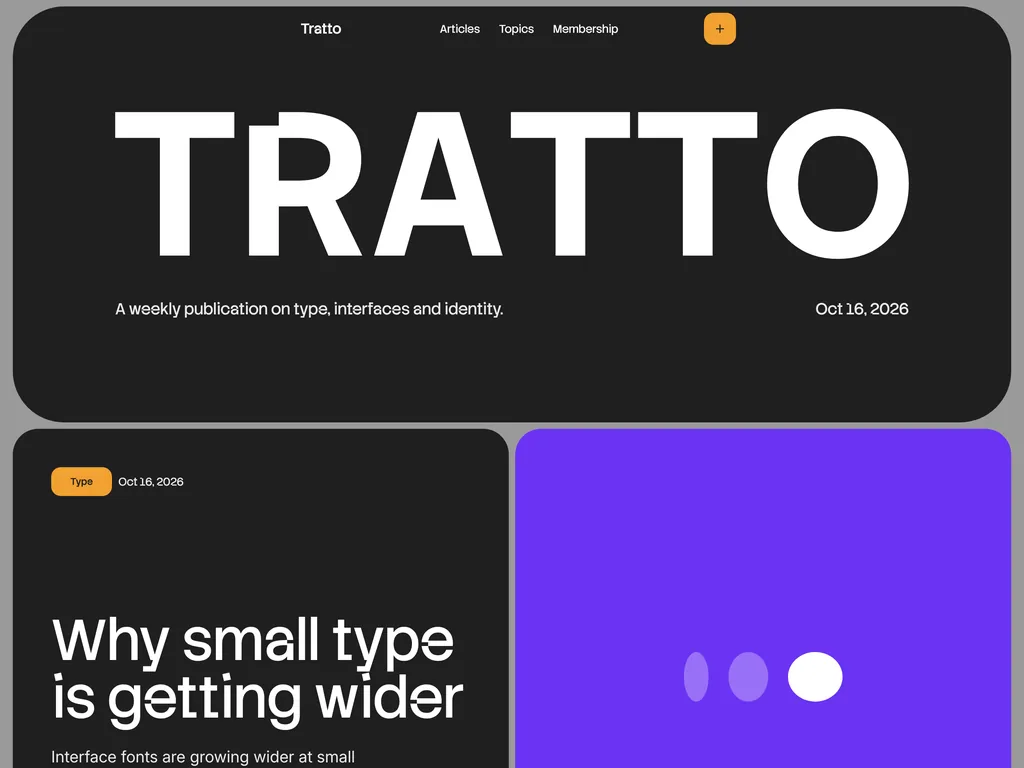
The demo is a fictional weekly called Tratto. The home page stacks rounded cards on a grey ground: an oversized masthead, the lead story, a numbered "This week" list of six stories, four topic tiles and a newsletter card. Each topic owns a color (Type purple, Interfaces orange, Identity magenta, Studios black), and an article's first topic sets its cover color wherever the article appears. Covers and editor portraits are inline SVG drawings, so the home page loads no image files at all. In browsers that support cross-document view transitions, a cover morphs from the archive into the article; the CSS switches this off for readers who prefer reduced motion. The centered menu bar opens into a panel with seven section links and sign-in, and nothing scrolls sideways on a 390 px screen.
An archive whose filters are links
The Articles page lists all 14 stories, newest first, with pills for the four topics and for members-only stories. The pills are links to topic pages and a members archive rather than client-side filters, so each filtered view is a real, crawlable page. There is no search, no pagination and no dark mode.
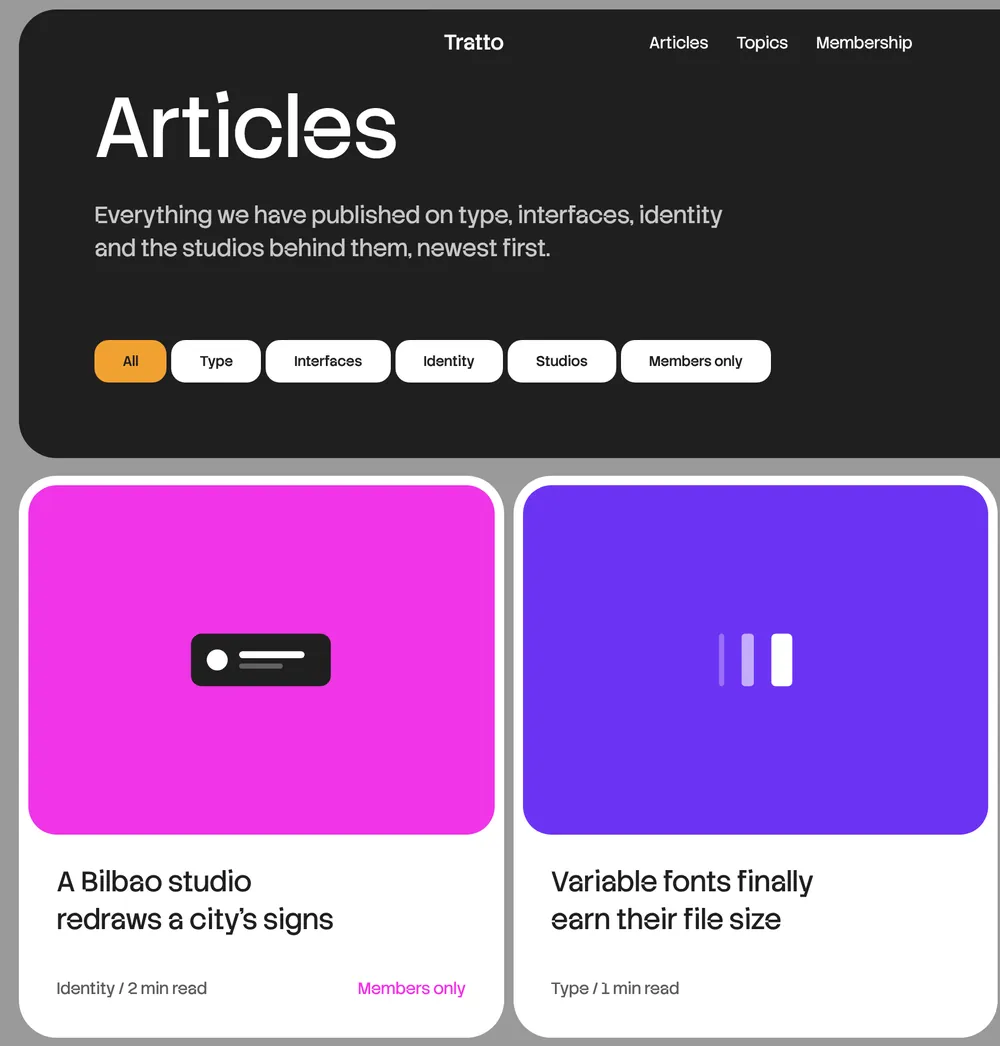
Article pages show the topic, date, editor and role, reading time, the body, a sponsored card and three "Read next" links from the same topic. Reading time is calculated from the text: the ten public sample articles run 163 to 254 words, so they say 1 or 2 minutes. Editor pages pair a drawn portrait and bio with the editor's articles.
A members gate that holds the text back
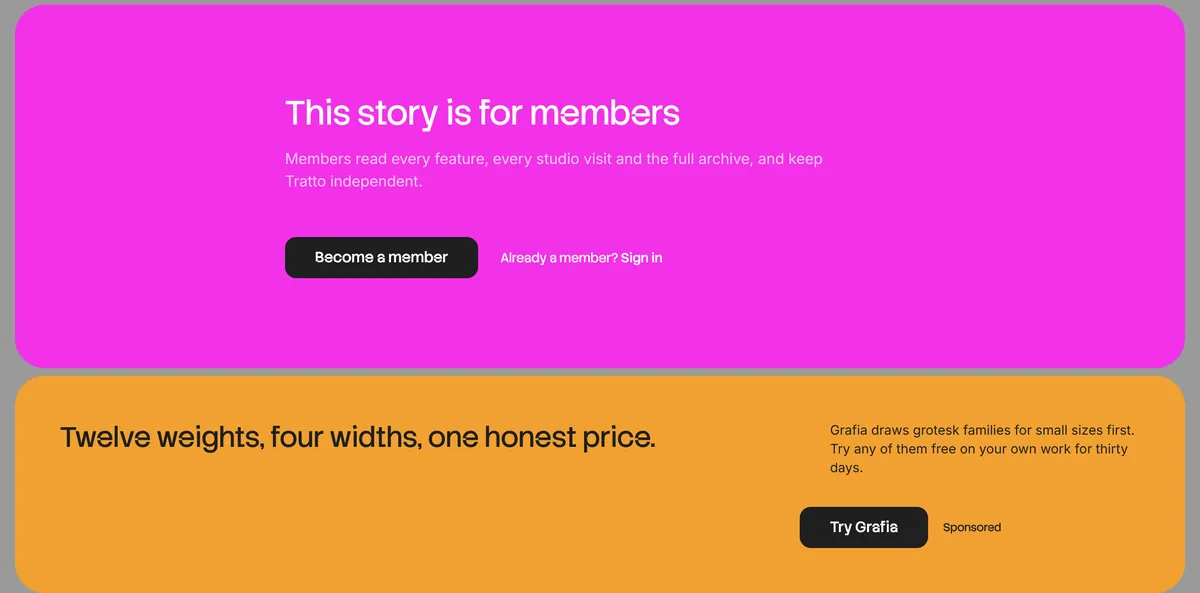
Four of the 14 articles are for members. Their pages keep the header and reading time, then show a "This story is for members" card where the body would be. The text is not in the HTML at all, so nobody can read it from the page source, but members can't read it either until you add accounts and server-side rendering.
Business pages ready, forms not connected
The membership page offers Reader (free), Member ($8 a month or $80 a year) and Studio ($40 a month for up to ten seats), with a testimonial and five questions. The newsletter page shows a sample letter and four past issues. The advertise page has a sample rate card ($1,200 per newsletter issue, $900 a week for a site banner, $3,000 a month for a topic partner), and the write-for-us page explains a three-step pitch process with sample fees. Audience figures such as "read by 42,000 designers" are sample copy to replace. The advertise page also promises that members never see the banner, which the theme has no way to know.
The forms are the weak spot. The newsletter card on every page and the contact form have no action, so submitting reloads the same page with the email, and on the contact page the message too, in the URL (?email=reviewer%40example.com). Sign in and sign up send a POST to the page itself; the static host answers with a 405 error and an empty body, so the reader sees a blank page. Sample addresses use the reserved .test domain, so nothing reaches a real inbox.
Performance and SEO
One Lighthouse 12.8.2 run per page, 30 October 2026:
| Page | Performance | Accessibility | Best practices | SEO |
|---|---|---|---|---|
| Home, mobile | 97 | 96 | 96 | 92 |
| Home, desktop | 99 | 96 | 96 | 92 |
| Article, mobile | 98 | 96 | 96 | 92 |
| Article, desktop | 90 | 96 | 96 | 92 |
The pages are light on everything except fonts: the home page transfers 416 KiB, and 377 KiB of that is Inter from rsms.me and Stack Sans Notch from Google Fonts. Their two stylesheets also block rendering, which Lighthouse put at 610 ms on the desktop article and is why that run scored 90; self-hosting the fonts would help both. Accessibility lost points for contrast on the colored tiles: topic links at 75% opacity on purple (4.18:1) and magenta (2.37:1), and white text on magenta (3.29:1). Lexington lists scores of 98, 97, 100 and 92.
The SEO points went on canonical links. All 44 pages share the title "Your Page Title" and the description "A detailed description of your page content.", and each carries two canonical links, to https://yoursite.com/current-page and https://www.yourwebsite.com/. The sitemap and the RSS feed of 14 articles use the placeholder domain too. No page has structured data, so there is no Article or Person markup, and the favicon and manifest files the head links to return 404 errors.
What you still have to build
Page metadata. Per-page titles, descriptions and social images, one canonical link per page, your domain in the config, favicons and a manifest.
Newsletter and contact. Connect the forms to an email service or form backend, sent by POST rather than in the URL, with success and error states.
Accounts and payments. Sign-in, payments for the three plans, Studio seats and server-side rendering so members can read members-only stories.
Ads. An ad source for the sponsored slot, and logic to hide it from members if you keep that promise.
Content. Your own audience figures, rates, testimonials and sponsor, and a drawn cover for every new article, or a switch to photos.
Pros and cons
Pros
A distinctive look that holds across every page, with drawn covers that cost no image weight.
Members-only text is left out of the HTML instead of hidden with CSS.
Membership with team seats, newsletter, advertise and write-for-us pages are designed and written.
Topic filters are real pages, and reading time and "Read next" come from the content.
Cons
Placeholder titles and two conflicting canonical links on every page, and no structured data.
Newsletter and contact forms put the reader's email in the URL; sign-in ends on a blank error page.
Fonts are 377 KiB of a 416 KiB page and block rendering.
Text on the purple and magenta tiles fails contrast checks.
Every new article needs a drawn cover in its topic's style.
How Snowpeak compares
Hemingway ($89, also Lexington) is a quiet, photo-led magazine with a podcast and an audio player. Its members gate only fades the text with CSS, and it has no newsletter form. Pick it if photography and audio matter more than color.
Phanatik ($89, also Lexington) is a sports newsroom with 30 sample stories, sport fronts, a scores strip and ad slots. Pick it for daily news volume rather than a weekly.
DevSpace by Cruip ($49, or in the $79 Classic Bundle of 20 templates) is a personal blog with topics, an about page and a newsletter page, in HTML, Next.js and Vue versions with a Figma file. Pick it for a one-author blog rather than a multi-editor publication.
Ghost(Pro) runs memberships, paid subscriptions through Stripe and newsletters out of the box. Its Publisher plan, the first with custom themes, is listed at $29 a month billed yearly for 1,000 members. Pick it if a working newsletter and paywall matter more than this design.
See all Tailwind templates for more options.
Who should buy Snowpeak
Buy it if you are launching a design, type or studio publication that wants a bold, colorful identity, plans to sell memberships and sponsorships, and has a developer to wire up accounts, email and metadata. Look elsewhere if your stories depend on photography, if you need a newsletter or paywall working without development, or if a podcast was the reason you looked at Snowpeak: the redesign removed it.
FAQ
Does Snowpeak's newsletter signup work?
No. The forms have no destination: submitting reloads the page with the email address in the URL. Connect them to an email service or form backend before launch.
Can members read Snowpeak's members-only stories?
Not until you add accounts and server-side rendering. The demo leaves members-only text out of the page entirely, so nobody can read it, members included.
Does Snowpeak still include a podcast and a jobs board?
No. Lexington removed the podcast, jobs and help center in the 17 October 2026 redesign. Per Lexington, the previous version of a redesigned theme stays available as a tagged GitHub release.
Should I buy Snowpeak alone or Lexington Full Access?
Full Access is better value for most buyers: Snowpeak alone costs $89, while Full Access Personal costs $99 (shown as 50% off) and includes all 53 Lexington Astro themes, Snowpeak included.
Can I use Snowpeak for client sites?
Yes. The license covers unlimited sites for yourself and your clients, with no attribution required. Each seat is one person, and you can't resell or redistribute the theme as a template.
KEEP EXPLORING
More templates