Next.js and Astro single-product store with a model picker and checkout UI
Riflesso
Dark Astro theme for photo studios, with artist pages, films and an archive
PaidTemplates
lexingtonthemes.comExplore the product
AT A GLANCE
- Website
- lexingtonthemes.com
- Pricing
- Paid
- Categories
- Templates
- Listed
- Sep 2023
- Updated
- Oct 2026
Details about Riflesso
KEY POINTS
- Tailwind CSS v4
Short verdict: Riflesso gives a small photo studio or rep agency a complete dark site: five artist pages, ten series with type filters, six films with a proper player, a 40-photo archive and a journal. Its motion (a cover strip that grows, a preview that follows the cursor, animated filters) steps aside on touch screens. The gaps are in the plumbing: every page ships with the title "Your Page Title" and a canonical URL on yourwebsite.com, and the contact form thanks visitors without sending anything. Buy it if you run a studio with a roster and have a developer for a day of wiring; a single photographer who wants rates on a light page is better served by Semplice.
How we reviewed it: On 30 October 2026 we used the live Astro demo, rebuilt by Lexington Themes on 20 October 2026, in Chromium at 1,440 px and 1,000 px wide and on a 390 px phone screen. We opened all 43 pages in its sitemap, used the filters, the archive toggle, the film player and the menu, submitted the contact form while logging network requests, and ran Lighthouse 12.8.2 once on the home page and once on a series page. We did not buy the theme, so we can't judge the source code or the Sanity and EmDash editions. Prices and license terms come from lexingtonthemes.com on the same day.
Disclosure: Our links to Lexington Themes carry a referral tag.
What you get for $89
| Price | $89 one-time for the Astro edition, $129 for the Sanity or EmDash edition. For $10 more, Lexington Themes Full Access Personal ($99, shown as 50% off $198) includes Riflesso and the other 52 Astro themes. |
|---|---|
| Version | Astro 7.4.1 and Tailwind CSS 4.3.3, per Lexington. First released in August 2023, rebuilt from scratch on 20 October 2026. |
| Size | Five static pages and five content collections, per Lexington. The demo's sitemap has 43 URLs: 10 series, 5 artists, 6 films, 6 journal posts, 3 legal pages and a 5-page style guide. |
| Stack | Astro and Tailwind CSS 4 with GSAP (Flip and ScrollTrigger) and Lenis smooth scroll. No Alpine.js or UI framework is loaded. The repository includes AGENTS.md, Cursor rules and a design skill for AI coding tools. |
| Delivery | Access to a private GitHub repository after paying through Polar.sh; builds to static files for Netlify, Vercel or any static host, per Lexington's docs. |
| License | Unlimited websites for yourself and clients, no attribution; you can't resell the theme as a template. Refunds only if the theme differs from the demo or you never accessed the repository within 14 days. License terms |
What we found in the demo
A home page built from the work
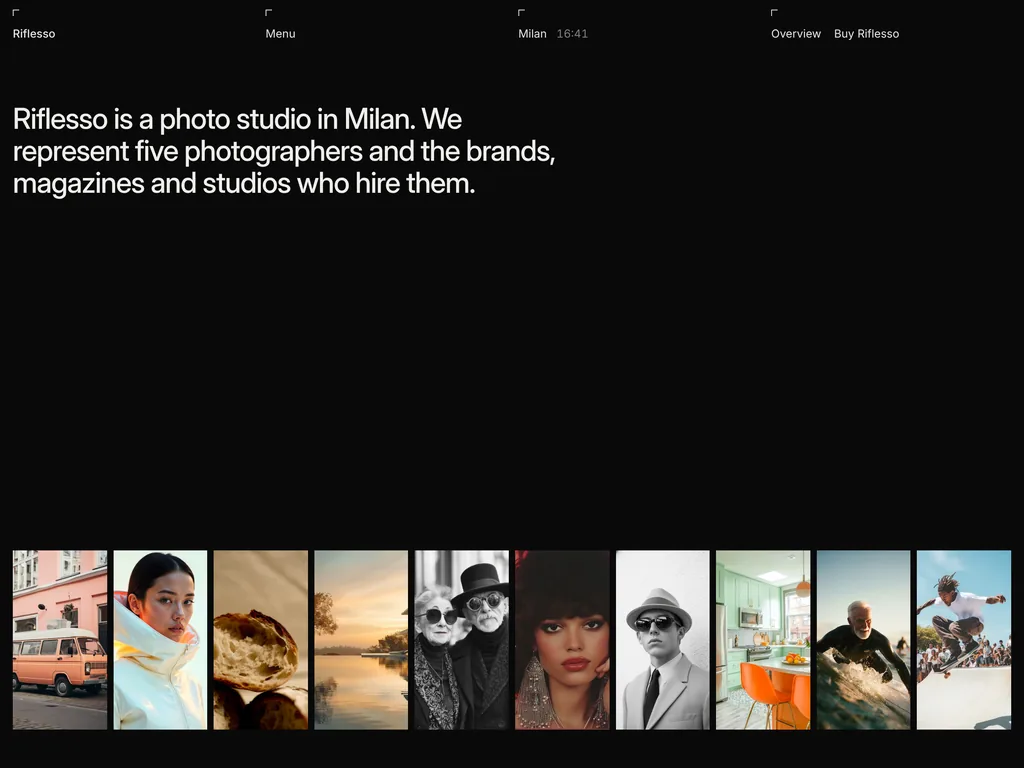
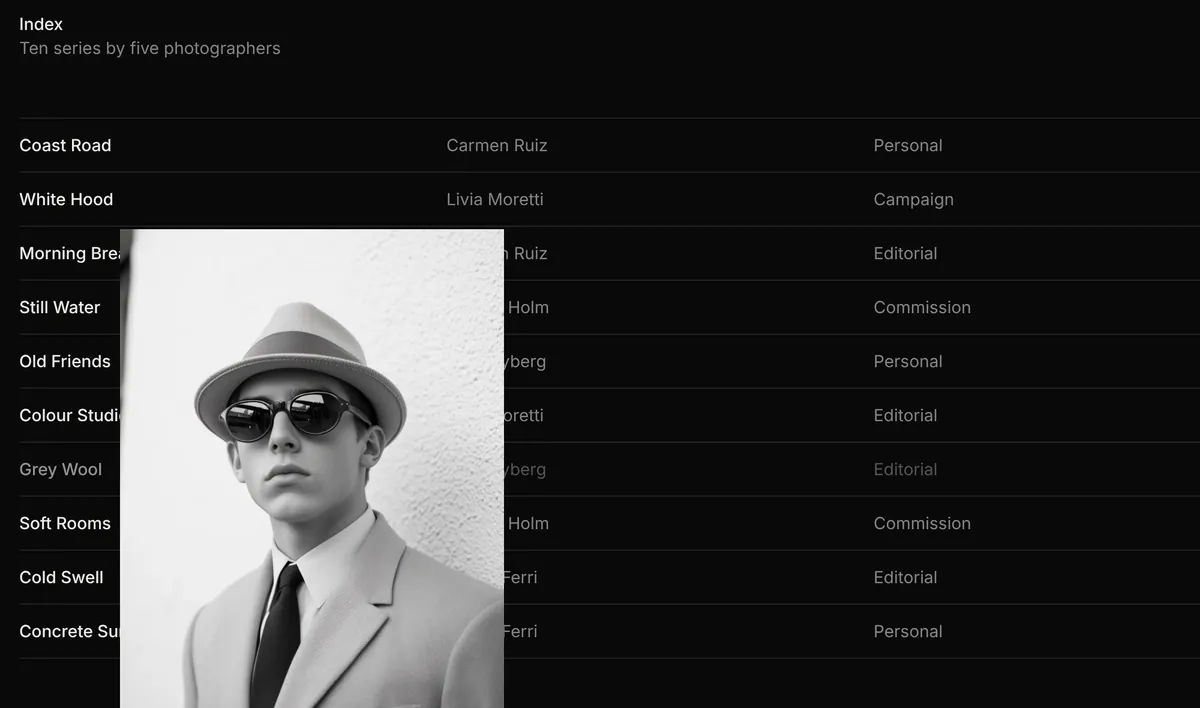
The home page opens with one sentence about the studio, then a strip of 10 covers, one per series. Hovering a cover widened it from 134 px to 334 px while the others narrowed, and each cover links to its series. Below it, an index lists the ten series with photographer, type, place and year; moving the cursor over a row brings up a 320 by 400 px photo that follows the pointer. Artist names, clients and a studio photo with parallax finish the page. The navigation carries a live Milan clock, which showed the right local time.
Work, series and artist pages
The work page filters series by type with an animated reflow: All showed 10, Personal 3, Campaign 1, Editorial 4 and Commission 2. The filter buttons report their state to screen readers, but the choice is not kept in the URL, so a filtered view can't be shared. Series pages carry photographer, type, place, year, a short text, six photos and a next-series link; artist pages add a discipline, a city, a bio and every series. Their "Book Carmen" style buttons lead to the contact page without preselecting the photographer, although the form has a photographer menu. Lexington says card images grow into the next page; the stylesheet does this with the browser's cross-document view transitions and turns them off for visitors who ask for reduced motion.
Films that load only when asked
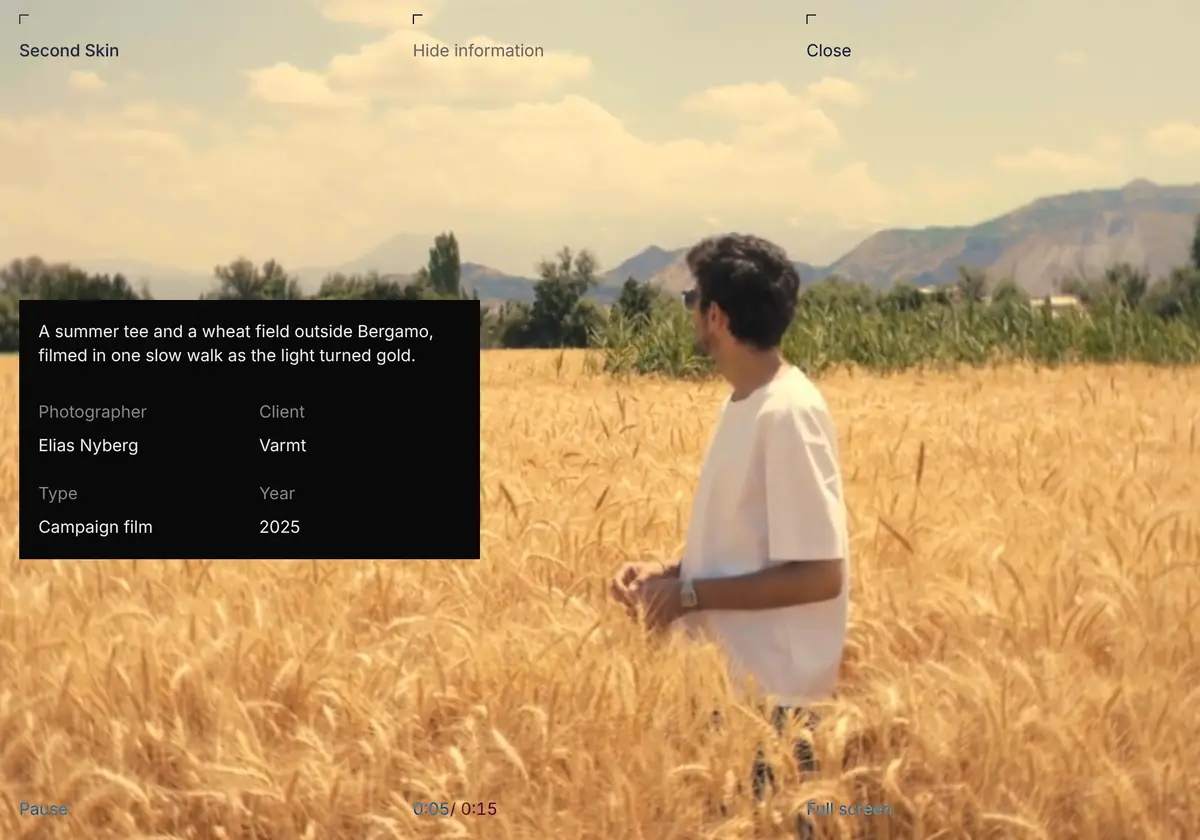
The films page shows six films. Their previews download nothing until you hover: one hover fetched a 1.0 MB MP4 and started a muted loop. A film page plays the clip full screen with an information panel (description, photographer, client, type, year), pause, a timer, sound, full screen, the next film and a close link. The six clips weigh 0.7 to 8.1 MB; the largest is worth compressing or moving to a video host. Below 1,024 px wide the player hides the sound toggle and the next link, and the video has no native controls, so on phones and tablets the films play muted.
An archive without a lightbox
The archive puts all 40 photographs on one contact sheet with a Small and Large toggle: 10 frames per row at 1,440 px, or 5 larger ones. Clicking a frame opens the series it belongs to; there is no full-size viewer. The journal has six posts with dates, reading time and an RSS feed.
A contact form that only says thank you
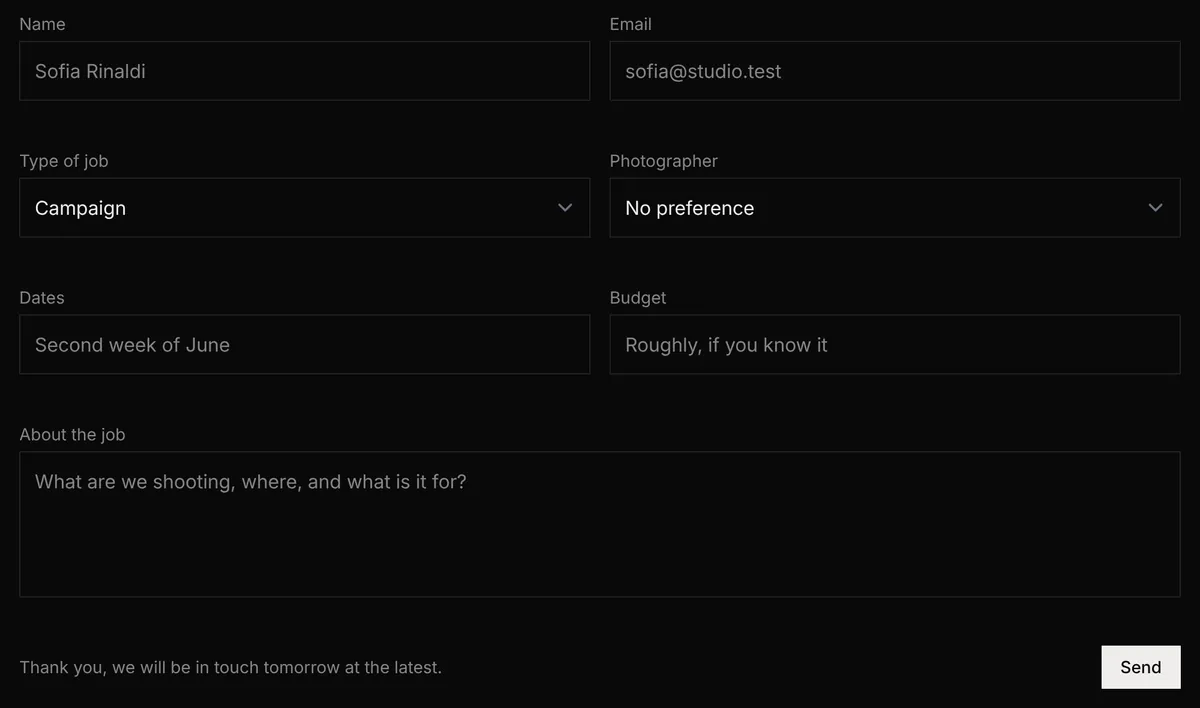
The contact form asks for name, email and a message (all required, checked by the browser), plus the type of job, a photographer, dates and a budget. After a valid submission the fields cleared and "Thank you, we will be in touch tomorrow at the latest." appeared, but our network log showed no request at all: the message goes nowhere.
On a 390 px screen we found no sideways scrolling, and the Menu button opens a panel with the seven sections.
Performance and SEO
One Lighthouse 12.8.2 run per page and form factor, 30 October 2026:
| Page | Performance | Accessibility | Best practices | SEO |
|---|---|---|---|---|
| Home, mobile | 98 | 100 | 96 | 100 |
| Home, desktop | 99 | 100 | 96 | 100 |
| Series page, mobile | 99 | 100 | 96 | 100 |
| Series page, desktop | 100 | 100 | 96 | 100 |
Lexington lists 100 in all four categories. Images are handled well: every photo is WebP from Astro's image pipeline with responsive sizes and fixed dimensions, and photos below the first screen load lazily. The heaviest file on a phone is not a photo but the Inter variable font, 345 KB from rsms.me behind a render-blocking stylesheet; the largest paint on the mobile home page is the opening sentence set in it (2.0 s in our run). Self-hosting a subset of Inter would remove most of that weight. On desktop the home page transferred 1.3 MB, 859 KB of it images: the strip asks for 432 px wide covers for 134 px slots so that a hovered cover stays sharp, and Lighthouse estimates 580 KB of savings. Best practices loses points because the page links a web manifest and favicons that return 404.
The SEO setup is the weak spot. All 43 pages share the title "Your Page Title" and the description "A detailed description of your page content.", and each declares its canonical URL as https://yourwebsite.com/current-page with a share image on the same placeholder domain. The sitemap and RSS feed also point at yourwebsite.com, and there is no structured data. Lighthouse still scores SEO 100 because it checks that these tags exist, not what they say. Deployed as is, every page would tell Google it is a copy of one address on another domain.
What you still have to build
SEO tags. Pass a real title, description, canonical URL and share image to every page, and set your domain so the sitemap and RSS feed use it.
Form delivery. Connect the contact form to a form service or your own endpoint, and make the artist buttons preselect the photographer.
Your own photos and films. Lexington's license says stock images in demos stay their owners' property, and Riflesso's page does not list free-usage images. Compress the films or host them on a video service.
Icons and font. Add the favicon and manifest files the layout links to, and self-host Inter.
Sound on phones. Add a sound control below 1,024 px if your films need it.
Pros and cons
Pros
A full studio structure: artist pages, series, films, archive and journal, linked to each other.
Careful image loading: WebP everywhere, responsive sizes, lazy loading, and film previews that download only on hover.
Accessibility scored 100 on every page we tested, and filters and menu expose their state.
Motion that adds something, with hover effects limited to devices that can hover and page transitions off for reduced motion.
Cons
Placeholder titles, descriptions and canonical URLs on every page, despite the "SEO optimized" claim.
The contact form shows a thank-you message and sends nothing.
A 345 KB third-party font is the heaviest file on a phone.
No sound control on phones and tablets, and film files up to 8.1 MB.
Lexington's redesign notes don't say whether the Sanity and EmDash editions got the new design.
How Riflesso compares
Semplice ($89, same maker) is, per Lexington, a white editorial portfolio for one photographer with projects, an archive, rates and a journal. Pick it if you sell your own work rather than a roster.
Studiomax ($89, same maker) applies the same roster idea to a model agency, with a filterable board, profiles and booking and scouting forms, on a light page.
Horizon by Cosmic Themes is a free Astro photography theme with portfolio collections, bento image grids, a pricing section and a contact form. It was last updated on 9 May 2025 and still runs Astro 5, so expect older dependencies and a lighter design.
See all Tailwind templates for more options.
Who should buy Riflesso
Buy it if you run a photo studio, a rep agency or a small production company with a few photographers or directors, want a dark site where the pictures and films carry the colour, and have someone who can wire the SEO tags and the form. Look elsewhere if you are a single photographer who needs rates and a light page, if you want to sell prints, or if you need a CMS edition today without first asking Lexington which design it ships.
FAQ
Does Riflesso's contact form send enquiries?
No. The demo shows a thank-you message after a valid submission, but no request leaves the browser. Connect the form to a form service or your own endpoint before launch.
Is it cheaper to buy Riflesso alone or Full Access?
Riflesso alone costs $89 for the Astro edition. Full Access Personal costs $99 (shown as 50% off $198) and includes Riflesso and the other 52 Lexington Astro themes, so for $10 more you get the whole catalog.
Do the Sanity and EmDash editions have the new design?
Lexington's redesign notes for 20 October 2026 don't say. The EmDash edition added in August 2026 was described with the old gallery, team and store pages, so ask Lexington before paying $129 for a CMS edition.
Can I sell prints with Riflesso?
Not out of the box. The October 2026 redesign removed the old store page, so you would add a shop or link to one yourself.
Can I use Riflesso for client sites?
Yes. Lexington's license allows unlimited websites for yourself and for clients, with no attribution. You can't resell the theme or share the repository beyond the seats you bought.
KEEP EXPLORING
More templates