Next.js and Astro single-product store with a model picker and checkout UI
Pro FolioX
Astro portfolio for designers who also sell courses, templates and workshops
PaidTemplates
lexingtonthemes.comExplore the product
AT A GLANCE
- Website
- lexingtonthemes.com
- Pricing
- Paid
- Categories
- Templates
- Listed
- Mar 2023
- Updated
- Oct 2026
Details about Pro FolioX
KEY POINTS
- Tailwind CSS v4
Short verdict: Of the four Lexington portfolio themes we reviewed, Pro FolioX does the most: next to six case studies it has course pages with modules and lesson times that add up, a small shop of templates with a bundle price, workshop formats, a newsletter page and a contact form that asks for a budget. It is front end only: every buy button points to a placeholder, and the contact and newsletter forms post to the page itself, which on the demo left us on a blank page. The editorial design is calm and consistent. It suits a designer who teaches or sells files and will connect a checkout and a form service; it is more than a simple portfolio needs.
How we reviewed it: On 30 October 2026 we used the live Astro demo on a 1440 px desktop, in a 1000 px window and on a 390 px phone. We opened every collection, added up a course's lesson times, checked the shop's bundle math, submitted the contact and newsletter forms while logging network requests, and ran Lighthouse 12.8.2 on the home page and a course page. We did not buy the theme, so we could not review its source code or the Sanity and EmDash editions, which have no public demo. Prices and license terms come from Lexington Themes on the same day.
Disclosure: Our links to Lexington Themes carry a referral tag.
What you get for $89
| Price | $89 one-time for the Astro edition, $129 for the Astro + Sanity or Astro + EmDash edition. Full Access Personal costs $99 (shown as 50% off $198) and includes all 53 Lexington Astro themes, so for $10 more you get Pro FolioX and every other theme: see Lexington Themes Full Access. |
|---|---|
| Version | Rebuilt from scratch on 30 September 2026 and updated in October, per Lexington, on Astro 7.4.1 and Tailwind CSS 4.3.3. First released in March 2023. |
| Size | Home, about, workshops, newsletter, contact and 404 pages plus work, courses, products, journal and legal collections, per Lexington. The demo's sitemap lists 43 URLs: 6 case studies, 4 courses, 5 products, 6 journal posts with 6 topic pages, 3 legal pages and 4 style-guide pages. An RSS feed is included. |
| Stack | Astro and Tailwind CSS 4, with GSAP for motion and Lenis smooth scrolling. No Alpine.js. Switzer for all text. |
| Delivery | Access to a private GitHub repository through Polar, with AGENTS.md, Cursor rules and a design skill for AI coding tools. Builds to static files for Netlify, Vercel or any static host. |
| License | Unlimited sites for yourself and your clients, commercial and white-label, for one named person. You can't resell the theme as a template. License terms |
What we found in the demo
Case studies laid out like a printed portfolio
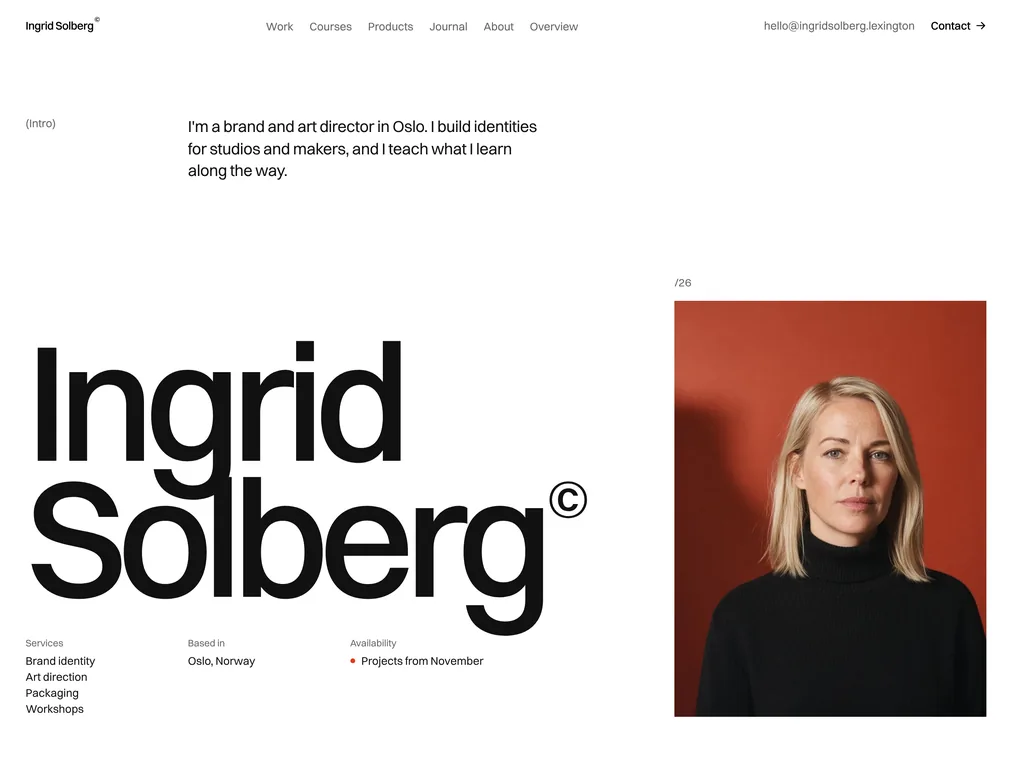
The home page opens with a short intro, the designer's name set very large and a portrait, then six projects, a teaching section and a call to action. Each of the six case studies lists the client, location, year and services, tells the story as brief, work and result, and ends with a link to the next project. Lexington builds the pages on a 12-column grid; what you see is small gray labels in brackets on the left, thin rules instead of boxed cards, and a single red accent.
Courses with modules and lesson times that add up
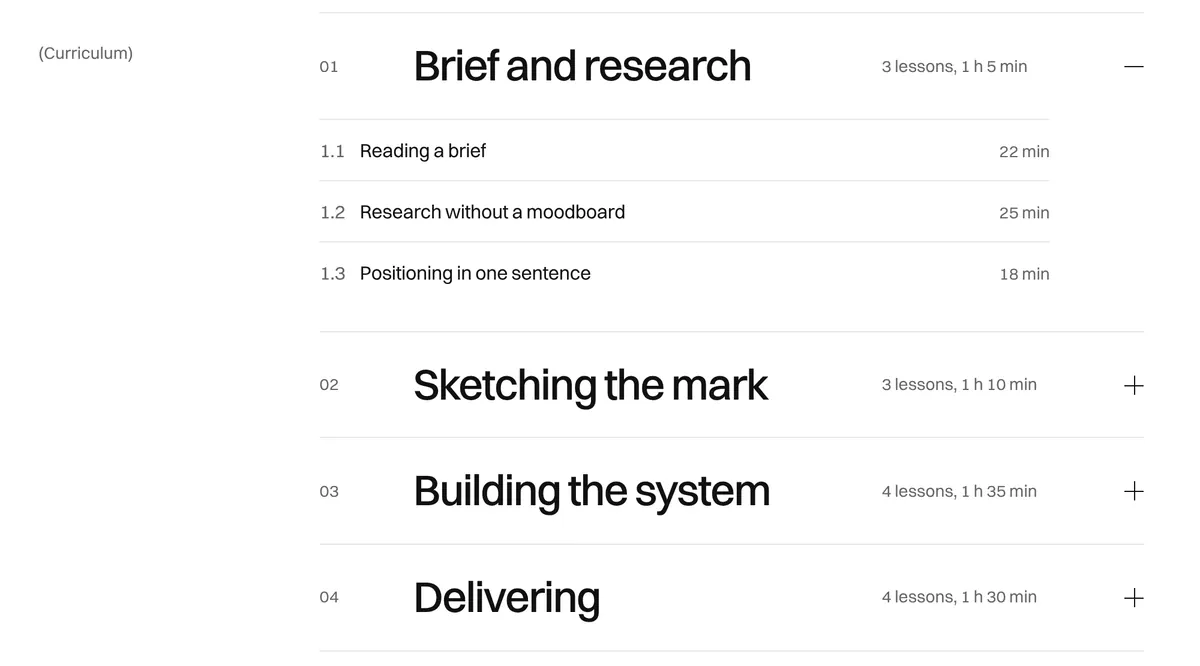
The courses page lists four courses priced from 99 to 189 euros in the demo, with totals of 44 lessons and 15 hours of video. We checked: the lesson counts add up to 44 and the lengths to 15 h 19 min. On the brand identity course, the first module's lessons (22, 25 and 18 minutes) make the 1 h 5 min shown in its header, and the four modules make the course's 5 h 20 min. Lexington says these totals are worked out for you. The buy box lists what is included, but Buy the course points to a placeholder: there is no checkout, video player or student login.
A shop of templates, and workshops
The products page sells five files from 29 to 59 euros, each with its formats, and a bundle of all five for 149 euros "instead of 211", which matches the sum of the five prices. Product pages list what is inside and details such as page count, formats and license in a side panel that stays put while you scroll on desktop. Buy and download and Get the bundle point to placeholders too.
The workshops page offers three formats from 1,800 to 4,200 euros and a talk on request, plus a list of upcoming dates. On 30 October that list still showed a sprint on 14 October 2026 with "4 seats left", so past events stay until you remove them. Book a session leads to the contact page.
Forms that look finished but send nothing
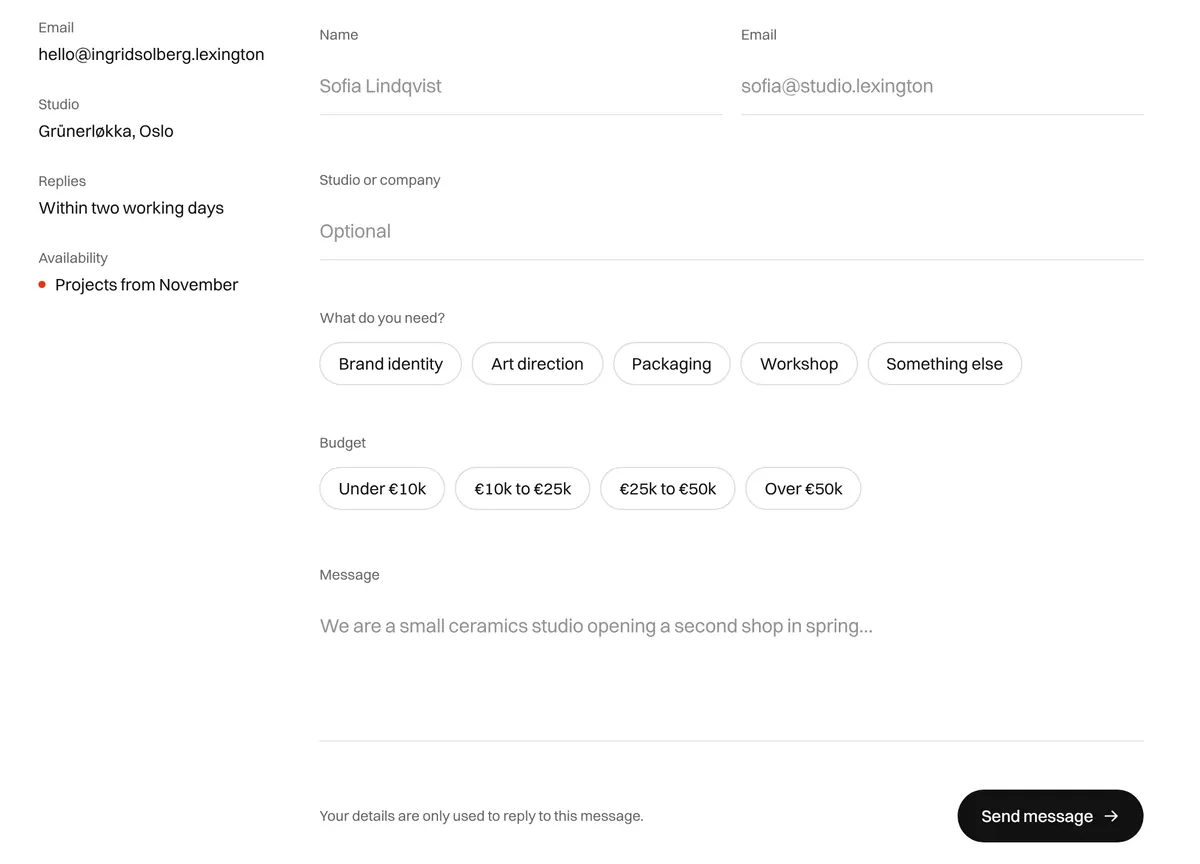
The contact form asks for a name, email and studio, which of five services you need, a budget in one of four ranges, and a message; name, email and message are required. We filled it in and pressed Send message: the browser posted the fields to the page's own address, the demo host answered 405 Method Not Allowed, and we were left on a blank white page. The newsletter form did the same. Nothing receives either form until you connect one.
Motion, journal and mobile
The motion runs on GSAP. Lexington lists headings that rise line by line and photos that wipe in and drift; we also tried the home page's list of courses and products, where a photo follows the pointer on devices that can hover. The motion scripts check the visitor's reduced-motion setting. The journal has six posts with topic filters that link to topic pages, reading times and an RSS feed. On a 390 px phone the header collapses to a Menu button that opens seven numbered links and closes with Escape, and nothing scrolls sideways.
Performance and SEO
One Lighthouse 12.8.2 run per page, 30 October 2026:
| Page | Performance | Accessibility | Best practices | SEO |
|---|---|---|---|---|
| Home, mobile | 96 | 100 | 96 | 100 |
| Home, desktop | 96 | 100 | 96 | 100 |
| Course page, mobile | 86 | 100 | 96 | 100 |
| Course page, desktop | 100 | 100 | 96 | 100 |
The home page transfers about 314 KB on mobile and showed its largest element at 2.4 s. The course page is lighter (220 KB) but scored 86 on mobile because, in our single run, its first paint came at 3.0 s and its main photo at 3.1 s; on desktop it scored 100. Lighthouse lists the Fontshare stylesheet that loads Switzer as render-blocking on both pages; self-hosting the font is the first thing to try.
Every page we loaded carried the same placeholder title ("Your Page Title"), description and canonical URL (yourwebsite.com/current-page), and the sitemap lists the pages on yourwebsite.com. Lighthouse still gives SEO 100 because it only checks that the tags exist, so set real titles, descriptions, canonical URLs and the site address before launch. The favicon, touch icons and web manifest the pages link to return 404 on the demo, which is where the best-practices points go. There is no structured data, so courses and products carry no Course or Product markup.
What you still have to build
Checkout and delivery. Payment links or a course platform for the courses, files and bundle, plus video hosting and student access for the lessons.
Form handling. Connect the contact form to a form service and the newsletter form to your email provider.
Per-page SEO. Titles, descriptions, canonical URLs, an Open Graph image and the site address the sitemap uses.
Your numbers. Replace the sample prices in euros, the 3,200 students, 1,900 newsletter readers and testimonials with your own, and keep the workshop dates current.
Icons. Add the favicon, touch icons and manifest the pages already link to.
Pros and cons
Pros
Pages for selling what you know, which most portfolio themes lack: courses with a curriculum, products with a bundle, workshops and a newsletter.
Course totals match their lessons in the demo, and Lexington says they are calculated for you.
Accessibility and SEO scored 100 in all four of our runs; the home page scored 96 for performance on mobile and desktop.
Motion that respects reduced motion, and a phone menu that works from the keyboard.
Cons
No checkout or course delivery: every buy button is a placeholder.
The contact and newsletter forms post to the page itself; on a static host the visitor gets an error.
Workshop dates and seat counts are static text.
The same placeholder title, description and canonical URL on every page.
How Pro FolioX compares
Simplexity ($89) is Lexington's photo-led portfolio for product designers, with full-bleed projects, a filterable work grid and a blog, but no contact page and nothing to sell. Choose it if your work is the only product.
Flaco ($89) shows an architecture practice on a single dark screen with rotating projects. Choose it for a few strong photographs and very little text.
Prima Persona is Lexington's free one-page portfolio. Choose it if a list of work, talks and education is enough.
Hatch by Shadcnblocks ($79, Next.js and Astro editions) is a freelancer portfolio and services site with 15 pages built from shadcn/ui blocks. Choose it if you sell services rather than courses or files.
See all portfolio templates for more options.
Who should buy Pro FolioX
Buy Pro FolioX if you are a designer who also runs courses, sells templates or holds workshops, and you want all of that on one calm, editorial site you control. Plan on connecting a checkout, a course platform or payment links, and a form service, and on writing real page titles. If you only need to show your work, the extra sections are weight you will delete; Simplexity or Flaco are simpler starting points.
FAQ
Can Pro FolioX sell courses and templates out of the box?
No. The course, product and bundle pages are designed, but their buy buttons point to placeholders and there is no checkout, video player or student login. Connect payment links or a course platform yourself.
Do the contact and newsletter forms work?
Not on their own. In our test both forms posted to the page's own address, and the demo host answered with a 405 error and a blank page. Connect the contact form to a form service and the newsletter form to your email provider.
Is Pro FolioX cheaper on its own or with Full Access?
Pro FolioX alone costs $89. Lexington's Full Access Personal costs $99 (shown as 50% off $198) and includes all 53 Lexington Astro themes, Pro FolioX among them, so the bundle costs $10 more.
Can I use Pro FolioX for client projects?
Yes. Lexington's license allows unlimited sites for yourself and your clients, including commercial and white-label work, for one named person. You can't resell or redistribute the theme as a template.
Does Pro FolioX have a dark mode?
No. Lexington's changelog says dark mode, search, pagination and the sign-in pages were removed in the 30 September 2026 redesign. It is a light design with one red accent.
KEEP EXPLORING
More templates